
Homing projectile vs multiple targets
-
@SplitMindGaming It finds the nearest target ONCE, and chases that one forever. It can be told to redirect whenever you want, just activate the behaviour bundle called "Homing trigger" and it will redirect to the nearest target and then chase that one forever. For example: edit the project and add a timer and connect Homing trigger (with all the behaviours under it) underneath the timer. Don't make the timer too fast or you could lag/freeze the project if you have spawned in lots of targets. 0.5s would be fine.
I did look at yours. I moved the blue and green squares both to the top right of the screen and the missile just stopped and sat there.
@Aidan-Oxley yeah I was going to say the same thing. When your missile hits the edge of the screen it just stops there and freezes.
-
@SplitMindGaming It finds the nearest target ONCE, and chases that one forever. It can be told to redirect whenever you want, just activate the behaviour bundle called "Homing trigger" and it will redirect to the nearest target and then chase that one forever. For example: edit the project and add a timer and connect Homing trigger (with all the behaviours under it) underneath the timer. Don't make the timer too fast or you could lag/freeze the project if you have spawned in lots of targets. 0.5s would be fine.
I did look at yours. I moved the blue and green squares both to the top right of the screen and the missile just stopped and sat there.
-
@Aidan-Oxley
@SplitMindGaming If the object the missile is chasing gets deleted, the missile will stop and have nothing to do. In that case, you would want to add some logic to detect when its target is destroyed, and decide what to do then (e.g trigger homing again and select a new target, or just delete the missile). However if you get the missile to constantly redirect to the nearest target on a timer this shouldn't happen unless all targets are destroyed.
-
@SplitMindGaming If the object the missile is chasing gets deleted, the missile will stop and have nothing to do. In that case, you would want to add some logic to detect when its target is destroyed, and decide what to do then (e.g trigger homing again and select a new target, or just delete the missile). However if you get the missile to constantly redirect to the nearest target on a timer this shouldn't happen unless all targets are destroyed.
@Aidan-Oxley sorry I actually want this to work because it’s something I needed for my game as well. I attached a video of me playing your version and turned on the homing behavior as you said so that it can redirect. But it still doesn’t re direct. What am I doing wrong. Are you able to get urs to redirect? FullSizeRender.mov
-
@Aidan-Oxley sorry I actually want this to work because it’s something I needed for my game as well. I attached a video of me playing your version and turned on the homing behavior as you said so that it can redirect. But it still doesn’t re direct. What am I doing wrong. Are you able to get urs to redirect? FullSizeRender.mov
@SplitMindGaming never mind I activated the homing timer instead. How do you activate the behavior bundle homing trigger?
-
@SplitMindGaming never mind I activated the homing timer instead. How do you activate the behavior bundle homing trigger?
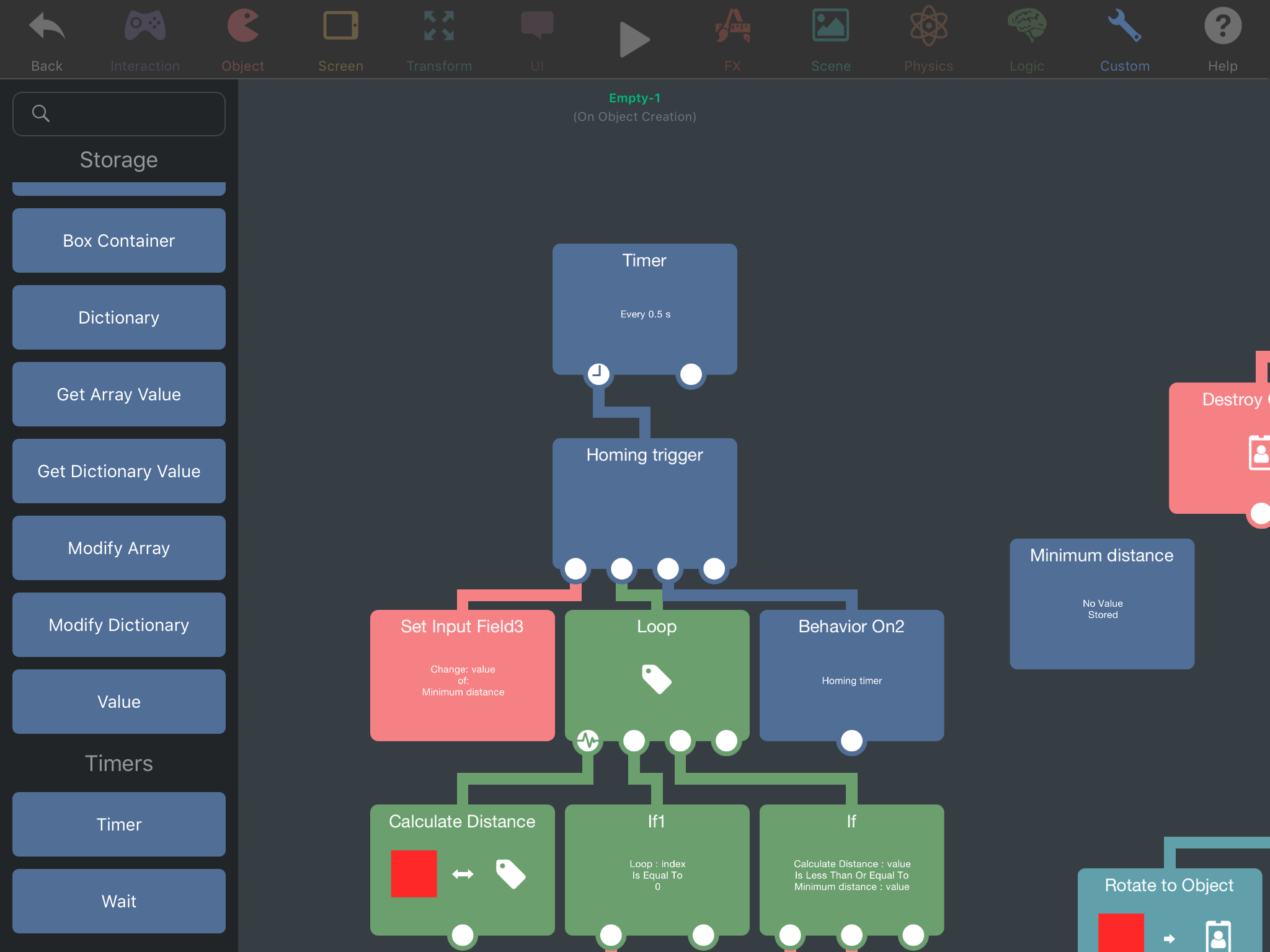
@SplitMindGaming If you activate this behaviour in any way (by connecting it under another behaviour directly, using Behaviour On with it selected, or using Execute behaviour with it selected) the missile will redirect targets ONCE.
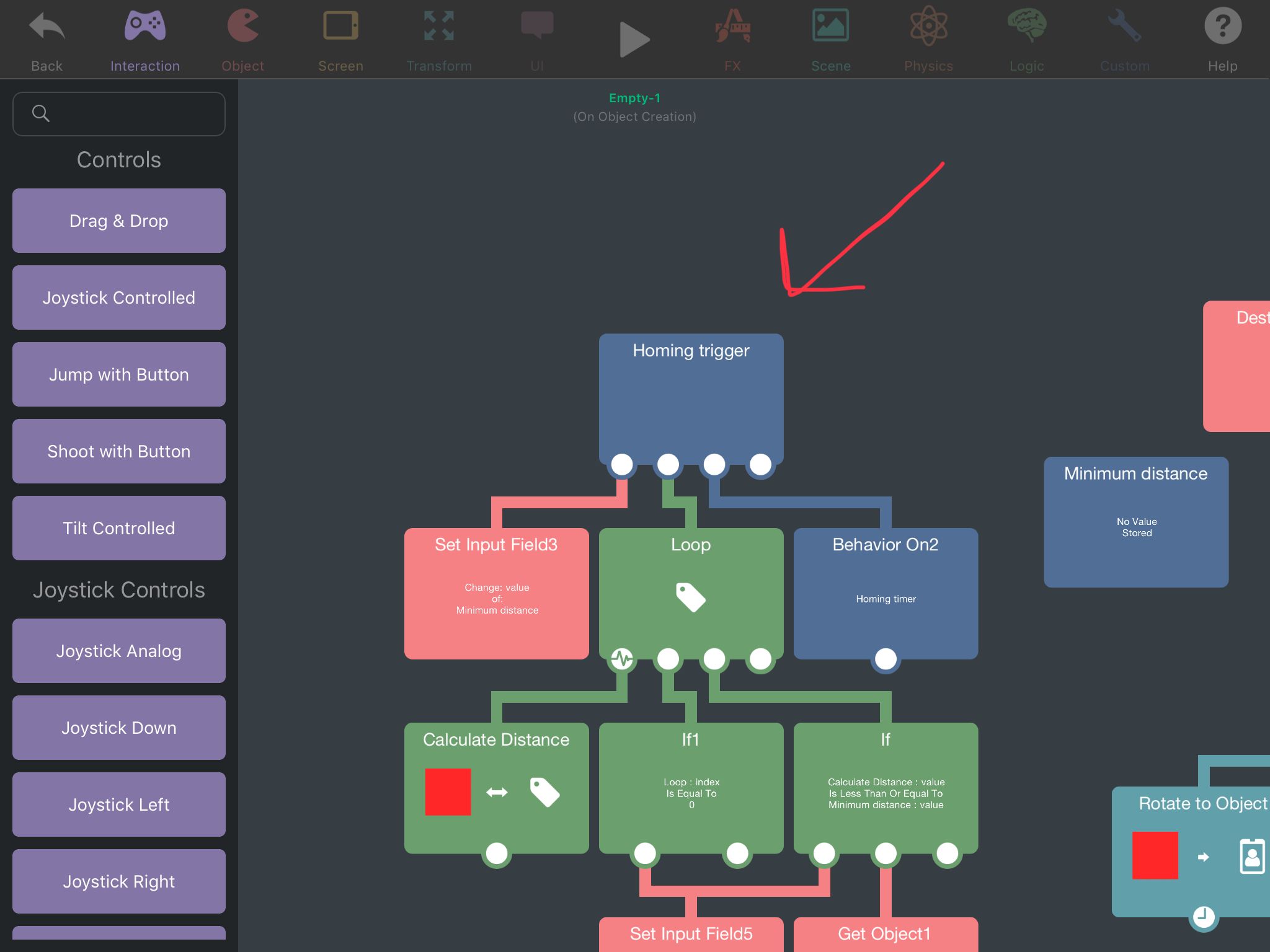
If I do this, the missile will redirect to the nearest target every 0.5s:
-
@SplitMindGaming If you activate this behaviour in any way (by connecting it under another behaviour directly, using Behaviour On with it selected, or using Execute behaviour with it selected) the missile will redirect targets ONCE.
If I do this, the missile will redirect to the nearest target every 0.5s:
@Aidan-Oxley ahhh I didn’t add the timer. Yes it works flawlessly like that. Thanks
-
@SplitMindGaming If you activate this behaviour in any way (by connecting it under another behaviour directly, using Behaviour On with it selected, or using Execute behaviour with it selected) the missile will redirect targets ONCE.
If I do this, the missile will redirect to the nearest target every 0.5s:
@Aidan-Oxley care to be a teacher for a bit. I don’t understand input field or even how to use loop properly in that matter. What does it mean when you put “a” on the input field. What does that represent?
-
@Aidan-Oxley care to be a teacher for a bit. I don’t understand input field or even how to use loop properly in that matter. What does it mean when you put “a” on the input field. What does that represent?
@SplitMindGaming lol nothing. It's a mistake, I meant to put 0 or absolutely nothing in there. Now that I think about it, delete that behaviour completely, it'll still work exactly the same, it's leftover from my previous method before Jack showed me better one.
Set Input Field basically does exactly as it says. When you press on that symbol next to the Input field of a behaviour, you are given a prompt and you can create a Set Input Field behaviour. When this behaviour is run, it simply changes whatever was in there to the new value you put in it.
The loop behaviour is like a timer but extremely fast, as in it will freeze hyperPad until it is done (it won't freeze hyperPad unless you make it loop a crazy amount of times). It has a few settings, you can either set the exact amount of times you want it to repeat the stuf under it, or you can give it a tag and set it to "for each" where it will count the amount of objects in that tag by itself, and then repeat the stuff under it once for each object while also selecting that object to do stuff to.
-
@SplitMindGaming lol nothing. It's a mistake, I meant to put 0 or absolutely nothing in there. Now that I think about it, delete that behaviour completely, it'll still work exactly the same, it's leftover from my previous method before Jack showed me better one.
Set Input Field basically does exactly as it says. When you press on that symbol next to the Input field of a behaviour, you are given a prompt and you can create a Set Input Field behaviour. When this behaviour is run, it simply changes whatever was in there to the new value you put in it.
The loop behaviour is like a timer but extremely fast, as in it will freeze hyperPad until it is done (it won't freeze hyperPad unless you make it loop a crazy amount of times). It has a few settings, you can either set the exact amount of times you want it to repeat the stuf under it, or you can give it a tag and set it to "for each" where it will count the amount of objects in that tag by itself, and then repeat the stuff under it once for each object while also selecting that object to do stuff to.
@Aidan-Oxley I see what about the box container minimum distance. It doesn’t even have any value storing. I notice it was called on an if statement saying if calculate distance is less then minimum distance. How does that calculate when the minimum distance contains no value. Or does it contain a value? I’m not sure exactly what happening there.
-
@Aidan-Oxley I see what about the box container minimum distance. It doesn’t even have any value storing. I notice it was called on an if statement saying if calculate distance is less then minimum distance. How does that calculate when the minimum distance contains no value. Or does it contain a value? I’m not sure exactly what happening there.
@SplitMindGaming If the loop index = 0 (that is, if it's the very first object selected in the loop), set the minimum distance to the distance calculated to this specific object. Now, if the distance calculated is less than or equal to the value stored in minimum distance, then get the ID of this object we calculated the distance to.
This is exactly how the logic under the loop works in the example, explained into words.
-
I’ve gotta say.. thanks a million. I’ve NEVER seen the loop and get object behaviors there. I’ve always wished for them lol.
I got it to work almost perfectly.
Also, I find that using a Propel Object behavior with a negative value attached to a timer is a nice, smooth, and easy way to accomplish a classic homing missile effect.
-
I’ve gotta say.. thanks a million. I’ve NEVER seen the loop and get object behaviors there. I’ve always wished for them lol.
I got it to work almost perfectly.
Also, I find that using a Propel Object behavior with a negative value attached to a timer is a nice, smooth, and easy way to accomplish a classic homing missile effect.
-
@bosswave Yeah I've used that before I think. Just as long as you have friction it's fine (without friction the missile can just go into orbit of the target lol).
@Aidan-Oxley Think you mean air resistance rather than friction :P
-
@Aidan-Oxley Think you mean air resistance rather than friction :P
@Jack8680 Shush same thing. Air resistance your face.
-
@SplitMindGaming If the loop index = 0 (that is, if it's the very first object selected in the loop), set the minimum distance to the distance calculated to this specific object. Now, if the distance calculated is less than or equal to the value stored in minimum distance, then get the ID of this object we calculated the distance to.
This is exactly how the logic under the loop works in the example, explained into words.
@Aidan-Oxley couldn’t you just put the actual number 0 on that if statement instead of calling a box container? Or does it not work that way. Also to minimize timers. Could you also set the “rotate to object” and “move to object” directly under the homing trigger?
-
@Aidan-Oxley couldn’t you just put the actual number 0 on that if statement instead of calling a box container? Or does it not work that way. Also to minimize timers. Could you also set the “rotate to object” and “move to object” directly under the homing trigger?
@SplitMindGaming said in Homing projectile vs multiple targets:
Could you also set the “rotate to object” and “move to object” directly under the homing trigger?
You probably could. The thing is, the homing trigger is only meant to select a target, not move the missile to the target. That's what the Homing timer was for. As bosswave did, you can completely change the homing mechanics to however you want as long as you use the same Object ID in your homing logic as the example does.
I'm not exactly sure what you mean with using 0 instead of the box container, but I suspect it doesn't work the way you think?
-
@SplitMindGaming said in Homing projectile vs multiple targets:
Could you also set the “rotate to object” and “move to object” directly under the homing trigger?
You probably could. The thing is, the homing trigger is only meant to select a target, not move the missile to the target. That's what the Homing timer was for. As bosswave did, you can completely change the homing mechanics to however you want as long as you use the same Object ID in your homing logic as the example does.
I'm not exactly sure what you mean with using 0 instead of the box container, but I suspect it doesn't work the way you think?
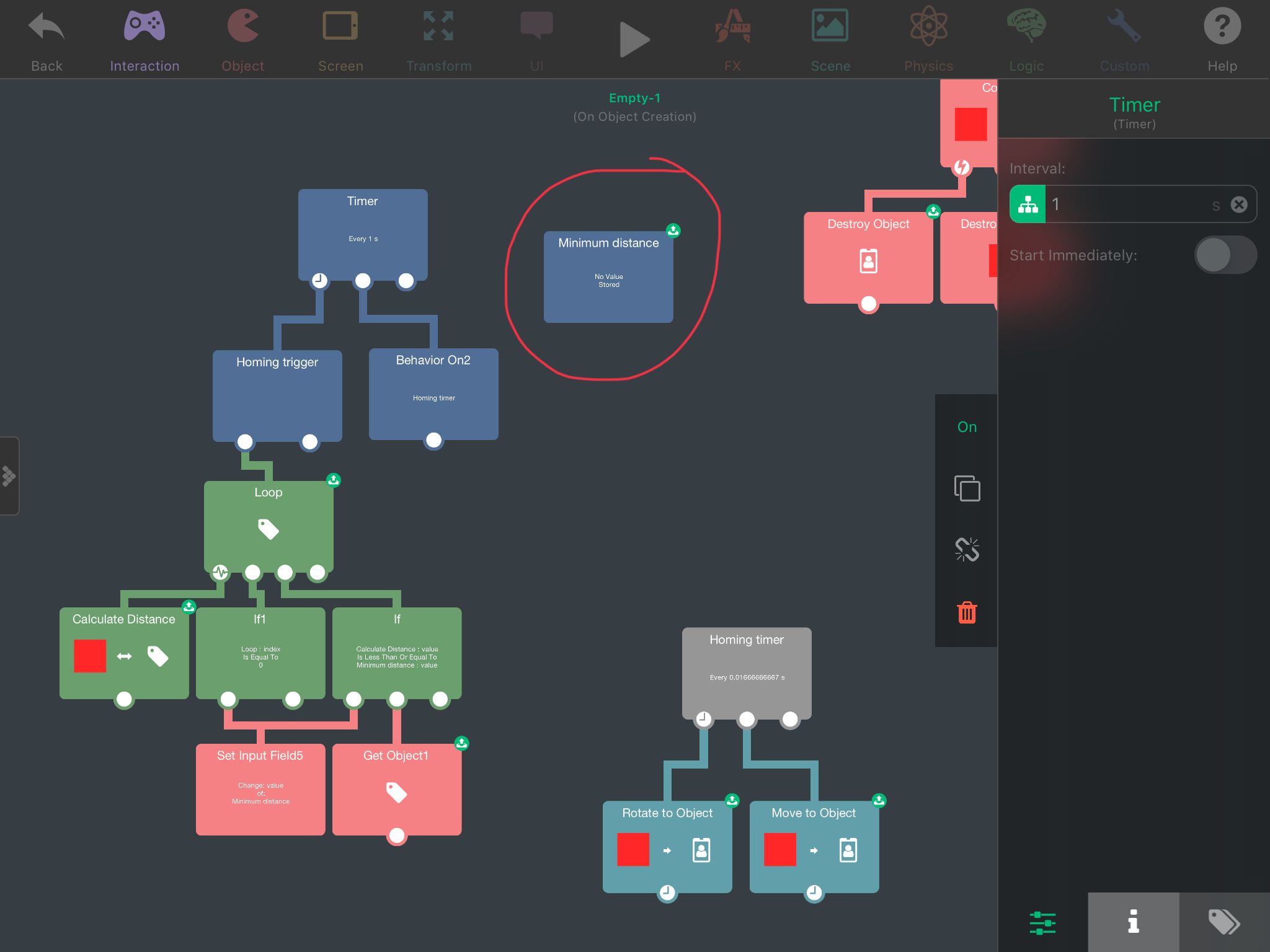
@Aidan-Oxley I see. Im still confused on the box container titled “minimum distance”. It says there’s no value being stored. So how is it calculating the minimum distance? Sorry it might be really obvious to you but I can’t seem to wrap my head around what is going on here.
-
@Aidan-Oxley I see. Im still confused on the box container titled “minimum distance”. It says there’s no value being stored. So how is it calculating the minimum distance? Sorry it might be really obvious to you but I can’t seem to wrap my head around what is going on here.
@SplitMindGaming The value is set by the
Set Input Field5behaviourIf calculate distance is less than minimum distance, set minimum distance to calculate distance.
-
@SplitMindGaming The value is set by the
Set Input Field5behaviourIf calculate distance is less than minimum distance, set minimum distance to calculate distance.




Hello! It looks like you're interested in this conversation, but you don't have an account yet.
Getting fed up of having to scroll through the same posts each visit? When you register for an account, you'll always come back to exactly where you were before, and choose to be notified of new replies (either via email, or push notification). You'll also be able to save bookmarks and upvote posts to show your appreciation to other community members.
With your input, this post could be even better 💗
Register Login