
A Question about cloning objects
-
Hi everyone,
This is just a quick query, because I can't seem to figure it out myself. Is there any way that when you clone an object, the object that is cloned is 1 layer below the previous objects layer?
Basically -1z layer with every clone?@Evolution you can’t dynamically create layers, so you would have to make layers for each clone in the editor. Then you would have to have a value for the number of clones and use some IF’s to set the clone to the right layer.
If all you want is a z order, I would just have a value that decreases by one for every clone, and set the clone’s z order to it. -
Yes, but how do I get a value that decreases by 1 every time a clone spawns. That's what I'm trying to figure out
-
Yes, but how do I get a value that decreases by 1 every time a clone spawns. That's what I'm trying to figure out
@Evolution you could use a box container or an attribute.
-
Yes, but how do I get a value that decreases by 1 every time a clone spawns. That's what I'm trying to figure out
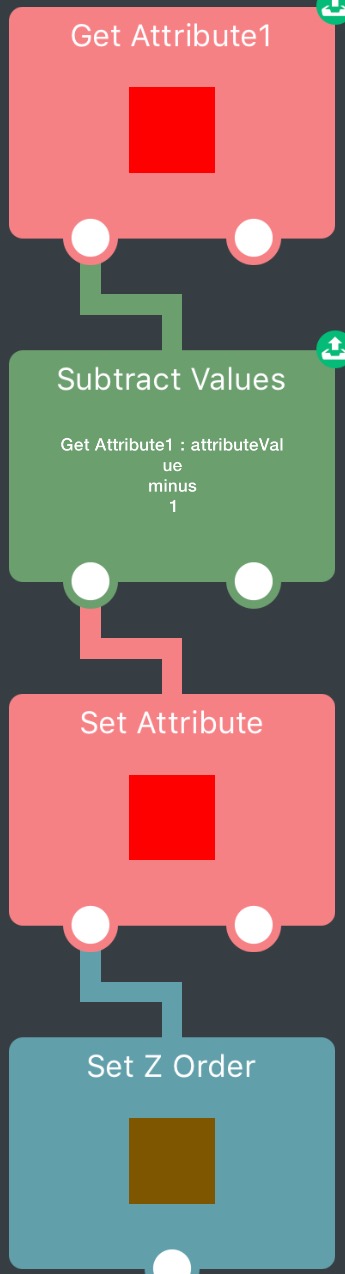
@Evolution you can use a main object that stores an attribute, then each time a new object spawns it gets the main attribute, subtracts 1, sets the attribute to that value, then moves to that z order.
Edit: like this:
-
Thank you @Jack8680 ! I will try your method now.
-
I tried your method, it didn't seem to work. What Attribute key and type am I supposed to use? Do I need to use two different objects? Once I added what you've done in the picture, the movements and cloning stopped working all together. Even after deleting all of what I had added, it still didn't work. So I had to reset up the entire thing. Do you know what I've done wrong?
-
I tried your method, it didn't seem to work. What Attribute key and type am I supposed to use? Do I need to use two different objects? Once I added what you've done in the picture, the movements and cloning stopped working all together. Even after deleting all of what I had added, it still didn't work. So I had to reset up the entire thing. Do you know what I've done wrong?
@Evolution the red object is a different object (can be anything, except the object you're spawning). The attribute can be anything as long as both behaviours use the same key. The brown object is the one you're spawning, and it contains those behaviours.
-
I tried your method, it didn't seem to work. What Attribute key and type am I supposed to use? Do I need to use two different objects? Once I added what you've done in the picture, the movements and cloning stopped working all together. Even after deleting all of what I had added, it still didn't work. So I had to reset up the entire thing. Do you know what I've done wrong?
@Evolution also, deleting what you added shouldn't leave the project broken. Did you leave something behind or accidentally delete/change something else?
-
It's not working. I've tried other variables but they aren't working either. As for your question, I don't know why the object just broke, but now it is ok. Do you know anything else I could possibly try?
-
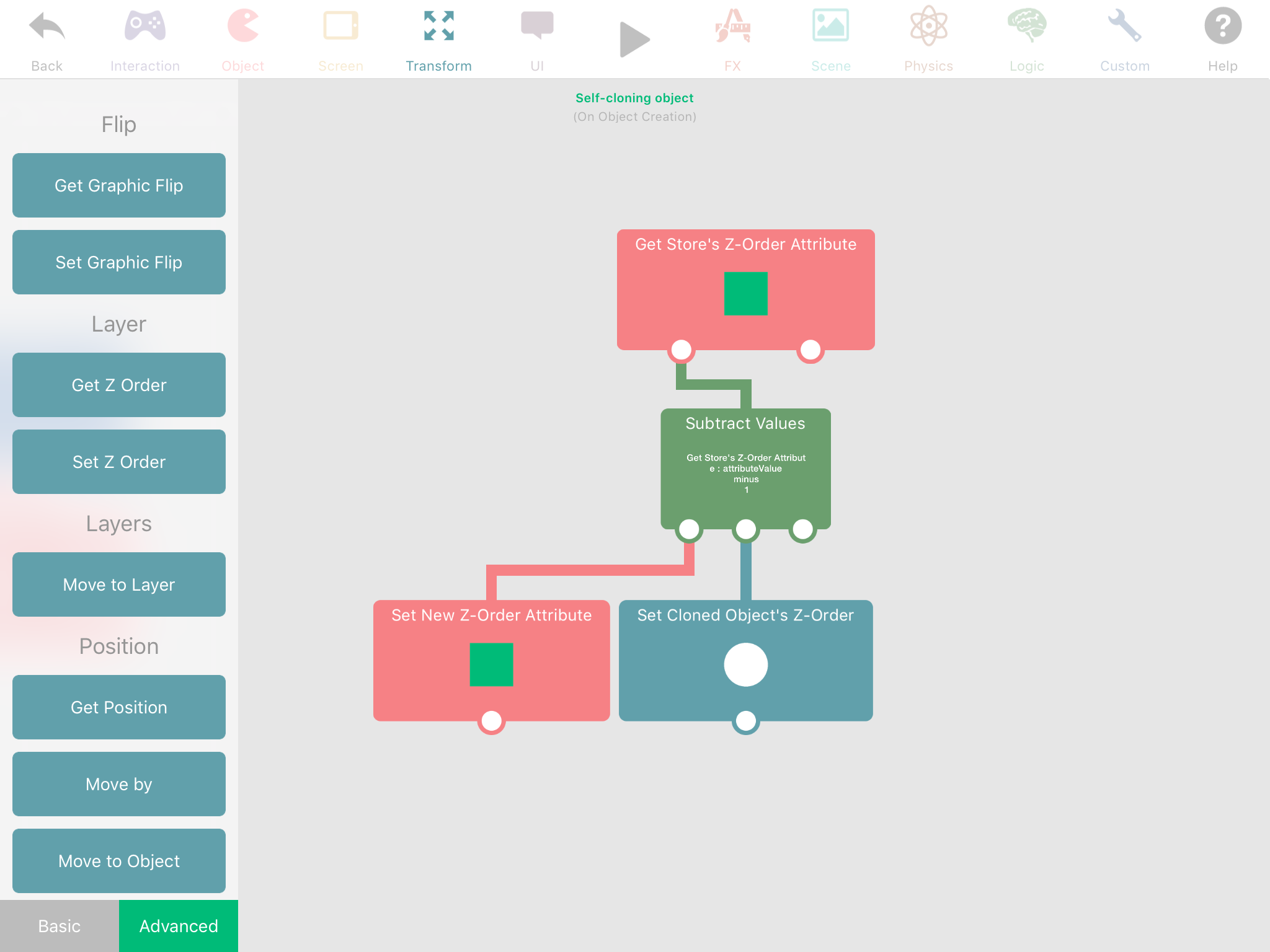
(Easy but probably less efficient method) Have some label hiding off the screen, set the value to whatever you want the first object's z layer to be (really doesn't matter), when the object spawns, straight away make that object get that label, set its own z layer to what the label says, subtract the label value by one then set the label to that subtract.
-
I wanted to type that by myself, but yeah, Aidan's method is working. You can use label or create an object with Z-Order Attribute.
-
Ok, what I've figured out is both of your ideas work. But, with the cloning component, for some reason the cloned object is only ever the 'original' state of the very 'first' version of the object being cloned.
So if I'm cloning the object with z layer 1, then the z layer becomes -49. Nothing will change, it will still be a clone of z layer 1. Does anyone know how to fix this?
@Jack8680 @Aidan-Oxley @iTap-Development
-
Ok, what I've figured out is both of your ideas work. But, with the cloning component, for some reason the cloned object is only ever the 'original' state of the very 'first' version of the object being cloned.
So if I'm cloning the object with z layer 1, then the z layer becomes -49. Nothing will change, it will still be a clone of z layer 1. Does anyone know how to fix this?
@Jack8680 @Aidan-Oxley @iTap-Development
@Evolution , you can try to store the data about the latest clone and make the new clone change it's basic data to the latest clone's data. The data can be stored within several labels or within attributes of some other object that is not one of the clones. When you use spawn behaviors hyperPad spawns the object you selected in your scene, which is the first clone. So as I know you can't spawn the previous clone, but you can store it's data and set it on a new clone. By the way, won't you mind if I'll ask what are you doing with this? You are making a game about clones with that stuff?
-
Ok, what I've figured out is both of your ideas work. But, with the cloning component, for some reason the cloned object is only ever the 'original' state of the very 'first' version of the object being cloned.
So if I'm cloning the object with z layer 1, then the z layer becomes -49. Nothing will change, it will still be a clone of z layer 1. Does anyone know how to fix this?
@Jack8680 @Aidan-Oxley @iTap-Development
@Evolution I'm not sure what problem you're having, but from your first post I'm assuming you want something like this project (copy the link to safari and open in hyperPad):
http://bit.ly/2uE0KTv
I tried to describe this earlier, but the project is probably easier. -
@Evolution , you can try to store the data about the latest clone and make the new clone change it's basic data to the latest clone's data. The data can be stored within several labels or within attributes of some other object that is not one of the clones. When you use spawn behaviors hyperPad spawns the object you selected in your scene, which is the first clone. So as I know you can't spawn the previous clone, but you can store it's data and set it on a new clone. By the way, won't you mind if I'll ask what are you doing with this? You are making a game about clones with that stuff?
@Andrey-Ghost I'm making a rather large game, the details will not be shared until its close to the first release.
-
@Evolution I'm not sure what problem you're having, but from your first post I'm assuming you want something like this project (copy the link to safari and open in hyperPad):
http://bit.ly/2uE0KTv
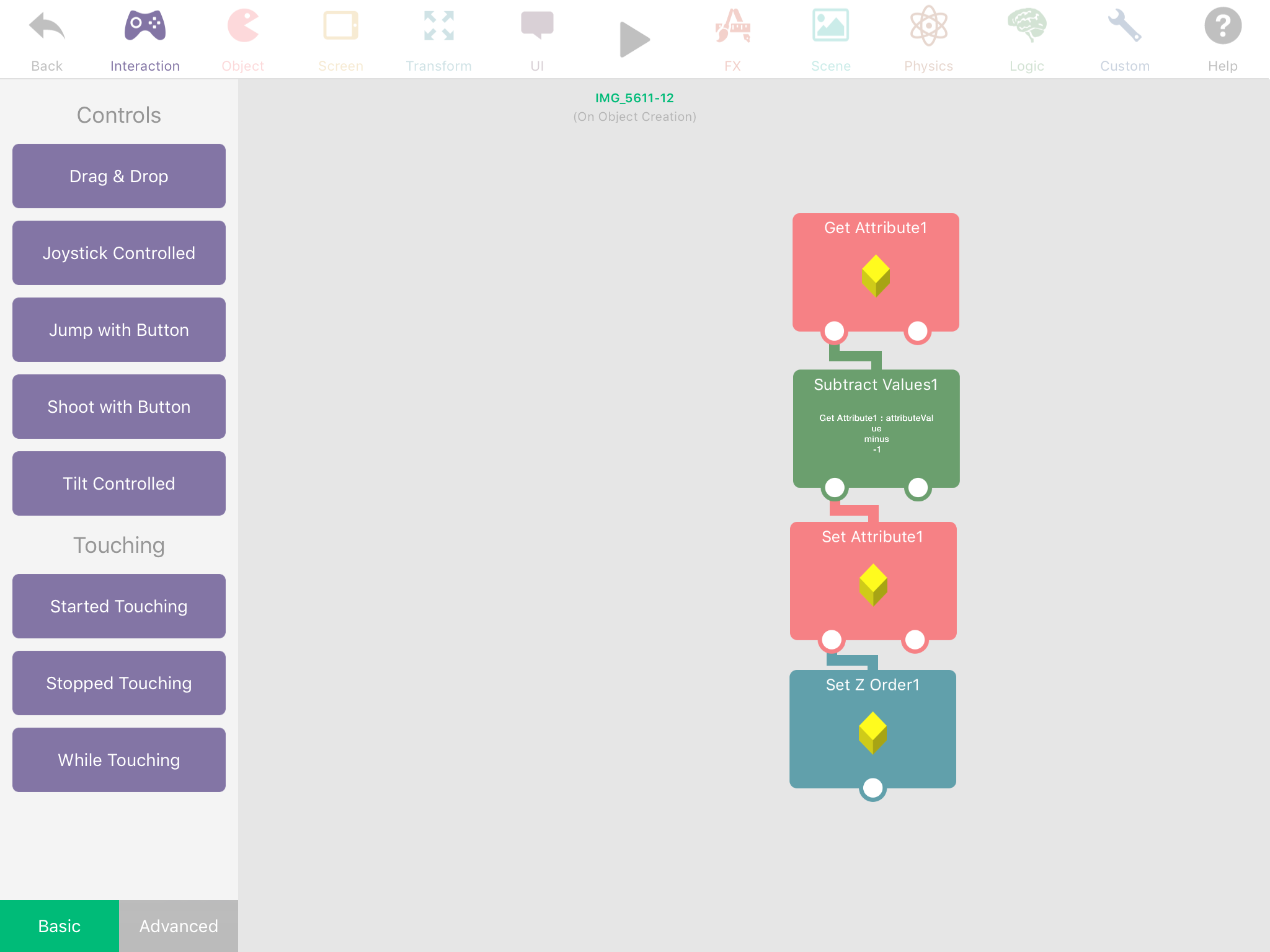
I tried to describe this earlier, but the project is probably easier.@Jack8680 your project was very helpful, and I thank you a lot. Although, even though I copied your project Exactly, it's still not working.
-
@Evolution I'm not sure what problem you're having, but from your first post I'm assuming you want something like this project (copy the link to safari and open in hyperPad):
http://bit.ly/2uE0KTv
I tried to describe this earlier, but the project is probably easier.@Jack8680 It's working! There is only one problem, whenever the object turns direction, it begins uhhhh, doing something odd, as if it keeps changing z layer again and again. But it doesn't always happen, only sometimes.





Hello! It looks like you're interested in this conversation, but you don't have an account yet.
Getting fed up of having to scroll through the same posts each visit? When you register for an account, you'll always come back to exactly where you were before, and choose to be notified of new replies (either via email, or push notification). You'll also be able to save bookmarks and upvote posts to show your appreciation to other community members.
With your input, this post could be even better 💗
Register Login