Skip to content
  • Categories
  • Recent
  • Tags
  • Popular
  • Users
  • Search
Skins
  • Light
  • Brite
  • Cerulean
  • Cosmo
  • Flatly
  • Journal
  • Litera
  • Lumen
  • Lux
  • Materia
  • Minty
  • Morph
  • Pulse
  • Sandstone
  • Simplex
  • Sketchy
  • Spacelab
  • United
  • Yeti
  • Zephyr
  • Dark
  • Cyborg
  • Darkly
  • Quartz
  • Slate
  • Solar
  • Superhero
  • Vapor

  • Default (No Skin)
  • No Skin
Collapse
hyperPad

hyperPad Forum

  1. Home
  2. Bug Reports
  3. Became Idle only works once...

Became Idle only works once...

Scheduled Pinned Locked Moved Bug Reports
16 Posts 3 Posters 2.2k Views 2 Watching
  • Oldest to Newest
  • Newest to Oldest
  • Most Votes
Reply
  • Reply as topic
Log in to reply
This topic has been deleted. Only users with topic management privileges can see it.
  • D Deeeds

    My ‘hero’ drops into the scene, and is moving until he’s not... at which point he reports being idle.

    After that, I play a little, he jumps and spins, then comes to rest.

    But he never "becomes idle" again, despite coming to a full stop.

    iTap DevelopmentI Offline
    iTap DevelopmentI Offline
    iTap Development
    wrote on last edited by iTap Development
    #2

    @Deeeds do you possibly have a touch behavior or something connected above the “became idle”? I could be wrong, but I think if you have something like “started touching” and then “became idle” the touch would have to be retriggered at least once before “became idle” would be retriggered.

    D 1 Reply Last reply
    0
    • iTap DevelopmentI iTap Development

      @Deeeds do you possibly have a touch behavior or something connected above the “became idle”? I could be wrong, but I think if you have something like “started touching” and then “became idle” the touch would have to be retriggered at least once before “became idle” would be retriggered.

      D Offline
      D Offline
      Deeeds
      wrote on last edited by
      #3

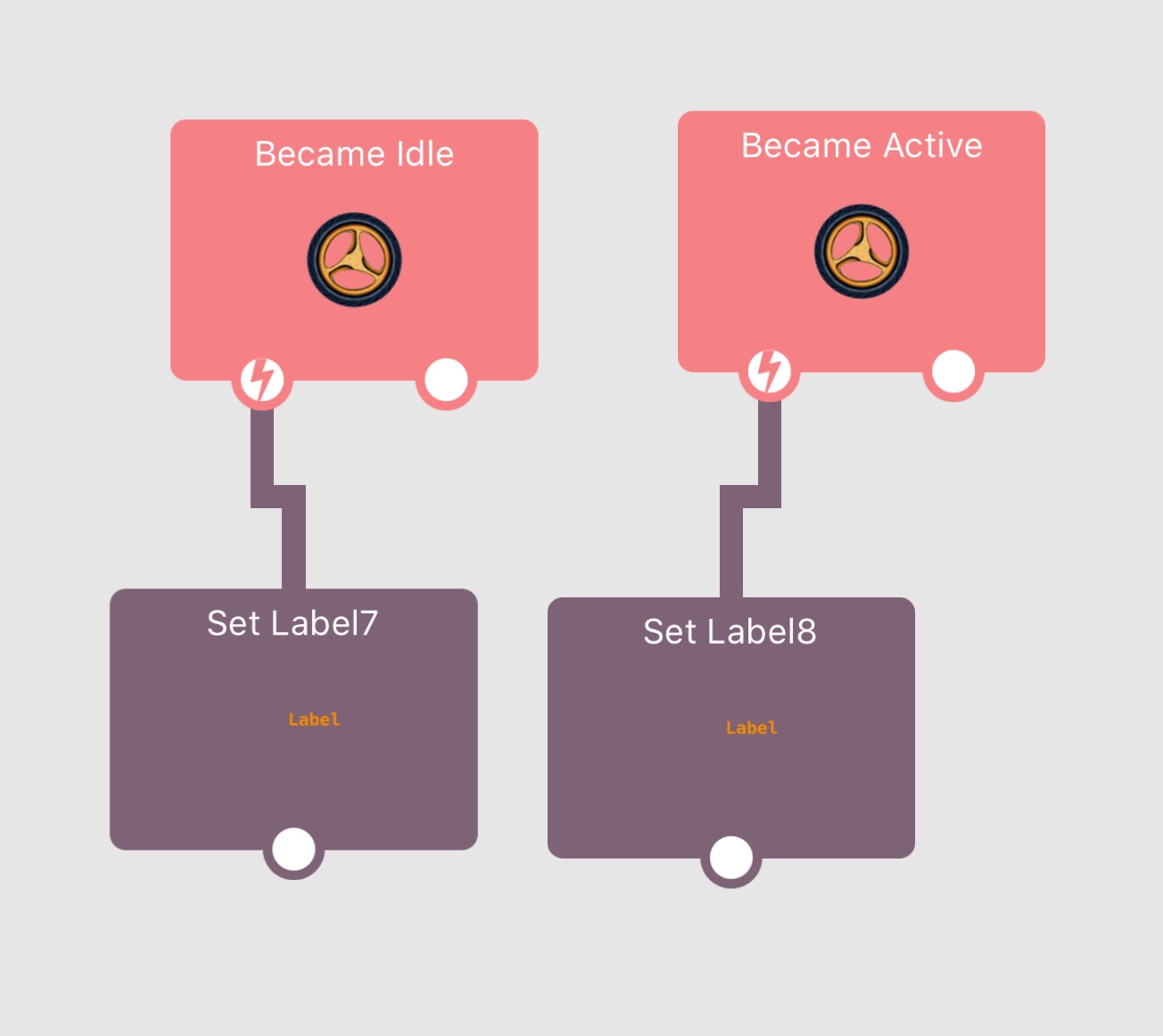
      @iTap-Development No, the two behaviours, idle and active are sitting alone, at the top of the object, inside the object of interest, like this:
      0_1509564775904_IMG_0792.jpg

      I've also tried various combinations of turning these on and off, kind of like resetting them, but that doesn't work, either.

      iTap DevelopmentI 1 Reply Last reply
      0
      • D Deeeds

        @iTap-Development No, the two behaviours, idle and active are sitting alone, at the top of the object, inside the object of interest, like this:

        0_1509564775904_IMG_0792.jpg

        I've also tried various combinations of turning these on and off, kind of like resetting them, but that doesn't work, either.

        iTap DevelopmentI Offline
        iTap DevelopmentI Offline
        iTap Development
        wrote on last edited by
        #4

        @Deeeds just made a test project....it seems like it’s just very sensitive to any movement. I had a ball drop to a platform and it triggered, but if I dragged the ball up and dropped it wouldn’t trigger. So I changed the air resistance from the default 0 to 1 and after a few seconds it stops moving completely and will retrigger. I think without are resistance or enough friction, it just keeps moving a tiny bit.

        D 1 Reply Last reply
        0
        • iTap DevelopmentI iTap Development

          @Deeeds just made a test project....it seems like it’s just very sensitive to any movement. I had a ball drop to a platform and it triggered, but if I dragged the ball up and dropped it wouldn’t trigger. So I changed the air resistance from the default 0 to 1 and after a few seconds it stops moving completely and will retrigger. I think without are resistance or enough friction, it just keeps moving a tiny bit.

          D Offline
          D Offline
          Deeeds
          wrote on last edited by
          #5

          @iTap-Development I've tried with much higher air resistance, but not waited for minutes. Dropping doesn't seem to be the problem, rotation is the problem.

          Any rotation seems to take FOREVER to actually stop to the satisfaction of this trigger.

          iTap DevelopmentI 1 Reply Last reply
          0
          • D Deeeds

            @iTap-Development I've tried with much higher air resistance, but not waited for minutes. Dropping doesn't seem to be the problem, rotation is the problem.

            Any rotation seems to take FOREVER to actually stop to the satisfaction of this trigger.

            iTap DevelopmentI Offline
            iTap DevelopmentI Offline
            iTap Development
            wrote on last edited by
            #6

            @Deeeds do you have friction?

            D 1 Reply Last reply
            0
            • iTap DevelopmentI iTap Development

              @Deeeds do you have friction?

              D Offline
              D Offline
              Deeeds
              wrote on last edited by
              #7

              @iTap-Development Yes, lots.

              iTap DevelopmentI 1 Reply Last reply
              0
              • D Deeeds

                @iTap-Development Yes, lots.

                iTap DevelopmentI Offline
                iTap DevelopmentI Offline
                iTap Development
                wrote on last edited by
                #8

                @Deeeds you could share a test project of it not working

                D 1 Reply Last reply
                0
                • iTap DevelopmentI iTap Development

                  @Deeeds you could share a test project of it not working

                  D Offline
                  D Offline
                  Deeeds
                  wrote on last edited by
                  #9

                  @iTap-Development I could, but there's no need. You've confirmed the problem.

                  The rotation movement sensitivity for triggering an idle state is either too sensitive, or there's a process of halving halves in tiny decimals that's going on forever and still being considered "rotation", or both.

                  It's a bug.

                  Or a feature.

                  iTap DevelopmentI 1 Reply Last reply
                  0
                  • D Deeeds

                    @iTap-Development I could, but there's no need. You've confirmed the problem.

                    The rotation movement sensitivity for triggering an idle state is either too sensitive, or there's a process of halving halves in tiny decimals that's going on forever and still being considered "rotation", or both.

                    It's a bug.

                    Or a feature.

                    iTap DevelopmentI Offline
                    iTap DevelopmentI Offline
                    iTap Development
                    wrote on last edited by
                    #10

                    @Deeeds well, it working for me, just very sensitive. What you could do Is just calculate it manually.

                    D 1 Reply Last reply
                    0
                    • iTap DevelopmentI iTap Development

                      @Deeeds well, it working for me, just very sensitive. What you could do Is just calculate it manually.

                      D Offline
                      D Offline
                      Deeeds
                      wrote on last edited by
                      #11

                      @iTap-Development Or you could acknowledge it's a buggy behaviour that's not working as intended, and doesn't work in the manner the simple (non rotational) movement idling does, and expect it to get fixed by the powers that be.

                      Aidan_FireA 1 Reply Last reply
                      0
                      • D Deeeds

                        @iTap-Development Or you could acknowledge it's a buggy behaviour that's not working as intended, and doesn't work in the manner the simple (non rotational) movement idling does, and expect it to get fixed by the powers that be.

                        Aidan_FireA Offline
                        Aidan_FireA Offline
                        Aidan_Fire
                        wrote on last edited by
                        #12

                        @Deeeds It’s probably not the behaviour that’s being buggy, but the physics system being annoying, and that you think the object has stopped but it’s actually just moving REALLY REALLY REALLY slowly. If I’m right, that sucks.

                        D 1 Reply Last reply
                        0
                        • Aidan_FireA Aidan_Fire

                          @Deeeds It’s probably not the behaviour that’s being buggy, but the physics system being annoying, and that you think the object has stopped but it’s actually just moving REALLY REALLY REALLY slowly. If I’m right, that sucks.

                          D Offline
                          D Offline
                          Deeeds
                          wrote on last edited by
                          #13

                          @Aidan-Oxley Yes, I agree with you, I think the rotation part of the physics engine is reducing speeds by the factor of the air resistance, down to TINY little numbers... and this is being considered to still be movement. Either a filter is needed on rotation reduction under air resistance or a filter on the definition of idle.

                          Aidan_FireA 1 Reply Last reply
                          0
                          • D Deeeds

                            @Aidan-Oxley Yes, I agree with you, I think the rotation part of the physics engine is reducing speeds by the factor of the air resistance, down to TINY little numbers... and this is being considered to still be movement. Either a filter is needed on rotation reduction under air resistance or a filter on the definition of idle.

                            Aidan_FireA Offline
                            Aidan_FireA Offline
                            Aidan_Fire
                            wrote on last edited by
                            #14

                            @Deeeds Just do it manually lol. Run a timer, Get Velocity of your object, If velocity is less than something really small, say 0.01, do whatever behaviours that should act when its idle. (You may or may not need to make 2, one for x and one for y)

                            Aidan_FireA 1 Reply Last reply
                            0
                            • Aidan_FireA Aidan_Fire

                              @Deeeds Just do it manually lol. Run a timer, Get Velocity of your object, If velocity is less than something really small, say 0.01, do whatever behaviours that should act when its idle. (You may or may not need to make 2, one for x and one for y)

                              Aidan_FireA Offline
                              Aidan_FireA Offline
                              Aidan_Fire
                              wrote on last edited by
                              #15

                              I didn’t read all of it, you’re using rotation? Alright, Get Rotational Velocity in the physics tab and do the same thing.


                              D 1 Reply Last reply
                              0
                              • Aidan_FireA Aidan_Fire

                                I didn’t read all of it, you’re using rotation? Alright, Get Rotational Velocity in the physics tab and do the same thing.

                                D Offline
                                D Offline
                                Deeeds
                                wrote on last edited by
                                #16

                                @Aidan-Oxley I've already done all that. My point is.... it is a bug, and this is the bug reporting section of the forum.

                                1 Reply Last reply
                                0

                                Hello! It looks like you're interested in this conversation, but you don't have an account yet.

                                Getting fed up of having to scroll through the same posts each visit? When you register for an account, you'll always come back to exactly where you were before, and choose to be notified of new replies (either via email, or push notification). You'll also be able to save bookmarks and upvote posts to show your appreciation to other community members.

                                With your input, this post could be even better 💗

                                Register Login
                                Reply
                                • Reply as topic
                                Log in to reply
                                • Oldest to Newest
                                • Newest to Oldest
                                • Most Votes


                                • Login

                                • Login or register to search.
                                • First post
                                  Last post
                                0
                                • Categories
                                • Recent
                                • Tags
                                • Popular
                                • Users
                                • Search