
Proper chain for applying and power-up and turning it off
-
Hi everyone,
I am having difficulty getting power ups to work in my games. I can turn them on and the effects work but I can’t figure out how to shut them off.
Any help would be appreciated thank you I’m very new to building games.
-
Hi everyone,
I am having difficulty getting power ups to work in my games. I can turn them on and the effects work but I can’t figure out how to shut them off.
Any help would be appreciated thank you I’m very new to building games.
@versioneight With a screenshot of your behaviors we can have a more specified discussion, but off the bat a "set behavior state" behavior (in behavior tab "custom") will probably get you to where you want to be.
Say you want the item buff to last 30 seconds: after the buff trigger, add a "timer" behavior. Attach a "set behavior state" and make it turn off the behavior tree inflicting the buff (setting the behavior state to "off" on any behavior in a behavior tree will stop all subsequent behaviors from triggering as well.)
There's some complications here like: 1. if the buff was a flat value addition, turning of behaviors won't then change values back (in that case you could reverse the effect by storing the buff value and adding when buffed, subtracting when not. 2. You will need to turn the behavior tree you turned off back on so that it's ready to receive a subsequent buff (can be done with the existing timer or maybe when the object is picked up or whatever).
I feel like I'm not making a ton of sense but if you screenshot the behavior tree I promise to be a little more coherent xD -
@versioneight With a screenshot of your behaviors we can have a more specified discussion, but off the bat a "set behavior state" behavior (in behavior tab "custom") will probably get you to where you want to be.
Say you want the item buff to last 30 seconds: after the buff trigger, add a "timer" behavior. Attach a "set behavior state" and make it turn off the behavior tree inflicting the buff (setting the behavior state to "off" on any behavior in a behavior tree will stop all subsequent behaviors from triggering as well.)
There's some complications here like: 1. if the buff was a flat value addition, turning of behaviors won't then change values back (in that case you could reverse the effect by storing the buff value and adding when buffed, subtracting when not. 2. You will need to turn the behavior tree you turned off back on so that it's ready to receive a subsequent buff (can be done with the existing timer or maybe when the object is picked up or whatever).
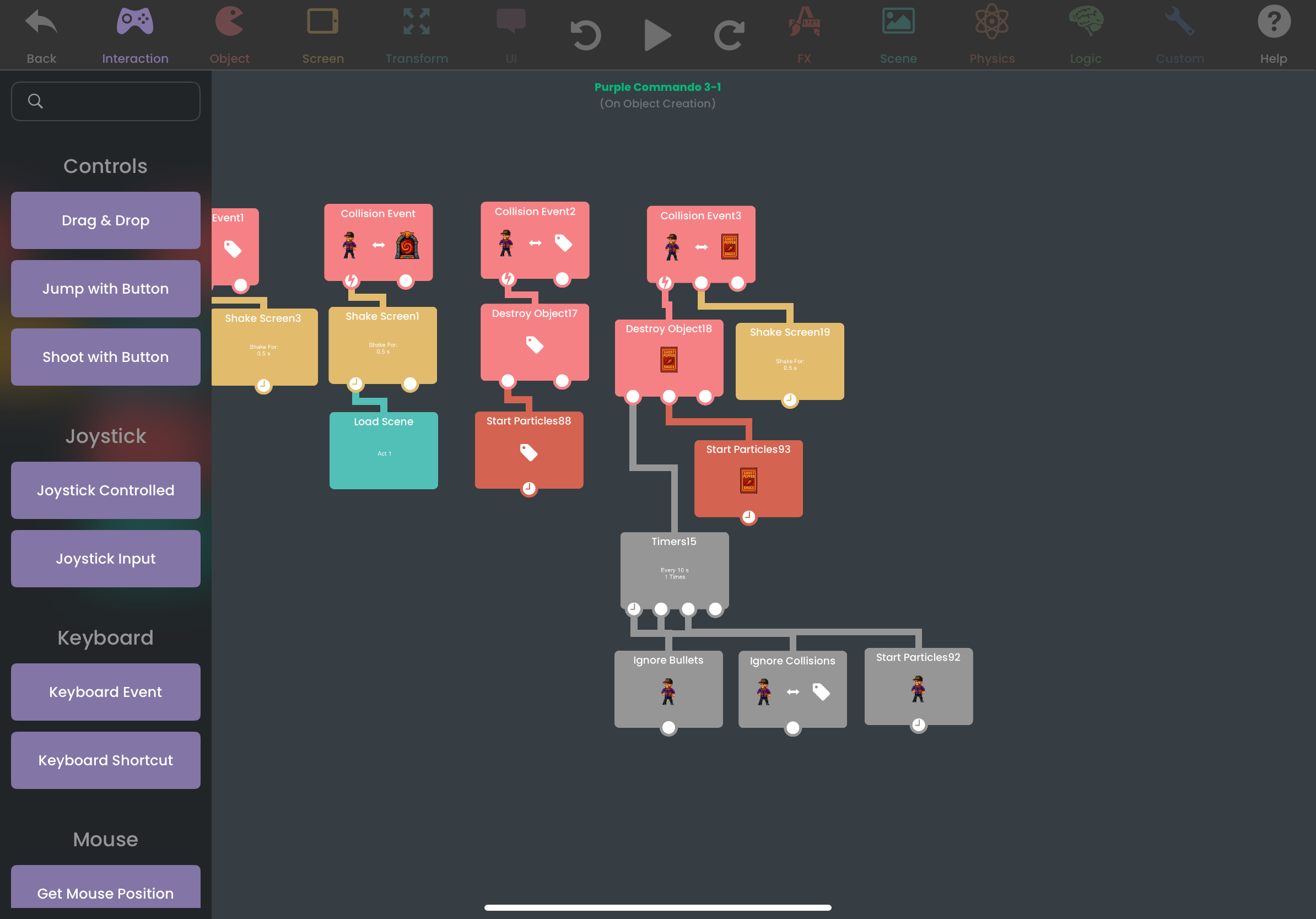
I feel like I'm not making a ton of sense but if you screenshot the behavior tree I promise to be a little more coherent xDThank you so much for your help here’s a screenshot I’m very new to understanding how the chains flow haha 😂🙏
-
Thank you so much for your help here’s a screenshot I’m very new to understanding how the chains flow haha 😂🙏
@versioneight Apologies for replying four days later I was out for the weekend.
I now see your issue; It would seem the "ignore bullets" behavior was designed for scene objects where you want to ignore bullets permanently. In the forum someone said disabling it with a "set behavior state" should also disable the effect but that isn't working for me so I used tags to work around it:
Instead of having the collision with the power-up set a "ignore bullets" behavior; you can have the bullets set to collide with a specific tag (I see you're using tags already). When the player collides with the invincibility item, use a "modify tags" behavior to disable or change the assigned tag. This will make bullets no longer impact. Next, add a timer attached to another "modify tag" to re-set the tag to normal making bullets hit again.
This tag logic should be adaptable for applying various effects. If you need a screen shot or have further questions let me now. I honestly enjoy solving problems and I'm learning as well so this is all good stuff :) -
Thank you so much for your help here’s a screenshot I’m very new to understanding how the chains flow haha 😂🙏
@versioneight P.S. you might want to have a tag for bullet collisions specifically. Found out the hard way things get screwy if you start trying to use the same tags for more than one function


Hello! It looks like you're interested in this conversation, but you don't have an account yet.
Getting fed up of having to scroll through the same posts each visit? When you register for an account, you'll always come back to exactly where you were before, and choose to be notified of new replies (either via email, or push notification). You'll also be able to save bookmarks and upvote posts to show your appreciation to other community members.
With your input, this post could be even better 💗
Register Login