
Spawned Objects Exploration
-
I guess it's not a new issue that we find ourselves needing more access to spawned objects, but I think I stumbled across something.
It seems that once a spawn behavior is used inside of an object, all subsequent objects are applied to the spawned object. If this is true, I'm wondering how I can get more control of these spawned objects. I see how IDs have been used in the enemy health bar bxample, but I want to understand the functionality at a more basic level.
How do the spawn behaviors work?
-
What do you need to know? Never make the spawned object spawn itself lol unless it's intended that the object duplicates itself apon an event like a broadcast message, if there's no event then they will spawn out of control instantly and crash hyperPad.
-
What do you need to know? Never make the spawned object spawn itself lol unless it's intended that the object duplicates itself apon an event like a broadcast message, if there's no event then they will spawn out of control instantly and crash hyperPad.
@Aidan-Oxley
Working on a sort of inventory.
https://www.dropbox.com/s/u5jmy43clh8t5oo/Inventory 2.tap?dl=0
-
Had a look, I don't see any spawning, what do you wanna use spawning for?
-
Had a look, I don't see any spawning, what do you wanna use spawning for?
@Aidan-Oxley
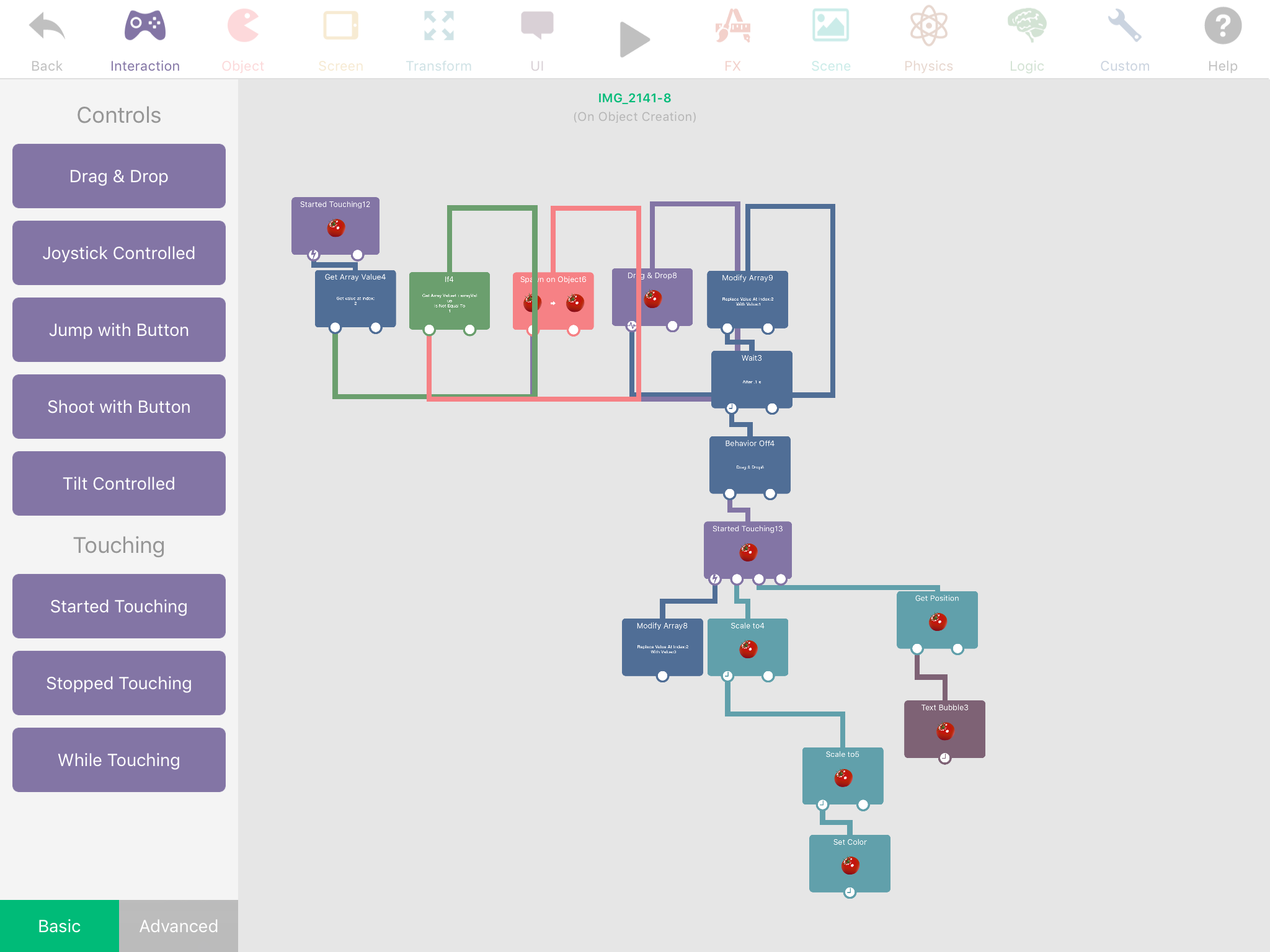
I'm spawning the fruit to simulate selecting fruit from the inventory and placing it in the world. I can even move the spawned object to another layer.
-
A simple way could be having the fruit down in some sort of inventory bar in the bottom of the screen, when you tap on it, it spawns another of itself on top and turns off the spawn ability, then add a drag and drop behaviour in it. Have anything the fruit does disabled until you stop touching it (so that if the fruit is supposed to do stuff in the world, it won't do it in your inventory bar, it will do it when it's dropped in the world. For another scene, can't you just copy it and paste it into another scene, and duplicate your entire inventory bar maybe? Otherwise you could try having it on the global UI, and when you drop it it will move layers. I hope I'm making sense and understanding your problem properly.
-
A simple way could be having the fruit down in some sort of inventory bar in the bottom of the screen, when you tap on it, it spawns another of itself on top and turns off the spawn ability, then add a drag and drop behaviour in it. Have anything the fruit does disabled until you stop touching it (so that if the fruit is supposed to do stuff in the world, it won't do it in your inventory bar, it will do it when it's dropped in the world. For another scene, can't you just copy it and paste it into another scene, and duplicate your entire inventory bar maybe? Otherwise you could try having it on the global UI, and when you drop it it will move layers. I hope I'm making sense and understanding your problem properly.
@Aidan-Oxley I misspoke about moving it to a scene. I can move it to another layer.
The way it works now, it seems that the inventory bar isn't affected and I am wondering how. It seems that once I have spawned the object, each subsequent action on the object is applied to the spawned object. Check out the behaviors in one of the fruit at the top. You can see how the Scale To behavior doesn't scale the fruit at the top, but the spawned object only, even though it's applied within that object, to that object.


Hello! It looks like you're interested in this conversation, but you don't have an account yet.
Getting fed up of having to scroll through the same posts each visit? When you register for an account, you'll always come back to exactly where you were before, and choose to be notified of new replies (either via email, or push notification). You'll also be able to save bookmarks and upvote posts to show your appreciation to other community members.
With your input, this post could be even better 💗
Register Login