hyperPad hyperPad Forum
    • Categories
    • Recent
    • Tags
    • Popular
    • Users
    • Search
    • Login

    Drag and drop object

    Scheduled Pinned Locked Moved Help and Support
    14 Posts 3 Posters 1.7k Views 1 Watching
    Loading More Posts
    • Oldest to Newest
    • Newest to Oldest
    • Most Votes
    Reply
    • Reply as topic
    Log in to reply
    This topic has been deleted. Only users with topic management privileges can see it.
    • ApplegdyA Offline
      Applegdy @RobinsonX
      last edited by

      @RobinsonX thanks a ton! I can build from here. Appreciate the help

      1 Reply Last reply Reply Quote 1
      • ApplegdyA Offline
        Applegdy @RobinsonX
        last edited by

        @RobinsonX how do you set the ball to be a physical object? And how would you make the object return to starting position if it was not dropped on the collision point?

        1 Reply Last reply Reply Quote 1
        • RobinsonXR Offline
          RobinsonX
          last edited by

          On the scene editor, you can click on an object and edit it's properties. Click on the rocket icon to make it a physical object.

          1 Reply Last reply Reply Quote 0
          • RobinsonXR Offline
            RobinsonX
            last edited by

            @Applegdy There's a behavior called Move to Point, it moves an object to the exact same coordinates you specify.

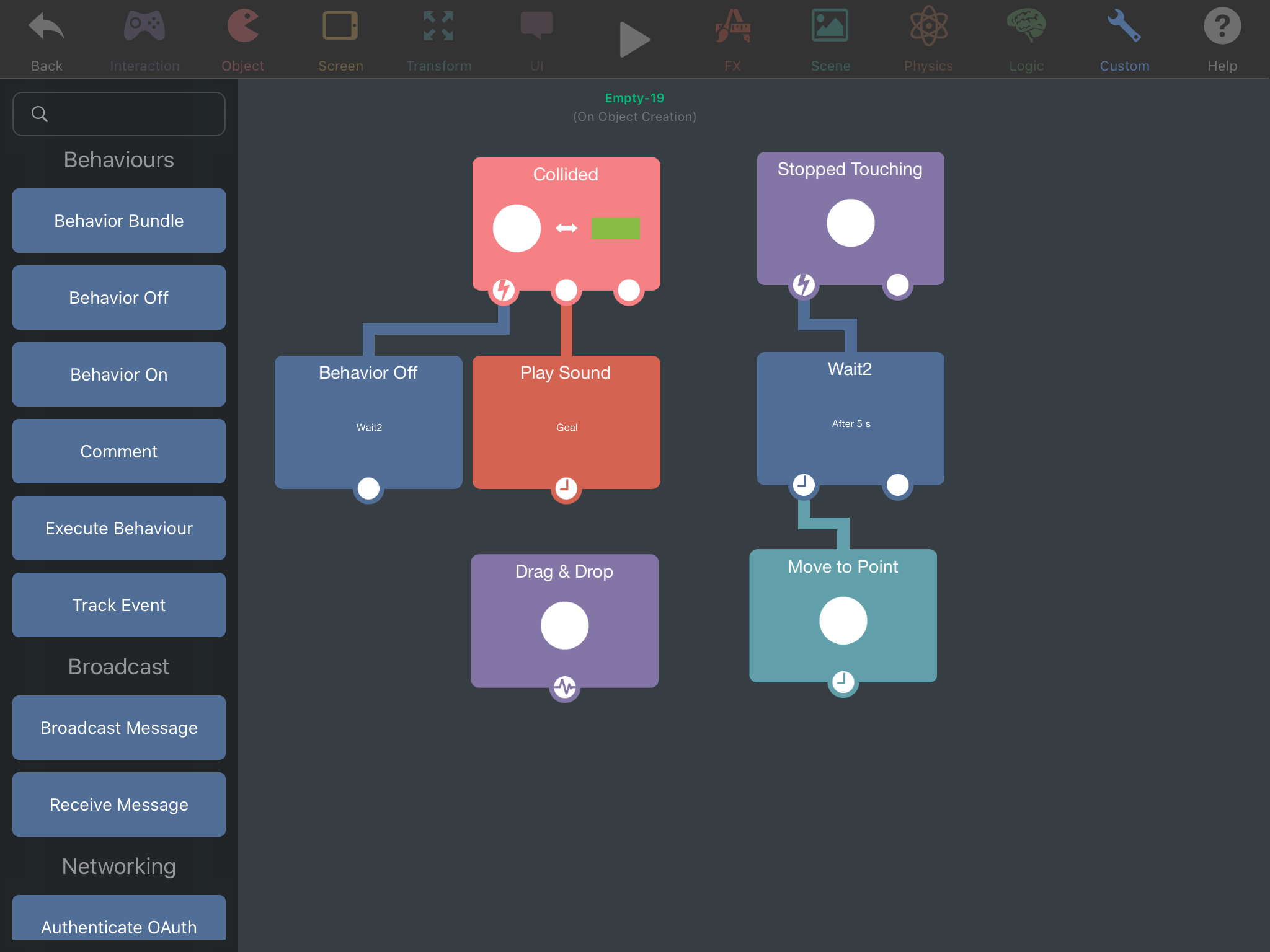
            You can activate a timer after the ball has been thrown and once that timer runs out, it can activate the move to point behavior.

            Stopped touching (ball)
            |
            Wait (as long as needed)
            |
            Move to Point (move ball back to original position)
            ——————
            when ball Collided with goal:
            |
            Behavior off (turn off timer)
            |
            Play sound

            1 Reply Last reply Reply Quote 0
            • RobinsonXR Offline
              RobinsonX
              last edited by

              DE9CDBA7-220F-4A38-B640-F9D783E37370.png
              Here you go, much easier to visualize it

              1 Reply Last reply Reply Quote 0
              • RobinsonXR Offline
                RobinsonX
                last edited by

                @Applegdy You can also add in custom events like when the ball hasn't made it in the goal in time, it can show a game over screen.

                ApplegdyA 2 Replies Last reply Reply Quote 0
                • ApplegdyA Offline
                  Applegdy @RobinsonX
                  last edited by

                  @RobinsonX thank you I will try. I have copied what you said at first but when my object collides there is no sound played. I copied as you put in first diagram

                  1 Reply Last reply Reply Quote 0
                  • ApplegdyA Offline
                    Applegdy @RobinsonX
                    last edited by

                    @RobinsonX I see the problem. I am using font for object. Is there no way to do this for font?

                    1 Reply Last reply Reply Quote 0
                    • RobinsonXR Offline
                      RobinsonX
                      last edited by

                      There's always a way to do something, even if it's not a feature.

                      You can have an empty object and the text can follow the empty object.

                      1 Reply Last reply Reply Quote 0
                      • RobinsonXR Offline
                        RobinsonX
                        last edited by

                        @Applegdy I thought there was a physical toggle for text, but maybe it got changed.

                        1 Reply Last reply Reply Quote 0
                        • HamedH Offline
                          Hamed Admin
                          last edited by

                          You can use the Make Physics behaviour to make font have physics:

                          https://hyperpad.zendesk.com/hc/en-us/articles/360016230052-Make-Physics

                          1 Reply Last reply Reply Quote 0

                          Hello! It looks like you're interested in this conversation, but you don't have an account yet.

                          Getting fed up of having to scroll through the same posts each visit? When you register for an account, you'll always come back to exactly where you were before, and choose to be notified of new replies (either via email, or push notification). You'll also be able to save bookmarks and upvote posts to show your appreciation to other community members.

                          With your input, this post could be even better 💗

                          Register Login
                          • First post
                            Last post