
Boosting my character
-
Hello all, i was just wondering if anyone can inform me on how to boost my joystick controlled players speed. If you do know examples and photos would be great. Thanks
-
If what you want is to move your player forward faster, just make the x or y value(s) greater. Experiment.
If you want to plan out boosts on a rhythm, you may want to boost your player using move by or velocity behaviors.
An example of this would be if the player hits a rock and it boosts forward before flipping:
Collided (player+rock)
Behavior off (collided)
Set Velocity (speed 50)
Wait (0.25 seconds)
Set Velocity (blank value)I do not know if that example works, but it is something that you can fool around to produce the right effect.
If you need any other help, feel free to let me know. I am not always available, but depending on the game, I can give some really good, tested advice.
-
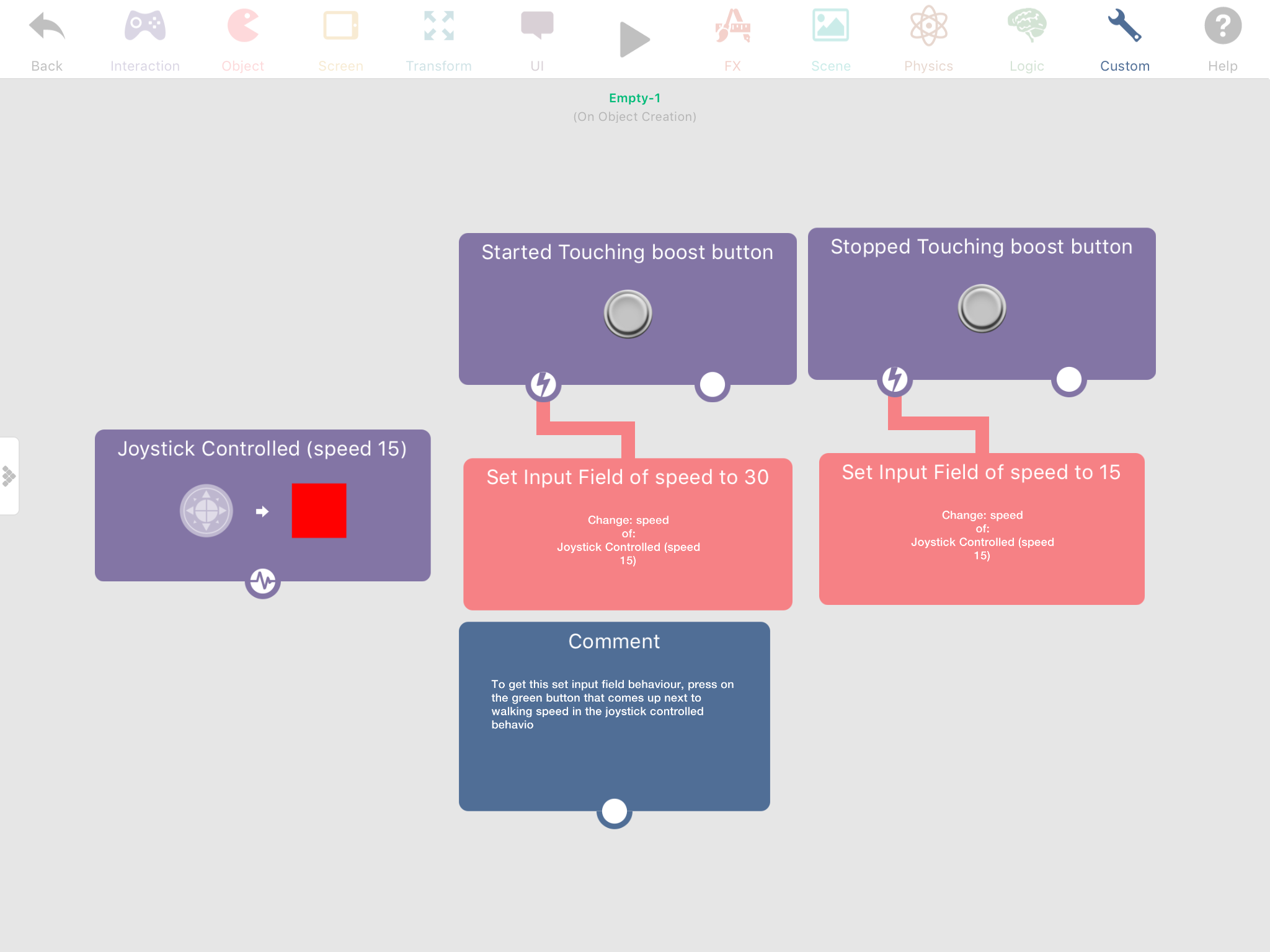
Do you want your player's speed to just be higher, or you want a certain event (like a power up) to boost your speed temporarily? For just increasing their speed, open up the joystick controlled behaviour and player speed or velocity should be in there somewhere, if you want a temporary boost you can use set input fields to change it to something higher than after a second change it to what it started as. If you don't understand, I can send a screenshot if you want 🙂 (just tell me exactly what you want to happen).
-
Do you want your player's speed to just be higher, or you want a certain event (like a power up) to boost your speed temporarily? For just increasing their speed, open up the joystick controlled behaviour and player speed or velocity should be in there somewhere, if you want a temporary boost you can use set input fields to change it to something higher than after a second change it to what it started as. If you don't understand, I can send a screenshot if you want 🙂 (just tell me exactly what you want to happen).
@Aidan-Oxley Thanks for the reply. I was planning to temporarily boost my characters speed using a button I created. A screenshot would be much appreciated. Thanks
-
-
@Aidan-Oxley thanks. I tried doing this but still no difference in speed. any ideas?
-
@Aidan-Oxley thanks. I tried doing this but still no difference in speed. any ideas?
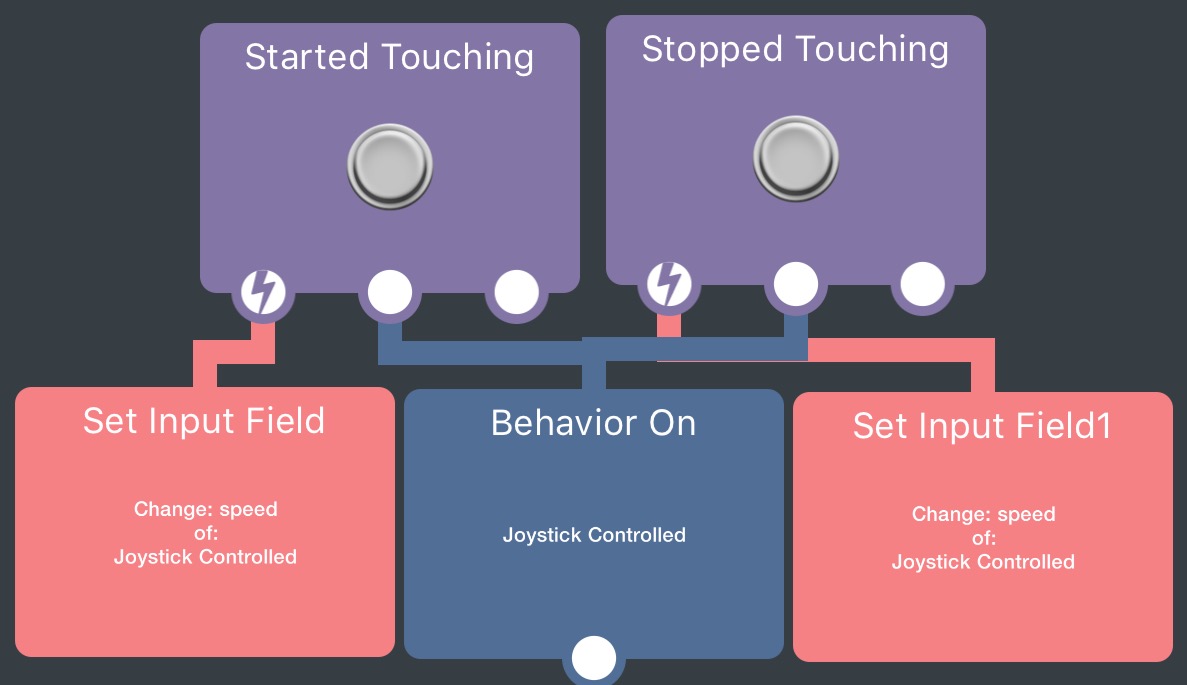
@Aaron-Cunn it's something weird hyperPad does where it doesn't update until you restart the behaviour. If you use a 'behaviour on' after setting the input field it will have the new speed. Like this:
-
@Aaron-Cunn it's something weird hyperPad does where it doesn't update until you restart the behaviour. If you use a 'behaviour on' after setting the input field it will have the new speed. Like this:
@Jack8680 Thank you, thank you so much. It's working great now.
-
@Aaron-Cunn it's something weird hyperPad does where it doesn't update until you restart the behaviour. If you use a 'behaviour on' after setting the input field it will have the new speed. Like this:
@Aaron-Cunn it's something weird hyperPad does where it doesn't update until you restart the behaviour. If you use a 'behaviour on' after setting the input field it will have the new speed. Like this:
One question I somehow don't have the input property block there where do I get it?



![[Deleted] b1](https://www.hyperpad.com/rails/active_storage/representations/redirect/eyJfcmFpbHMiOnsibWVzc2FnZSI6IkJBaHBBeWVKQnc9PSIsImV4cCI6bnVsbCwicHVyIjoiYmxvYl9pZCJ9fQ==--05c9a8002d587ca485d036c6e7e4080a740fb6e0/eyJfcmFpbHMiOnsibWVzc2FnZSI6IkJBaDdCem9MWm05eWJXRjBTU0lJY0c1bkJqb0dSVlE2RW5KbGMybDZaVjkwYjE5bWFYUmJCMmtCZ0drQmdBPT0iLCJleHAiOm51bGwsInB1ciI6InZhcmlhdGlvbiJ9fQ==--c1f45ea95ff72792b8b4745191d32976d37a96bf/avatar.png "[Deleted] b1")
Hello! It looks like you're interested in this conversation, but you don't have an account yet.
Getting fed up of having to scroll through the same posts each visit? When you register for an account, you'll always come back to exactly where you were before, and choose to be notified of new replies (either via email, or push notification). You'll also be able to save bookmarks and upvote posts to show your appreciation to other community members.
With your input, this post could be even better 💗
Register Login