Skip to content
  • Categories
  • Recent
  • Tags
  • Popular
  • Users
  • Search
Skins
  • Light
  • Brite
  • Cerulean
  • Cosmo
  • Flatly
  • Journal
  • Litera
  • Lumen
  • Lux
  • Materia
  • Minty
  • Morph
  • Pulse
  • Sandstone
  • Simplex
  • Sketchy
  • Spacelab
  • United
  • Yeti
  • Zephyr
  • Dark
  • Cyborg
  • Darkly
  • Quartz
  • Slate
  • Solar
  • Superhero
  • Vapor

  • Default (No Skin)
  • No Skin
Collapse
hyperPad

hyperPad Forum

  1. Home
  2. Help and Support
  3. Copies of object that can’t be deleted

Copies of object that can’t be deleted

Scheduled Pinned Locked Moved Help and Support
3 Posts 2 Posters 666 Views 1 Watching
  • Oldest to Newest
  • Newest to Oldest
  • Most Votes
Reply
  • Reply as topic
Log in to reply
This topic has been deleted. Only users with topic management privileges can see it.
  • DGames135D Offline
    DGames135D Offline
    DGames135
    wrote on last edited by
    #1

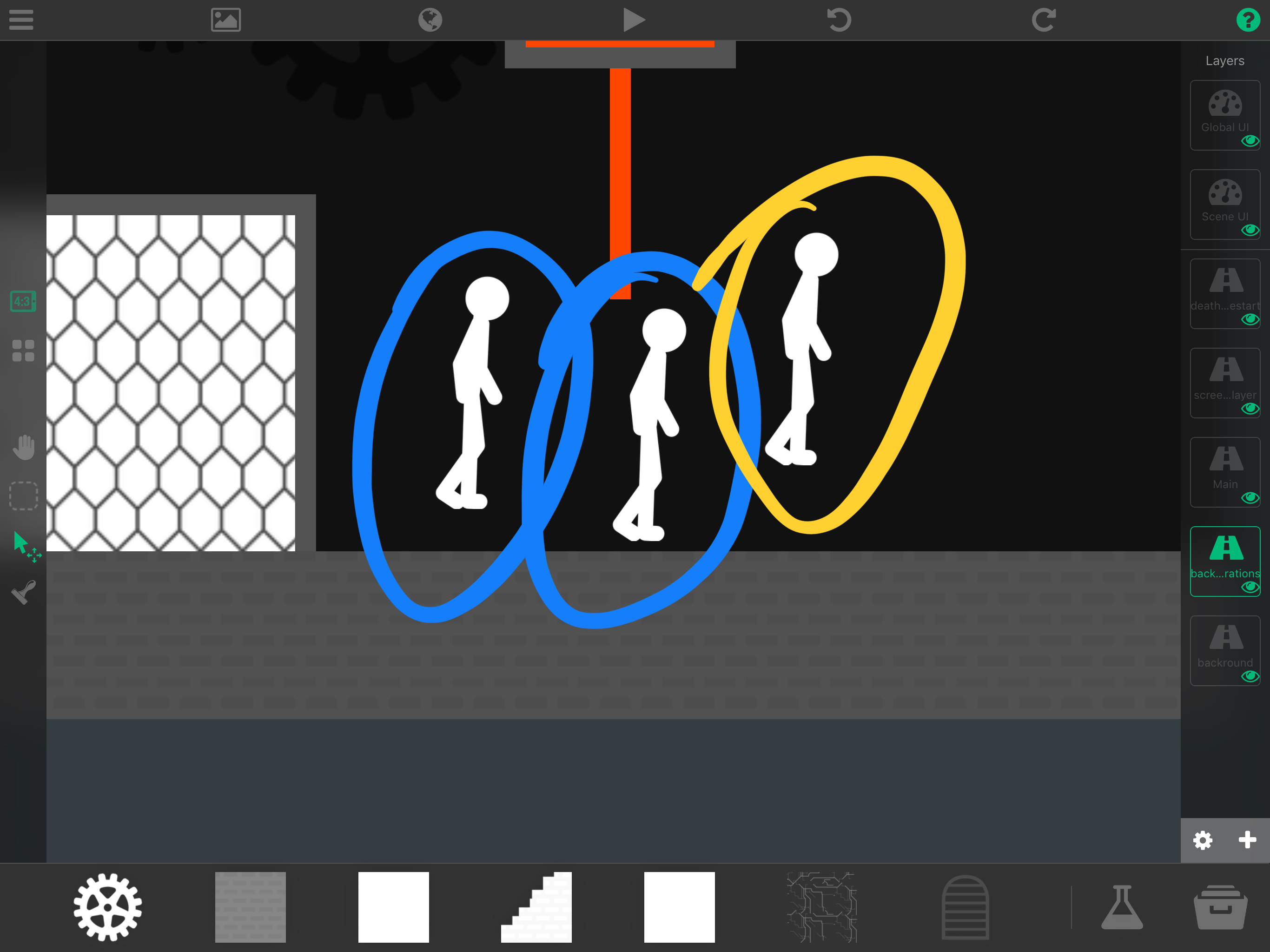
    So for some reason when I moved my charcater a copy was made of it and another one for some reason. I just moved my character and poof it hapened. Somohow the character was also moved to another layer and don’t even know why here’s a picture for proof
    0_1508966454932_87D257DB-D13F-46F2-85CA-C21949281566.jpeg
    The blue ones are the copies and the yellow is the character. For some reason those copies can’t be deleted or selected at all. They disappear when the game is running but in the editor I can’t do anything to them. Sometimes I can only move them. And yes I did try to select them from different layers and no results. Also the character was moved from the “main” layer to the layer bellow it.

    Aidan_FireA 1 Reply Last reply
    0
    • DGames135D DGames135

      So for some reason when I moved my charcater a copy was made of it and another one for some reason. I just moved my character and poof it hapened. Somohow the character was also moved to another layer and don’t even know why here’s a picture for proof
      0_1508966454932_87D257DB-D13F-46F2-85CA-C21949281566.jpeg
      The blue ones are the copies and the yellow is the character. For some reason those copies can’t be deleted or selected at all. They disappear when the game is running but in the editor I can’t do anything to them. Sometimes I can only move them. And yes I did try to select them from different layers and no results. Also the character was moved from the “main” layer to the layer bellow it.

      Aidan_FireA Offline
      Aidan_FireA Offline
      Aidan_Fire
      wrote on last edited by
      #2

      @DGames135 Have you tried restarting hyperPad?

      DGames135D 1 Reply Last reply
      0
      • Aidan_FireA Aidan_Fire

        @DGames135 Have you tried restarting hyperPad?

        DGames135D Offline
        DGames135D Offline
        DGames135
        wrote on last edited by
        #3

        @Aidan-Oxley I did it when it first happened but nothing changed and now when I say this I went back to it and it somehow was fixed. Maybe it was because I restarted my iPad and not hyperPad. Lol thanks anyway.

        1 Reply Last reply
        0

        Hello! It looks like you're interested in this conversation, but you don't have an account yet.

        Getting fed up of having to scroll through the same posts each visit? When you register for an account, you'll always come back to exactly where you were before, and choose to be notified of new replies (either via email, or push notification). You'll also be able to save bookmarks and upvote posts to show your appreciation to other community members.

        With your input, this post could be even better 💗

        Register Login
        Reply
        • Reply as topic
        Log in to reply
        • Oldest to Newest
        • Newest to Oldest
        • Most Votes


        • Login

        • Login or register to search.
        • First post
          Last post
        0
        • Categories
        • Recent
        • Tags
        • Popular
        • Users
        • Search