
Adjust a value over time: HOW?
-
-
How do I get at a property like Air Resistance and adjust it over a period of time?
eg.
As of an event, for the next 2 seconds, using an exponential out curve, reduce the value of Air Resistance from 3 to 0.1
@Deeeds You could try doing it manually, using something like timer 0 seconds, box container and set I put field.
-
How do I get at a property like Air Resistance and adjust it over a period of time?
eg.
As of an event, for the next 2 seconds, using an exponential out curve, reduce the value of Air Resistance from 3 to 0.1
@Deeeds I'm not completely sure what you mean by exponential out curve, but as an example I'll use a function in the form of
f(x)=ae^(-x)+c
(probably not exactly what you want). In the case of f(0)=3 and f(2)=0.1, the function would be approximately
f(x)=3.3539e^(-x)-0.3539.
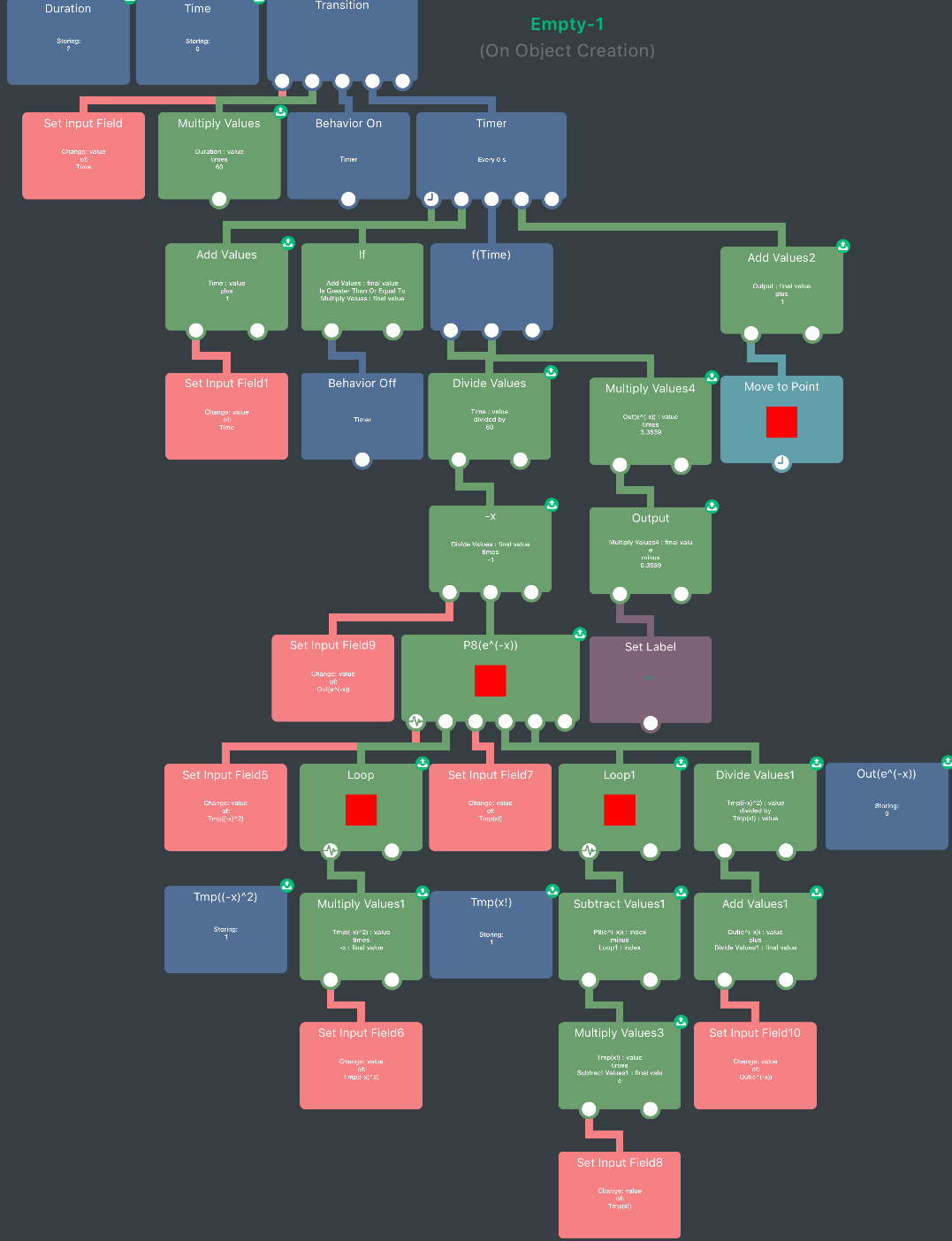
You can use this function as a function of time to use it as a transition between values.HyperPad timers run at 60/s when you set the duration to zero, to match the target fps. So multiplying the duration of your transition by 60 is the number of times a timer(0) needs to run. You can then divide the current index of the timer (keep track using a box container or attribute) by 60 to get the current time. Putting this time into the function will give a smooth transition.
Unfortunately hyperPad doesn't support exponents, so I've used the 8th tailor polynomial approximation for e^x: 1+x+x^2/2!+x^3/3!+...+x^8/8!.
I used a loop for the factorial and a loop the power of x, both within a loop for each part of the approximation. You can increase the number in the main loop to make it more accurate at the cost of performance. Here's a screenshot (hard to follow):
Here's a download link: http://bit.ly/2zXmKYy (copy, paste into safari).
Note that I'm adding 1 to the output value just so I can display the value using the y position of the base of the square, you wouldn't do this for your air resistance.
-
@Deeeds I'm not completely sure what you mean by exponential out curve, but as an example I'll use a function in the form of
f(x)=ae^(-x)+c
(probably not exactly what you want). In the case of f(0)=3 and f(2)=0.1, the function would be approximately
f(x)=3.3539e^(-x)-0.3539.
You can use this function as a function of time to use it as a transition between values.HyperPad timers run at 60/s when you set the duration to zero, to match the target fps. So multiplying the duration of your transition by 60 is the number of times a timer(0) needs to run. You can then divide the current index of the timer (keep track using a box container or attribute) by 60 to get the current time. Putting this time into the function will give a smooth transition.
Unfortunately hyperPad doesn't support exponents, so I've used the 8th tailor polynomial approximation for e^x: 1+x+x^2/2!+x^3/3!+...+x^8/8!.
I used a loop for the factorial and a loop the power of x, both within a loop for each part of the approximation. You can increase the number in the main loop to make it more accurate at the cost of performance. Here's a screenshot (hard to follow):
Here's a download link: http://bit.ly/2zXmKYy (copy, paste into safari).
Note that I'm adding 1 to the output value just so I can display the value using the y position of the base of the square, you wouldn't do this for your air resistance.
@Jack8680 SORRY JACK!!!
My question is all about changing the value over time, the exponential out (ease curve) is only used as an example of a type of ease curve... any curve would do, including linear change over time.
How do I read this WITHOUT the exponential stuff, so I can see how to change a value over time?
-
@Jack8680 SORRY JACK!!!
My question is all about changing the value over time, the exponential out (ease curve) is only used as an example of a type of ease curve... any curve would do, including linear change over time.
How do I read this WITHOUT the exponential stuff, so I can see how to change a value over time?
-
@Jack8680 SORRY JACK!!!
My question is all about changing the value over time, the exponential out (ease curve) is only used as an example of a type of ease curve... any curve would do, including linear change over time.
How do I read this WITHOUT the exponential stuff, so I can see how to change a value over time?
@Deeeds
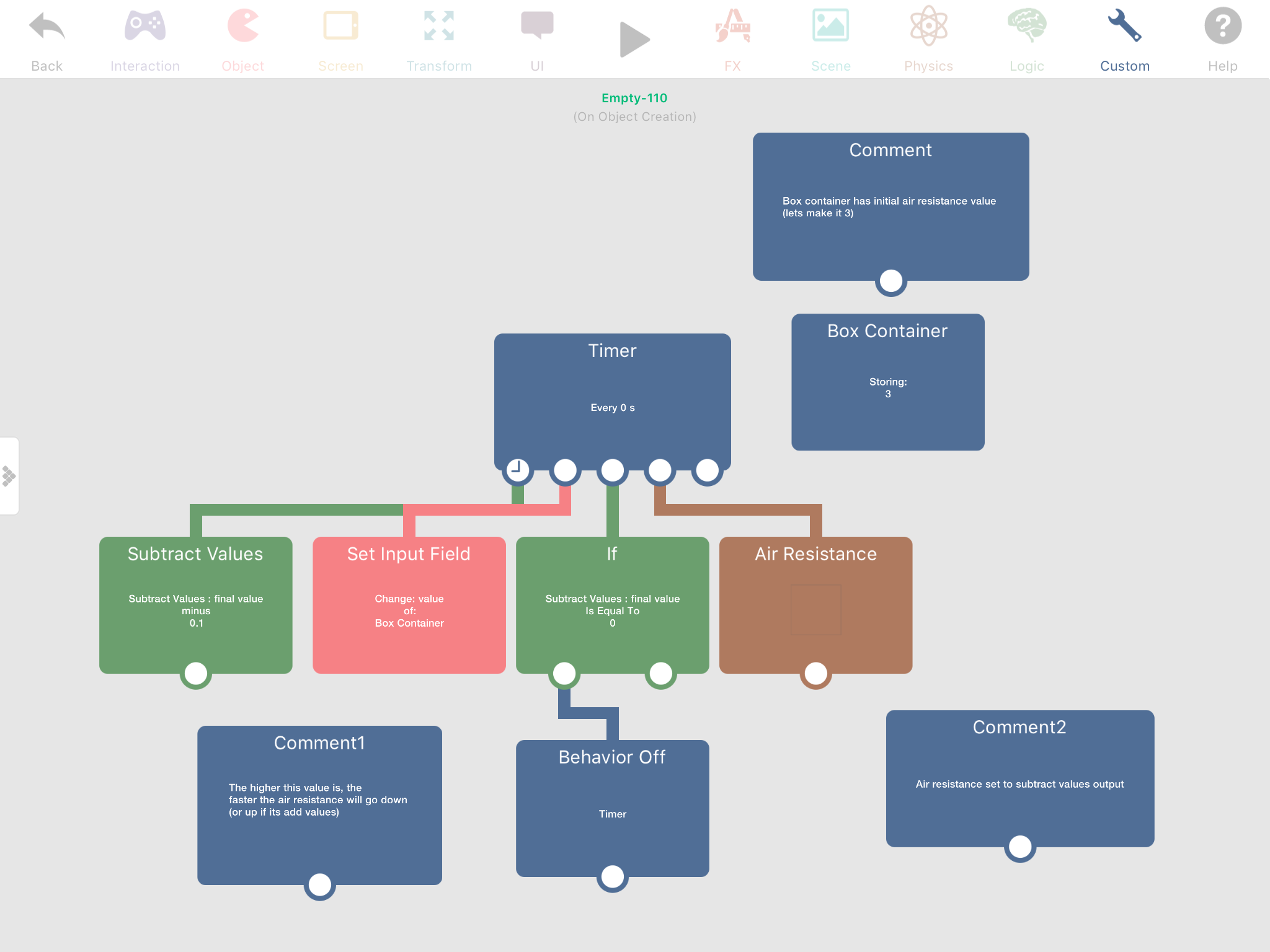
Hope this can help. -
@Deeeds I'm not completely sure what you mean by exponential out curve, but as an example I'll use a function in the form of
f(x)=ae^(-x)+c
(probably not exactly what you want). In the case of f(0)=3 and f(2)=0.1, the function would be approximately
f(x)=3.3539e^(-x)-0.3539.
You can use this function as a function of time to use it as a transition between values.HyperPad timers run at 60/s when you set the duration to zero, to match the target fps. So multiplying the duration of your transition by 60 is the number of times a timer(0) needs to run. You can then divide the current index of the timer (keep track using a box container or attribute) by 60 to get the current time. Putting this time into the function will give a smooth transition.
Unfortunately hyperPad doesn't support exponents, so I've used the 8th tailor polynomial approximation for e^x: 1+x+x^2/2!+x^3/3!+...+x^8/8!.
I used a loop for the factorial and a loop the power of x, both within a loop for each part of the approximation. You can increase the number in the main loop to make it more accurate at the cost of performance. Here's a screenshot (hard to follow):
Here's a download link: http://bit.ly/2zXmKYy (copy, paste into safari).
Note that I'm adding 1 to the output value just so I can display the value using the y position of the base of the square, you wouldn't do this for your air resistance.
@Jack8680 Jack, I don't really know how to say "Thank you" in any way that's strong enough.
This is an astonishing amount of effort and consideration, and an amazingly powerful demonstration of talent and understanding. I'm overwhelmed!
How long have you been using hyperPad?
Have you used other visual programming environments?
How did you get to conceiving programming visually? I still struggle with it, greatly, finding most programming languages to be easier to conceive within than visual coding... despite the fact that I'm a TERRIBLE programmer.
-
@Jack8680 Jack, I don't really know how to say "Thank you" in any way that's strong enough.
This is an astonishing amount of effort and consideration, and an amazingly powerful demonstration of talent and understanding. I'm overwhelmed!
How long have you been using hyperPad?
Have you used other visual programming environments?
How did you get to conceiving programming visually? I still struggle with it, greatly, finding most programming languages to be easier to conceive within than visual coding... despite the fact that I'm a TERRIBLE programmer.
@Deeeds Timer repeats every behaviour connected underneath it with a delay of whatever value it has in seconds. When you set it to zero, it simply runs it every frame (60th of a second). Jack and myself have both been using hyperPad for about 4-5 years I think? Discovered it in early high school back when it was called GamePress.
-
@Deeeds You could try doing it manually, using something like timer 0 seconds, box container and set I put field.
-
@Aidan-Oxley Can you explain "timer" in the way hyperPad uses it? I can't see how it only runs for 2 seconds.
@Deeeds It doesn’t have to run for just 2 seconds, it’s set to stop the timer whenever the air resistance is zero. Sorry I forgot to mention that in the comments.
-
@Deeeds It doesn’t have to run for just 2 seconds, it’s set to stop the timer whenever the air resistance is zero. Sorry I forgot to mention that in the comments.
@Aidan-Oxley argh. Got it... however.. what I'm trying to find is the process to change a value, over time, for a specific duration, with any given curve function. This is normally done with keyframes in animation editors, and Actions within cocos2D, SpriteKit and a couple of other engines, and with coroutines in just about all other coding/engine environments.
-
@Aidan-Oxley argh. Got it... however.. what I'm trying to find is the process to change a value, over time, for a specific duration, with any given curve function. This is normally done with keyframes in animation editors, and Actions within cocos2D, SpriteKit and a couple of other engines, and with coroutines in just about all other coding/engine environments.
@Deeeds Mine is linear, super easy, a curve function would be much more complex, since you have to do it manually in this case, and you’d end up doing probably whatever Jack did before, depending on how complex your curve function is.
-
@Deeeds Mine is linear, super easy, a curve function would be much more complex, since you have to do it manually in this case, and you’d end up doing probably whatever Jack did before, depending on how complex your curve function is.
@Aidan-Oxley I get what yours is doing. And am very impressed. It's incredibly elegant, and has some great advantages: e.g.... in terms of it being dynamic based on the higher value's ... value.
THANK YOU!
However, I'm trying to understand how to set a timer to operate on a value for a specific amount of time.
-
@Aidan-Oxley I get what yours is doing. And am very impressed. It's incredibly elegant, and has some great advantages: e.g.... in terms of it being dynamic based on the higher value's ... value.
THANK YOU!
However, I'm trying to understand how to set a timer to operate on a value for a specific amount of time.
@Deeeds Then simply at the same time the timer is activated, also activate a “Wait” behaviour with the duration you want your timer to run for, at the end of the “Wait” add a “Behaviour Off” with the t8mer selected.
-
@Deeeds Then simply at the same time the timer is activated, also activate a “Wait” behaviour with the duration you want your timer to run for, at the end of the “Wait” add a “Behaviour Off” with the t8mer selected.
-
@Deeeds Then simply at the same time the timer is activated, also activate a “Wait” behaviour with the duration you want your timer to run for, at the end of the “Wait” add a “Behaviour Off” with the t8mer selected.
@Aidan-Oxley I think I'm starting to understand what Jack did. He manually specified the divisor for the units of time, and then calculated how far through the desired duration the changes had been, and uses an "IF" conditional to break out of the loop once the duration limit has been reached. But I'm not quite sure how he's distributed the change of value to the specified duration.
-
@Aidan-Oxley That won't work because it doesn't graduate the change of the value over the specified time, it only limits the operation of the loop influencing the value via the timer's frequency effect.
@Deeeds I would just use what I already have, then do the maths to work out what the value in that “Subtract values” behaviour should be. For example: I want the timer to take 2 seconds. There are 60 frames in a second, 2 seconds makes 120 frames. I want to go down by 3 in 120 frames (to get from 3 to 0). 3 ÷ 120 = 0.025. The value in my subtract values behaviour will be 0.025.
-
@Deeeds I would just use what I already have, then do the maths to work out what the value in that “Subtract values” behaviour should be. For example: I want the timer to take 2 seconds. There are 60 frames in a second, 2 seconds makes 120 frames. I want to go down by 3 in 120 frames (to get from 3 to 0). 3 ÷ 120 = 0.025. The value in my subtract values behaviour will be 0.025.
@Aidan-Oxley You know maths FAR better than I do. I'm a visual thinker ;)
The problem is that the arbitrary high value (3 in this example) is never going to be the same. It's the rate of spin the character has attained, and can be anything from a very small number to a massive value.
Is it possible to do this pre-calcuation of the required distribution rate, to perform the transition for a specific duration, for things like an exponential, quadratic or cubic curve? Don't worry about trying to answer with a massive visual code, I'm just curious if it's possible to pre-plan. Just a yes or no will give me the incentive to believe it possible.
I'm truly flummoxed by maths.
But can lift heavy things.
-
@Deeeds I would just use what I already have, then do the maths to work out what the value in that “Subtract values” behaviour should be. For example: I want the timer to take 2 seconds. There are 60 frames in a second, 2 seconds makes 120 frames. I want to go down by 3 in 120 frames (to get from 3 to 0). 3 ÷ 120 = 0.025. The value in my subtract values behaviour will be 0.025.
@Aidan-Oxley I think I've found a dirty cheat way to do this:
Create an empty object as a dummy.
Set its X position to the incoming rotation speed (3 in this example)
Use a Move to Point behaviour for a duration of 2 seconds with an Exponential Out curve, to move it to 0.1 on the X axis.
Whilst this "action" is running, use it to set the value of the Air Resistance on the desired object.
-
@Aidan-Oxley I think I've found a dirty cheat way to do this:
Create an empty object as a dummy.
Set its X position to the incoming rotation speed (3 in this example)
Use a Move to Point behaviour for a duration of 2 seconds with an Exponential Out curve, to move it to 0.1 on the X axis.
Whilst this "action" is running, use it to set the value of the Air Resistance on the desired object.
@Deeeds Haha real dirty, also less efficient. Value for subtract values = amount you want to increase or decrease by ÷ (amount of seconds it should take × 60) (the brackets just meaning the times 60 happens before the division). Doing maths in hyperPad rather than your dirty method is usually much more efficient. But your way is heaps easier especially fur curve functions.


Hello! It looks like you're interested in this conversation, but you don't have an account yet.
Getting fed up of having to scroll through the same posts each visit? When you register for an account, you'll always come back to exactly where you were before, and choose to be notified of new replies (either via email, or push notification). You'll also be able to save bookmarks and upvote posts to show your appreciation to other community members.
With your input, this post could be even better 💗
Register Login