
For Each Tag, order gotten same every time?
-
If the number of objects with a given tag doesn't change, does For Each iterate over them in the same order every single time?
@Deeeds usually it does but sometimes it doesn't. I've had it change when I've tested after an object, but restarting the project goes back to the original order. I wouldn't rely on it.
-
@Deeeds usually it does but sometimes it doesn't. I've had it change when I've tested after an object, but restarting the project goes back to the original order. I wouldn't rely on it.
-
@Deeeds usually it does but sometimes it doesn't. I've had it change when I've tested after an object, but restarting the project goes back to the original order. I wouldn't rely on it.
-
@Jack8680 And is this anywhere near the right way to do something like a parallax pump in hyperPad?
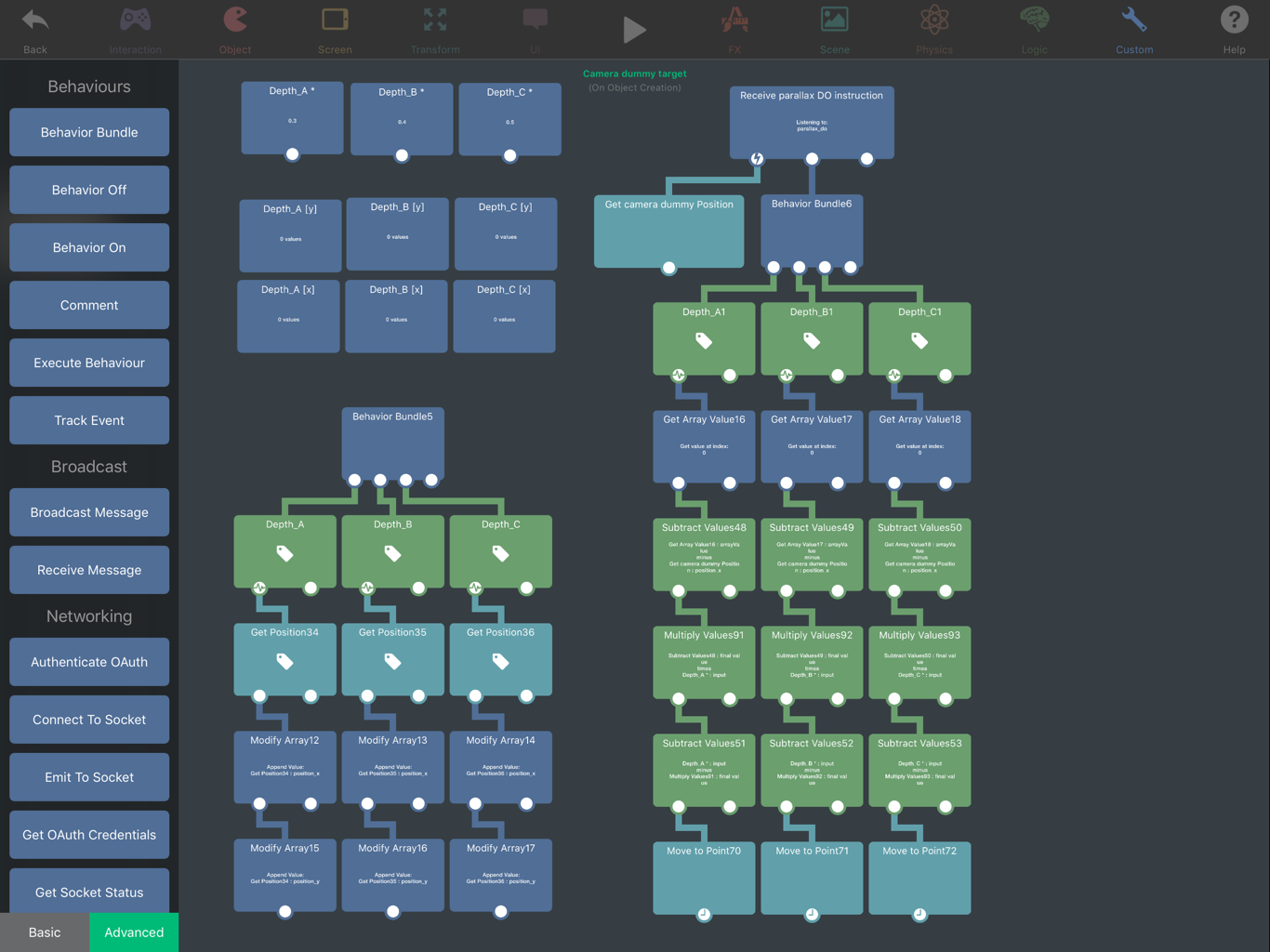
@Deeeds I would use an attribute on the objects in the tag to store their starting x position rather than an array, so it won't rely on the order they are selected in. Also, I think you forgot to select the tags in your move to point behaviou
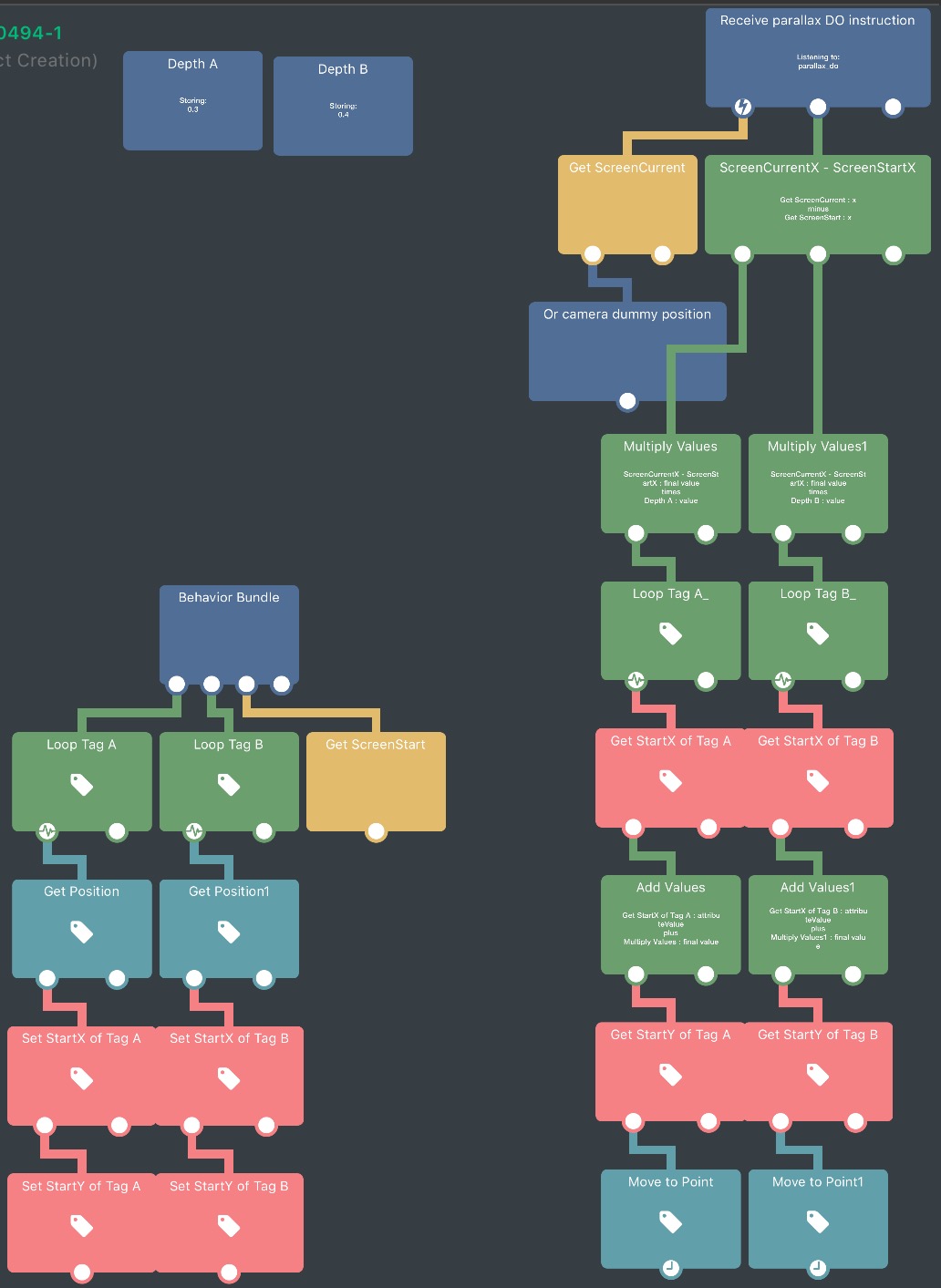
I don't fully understand what your screenshot is doing but if I understand what you want correctly, you should be able to do something like:
For each in [tag]:
    {
    Attribute [tag].StartX = [tag].CurrentX

Function 'parallax DO instruction':
    {
    var ScreenDifference = ScreenCurrentX - ScreenStartX

    var ScreenWeightedA = ScreenDifference * ParallaxWeightA
    For each in tag A:
        {
        ObjectNewX = ScreenWeightedA + attribute [tag A].ObjectStartX
        }

    var ScreenWeightedB = ScreenDifference * ParallaxWeightB
    For each in tag B:
        {etc.}
    }
This way the object moves to an offset of its starting position by a multiple of how much the screen has moved (for background layers you'd have the parallax greater than 0 so they move slower than the screen). Here a weight of 0 means it moves like a normal object and a weight of 1 means it sticks with the screen
Here's a screenshot:
-
@Deeeds I would use an attribute on the objects in the tag to store their starting x position rather than an array, so it won't rely on the order they are selected in. Also, I think you forgot to select the tags in your move to point behaviou
I don't fully understand what your screenshot is doing but if I understand what you want correctly, you should be able to do something like:
For each in [tag]:
    {
    Attribute [tag].StartX = [tag].CurrentX

Function 'parallax DO instruction':
    {
    var ScreenDifference = ScreenCurrentX - ScreenStartX

    var ScreenWeightedA = ScreenDifference * ParallaxWeightA
    For each in tag A:
        {
        ObjectNewX = ScreenWeightedA + attribute [tag A].ObjectStartX
        }

    var ScreenWeightedB = ScreenDifference * ParallaxWeightB
    For each in tag B:
        {etc.}
    }
This way the object moves to an offset of its starting position by a multiple of how much the screen has moved (for background layers you'd have the parallax greater than 0 so they move slower than the screen). Here a weight of 0 means it moves like a normal object and a weight of 1 means it sticks with the screen
Here's a screenshot:
-
@Deeeds I would use an attribute on the objects in the tag to store their starting x position rather than an array, so it won't rely on the order they are selected in. Also, I think you forgot to select the tags in your move to point behaviou
I don't fully understand what your screenshot is doing but if I understand what you want correctly, you should be able to do something like:
For each in [tag]:
    {
    Attribute [tag].StartX = [tag].CurrentX

Function 'parallax DO instruction':
    {
    var ScreenDifference = ScreenCurrentX - ScreenStartX

    var ScreenWeightedA = ScreenDifference * ParallaxWeightA
    For each in tag A:
        {
        ObjectNewX = ScreenWeightedA + attribute [tag A].ObjectStartX
        }

    var ScreenWeightedB = ScreenDifference * ParallaxWeightB
    For each in tag B:
        {etc.}
    }
This way the object moves to an offset of its starting position by a multiple of how much the screen has moved (for background layers you'd have the parallax greater than 0 so they move slower than the screen). Here a weight of 0 means it moves like a normal object and a weight of 1 means it sticks with the screen
Here's a screenshot:
@Jack8680 I've got mine working, it's almost exactly as you're describing: 0 = fixed like a normal object, the higher the value the "deeper" it is back from the camera, hence using
Depthto describe their position.And the sequencing through the tags (Loop For Each) is seeming to work just fine.
I went this way in the off chance it might work, for a few reasons.
- I love arrays. And figured this would be the fastest way
- I have a suspicion that looking up tags is a proper property value hunt underneath (slower)
- I intend to add lots more objects and depths and effects to this, so want the performance
- I'm using teleporting at each "end" of the "world", for which these arrays are something I'm going to use to mirror some objects at each end around to the other end so that there's a seamless switch
But, having said that, I haven't taken the time to really grok what you're doing with tags and attributes and how that alleviates any potential order issues, and what that might mean for adding content to the backgrounds dynamically (something else I'm considering).
-
@Deeeds I would use an attribute on the objects in the tag to store their starting x position rather than an array, so it won't rely on the order they are selected in. Also, I think you forgot to select the tags in your move to point behaviou
I don't fully understand what your screenshot is doing but if I understand what you want correctly, you should be able to do something like:
For each in [tag]:
    {
    Attribute [tag].StartX = [tag].CurrentX

Function 'parallax DO instruction':
    {
    var ScreenDifference = ScreenCurrentX - ScreenStartX

    var ScreenWeightedA = ScreenDifference * ParallaxWeightA
    For each in tag A:
        {
        ObjectNewX = ScreenWeightedA + attribute [tag A].ObjectStartX
        }

    var ScreenWeightedB = ScreenDifference * ParallaxWeightB
    For each in tag B:
        {etc.}
    }
This way the object moves to an offset of its starting position by a multiple of how much the screen has moved (for background layers you'd have the parallax greater than 0 so they move slower than the screen). Here a weight of 0 means it moves like a normal object and a weight of 1 means it sticks with the screen
Here's a screenshot:
-
@Deeeds I would use an attribute on the objects in the tag to store their starting x position rather than an array, so it won't rely on the order they are selected in. Also, I think you forgot to select the tags in your move to point behaviou
I don't fully understand what your screenshot is doing but if I understand what you want correctly, you should be able to do something like:
For each in [tag]:
    {
    Attribute [tag].StartX = [tag].CurrentX

Function 'parallax DO instruction':
    {
    var ScreenDifference = ScreenCurrentX - ScreenStartX

    var ScreenWeightedA = ScreenDifference * ParallaxWeightA
    For each in tag A:
        {
        ObjectNewX = ScreenWeightedA + attribute [tag A].ObjectStartX
        }

    var ScreenWeightedB = ScreenDifference * ParallaxWeightB
    For each in tag B:
        {etc.}
    }
This way the object moves to an offset of its starting position by a multiple of how much the screen has moved (for background layers you'd have the parallax greater than 0 so they move slower than the screen). Here a weight of 0 means it moves like a normal object and a weight of 1 means it sticks with the screen
Here's a screenshot:
I think I've grokked what you're doing.
Each object stores its original position in an Attribute, each run through the loop this is gotten and used for the calculation.
I've believed in arrays, stuffed them full of each objects' original positions and hoped for the For Each loop to go through in the same order each time, since I'm using the index to grab those original positions, they aren't tied to their original object.
This will probably lead to catastrophe at some point, when I'll need to use your approach.

Hello! It looks like you're interested in this conversation, but you don't have an account yet.
Getting fed up of having to scroll through the same posts each visit? When you register for an account, you'll always come back to exactly where you were before, and choose to be notified of new replies (either via email, or push notification). You'll also be able to save bookmarks and upvote posts to show your appreciation to other community members.
With your input, this post could be even better 💗
Register Login