
How do you code strikes?
-
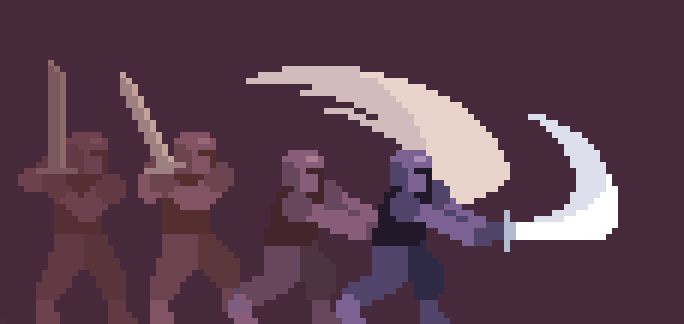
This is not my image by the way. Just a reference. How would you code this in hyperpad. Basically a strike coming from an animation. Do you redraw the collisions so it expands? I understand how this would work with rigging but I cant wrap my brain on how this would work with hyperpad.
-
Don't worry about redrawing collisions. Focus on the animation of the character for now.
Started Touching -> Play Animation
You can also make itplay a soundand add other effects for the animation.You can have another object act as a hit box for the sword. It'll be invisible, but at least it'll make things a lot easier.
You want to move this object to the player when the player strikes. It would teleport instantly, so use0sduration.So now we have:
Started Touching -> Move to Object + Play Animation
You can change the anchors in the Move to Object behavior so that the hitbox can move to where the sword is swinging in front of the player!You can code the hit box object to damage enemies on collision.
And of course, you want to take the hit box away so that the enemies don't get damaged when the animation is over. You can move the object to a point, say(-99999,-99999)for example, where it is very far from the enemies.And now we have:
Started Touching -> Move to Object + Play Animation -> Move to Point -
Don't worry about redrawing collisions. Focus on the animation of the character for now.
Started Touching -> Play Animation
You can also make itplay a soundand add other effects for the animation.You can have another object act as a hit box for the sword. It'll be invisible, but at least it'll make things a lot easier.
You want to move this object to the player when the player strikes. It would teleport instantly, so use0sduration.So now we have:
Started Touching -> Move to Object + Play Animation
You can change the anchors in the Move to Object behavior so that the hitbox can move to where the sword is swinging in front of the player!You can code the hit box object to damage enemies on collision.
And of course, you want to take the hit box away so that the enemies don't get damaged when the animation is over. You can move the object to a point, say(-99999,-99999)for example, where it is very far from the enemies.And now we have:
Started Touching -> Move to Object + Play Animation -> Move to Point@RobinsonX Nice. I was thinking it had to do with some type of weld attach. Never thought to make an invisible hit box. Thanks

Hello! It looks like you're interested in this conversation, but you don't have an account yet.
Getting fed up of having to scroll through the same posts each visit? When you register for an account, you'll always come back to exactly where you were before, and choose to be notified of new replies (either via email, or push notification). You'll also be able to save bookmarks and upvote posts to show your appreciation to other community members.
With your input, this post could be even better 💗
Register Login