
Projectile not showing up on layer
-
Did you publish a new version of the app?
How did you fix it? Is it something in the behaviour that is visible so we can change the Z axis? Or we have to use a behaviour on that behaviour? -
It would be nice that the bullets could have a tag just like an object.
It’s very useful when you have a hit box inside a collision box.
So you have a collision box for general collision and in the centre you have the real hit box -
Or, do you have any work around?
-
- App hasn't been updated yet.
- The Z order property is editable in the shoot behavior itself.
- I'm guessing you mean to have bullets ignore collisions of some objects - not possible at the moment. Treating bullets like objects would bring a lot of performance overhead. It would be a lot better to use actual objects instead since you can define custom behavior logic for each bullet.
-
I cannot find the Z option in shoot…
-
And yes, it’s exactly what I meant about the bullet object… it would be nice to have a both system. even if it has performance issue… the performance issue we can judge by ourselves when we do something..
Otherwise, it’s much too limited -
As I’m not an engineer in IT or mathematician.
I would need a tutorial on how to shoot with a precise angle.
Trying to become an engineer now, it will be too late for me.
I would need a tutorial for that.When you just have to have a node that say shoot by an angle. making this by yourself with math formula, it’s mind blowing weird.
Do you know somebody or something that can show me a complete and clean explanation how to do this?
Thank you very much -
-
Here is the project!
https://bit.ly/4x0FdQP -
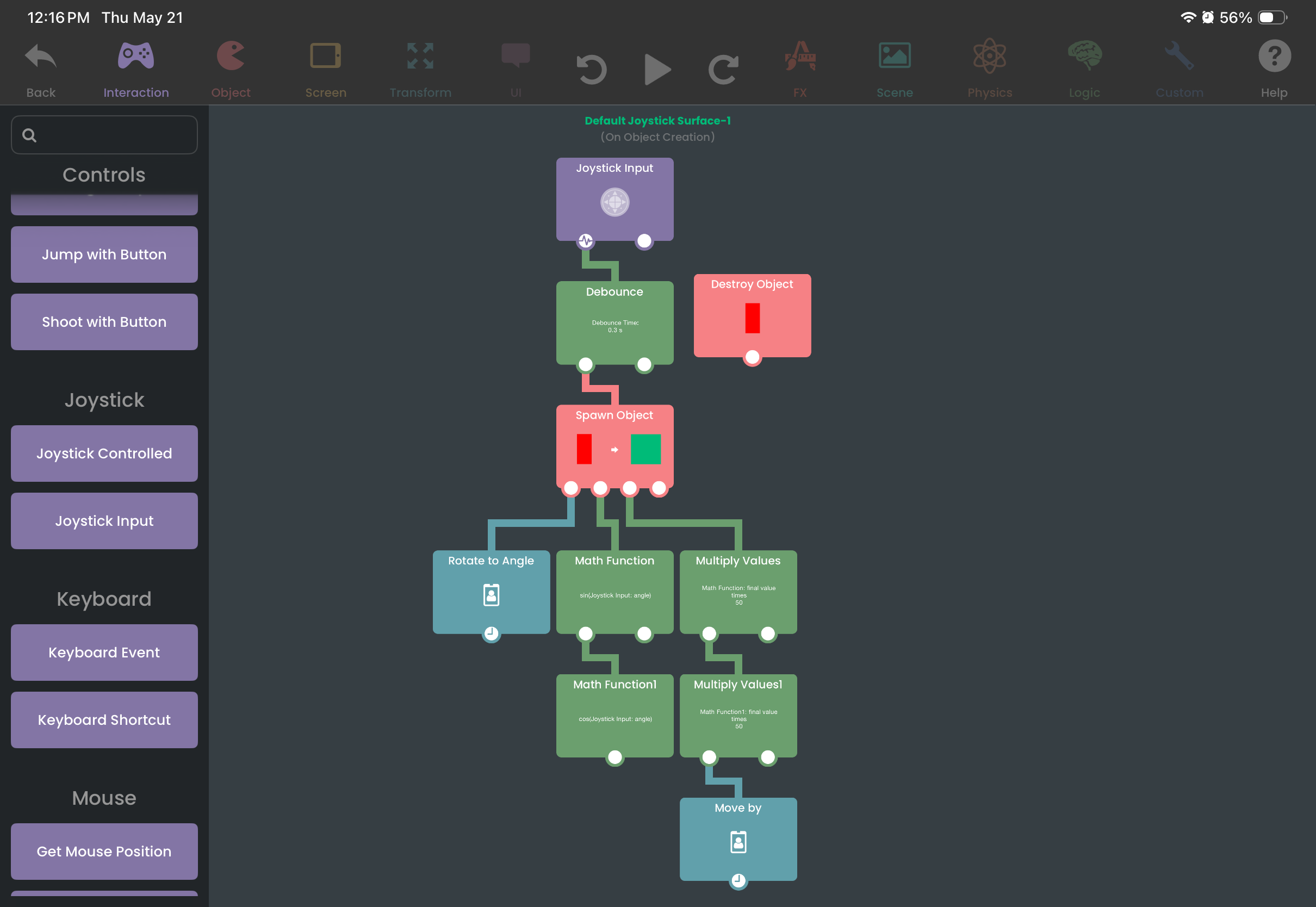
The shooting logic is located in the Joystick object. I'll briefly explain how it works.- Joystick Input triggers while using the joystick.
- Debounce adds a cooldown so it doesn't shoot every frame. It limits how often its child behaviors are executed. In this case, it is set to
0.3sso you can only shoot one bullet every 0.3 seconds. - It spawns an object (the projectile), then it sets the spawned object's rotation to the
anglefrom the Joystick Input. - We perform sine and cosine Math Functions on the
angleto get the horizontal and vertical components respectively. These output a value between-1and1. - These components are multiplied because -1 and 1 is too small of a range. You'd probably want your projectiles to travel further than that.
- Move By moves the spawned object by the multiplied values.
In conclusion, while holding the joystick, the player will shoot a bullet every 0.3 seconds angled at where the joystick is. Depending on the angle, the projectile moves in a particular direction.
In the spawned object, you can add whatever logic you want. In this case, I made the projectiles emit particles and destroy themselves when colliding with an object with the "Wall" tag.
-
Wow cool thanks
Hello! It looks like you're interested in this conversation, but you don't have an account yet.
Getting fed up of having to scroll through the same posts each visit? When you register for an account, you'll always come back to exactly where you were before, and choose to be notified of new replies (either via email, or push notification). You'll also be able to save bookmarks and upvote posts to show your appreciation to other community members.
With your input, this post could be even better 💗
Register Login