Skip to content
  • Categories
  • Recent
  • Tags
  • Popular
  • Users
  • Search
Skins
  • Light
  • Brite
  • Cerulean
  • Cosmo
  • Flatly
  • Journal
  • Litera
  • Lumen
  • Lux
  • Materia
  • Minty
  • Morph
  • Pulse
  • Sandstone
  • Simplex
  • Sketchy
  • Spacelab
  • United
  • Yeti
  • Zephyr
  • Dark
  • Cyborg
  • Darkly
  • Quartz
  • Slate
  • Solar
  • Superhero
  • Vapor

  • Default (No Skin)
  • No Skin
Collapse
hyperPad

hyperPad Forum

  1. Home
  2. Help and Support
  3. Get Color of Background: HOW?

Get Color of Background: HOW?

Scheduled Pinned Locked Moved Help and Support
11 Posts 4 Posters 1.8k Views 1 Watching
  • Oldest to Newest
  • Newest to Oldest
  • Most Votes
Reply
  • Reply as topic
Log in to reply
This topic has been deleted. Only users with topic management privileges can see it.
  • D Offline
    D Offline
    Deeeds
    wrote on last edited by
    #1

    I want to get the colour of the background and apply it to an object.

    How is this done?

    1 Reply Last reply
    0
    • Andrey GhostA Offline
      Andrey GhostA Offline
      Andrey Ghost
      wrote on last edited by
      #2

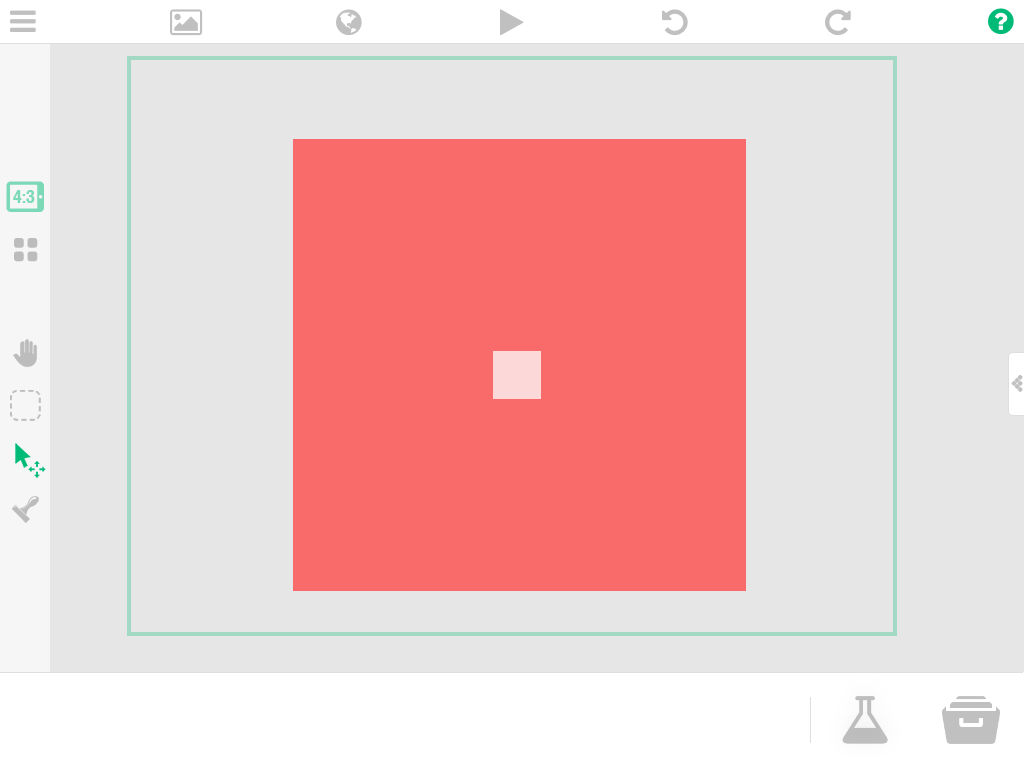
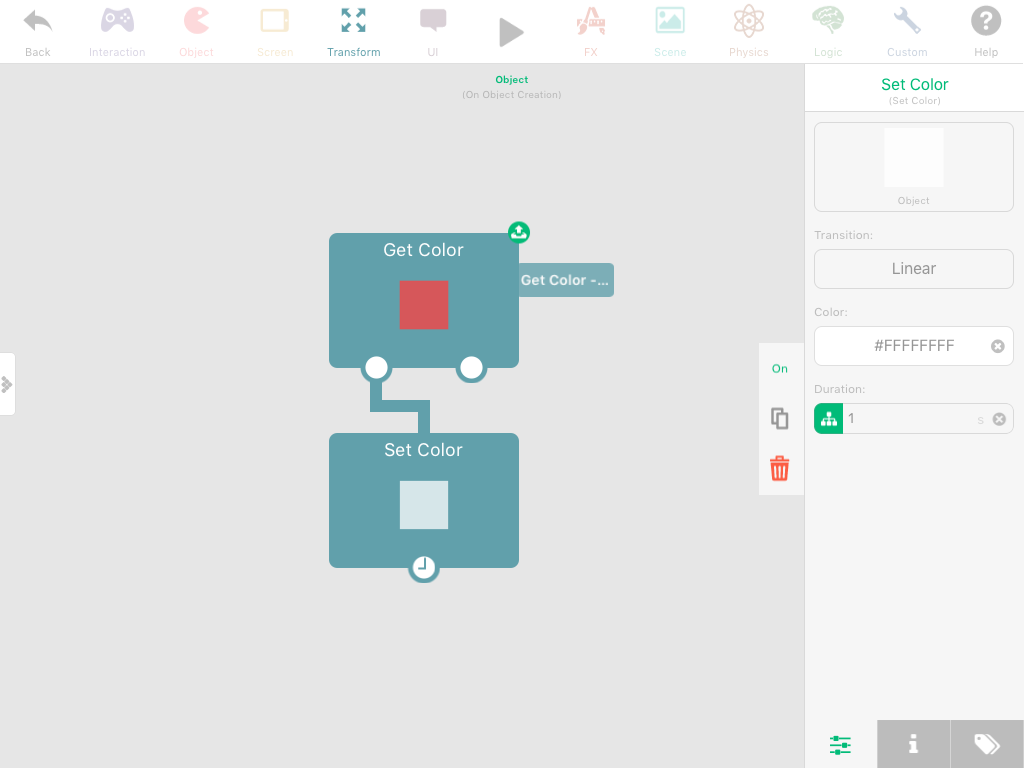
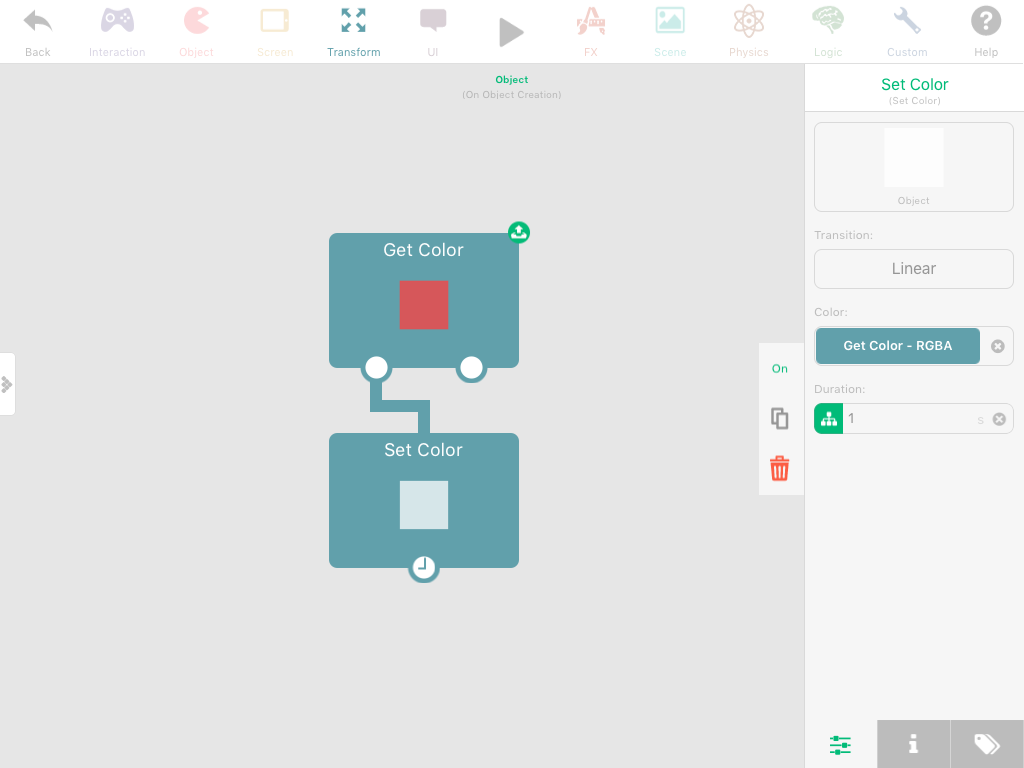
      Go to «Behaviour» --> «Transform» list --> Tap «Advanced» --> Find «Get Color» behavior --> Use its input field with «Set Color»0_1512205223517_image.png 0_1512205281739_image.png 0_1512205291041_image.png 0_1512205303438_image.png 0_1512205499810_image.png
      (In my bad sample objects had partly transparent color, that's why the small one seems to have another color)

      D 1 Reply Last reply
      1
      • Andrey GhostA Andrey Ghost

        Go to «Behaviour» --> «Transform» list --> Tap «Advanced» --> Find «Get Color» behavior --> Use its input field with «Set Color»0_1512205223517_image.png 0_1512205281739_image.png 0_1512205291041_image.png 0_1512205303438_image.png 0_1512205499810_image.png
        (In my bad sample objects had partly transparent color, that's why the small one seems to have another color)

        D Offline
        D Offline
        Deeeds
        wrote on last edited by
        #3

        @Andrey-Ghost How does this get the colour of the game's background?

        Aidan_FireA 1 Reply Last reply
        0
        • RobinsonXR Offline
          RobinsonXR Offline
          RobinsonX
          wrote on last edited by
          #4

          You can't get the color of the background (yet?), but there is a simple way around that.

          You can set an empty object as a background and an another object can use the Get Color behavior to get the color of the background, just like how Andrew Ghost did it.

          1 Reply Last reply
          1
          • D Deeeds

            @Andrey-Ghost How does this get the colour of the game's background?

            Aidan_FireA Offline
            Aidan_FireA Offline
            Aidan_Fire
            wrote on last edited by
            #5

            @Deeeds While the game is running, you can’t Get or Set the background colour. I’d recommend just going into the background, finding the colour section then copying the colour code and use that. I’m pretty sure next update we’ll be able to set background colour.

            1 Reply Last reply
            0
            • Aidan_FireA Offline
              Aidan_FireA Offline
              Aidan_Fire
              wrote on last edited by
              #6

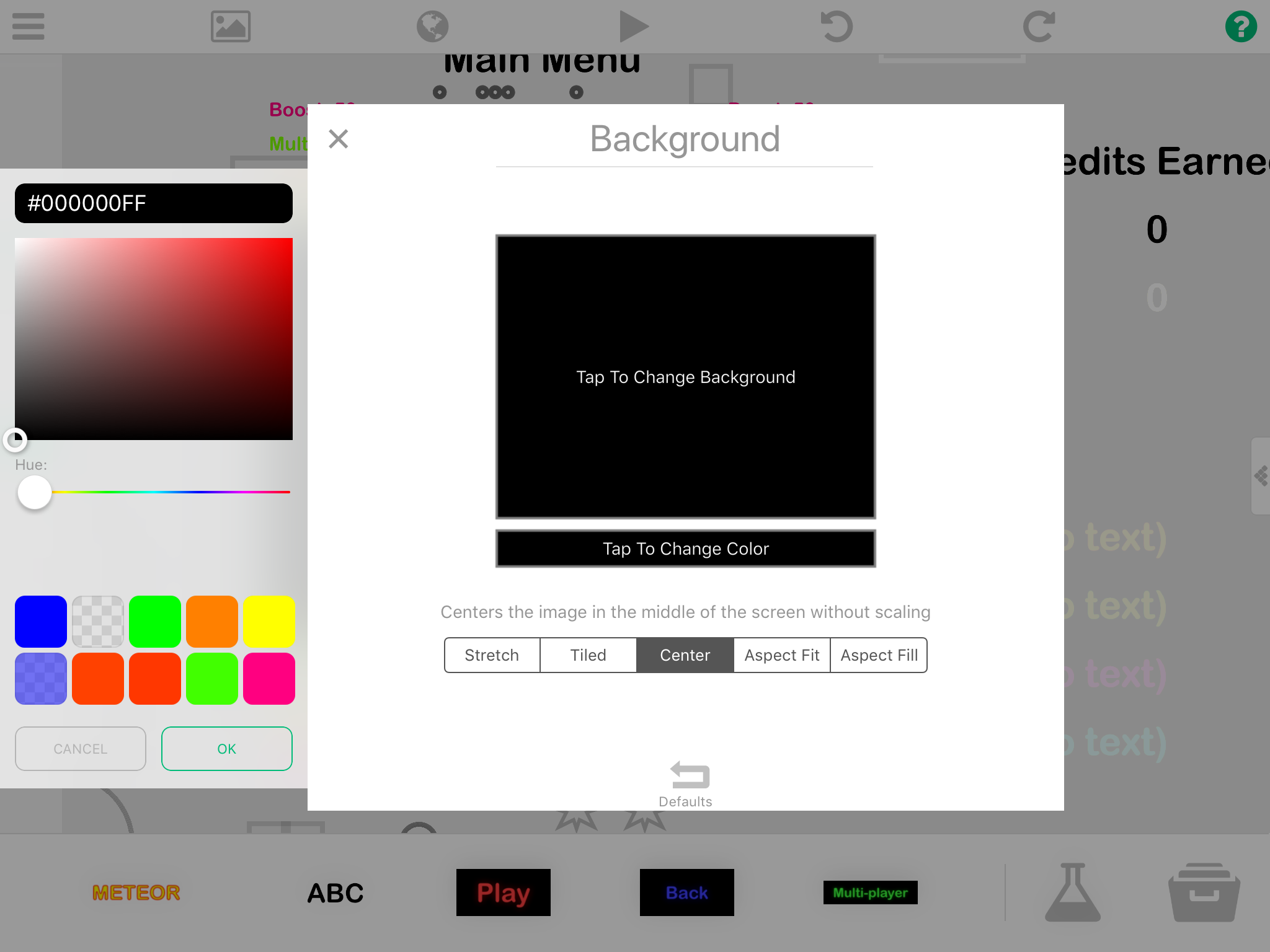
              0_1512214404053_3B9036EE-12D1-4693-8AEF-5EE0E324B0E0.png
              You can see the background colour here. Colour code to the left #000000FF

              D 1 Reply Last reply
              0
              • Aidan_FireA Aidan_Fire

                0_1512214404053_3B9036EE-12D1-4693-8AEF-5EE0E324B0E0.png
                You can see the background colour here. Colour code to the left #000000FF

                D Offline
                D Offline
                Deeeds
                wrote on last edited by
                #7

                @Aidan-Oxley Yes, I'm well aware of this, this is where I'm setting different colours for different scenes. However... I'd like certain objects to become aware of this colour, and then change themselves to this colour so they can "burn" into the background, and then act as "masks" for parts of other things.

                Hence the very specific nature of the question... how do I get this colour?

                Since it's not possible, let's hope this also comes with a "set" feature, in next week's update.

                Aidan_FireA 1 Reply Last reply
                0
                • D Deeeds

                  @Aidan-Oxley Yes, I'm well aware of this, this is where I'm setting different colours for different scenes. However... I'd like certain objects to become aware of this colour, and then change themselves to this colour so they can "burn" into the background, and then act as "masks" for parts of other things.

                  Hence the very specific nature of the question... how do I get this colour?

                  Since it's not possible, let's hope this also comes with a "set" feature, in next week's update.

                  Aidan_FireA Offline
                  Aidan_FireA Offline
                  Aidan_Fire
                  wrote on last edited by
                  #8

                  @Deeeds Waiting for new features isn’t the only way to do what you’re trying to do. You could store the colour code of the scene background somewhere, and have your object aware of what scene it is in. But if the object isn’t mirrored across scenes, then the object doesn’t have to look for or get anything, it can just set colour to what your background is.

                  1 Reply Last reply
                  0
                  • Aidan_FireA Offline
                    Aidan_FireA Offline
                    Aidan_Fire
                    wrote on last edited by
                    #9

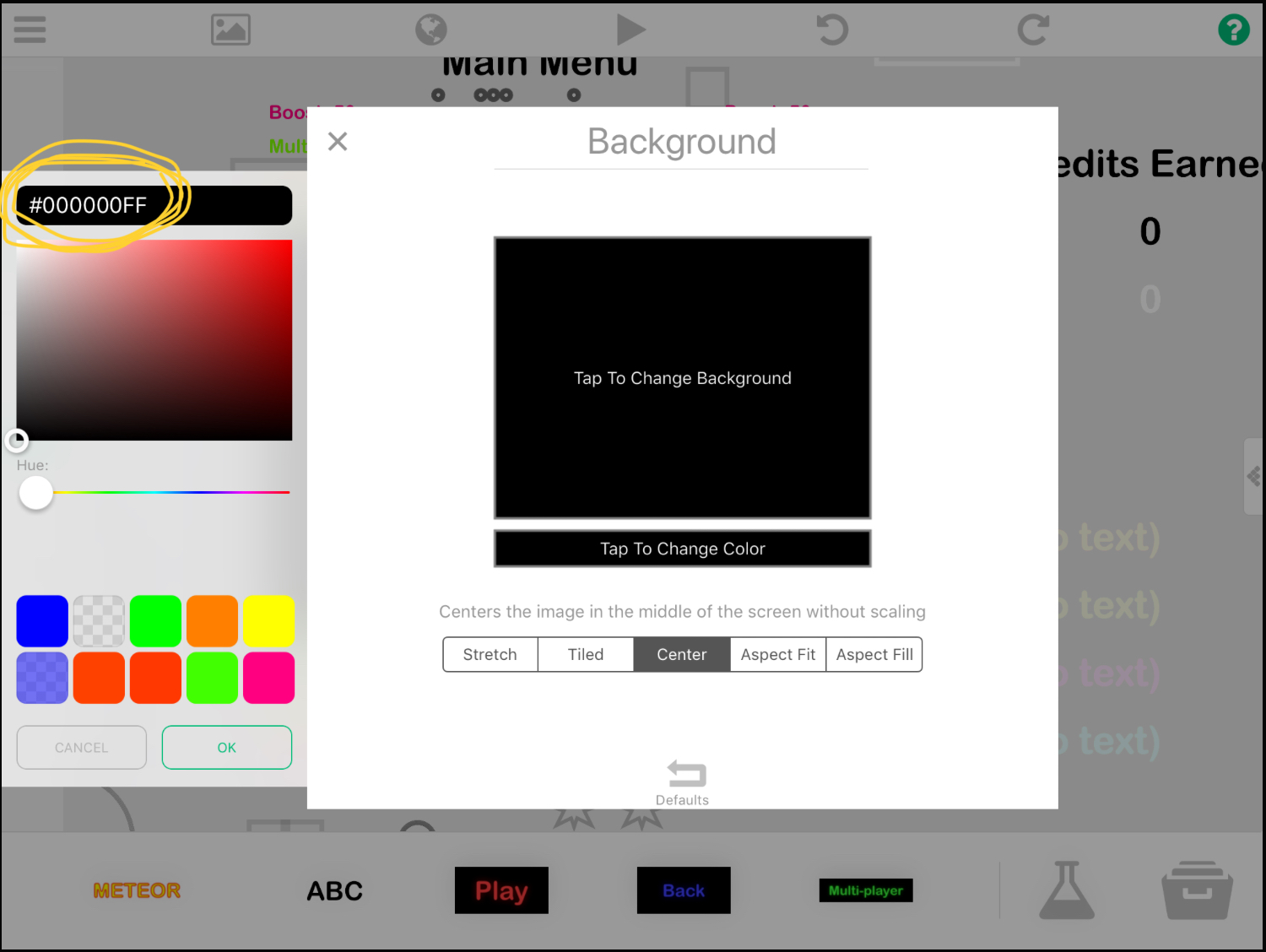
                    0_1512249255494_3FFEDAE9-D1E7-4F3C-B0C8-D6FB189DB914.jpeg
                    Copy what’s circled in yellow, then you can just paste it into the Set Colour where you want it to be same as background colour.

                    D 1 Reply Last reply
                    0
                    • Aidan_FireA Aidan_Fire

                      0_1512249255494_3FFEDAE9-D1E7-4F3C-B0C8-D6FB189DB914.jpeg
                      Copy what’s circled in yellow, then you can just paste it into the Set Colour where you want it to be same as background colour.

                      D Offline
                      D Offline
                      Deeeds
                      wrote on last edited by
                      #10

                      @Aidan-Oxley Again, you're not hearing me.

                      I know about this approach, already. But it limits me to having to do this, for every single scene, for every single object that's doing "masking".

                      I want to be able to get that colour, regardless of how many times I change it, and how different it is in each scene. I'm reasonably sure you know this but are simply jumping to your reflexive defence of hyperPad, again.

                      Aidan_FireA 1 Reply Last reply
                      0
                      • D Deeeds

                        @Aidan-Oxley Again, you're not hearing me.

                        I know about this approach, already. But it limits me to having to do this, for every single scene, for every single object that's doing "masking".

                        I want to be able to get that colour, regardless of how many times I change it, and how different it is in each scene. I'm reasonably sure you know this but are simply jumping to your reflexive defence of hyperPad, again.

                        Aidan_FireA Offline
                        Aidan_FireA Offline
                        Aidan_Fire
                        wrote on last edited by
                        #11

                        @Deeeds I guess since you keep changing it through the editor, it could make it a bit easier for you. But if there were no way to change the background through behaviours, it would make little sense to be able to get the background colour through behaviours.


                        1 Reply Last reply
                        0

                        Hello! It looks like you're interested in this conversation, but you don't have an account yet.

                        Getting fed up of having to scroll through the same posts each visit? When you register for an account, you'll always come back to exactly where you were before, and choose to be notified of new replies (either via email, or push notification). You'll also be able to save bookmarks and upvote posts to show your appreciation to other community members.

                        With your input, this post could be even better 💗

                        Register Login
                        Reply
                        • Reply as topic
                        Log in to reply
                        • Oldest to Newest
                        • Newest to Oldest
                        • Most Votes


                        • Login

                        • Login or register to search.
                        • First post
                          Last post
                        0
                        • Categories
                        • Recent
                        • Tags
                        • Popular
                        • Users
                        • Search