Skip to content
  • Categories
  • Recent
  • Tags
  • Popular
  • Users
  • Search
Skins
  • Light
  • Brite
  • Cerulean
  • Cosmo
  • Flatly
  • Journal
  • Litera
  • Lumen
  • Lux
  • Materia
  • Minty
  • Morph
  • Pulse
  • Sandstone
  • Simplex
  • Sketchy
  • Spacelab
  • United
  • Yeti
  • Zephyr
  • Dark
  • Cyborg
  • Darkly
  • Quartz
  • Slate
  • Solar
  • Superhero
  • Vapor

  • Default (No Skin)
  • No Skin
Collapse
hyperPad

hyperPad Forum

  1. Home
  2. Help and Support
  3. How to move Anchor Point with code?

How to move Anchor Point with code?

Scheduled Pinned Locked Moved Help and Support
20 Posts 4 Posters 1.4k Views 2 Watching
  • Oldest to Newest
  • Newest to Oldest
  • Most Votes
Reply
  • Reply as topic
Log in to reply
This topic has been deleted. Only users with topic management privileges can see it.
  • D Deeeds

    Is it possible to move the anchor point with code?

    Aidan_FireA Offline
    Aidan_FireA Offline
    Aidan_Fire
    wrote on last edited by
    #3

    @Deeeds Move the anchor point of what? Just move the object’s anchor point, or move the anchor point of an object in a behaviour (like Move to Object etc)?

    You can’t just move an object’s anchor point, but you can change the anchor point that behaviours select the object with.

    iTap DevelopmentI 1 Reply Last reply
    0
    • Aidan_FireA Aidan_Fire

      @Deeeds Move the anchor point of what? Just move the object’s anchor point, or move the anchor point of an object in a behaviour (like Move to Object etc)?

      You can’t just move an object’s anchor point, but you can change the anchor point that behaviours select the object with.

      iTap DevelopmentI Offline
      iTap DevelopmentI Offline
      iTap Development
      wrote on last edited by
      #4

      @Aidan-Oxley I think @Deeeds means being able to set the anchor point while the game is running.

      Aidan_FireA 1 Reply Last reply
      1
      • iTap DevelopmentI iTap Development

        @Aidan-Oxley I think @Deeeds means being able to set the anchor point while the game is running.

        Aidan_FireA Offline
        Aidan_FireA Offline
        Aidan_Fire
        wrote on last edited by
        #5

        @iTap-Development In behaviours, you can. Use set input field or something, but it had to be a behaviour like Move to Object etc.

        D iTap DevelopmentI 2 Replies Last reply
        0
        • Aidan_FireA Aidan_Fire

          @iTap-Development In behaviours, you can. Use set input field or something, but it had to be a behaviour like Move to Object etc.

          D Offline
          D Offline
          Deeeds
          wrote on last edited by
          #6

          @Aidan-Oxley I'm not understand what you're saying. Sorry. How do you mean, and what happens?

          1 Reply Last reply
          0
          • RobinsonXR Offline
            RobinsonXR Offline
            RobinsonX
            wrote on last edited by
            #7

            HyperPad doesn't have the dynamic changing for anchor points, (Yet?) But you could move the anchor point in the object while selecting it inside a behavior.

            D 1 Reply Last reply
            0
            • RobinsonXR RobinsonX

              HyperPad doesn't have the dynamic changing for anchor points, (Yet?) But you could move the anchor point in the object while selecting it inside a behavior.

              D Offline
              D Offline
              Deeeds
              wrote on last edited by
              #8

              @RobinsonX ?

              sorry, dont understand.

              1 Reply Last reply
              0
              • Aidan_FireA Aidan_Fire

                @iTap-Development In behaviours, you can. Use set input field or something, but it had to be a behaviour like Move to Object etc.

                iTap DevelopmentI Offline
                iTap DevelopmentI Offline
                iTap Development
                wrote on last edited by iTap Development
                #9

                @Deeeds what they are saying is move type behaviors have anchors you can move when you select the object for the behavior.... however those “anchors” aren’t for making an actual anchor point. Instead they are, for example, used in the ‘move to point’ behavior to select the position to move to. Also, that “anchor” has no effect on rotate behaviors.

                D 1 Reply Last reply
                0
                • iTap DevelopmentI iTap Development

                  @Deeeds what they are saying is move type behaviors have anchors you can move when you select the object for the behavior.... however those “anchors” aren’t for making an actual anchor point. Instead they are, for example, used in the ‘move to point’ behavior to select the position to move to. Also, that “anchor” has no effect on rotate behaviors.

                  D Offline
                  D Offline
                  Deeeds
                  wrote on last edited by
                  #10

                  @iTap-Development Ok, so they're answering a question that's not this question?

                  iTap DevelopmentI 1 Reply Last reply
                  0
                  • D Deeeds

                    @iTap-Development Ok, so they're answering a question that's not this question?

                    iTap DevelopmentI Offline
                    iTap DevelopmentI Offline
                    iTap Development
                    wrote on last edited by
                    #11

                    @Deeeds I think they maybe thought that the “anchor” did what you needed. Which, as far as I can tell, it doesn’t.

                    D 1 Reply Last reply
                    0
                    • iTap DevelopmentI iTap Development

                      @Deeeds I think they maybe thought that the “anchor” did what you needed. Which, as far as I can tell, it doesn’t.

                      D Offline
                      D Offline
                      Deeeds
                      wrote on last edited by
                      #12

                      @iTap-Development I still have no idea what they're talking about. The anchor is a specific feature of any object in a 2D or 3D space. They don't seem to be talking about the anchor.

                      And yes, you've guessed right, rotation is the issue, around a point that's arbitrary, and dynamic. And gets around the snapping problem of anchor points in the editor.

                      iTap DevelopmentI 1 Reply Last reply
                      0
                      • D Deeeds

                        @iTap-Development I still have no idea what they're talking about. The anchor is a specific feature of any object in a 2D or 3D space. They don't seem to be talking about the anchor.

                        And yes, you've guessed right, rotation is the issue, around a point that's arbitrary, and dynamic. And gets around the snapping problem of anchor points in the editor.

                        iTap DevelopmentI Offline
                        iTap DevelopmentI Offline
                        iTap Development
                        wrote on last edited by
                        #13

                        @Deeeds they are talking about the “anchor” that you can drag when selecting an object for a behavior. I think they thought that that anchor could be used to set the anchor for the object, but it is actually used for selecting positions for certain behaviors(and in many behaviors, It does nothing).

                        I don’t know if you saw my post, but the anchor point seems to be snapping to its own grid relative to the object. So if you rotate the object, the grid gets rotated. I can see that could be useful for some things, and for others not so much. Maybe a toggle is needed?

                        You could search for, or find in my posts, a thread related to making your own anchor point. It’s kinda a lot of work, but if you need an anchor bad it might help.

                        1 Reply Last reply
                        0
                        • Aidan_FireA Offline
                          Aidan_FireA Offline
                          Aidan_Fire
                          wrote on last edited by Aidan_Fire
                          #14

                          If you can understand what’s happening in this screenshot, it shows you the only possible ways to ever change an anchor while the project is running, in a behaviour, not the anchor of the object itself.
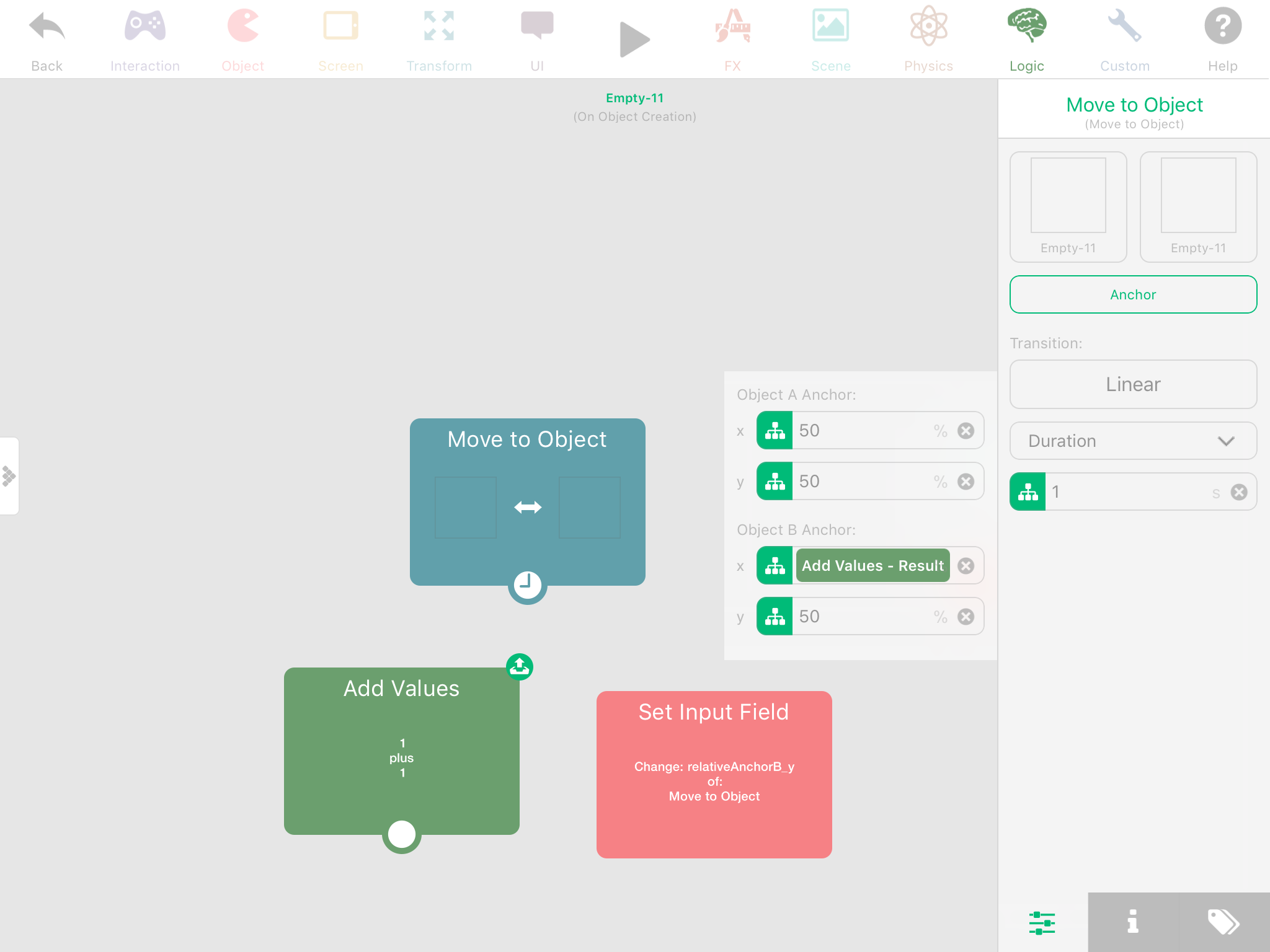
                          0_1514504323498_BE3B2FEE-103D-4350-BE63-70F97DCBB6C2.png

                          iTap DevelopmentI 1 Reply Last reply
                          0
                          • Aidan_FireA Aidan_Fire

                            If you can understand what’s happening in this screenshot, it shows you the only possible ways to ever change an anchor while the project is running, in a behaviour, not the anchor of the object itself.
                            0_1514504323498_BE3B2FEE-103D-4350-BE63-70F97DCBB6C2.png

                            iTap DevelopmentI Offline
                            iTap DevelopmentI Offline
                            iTap Development
                            wrote on last edited by
                            #15

                            @Aidan-Oxley oh I see what you mean. That anchor is pretty much an offset of the objects real anchor. That won’t help with rotation though.

                            Aidan_FireA 1 Reply Last reply
                            0
                            • iTap DevelopmentI iTap Development

                              @Aidan-Oxley oh I see what you mean. That anchor is pretty much an offset of the objects real anchor. That won’t help with rotation though.

                              Aidan_FireA Offline
                              Aidan_FireA Offline
                              Aidan_Fire
                              wrote on last edited by
                              #16

                              @iTap-Development If you have a Rotate By or a behaviour similar to that, and you set the anchor to something other than 50 50, it will rotate about the anchor you put in.

                              D 1 Reply Last reply
                              0
                              • Aidan_FireA Aidan_Fire

                                @iTap-Development If you have a Rotate By or a behaviour similar to that, and you set the anchor to something other than 50 50, it will rotate about the anchor you put in.

                                D Offline
                                D Offline
                                Deeeds
                                wrote on last edited by
                                #17

                                @Aidan-Oxley But you can't set this anchor point, for rotation, with code... right?

                                Aidan_FireA 1 Reply Last reply
                                0
                                • D Deeeds

                                  @Aidan-Oxley But you can't set this anchor point, for rotation, with code... right?

                                  Aidan_FireA Offline
                                  Aidan_FireA Offline
                                  Aidan_Fire
                                  wrote on last edited by
                                  #18

                                  @Deeeds Yes, using Set Input Field. You know how that works right?
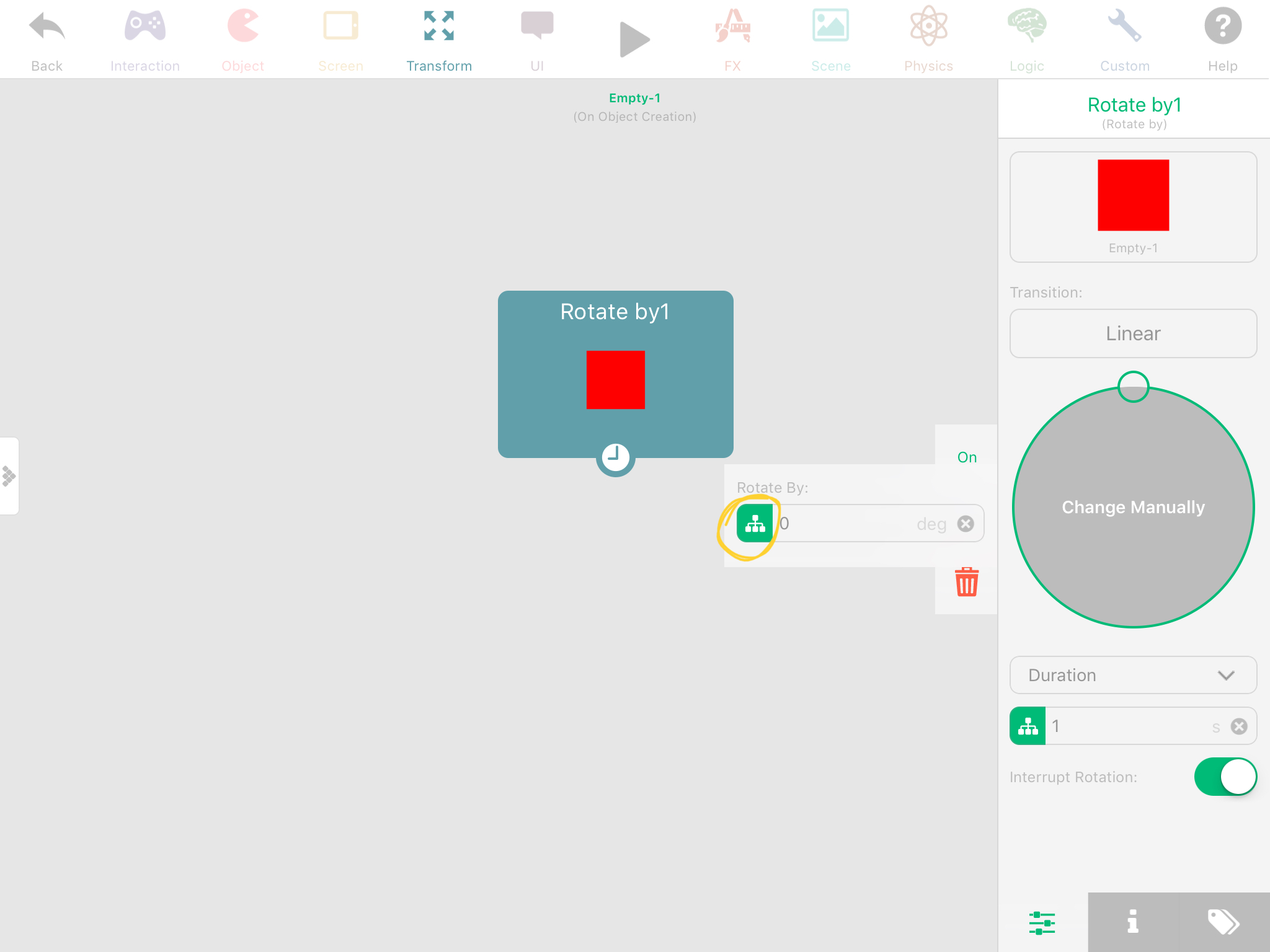
                                  0_1514527083425_E4F9BDDD-56B8-4EB4-BE0D-D1CB26C30963.jpeg

                                  D 1 Reply Last reply
                                  0
                                  • Aidan_FireA Aidan_Fire

                                    @Deeeds Yes, using Set Input Field. You know how that works right?
                                    0_1514527083425_E4F9BDDD-56B8-4EB4-BE0D-D1CB26C30963.jpeg

                                    D Offline
                                    D Offline
                                    Deeeds
                                    wrote on last edited by
                                    #19

                                    @Aidan-Oxley That's not moving the anchor point, that's changing the rotation.

                                    I'm asking if it's possible to move the anchor point with code.

                                    Not a virtual anchor point.

                                    The anchor point.

                                    Aidan_FireA 1 Reply Last reply
                                    0
                                    • D Deeeds

                                      @Aidan-Oxley That's not moving the anchor point, that's changing the rotation.

                                      I'm asking if it's possible to move the anchor point with code.

                                      Not a virtual anchor point.

                                      The anchor point.

                                      Aidan_FireA Offline
                                      Aidan_FireA Offline
                                      Aidan_Fire
                                      wrote on last edited by Aidan_Fire
                                      #20

                                      @Deeeds Yes, I’m stupid. Didn’t look at what I was doing. Erm, maybe this doesn’t work for rotations, but it does for Move to Object, or Rotate to Object.


                                      1 Reply Last reply
                                      0

                                      Hello! It looks like you're interested in this conversation, but you don't have an account yet.

                                      Getting fed up of having to scroll through the same posts each visit? When you register for an account, you'll always come back to exactly where you were before, and choose to be notified of new replies (either via email, or push notification). You'll also be able to save bookmarks and upvote posts to show your appreciation to other community members.

                                      With your input, this post could be even better 💗

                                      Register Login
                                      Reply
                                      • Reply as topic
                                      Log in to reply
                                      • Oldest to Newest
                                      • Newest to Oldest
                                      • Most Votes


                                      • Login

                                      • Login or register to search.
                                      • First post
                                        Last post
                                      0
                                      • Categories
                                      • Recent
                                      • Tags
                                      • Popular
                                      • Users
                                      • Search