
This would help out alot.
-
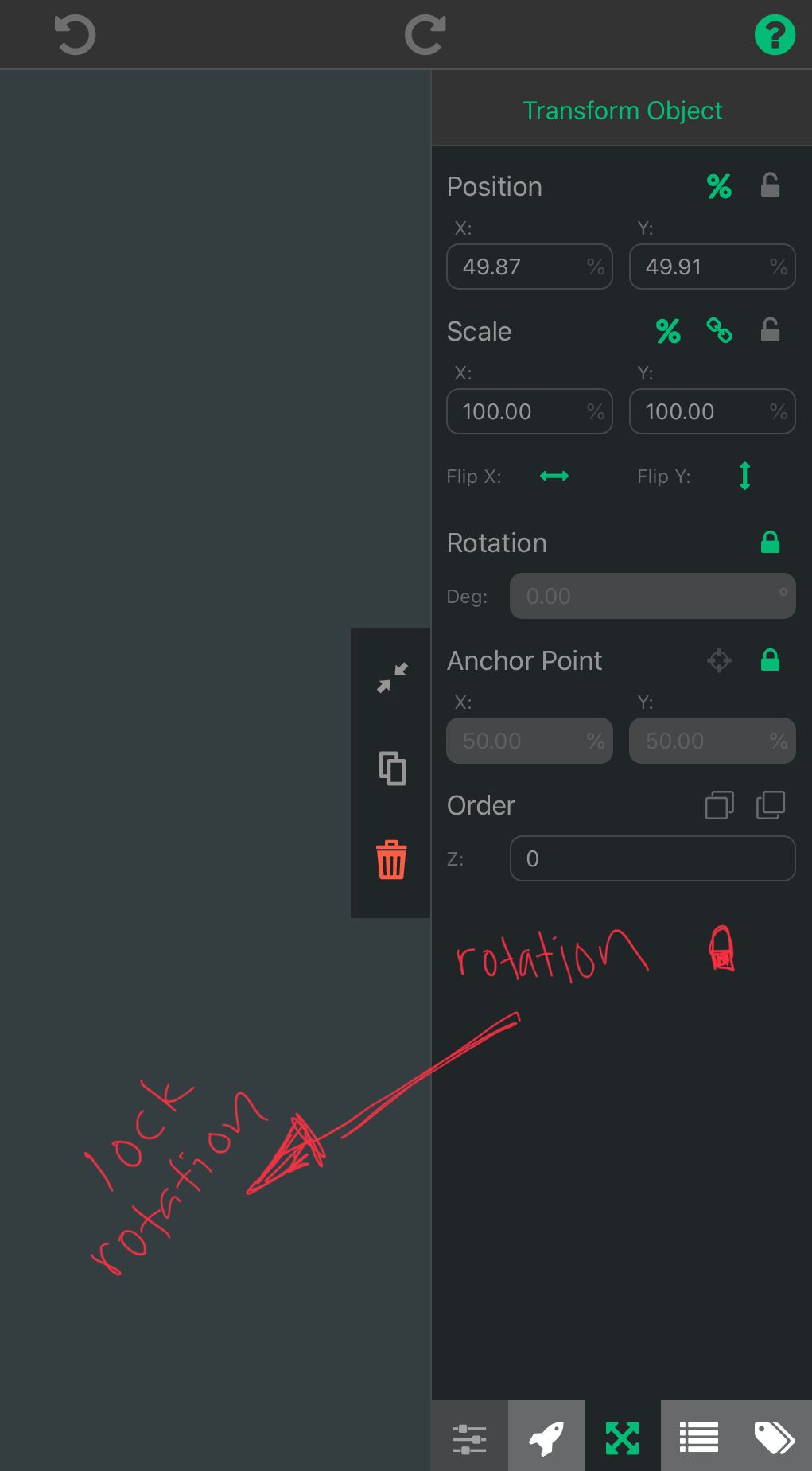
As im importing countless new objects to my scene. I believe the lock rotation option should be within the object properties. Its kind of time consuming to keep adding a lock rotation code to each object. I know i can give it a tag and do it all that way but a simple tick of a button seems more efficient. Murtaza also mentioned that objects will have a toggle to hide so that when the project starts it doesnt show the objects first hand. This feature i beleive should be at this location as well. I included a screenshot of what im talking about where the lock rotation should be and the upcoming hide/show togggle.
-
I disagree with this because if this became a thing then wouldn't you start to want even more options for object behaviours in the properties? Which would start to clutter the UI. It would be weird to have the lock rotation option that already exists plus another lock rotation option that literally just adds a behaviour into the object.
-
As im importing countless new objects to my scene. I believe the lock rotation option should be within the object properties. Its kind of time consuming to keep adding a lock rotation code to each object. I know i can give it a tag and do it all that way but a simple tick of a button seems more efficient. Murtaza also mentioned that objects will have a toggle to hide so that when the project starts it doesnt show the objects first hand. This feature i beleive should be at this location as well. I included a screenshot of what im talking about where the lock rotation should be and the upcoming hide/show togggle.
@SplitMindGaming Do your objects not have any behaviours in them? Also, just saying, it takes the same amount of presses on your screen to add an object to a tag as ticking an object property.
-
@SplitMindGaming Do your objects not have any behaviours in them? Also, just saying, it takes the same amount of presses on your screen to add an object to a tag as ticking an object property.
@Aidan-Oxley yeah i requested this because im literally going to have hundreds of little objects in my game with nothing but physics to them. I also like to keep my tags section clean. This is just from my experience. I use this program religiously about 8-10 hours a day. This is something i didnt just think from the top of my head and more of an annoyance i find myself doing constantly when adding new physic objects. Because alot of the time im switching out these objects as i am indecisive with design choices and experimenting with different animations so a simple graphic swap is a little more tedius and much easier to drag a brand new object with animation already attached to it. A toggle to control an objects locked rotation sounds more in the lines of a property then a behavior dont you agree? because locked rotation seems more of a set and forget type of thing. I cant imagine a behavior calling a locked rotation behavior.
-
@Aidan-Oxley yeah i requested this because im literally going to have hundreds of little objects in my game with nothing but physics to them. I also like to keep my tags section clean. This is just from my experience. I use this program religiously about 8-10 hours a day. This is something i didnt just think from the top of my head and more of an annoyance i find myself doing constantly when adding new physic objects. Because alot of the time im switching out these objects as i am indecisive with design choices and experimenting with different animations so a simple graphic swap is a little more tedius and much easier to drag a brand new object with animation already attached to it. A toggle to control an objects locked rotation sounds more in the lines of a property then a behavior dont you agree? because locked rotation seems more of a set and forget type of thing. I cant imagine a behavior calling a locked rotation behavior.
@SplitMindGaming I don't really. It changes the way it behaves while the game is running, and you might want to be able to turn it on and off while the game is running. If you don't want them to be in a tag, can you not just make one with the behaviour in it, then copy paste it or duplicate it everywhere? I guess it depends on what exactly you're trying to make and how many tags you already have. Of course I like to keep tags clean as well, but I still think I would add these objects to a tag for the lock rotation.
-
@SplitMindGaming I don't really. It changes the way it behaves while the game is running, and you might want to be able to turn it on and off while the game is running. If you don't want them to be in a tag, can you not just make one with the behaviour in it, then copy paste it or duplicate it everywhere? I guess it depends on what exactly you're trying to make and how many tags you already have. Of course I like to keep tags clean as well, but I still think I would add these objects to a tag for the lock rotation.
@Aidan-Oxley yeah but i think it can have both. Have an option to lock rotation from the properties menu and a behavior as well. The same how theres a behavior and property for set color, resize, rotate, z order etc.
-
There could be a toggle for "advanced" or "more" properties like how we had it back in the day when behaviors were grouped into advanced and basic groups.
We could have more properties, yet keep a clutter-free UI. Almost everything in hyperPad are seperated by groups, and it wouldn't hurt to just add another section dedicated to object properties. Right?


Hello! It looks like you're interested in this conversation, but you don't have an account yet.
Getting fed up of having to scroll through the same posts each visit? When you register for an account, you'll always come back to exactly where you were before, and choose to be notified of new replies (either via email, or push notification). You'll also be able to save bookmarks and upvote posts to show your appreciation to other community members.
With your input, this post could be even better 💗
Register Login