Skip to content
  • Categories
  • Recent
  • Tags
  • Popular
  • Users
  • Search
Skins
  • Light
  • Brite
  • Cerulean
  • Cosmo
  • Flatly
  • Journal
  • Litera
  • Lumen
  • Lux
  • Materia
  • Minty
  • Morph
  • Pulse
  • Sandstone
  • Simplex
  • Sketchy
  • Spacelab
  • United
  • Yeti
  • Zephyr
  • Dark
  • Cyborg
  • Darkly
  • Quartz
  • Slate
  • Solar
  • Superhero
  • Vapor

  • Default (No Skin)
  • No Skin
Collapse
hyperPad

hyperPad Forum

  1. Home
  2. Help and Support
  3. Creating a 3D game, need some assistance

Creating a 3D game, need some assistance

Scheduled Pinned Locked Moved Help and Support
11 Posts 2 Posters 1.6k Views 1 Watching
  • Oldest to Newest
  • Newest to Oldest
  • Most Votes
Reply
  • Reply as topic
Log in to reply
This topic has been deleted. Only users with topic management privileges can see it.
  • RobinsonXR Offline
    RobinsonXR Offline
    RobinsonX
    wrote on last edited by
    #1

    EC9CE945-88B4-48D6-9989-A5892ECD707B.jpeg
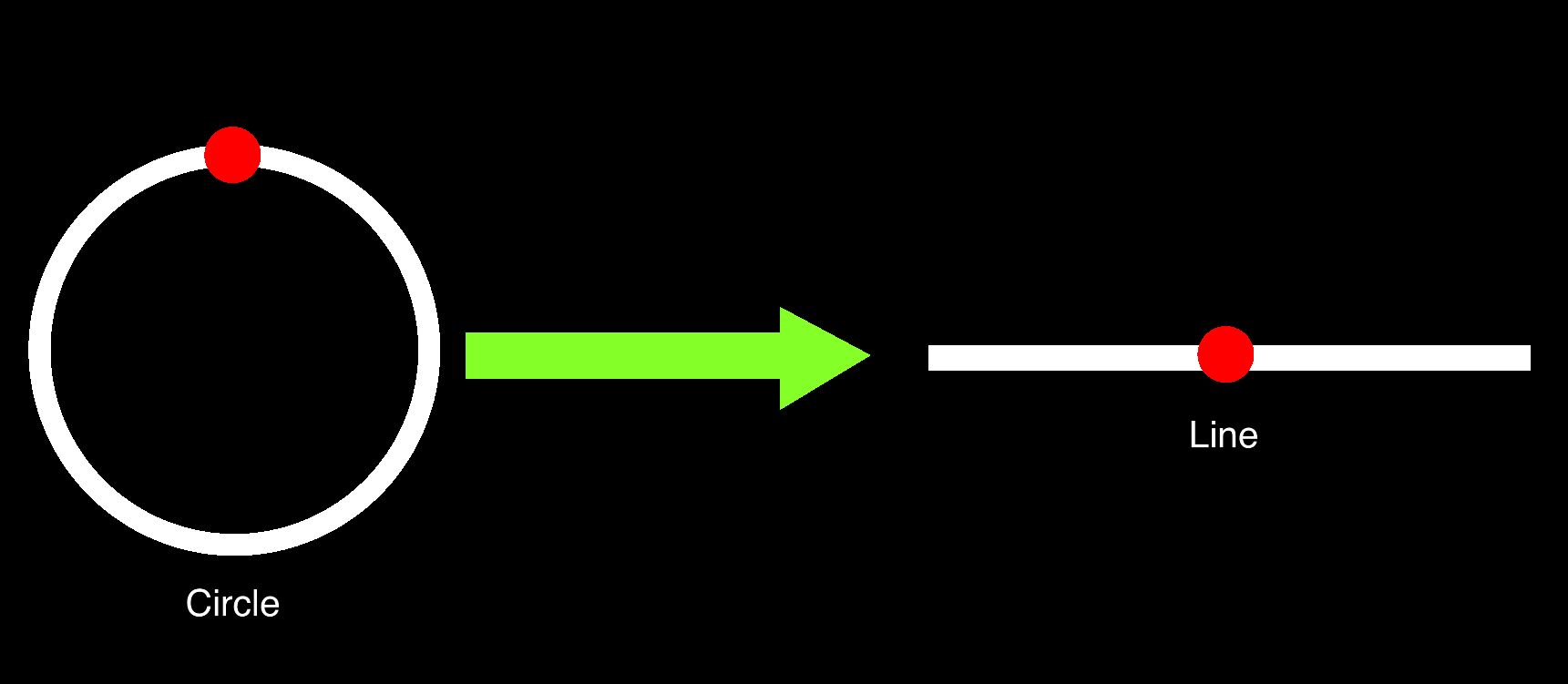
    How would I convert a point on a circle to a point on a line? 🤔 This is for my 3D project that I am making. Things that are behind the player still render on the screen, which is a problem.
    (I'll probably find a way, just asking in case anyone knows right now.)

    Aidan_FireA 1 Reply Last reply
    0
    • RobinsonXR RobinsonX

      EC9CE945-88B4-48D6-9989-A5892ECD707B.jpeg
      How would I convert a point on a circle to a point on a line? 🤔 This is for my 3D project that I am making. Things that are behind the player still render on the screen, which is a problem.
      (I'll probably find a way, just asking in case anyone knows right now.)

      Aidan_FireA Offline
      Aidan_FireA Offline
      Aidan_Fire
      wrote on last edited by
      #2

      @RobinsonX What are we given? Like do you know the coordinates of the point on the circle, or just the radius of the circle and the angle the point is at?

      1 Reply Last reply
      0
      • Aidan_FireA Offline
        Aidan_FireA Offline
        Aidan_Fire
        wrote on last edited by Aidan_Fire
        #3

        If you know the angle from the centre of the circle to the point for some reason, then:

        position along the line = radius of circle × cos(the angle)

        You may want to experiment with the angle, adding maybe +90 or -90 or something to "the angle" because hyperpad's angle system always messes me up and I'm not sure exactly what you might need to add.

        1 Reply Last reply
        0
        • Aidan_FireA Offline
          Aidan_FireA Offline
          Aidan_Fire
          wrote on last edited by
          #4

          I'm not sure how your 3D works, but do you produce x y and z coordinates? The way mine works is you are rotating the actual object which changes each point's (or face's) coordinates. If I ever get perspective etc working, objects that are behind the screen SHOULD end up having a negative z value meaning I can just do logic "if z < 0 then don't render".

          1 Reply Last reply
          0
          • RobinsonXR Offline
            RobinsonXR Offline
            RobinsonX
            wrote on last edited by
            #5

            @Aidan-Oxley For each point, there are x, y and z coordinates. The player can draw an imaginary line from itself to all the points, the angle of the lines (x and y vectors) would output positions of dots on the screen. So if you are looking directly at a point, it should be it the center of the screen because x_vector and y_vector is 0, so there is no offset.

            The player can rotate it's head, which offsets the angles. Currently, I'm using a circle which is surrounding the player. Notice that the circle goes 360°, all around the player. If a point is behind the player, it will still render. An 180° angle from the point to the player will still render the same as a 0° angle towards the player.

            Yes, I tried making it disappear when it was behind the player. Though, the lines that it makes still renders because of the other points that aren't behind the player. 😬

            1 Reply Last reply
            0
            • RobinsonXR Offline
              RobinsonXR Offline
              RobinsonX
              wrote on last edited by
              #6

              F5E7F192-57FC-4478-89F2-135B191C4CAA.png
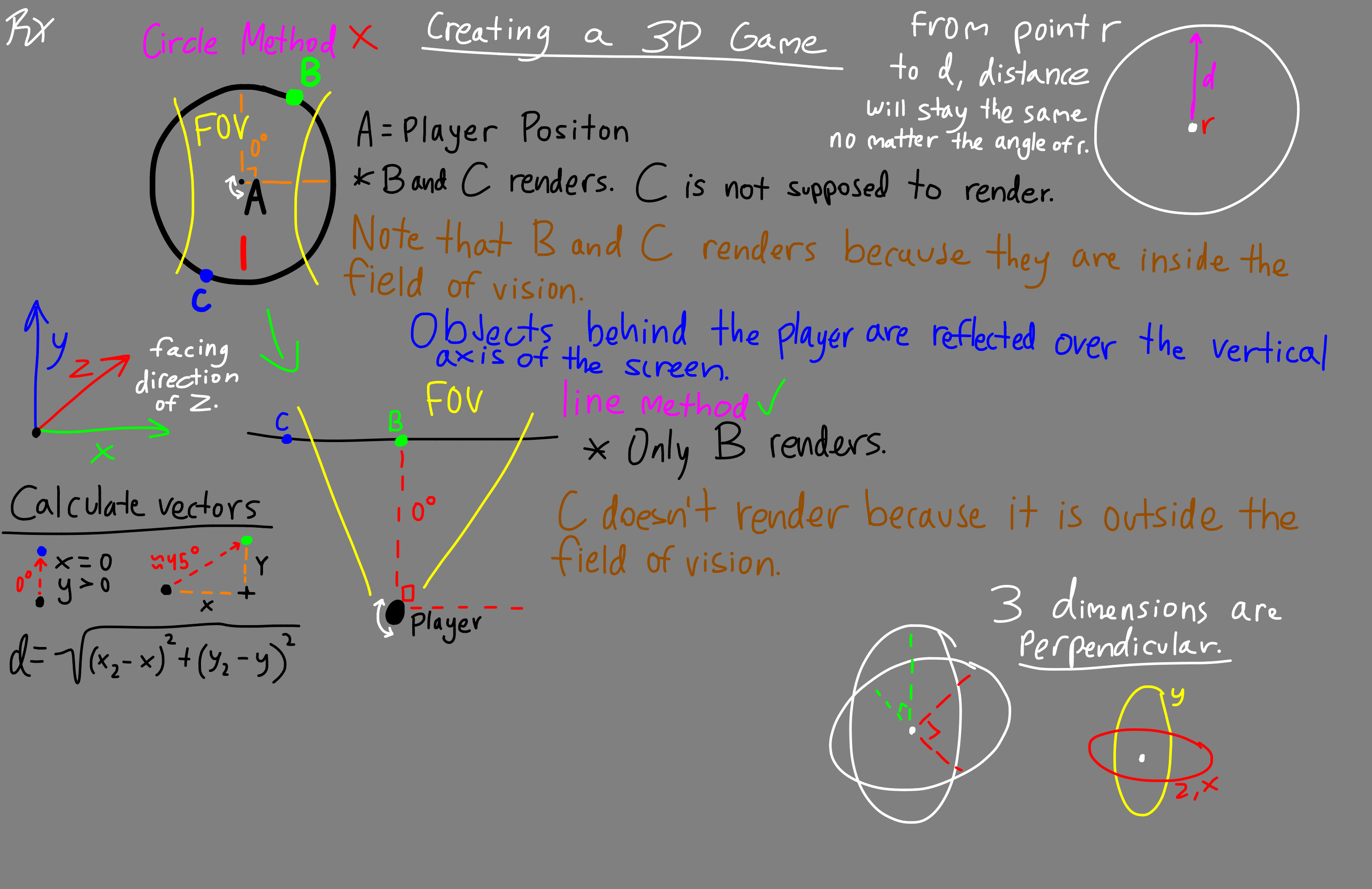
              I've took notes and did some illustrations. This may be too much to take at once, I apologize for that. 😬

              Aidan_FireA 1 Reply Last reply
              0
              • RobinsonXR RobinsonX

                F5E7F192-57FC-4478-89F2-135B191C4CAA.png
                I've took notes and did some illustrations. This may be too much to take at once, I apologize for that. 😬

                Aidan_FireA Offline
                Aidan_FireA Offline
                Aidan_Fire
                wrote on last edited by
                #7

                @RobinsonX Ok, I have a little idea of what you're doing. So face's are fine right? I imagine you're making them work similarly to how I am (clearly slightly different though, somehow my skewed triangles don't end up with gaps making a square surface). You have faces not rendering when behind the player, but not lines? What if you have the lines hide themselves when a face they are associated with is hidden?

                1 Reply Last reply
                0
                • Aidan_FireA Offline
                  Aidan_FireA Offline
                  Aidan_Fire
                  wrote on last edited by
                  #8

                  Also I think I can help with your original question if you give more details (unless it's already solved)

                  1 Reply Last reply
                  0
                  • RobinsonXR Offline
                    RobinsonXR Offline
                    RobinsonX
                    wrote on last edited by
                    #9

                    @Aidan-Oxley I'm waiting for the bitmap feature to come out so drawing faces won't be as much laggy. I tried doing the things you've mentioned and the results are weird, things disappear when you face slightly away from them.

                    1 Reply Last reply
                    0
                    • RobinsonXR Offline
                      RobinsonXR Offline
                      RobinsonX
                      wrote on last edited by
                      #10

                      I just realized, angles go from 0° to 360°. I can just use the angle themselves.. I can offset it by 180° and boom, there's that. 0° would be all the way left and 360° would be all the way right. And since it follows a path of a line, I don't have to worry about it rendering behind the player. 🤷‍♂️

                      1 Reply Last reply
                      0
                      • RobinsonXR Offline
                        RobinsonXR Offline
                        RobinsonX
                        wrote on last edited by
                        #11

                        Here's some more context:
                        IMG_1810.MP4

                        1 Reply Last reply
                        0

                        Hello! It looks like you're interested in this conversation, but you don't have an account yet.

                        Getting fed up of having to scroll through the same posts each visit? When you register for an account, you'll always come back to exactly where you were before, and choose to be notified of new replies (either via email, or push notification). You'll also be able to save bookmarks and upvote posts to show your appreciation to other community members.

                        With your input, this post could be even better 💗

                        Register Login
                        Reply
                        • Reply as topic
                        Log in to reply
                        • Oldest to Newest
                        • Newest to Oldest
                        • Most Votes


                        • Login

                        • Login or register to search.
                        • First post
                          Last post
                        0
                        • Categories
                        • Recent
                        • Tags
                        • Popular
                        • Users
                        • Search