
How to create a proper loop with a sound file
-
I wish the play sound had a loop function such as the play music. Future update? For now how can I achieve this seamlessly. Lets say you hold down your character and it plays a buzzing sound. When you let go it stops the sound. I got it to loop but its not seamless. It will sound like buzz buzz buzz buzz instead of buzzzzzzzzzzzzzz if that makes any sense :).
-
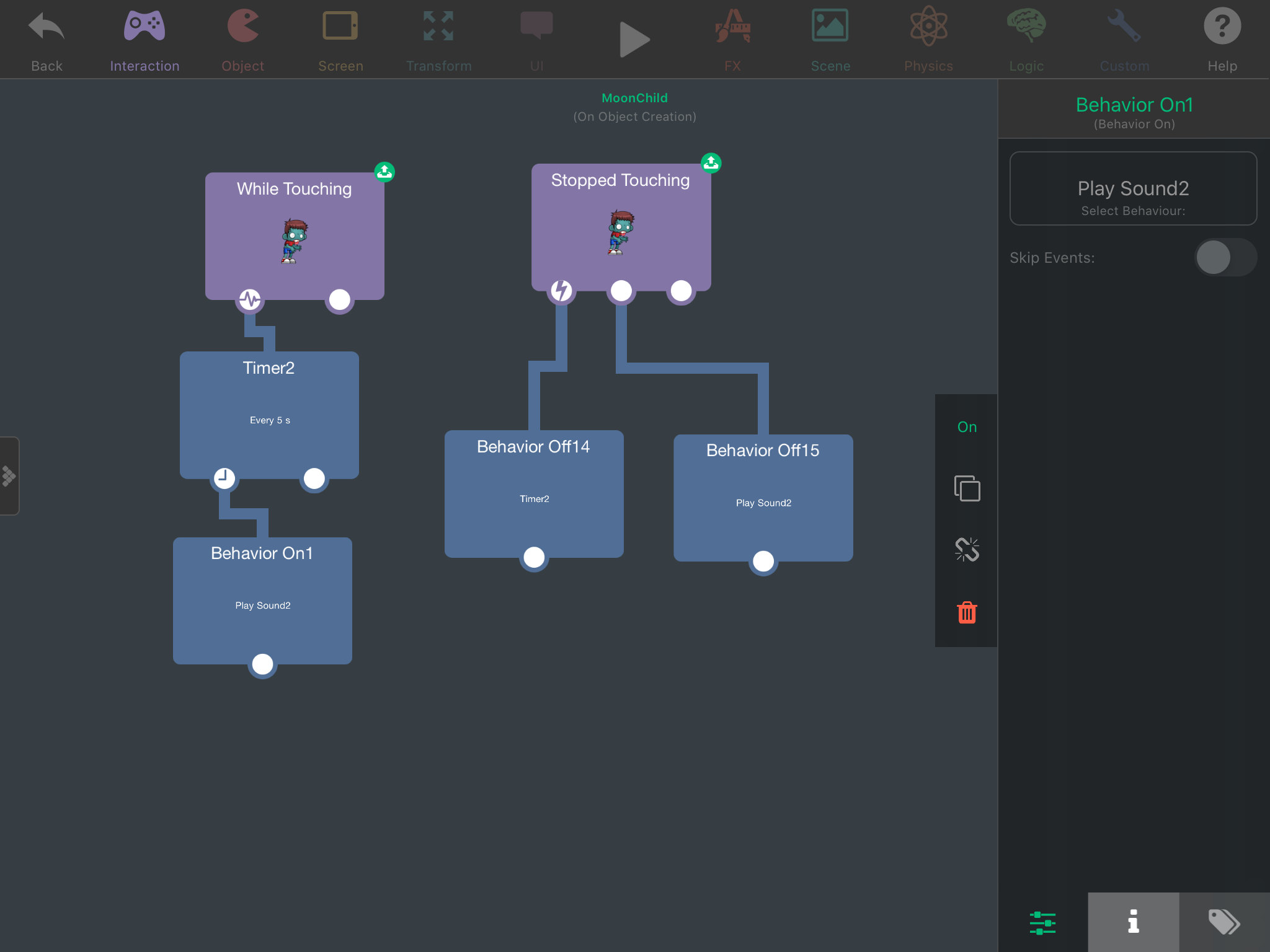
Yeah ive been at this for hours and tried everything in my power. I got it where the when not touching to turn off the sound down perfect. Its the when touching i cant get right. It loops the audio but its not looping correctly. It just sounds like your hitting the play button really really fast that it sounds distorted and not looping like how the play music loop function does. Screenshot below.
-
I tried just now only this time it doesnt loop. I would have to take my finger off the character and touch again continuously. Heres what im trying to do. I have a jetpack character that verytime you touch and hold the character he hovers. What im trying to get is to have the jet propulsion sound loop when you are touching and holding him simulating the hover. When you let go of the character the sound turns off. I dont know guys im ready to pull out my hair. Ive been at this for literally hours just trying to loop an audio which should be simple. Play a sound while your touching and holding the character. Sound turns off when you stop touching. Sounds easy but ohhhh man.
-
I tried just now only this time it doesnt loop. I would have to take my finger off the character and touch again continuously. Heres what im trying to do. I have a jetpack character that verytime you touch and hold the character he hovers. What im trying to get is to have the jet propulsion sound loop when you are touching and holding him simulating the hover. When you let go of the character the sound turns off. I dont know guys im ready to pull out my hair. Ive been at this for literally hours just trying to loop an audio which should be simple. Play a sound while your touching and holding the character. Sound turns off when you stop touching. Sounds easy but ohhhh man.
@SplitMindGaming it's easy. While touching is always activate while you're touching the object. So as long as you touching the object, the behaviors connected will activate. You don't need the Timer here, and you shouldn't put it to 5 as it will repeat each 5 seconds, so not what you wanted. Just delete the timer, and so the 'Behavior Off' that turn off the Timer, as the Timer don't exist now.
-
Yes it was the first thing I did. When you dont add a timer, while pressing it distorts the audio. It doesnt loop correctly. Imagine an audio that says “ hi my name is “ when clicked. Without the timer and setting it is when touched. It will sound like hihihihihihihihihi. It doesnt wait for the audio to finish before looping. Could be a bug but it makes more sense for a play audio to have a loop function such as play music does.
-
Yes it was the first thing I did. When you dont add a timer, while pressing it distorts the audio. It doesnt loop correctly. Imagine an audio that says “ hi my name is “ when clicked. Without the timer and setting it is when touched. It will sound like hihihihihihihihihi. It doesnt wait for the audio to finish before looping. Could be a bug but it makes more sense for a play audio to have a loop function such as play music does.
@SplitMindGaming maybe putting a 'behavior on' connected to the 'play sound' that will turn on the 'play sound' again 🤷 Or 'execute behavior's instead of the 'behavior on'. And when it stopped, it turn off the 'play sound' and 'behavior on/execute behavior' 🤷



Hello! It looks like you're interested in this conversation, but you don't have an account yet.
Getting fed up of having to scroll through the same posts each visit? When you register for an account, you'll always come back to exactly where you were before, and choose to be notified of new replies (either via email, or push notification). You'll also be able to save bookmarks and upvote posts to show your appreciation to other community members.
With your input, this post could be even better 💗
Register Login