Skip to content
  • Categories
  • Recent
  • Tags
  • Popular
  • Users
  • Search
Skins
  • Light
  • Brite
  • Cerulean
  • Cosmo
  • Flatly
  • Journal
  • Litera
  • Lumen
  • Lux
  • Materia
  • Minty
  • Morph
  • Pulse
  • Sandstone
  • Simplex
  • Sketchy
  • Spacelab
  • United
  • Yeti
  • Zephyr
  • Dark
  • Cyborg
  • Darkly
  • Quartz
  • Slate
  • Solar
  • Superhero
  • Vapor

  • Default (No Skin)
  • No Skin
Collapse
hyperPad

hyperPad Forum

  1. Home
  2. Bug Reports
  3. Sound Volume Set Input Field

Sound Volume Set Input Field

Scheduled Pinned Locked Moved Bug Reports
7 Posts 4 Posters 1.5k Views 1 Watching
  • Oldest to Newest
  • Newest to Oldest
  • Most Votes
Reply
  • Reply as topic
Log in to reply
This topic has been deleted. Only users with topic management privileges can see it.
  • TutorialDoctorT Offline
    TutorialDoctorT Offline
    TutorialDoctor
    wrote on last edited by TutorialDoctor
    #1

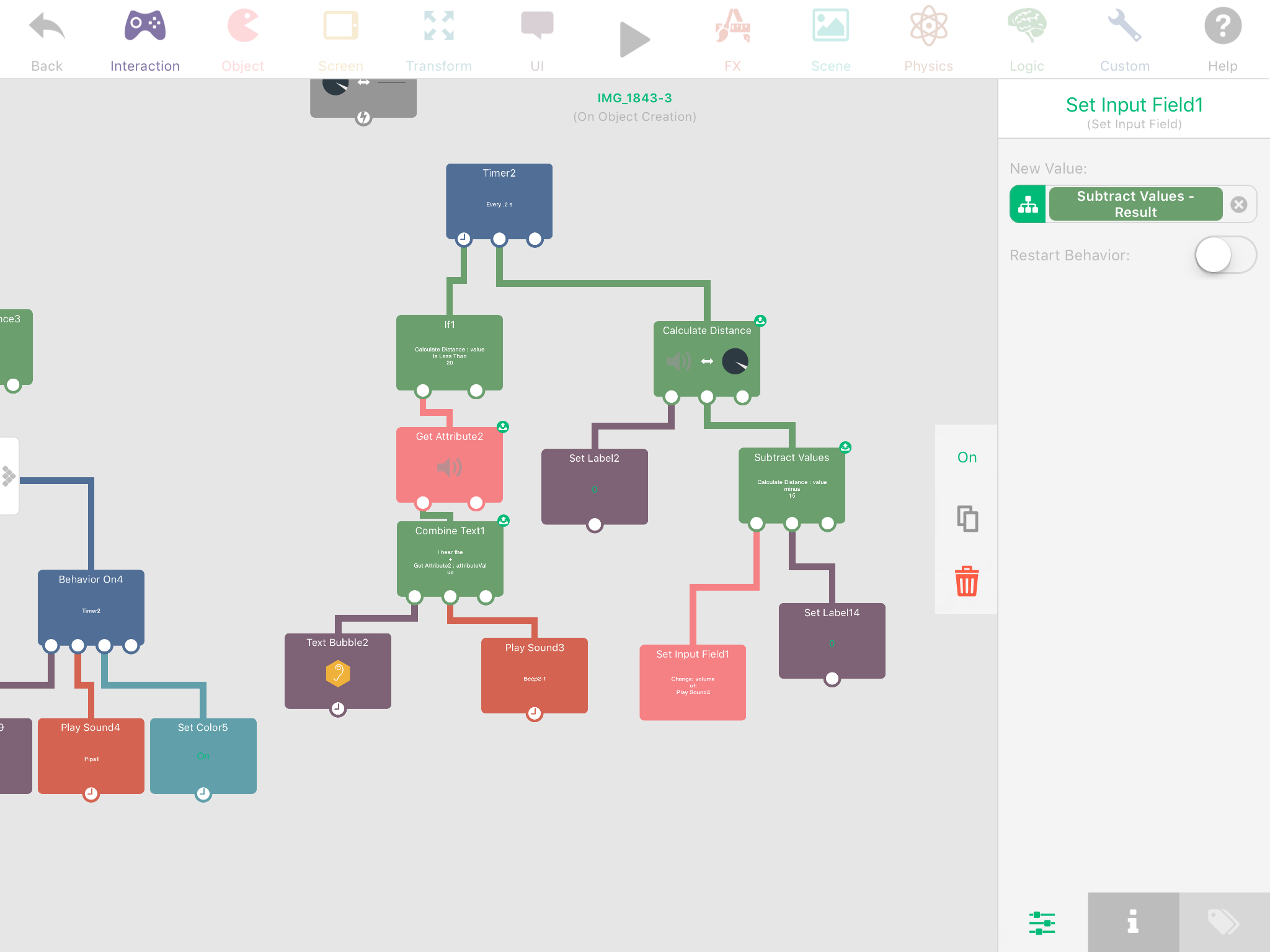
    In the screenshot below, the Set Input field of the Pipa sound is not being updated (the volume field). The sound was dragged to the scene.0_1488038596505_IMG_1892.PNG

    1 Reply Last reply
    0
    • MurtazaM Offline
      MurtazaM Offline
      Murtaza
      Admin
      wrote on last edited by
      #2

      On my phone. So I can't see the picture clearly right now.

      But you need to make sure to trigger the sound behaviour again. It's not a realtime dynamic audio control.

      TutorialDoctorT 1 Reply Last reply
      0
      • MurtazaM Murtaza

        On my phone. So I can't see the picture clearly right now.

        But you need to make sure to trigger the sound behaviour again. It's not a realtime dynamic audio control.

        TutorialDoctorT Offline
        TutorialDoctorT Offline
        TutorialDoctor
        wrote on last edited by TutorialDoctor
        #3

        @Murtaza So what does it mean in the alert where it says it allows you to change the input "on the fly?"

        How is it intended to be used?

        MurtazaM 1 Reply Last reply
        0
        • TutorialDoctorT TutorialDoctor

          @Murtaza So what does it mean in the alert where it says it allows you to change the input "on the fly?"

          How is it intended to be used?

          MurtazaM Offline
          MurtazaM Offline
          Murtaza
          Admin
          wrote on last edited by
          #4

          @TutorialDoctor in the case of audio, the volume is only affected next time it's executed.

          I believe it's a limitation of the audio engine. @hamed would know more though.

          ThisT 1 Reply Last reply
          0
          • MurtazaM Murtaza

            @TutorialDoctor in the case of audio, the volume is only affected next time it's executed.

            I believe it's a limitation of the audio engine. @hamed would know more though.

            ThisT Offline
            ThisT Offline
            This
            wrote on last edited by
            #5

            @Murtaza @Hamed Following up on this. Is there a way to change volume on the fly? Trying to have the music fade out instead of cut off abruptly.

            1 Reply Last reply
            0
            • HamedH Offline
              HamedH Offline
              Hamed
              Admin
              wrote on last edited by Hamed
              #6

              Set a timer at an interval for how smooth you want to fade out the audio. (the smaller the smoother it is).

              Have a box container representing how much volume there is.

              Subtract the box container value by some small amount every iteration of the timer, lets use the same interval as the timer.

              Set the set input field of the audio volume to be the box container value and make sure restart behaviour is called.

              Disable the timer when the box container value is < 0.

              TutorialDoctorT 1 Reply Last reply
              0
              • HamedH Hamed

                Set a timer at an interval for how smooth you want to fade out the audio. (the smaller the smoother it is).

                Have a box container representing how much volume there is.

                Subtract the box container value by some small amount every iteration of the timer, lets use the same interval as the timer.

                Set the set input field of the audio volume to be the box container value and make sure restart behaviour is called.

                Disable the timer when the box container value is < 0.

                TutorialDoctorT Offline
                TutorialDoctorT Offline
                TutorialDoctor
                wrote on last edited by TutorialDoctor
                #7

                @Hamed The issue is that the sound keeps getting triggered on each restart. Although the volume does go down each restart. If there were some sort of set_volume behavior that may work. Or I guess, what do you mean by setting the input field of the audio volume? Don't use a Play Sound behavior?


                1 Reply Last reply
                0

                Hello! It looks like you're interested in this conversation, but you don't have an account yet.

                Getting fed up of having to scroll through the same posts each visit? When you register for an account, you'll always come back to exactly where you were before, and choose to be notified of new replies (either via email, or push notification). You'll also be able to save bookmarks and upvote posts to show your appreciation to other community members.

                With your input, this post could be even better 💗

                Register Login
                Reply
                • Reply as topic
                Log in to reply
                • Oldest to Newest
                • Newest to Oldest
                • Most Votes


                • Login

                • Login or register to search.
                • First post
                  Last post
                0
                • Categories
                • Recent
                • Tags
                • Popular
                • Users
                • Search