Skip to content
  • Categories
  • Recent
  • Tags
  • Popular
  • Users
  • Search
Skins
  • Light
  • Brite
  • Cerulean
  • Cosmo
  • Flatly
  • Journal
  • Litera
  • Lumen
  • Lux
  • Materia
  • Minty
  • Morph
  • Pulse
  • Sandstone
  • Simplex
  • Sketchy
  • Spacelab
  • United
  • Yeti
  • Zephyr
  • Dark
  • Cyborg
  • Darkly
  • Quartz
  • Slate
  • Solar
  • Superhero
  • Vapor

  • Default (No Skin)
  • No Skin
Collapse
hyperPad

hyperPad Forum

  1. Home
  2. Help and Support
  3. Can attributes work across layers?

Can attributes work across layers?

Scheduled Pinned Locked Moved Help and Support
15 Posts 4 Posters 3.2k Views 3 Watching
  • Oldest to Newest
  • Newest to Oldest
  • Most Votes
Reply
  • Reply as topic
Log in to reply
This topic has been deleted. Only users with topic management privileges can see it.
  • ThisT Offline
    ThisT Offline
    This
    wrote on last edited by
    #1

    I have a button on one layer. Behaviors:
    Started Touching, Set Attribute to 1

    I have an object in a second layer
    Get Attribute, If (atttibute) is > 0, Execute Behavior.

    It works if I do it all in one layer, but not across layers. Am I doing something wrong?

    Jack de WildeJ iTap DevelopmentI 2 Replies Last reply
    0
    • ThisT This

      I have a button on one layer. Behaviors:
      Started Touching, Set Attribute to 1

      I have an object in a second layer
      Get Attribute, If (atttibute) is > 0, Execute Behavior.

      It works if I do it all in one layer, but not across layers. Am I doing something wrong?

      Jack de WildeJ Offline
      Jack de WildeJ Offline
      Jack de Wilde
      wrote on last edited by
      #2

      @This are you getting/setting the same attribute on the same object? They definitely should work across layers.

      1 Reply Last reply
      0
      • ThisT This

        I have a button on one layer. Behaviors:
        Started Touching, Set Attribute to 1

        I have an object in a second layer
        Get Attribute, If (atttibute) is > 0, Execute Behavior.

        It works if I do it all in one layer, but not across layers. Am I doing something wrong?

        iTap DevelopmentI Offline
        iTap DevelopmentI Offline
        iTap Development
        wrote on last edited by
        #3

        @This recently I made a dynamic attribute in the global behaviors, and my behaviors in scenes wouldn't get it. @Hamed is this how it's supposed to work?

        Jack de WildeJ 1 Reply Last reply
        0
        • iTap DevelopmentI iTap Development

          @This recently I made a dynamic attribute in the global behaviors, and my behaviors in scenes wouldn't get it. @Hamed is this how it's supposed to work?

          Jack de WildeJ Offline
          Jack de WildeJ Offline
          Jack de Wilde
          wrote on last edited by Jack8680
          #4

          @iTap-Development did you select an object to set the attribute on? I'm pretty sure global can't have any attributes on if so you have to select an object.

          iTap DevelopmentI 1 Reply Last reply
          0
          • ThisT Offline
            ThisT Offline
            This
            wrote on last edited by
            #5

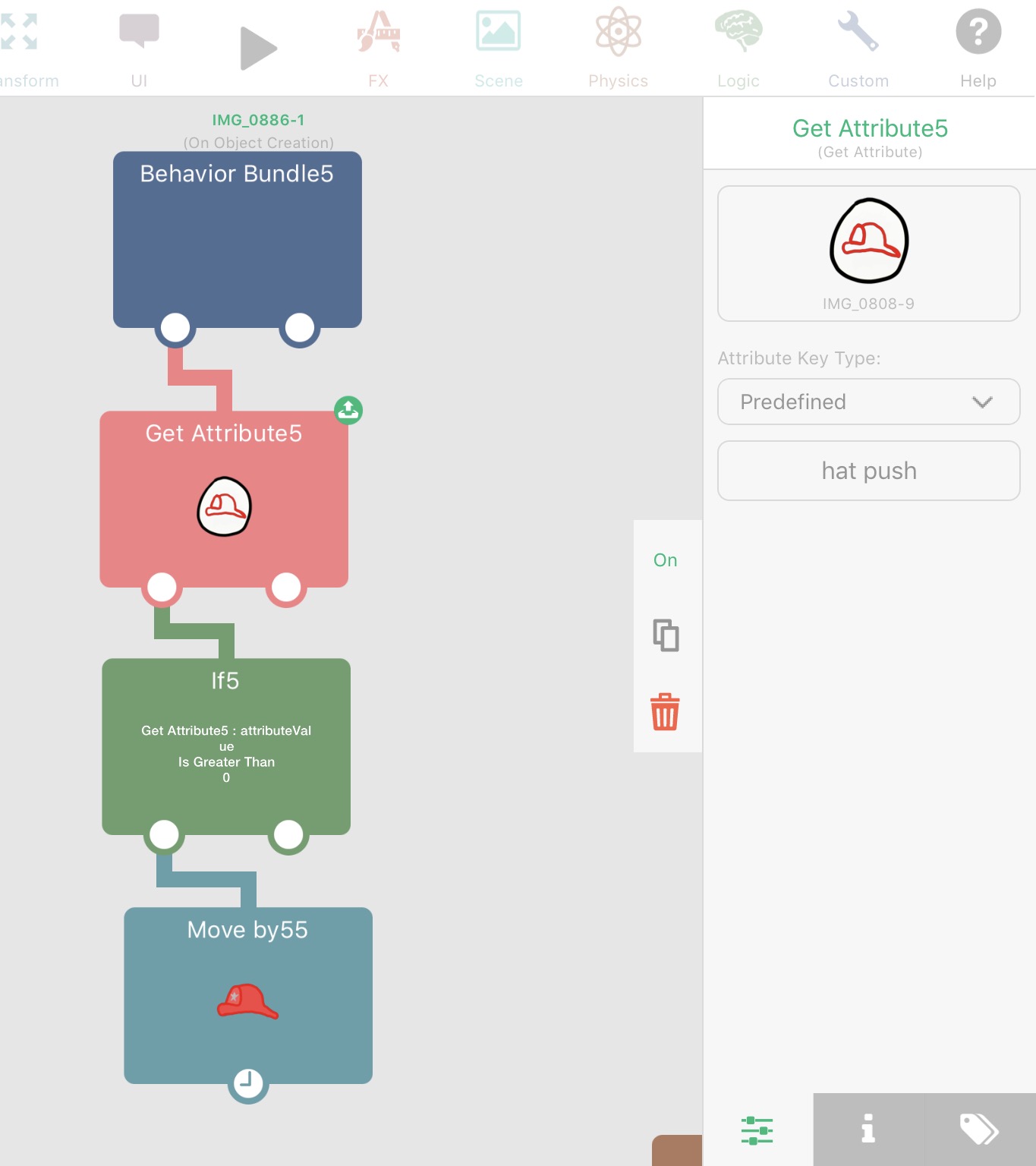
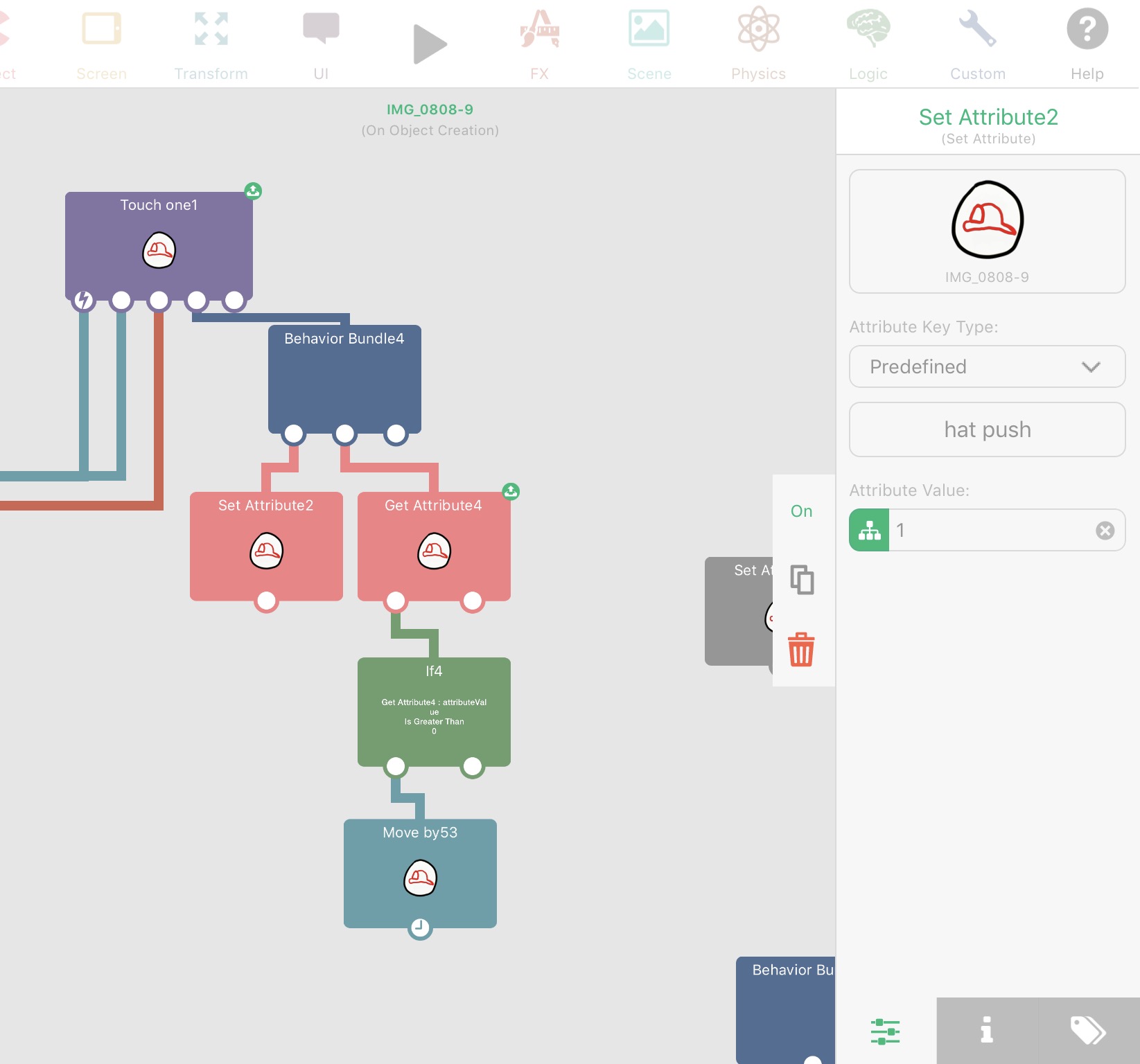
            1_1490671804717_IMG_0891.PNG 0_1490671804717_IMG_0890.PNG

            Attaching screen grabs. The one with Started touching is the layer that has the object with the attribute. It works. The other is a different layer. It does not work. Thoughts?

            Jack de WildeJ 1 Reply Last reply
            0
            • ThisT This

              1_1490671804717_IMG_0891.PNG 0_1490671804717_IMG_0890.PNG

              Attaching screen grabs. The one with Started touching is the layer that has the object with the attribute. It works. The other is a different layer. It does not work. Thoughts?

              Jack de WildeJ Offline
              Jack de WildeJ Offline
              Jack de Wilde
              wrote on last edited by
              #6

              @This in the first one, it is getting the attribute straight away. Is it at 1 from the start or does it get set to 1 after the get attribute has already run? Maybe share the download link.

              1 Reply Last reply
              0
              • Jack de WildeJ Jack de Wilde

                @iTap-Development did you select an object to set the attribute on? I'm pretty sure global can't have any attributes on if so you have to select an object.

                iTap DevelopmentI Offline
                iTap DevelopmentI Offline
                iTap Development
                wrote on last edited by
                #7

                @Jack8680 oh, I don't think I set an object on the global part🤔 that probably what's wrong😃

                1 Reply Last reply
                0
                • HamedH Offline
                  HamedH Offline
                  Hamed
                  Admin
                  wrote on last edited by
                  #8

                  Yeah, right now you can't set attributes on the global object. So you need to select an object to set an attribute on. The easiest way is to create an object on global UI, which will do what you want it to do.

                  iTap DevelopmentI 1 Reply Last reply
                  0
                  • ThisT Offline
                    ThisT Offline
                    This
                    wrote on last edited by
                    #9

                    So, I've created an empty object on the global UI level with an attribute. The default value of that attribute is 0. I have a rule on one layer that sets the attribute value to 1 when an object is touched. I have a rule on another layer that is pictured in the first screen grab above: behavior bundle, get attribute, if attribute is greater than 0, execute behavior. The only thing I can think of, does get attribute not constantly check to see if the attribute has been changed?

                    1 Reply Last reply
                    0
                    • HamedH Hamed

                      Yeah, right now you can't set attributes on the global object. So you need to select an object to set an attribute on. The easiest way is to create an object on global UI, which will do what you want it to do.

                      iTap DevelopmentI Offline
                      iTap DevelopmentI Offline
                      iTap Development
                      wrote on last edited by
                      #10

                      @Hamed will it work on global if you just select an object for the attribute?

                      ThisT 1 Reply Last reply
                      0
                      • iTap DevelopmentI iTap Development

                        @Hamed will it work on global if you just select an object for the attribute?

                        ThisT Offline
                        ThisT Offline
                        This
                        wrote on last edited by
                        #11

                        @iTap-Development Just tried it. Doesn't work. I think it might have something to do with the second layer not being aware that the attribute has been changed. Does "get attribute" constantly check to see if the attribute has changed or just do it once upon launch?

                        1 Reply Last reply
                        0
                        • ThisT Offline
                          ThisT Offline
                          This
                          wrote on last edited by
                          #12

                          Okay, I can get it to work, if I add a Start Touch behavior, which is not what I want it to do. I think I now understand that "get attribute" either executes immediately in launch or executes when it is triggered. What I am trying to figure out is how to have a behavior that is constantly monitoring for a change in the attribute. In the attached screen grab, I can get the left column to work, but the right column doesn't. The right column is what I would like. Anyway to achieve this?

                          0_1490730271376_IMG_0896.PNG

                          1 Reply Last reply
                          0
                          • HamedH Offline
                            HamedH Offline
                            Hamed
                            Admin
                            wrote on last edited by
                            #13

                            If you need a constant check, use a timer of 0 (ie. check every frame)

                            Usually timers of zero means that there is probably a better way of doing it. So if you know when you should update the attribute, its probably better to do it once.

                            ThisT 1 Reply Last reply
                            0
                            • HamedH Hamed

                              If you need a constant check, use a timer of 0 (ie. check every frame)

                              Usually timers of zero means that there is probably a better way of doing it. So if you know when you should update the attribute, its probably better to do it once.

                              ThisT Offline
                              ThisT Offline
                              This
                              wrote on last edited by
                              #14

                              @Hamed Got it. Set timer to .1 and that worked. WIll the timer make it run slower?

                              About an easier way, are there ways in HP for behaviors to automatically be aware of when attributes change?

                              Jack de WildeJ 1 Reply Last reply
                              0
                              • ThisT This

                                @Hamed Got it. Set timer to .1 and that worked. WIll the timer make it run slower?

                                About an easier way, are there ways in HP for behaviors to automatically be aware of when attributes change?

                                Jack de WildeJ Offline
                                Jack de WildeJ Offline
                                Jack de Wilde
                                wrote on last edited by Jack8680
                                #15

                                @This if you want it to happen every time the attribute satisfies a condition, you could use an execute behaviour in the objects that set the attribute, executing the get attribute and check if it's greater. That way, it checks if the attribute is greater than one every time you change the attribute.


                                1 Reply Last reply
                                0

                                Hello! It looks like you're interested in this conversation, but you don't have an account yet.

                                Getting fed up of having to scroll through the same posts each visit? When you register for an account, you'll always come back to exactly where you were before, and choose to be notified of new replies (either via email, or push notification). You'll also be able to save bookmarks and upvote posts to show your appreciation to other community members.

                                With your input, this post could be even better 💗

                                Register Login
                                Reply
                                • Reply as topic
                                Log in to reply
                                • Oldest to Newest
                                • Newest to Oldest
                                • Most Votes


                                • Login

                                • Login or register to search.
                                • First post
                                  Last post
                                0
                                • Categories
                                • Recent
                                • Tags
                                • Popular
                                • Users
                                • Search