
.tap file - HOW TO INSPECT and DISSECT... then re-open?
-
Update:
ZPATHDATA contains a list of all assets actually used.
This is the thing to look into when wanting to figure out what assets can be deleted and what needs to be kept.
-
Oops. Sorry. It might be just a list of assets in the above ZPATHDATA. No filtering based on whether or not they're actually used assets.
@deeeds Jack and I opened the SQLite files using an app called Private DB I think?
-
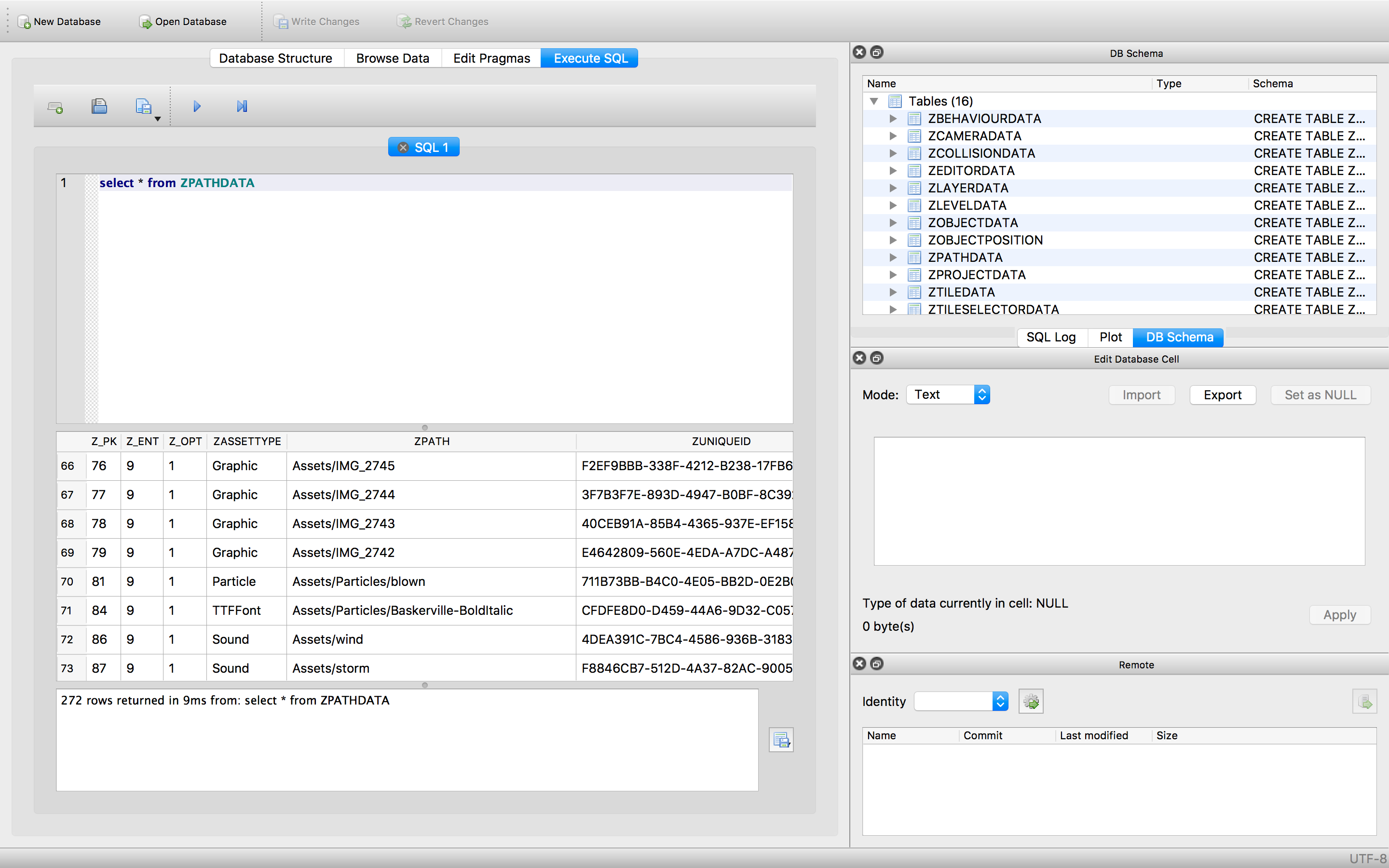
DB Browser on the mac can open sqlite files. -
@deeeds said in .tap file - HOW TO INSPECT and DISSECT... then re-open?:
I have, apparently, 96k of behaviours. Which is simply not the case. I might have made that many in all the duplicates of objects before I learnt to use spawn and "referencing" via "messaging", but that's not nearly where I'm at now...
I use DB Browser when I'm fixing your guys' projects. To find all of the limbo'd objects, you need to cross reference ZObjectPosition and ZObjectData. ZObjectPosition is where your object exists in which scene and which layer. So any object without a ZObjectPosition is usually in limbo.
I never thought the database files would be > 10MB so we figured we can sacrifice space for speed when deleting things.
-
@deeeds said in .tap file - HOW TO INSPECT and DISSECT... then re-open?:
I have, apparently, 96k of behaviours. Which is simply not the case. I might have made that many in all the duplicates of objects before I learnt to use spawn and "referencing" via "messaging", but that's not nearly where I'm at now...
I use DB Browser when I'm fixing your guys' projects. To find all of the limbo'd objects, you need to cross reference ZObjectPosition and ZObjectData. ZObjectPosition is where your object exists in which scene and which layer. So any object without a ZObjectPosition is usually in limbo.
I never thought the database files would be > 10MB so we figured we can sacrifice space for speed when deleting things.
-
@deeeds said in .tap file - HOW TO INSPECT and DISSECT... then re-open?:
I have, apparently, 96k of behaviours. Which is simply not the case. I might have made that many in all the duplicates of objects before I learnt to use spawn and "referencing" via "messaging", but that's not nearly where I'm at now...
I use DB Browser when I'm fixing your guys' projects. To find all of the limbo'd objects, you need to cross reference ZObjectPosition and ZObjectData. ZObjectPosition is where your object exists in which scene and which layer. So any object without a ZObjectPosition is usually in limbo.
I never thought the database files would be > 10MB so we figured we can sacrifice space for speed when deleting things.
@hamed So will you have next update make deleting scenes etc actually delete the objects and behaviours from the database?
-
@deeeds said in .tap file - HOW TO INSPECT and DISSECT... then re-open?:
I have, apparently, 96k of behaviours. Which is simply not the case. I might have made that many in all the duplicates of objects before I learnt to use spawn and "referencing" via "messaging", but that's not nearly where I'm at now...
I use DB Browser when I'm fixing your guys' projects. To find all of the limbo'd objects, you need to cross reference ZObjectPosition and ZObjectData. ZObjectPosition is where your object exists in which scene and which layer. So any object without a ZObjectPosition is usually in limbo.
I never thought the database files would be > 10MB so we figured we can sacrifice space for speed when deleting things.
-
@hamed said in .tap file - HOW TO INSPECT and DISSECT... then re-open?:
you need to cross reference ZObjectPosition and ZObjectData.
How do I do this?
-
@deeeds said in .tap file - HOW TO INSPECT and DISSECT... then re-open?:
I have, apparently, 96k of behaviours. Which is simply not the case. I might have made that many in all the duplicates of objects before I learnt to use spawn and "referencing" via "messaging", but that's not nearly where I'm at now...
I use DB Browser when I'm fixing your guys' projects. To find all of the limbo'd objects, you need to cross reference ZObjectPosition and ZObjectData. ZObjectPosition is where your object exists in which scene and which layer. So any object without a ZObjectPosition is usually in limbo.
I never thought the database files would be > 10MB so we figured we can sacrifice space for speed when deleting things.
@hamed Doing this causes all objects to loose their behaviours. There must be some behaviours that can't be deleted, that don't have a position. Bindings, perhaps, that setup the project's relationships, or something similar. Can you give me a few clues as to how/what/where I need to protect the foundations of a project?
And, oddly, I'm still seeing 18,000 objects with position information in a project that can't have more than a few thousand, behaviours included.
-
I have finally finished the tool to clean up bloated projects. We're initially going to add a button to do this in the project options, and we'll do it automatically when we see that its safe to do so. For now, anyone that wants their project cleaned up, can send the project to contact@hyperpad.com and I'll email you back your cleaned project.



Hello! It looks like you're interested in this conversation, but you don't have an account yet.
Getting fed up of having to scroll through the same posts each visit? When you register for an account, you'll always come back to exactly where you were before, and choose to be notified of new replies (either via email, or push notification). You'll also be able to save bookmarks and upvote posts to show your appreciation to other community members.
With your input, this post could be even better 💗
Register Login