
Where is Else If and Else?
-
Yeah, the else-if is kind of hidden in hyperPad. It's something we want to change but just haven't gotten around to it yet.
How it works is you drag another IF behaviour on-top of an existing IF, and it snaps in place (to the side) and turns into an Else-If. It's a really stupid system, that we thought was really clever when we implemented it.
An AND would be 1 if connected to another.
-
Yeah, the else-if is kind of hidden in hyperPad. It's something we want to change but just haven't gotten around to it yet.
How it works is you drag another IF behaviour on-top of an existing IF, and it snaps in place (to the side) and turns into an Else-If. It's a really stupid system, that we thought was really clever when we implemented it.
An AND would be 1 if connected to another.
@Murtaza Else If doesn’t really matter though anyway, a bunch more Ifs could do the same thing? E.g whether A equals 1 or not, If A = 1 (do stuff), Else If (do more stuff), instead of Else If just use If A ≠ 1 etc.
-
Yeah, the else-if is kind of hidden in hyperPad. It's something we want to change but just haven't gotten around to it yet.
How it works is you drag another IF behaviour on-top of an existing IF, and it snaps in place (to the side) and turns into an Else-If. It's a really stupid system, that we thought was really clever when we implemented it.
An AND would be 1 if connected to another.
@Murtaza Cheers. I didn't want to use an If, Else If, Else If, Else... tree... but am getting stuck with broadcasting and receiving not working the way I was expecting it to...
I need to recalibrate my expectations and figure out how broadcasting is actually working, and will then get back to figuring out how the conditionals work.
Prepare for a rant about the broadcasting system once I figure out what it's doing, not doing and how it's different from what I want/expect/demand ;)
-
@Murtaza Cheers. I didn't want to use an If, Else If, Else If, Else... tree... but am getting stuck with broadcasting and receiving not working the way I was expecting it to...
I need to recalibrate my expectations and figure out how broadcasting is actually working, and will then get back to figuring out how the conditionals work.
Prepare for a rant about the broadcasting system once I figure out what it's doing, not doing and how it's different from what I want/expect/demand ;)
@Deeeds 'broadcast message' has a key and a value. The key is the value you input into 'receive message', and the value is then sent through the receive message to be used as its output.
-
@Deeeds 'broadcast message' has a key and a value. The key is the value you input into 'receive message', and the value is then sent through the receive message to be used as its output.
@Jack8680 thanks. I've got this much working, for one instance of something. But I'm trying to use the receive block/node/behaviour to send forwards that value to two different blocks/nodes/behaviours... the second one never gets it... so far as I can tell, only the first. I've built a work around, but it's much messier, and means a lot more logic distributed around and through objects in the game world. I was trying to use broadcasting to centralise logic a bit.
-
@Jack8680 thanks. I've got this much working, for one instance of something. But I'm trying to use the receive block/node/behaviour to send forwards that value to two different blocks/nodes/behaviours... the second one never gets it... so far as I can tell, only the first. I've built a work around, but it's much messier, and means a lot more logic distributed around and through objects in the game world. I was trying to use broadcasting to centralise logic a bit.
@Deeeds can you send a screenshot of what's not working? Some behaviours like joystick controlled need to be restarted for changes in them to take effect.
-
@Deeeds can you send a screenshot of what's not working? Some behaviours like joystick controlled need to be restarted for changes in them to take effect.
@Jack8680 I've deleted it all, the extra stuff, since starting to use the work around.
I can, however, describe it.
There are four walls around a rectangular game room. NESW, or up, down, left and right.
When the player's hero character touches anyone of these walls, it becomes the "floor", and gravity points towards it. This also means the player's primary jump direction (done using forces, not a jump button) needs to be changed to suit the new direction of gravity.
To achieve this, each wall has two broadcasters that emit when touched by the player's hero character. That emittance, for the ceiling, (northern wall) looks like this:
Broadcast X gravity from Northern Wall
xGravity = 0BroadCast Y gravity from Norther Wall
yGravity = 1On the player's character object there's a pair of receivers:
Receive X Gravity Setting
listening for xGravityReceive Y Gravity Setting
listening for yGravityA "Set Input Field" behaviour is attached to each of these Receivers, and sets the force direction of the "jump" accordingly.
When I used another pair of "Set Input Fields" to change the global gravity, also coming off these two receivers, it never changed the gravity, but the jump directions were changed correctly.
-
@Jack8680 I've deleted it all, the extra stuff, since starting to use the work around.
I can, however, describe it.
There are four walls around a rectangular game room. NESW, or up, down, left and right.
When the player's hero character touches anyone of these walls, it becomes the "floor", and gravity points towards it. This also means the player's primary jump direction (done using forces, not a jump button) needs to be changed to suit the new direction of gravity.
To achieve this, each wall has two broadcasters that emit when touched by the player's hero character. That emittance, for the ceiling, (northern wall) looks like this:
Broadcast X gravity from Northern Wall
xGravity = 0BroadCast Y gravity from Norther Wall
yGravity = 1On the player's character object there's a pair of receivers:
Receive X Gravity Setting
listening for xGravityReceive Y Gravity Setting
listening for yGravityA "Set Input Field" behaviour is attached to each of these Receivers, and sets the force direction of the "jump" accordingly.
When I used another pair of "Set Input Fields" to change the global gravity, also coming off these two receivers, it never changed the gravity, but the jump directions were changed correctly.
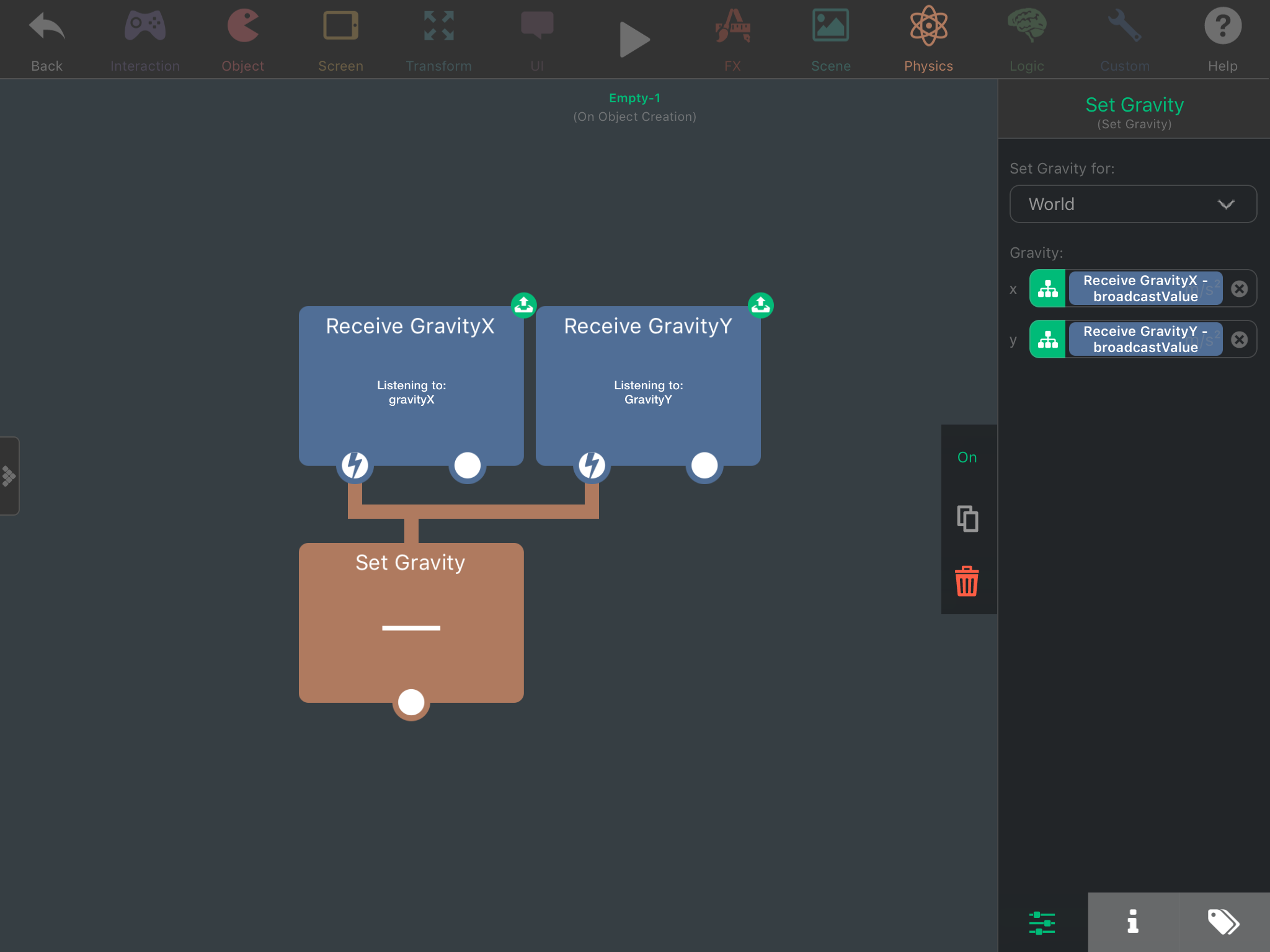
@Deeeds are you running the set gravity behaviour after setting the values? This should work:
-
Oops, forgot to add an @Jack8680 notification alerter... hope this edit does it...
Original:
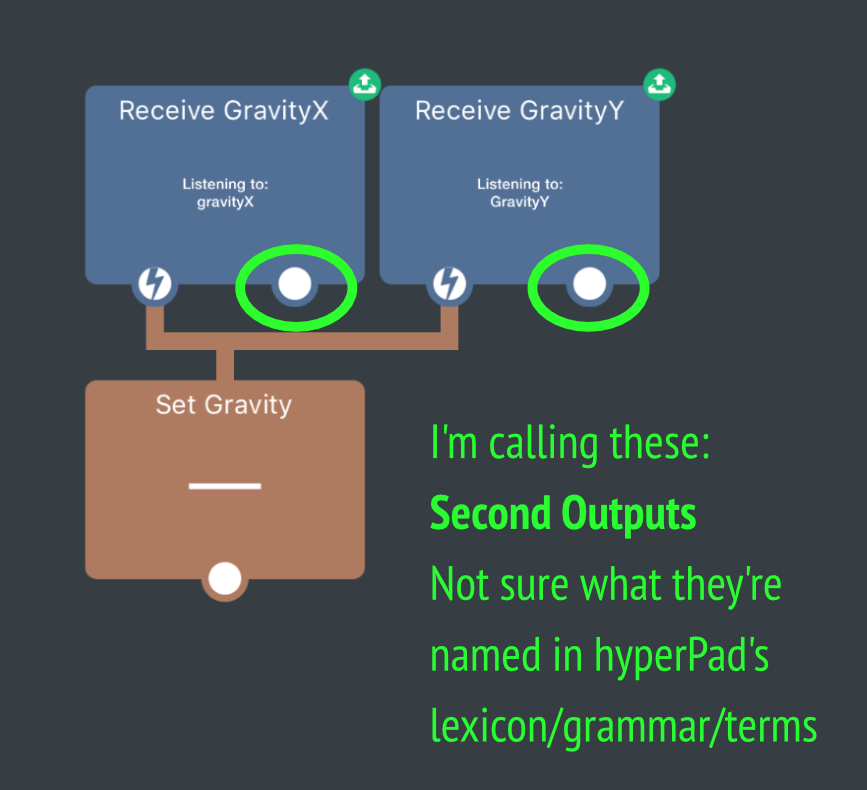
This first output, from each of the receives, it does send. However the second outputs do not appear to send, when they're hooked up to something.I'm using the first outputs to change the jump characteristics, the second ones to change gravity. I've presumed (rightly or wrongly) that the second outputs of these receivers aren't firing, and therefore created the workaround, wherein I'm simply setting gravity inside the wall objects... each wall having its own Set Gravity Behaviour. This works, for now, but I'll have many more "walls" later, and wanted to simply centralise.
I could be doing something else wrong...
Or may things wrong, I presume.
-
Oops, forgot to add an @Jack8680 notification alerter... hope this edit does it...
Original:
This first output, from each of the receives, it does send. However the second outputs do not appear to send, when they're hooked up to something.I'm using the first outputs to change the jump characteristics, the second ones to change gravity. I've presumed (rightly or wrongly) that the second outputs of these receivers aren't firing, and therefore created the workaround, wherein I'm simply setting gravity inside the wall objects... each wall having its own Set Gravity Behaviour. This works, for now, but I'll have many more "walls" later, and wanted to simply centralise.
I could be doing something else wrong...
Or may things wrong, I presume.
@Deeeds I'm not sure what you mean by second output, receive message only has one output. You can use an array if you want to send multiple values through a single message though.
Edit: also, my screenshot is a bit double, you'd only need the set gravity attached to the second receive message (based on the order you send them) -
@Deeeds I'm not sure what you mean by second output, receive message only has one output. You can use an array if you want to send multiple values through a single message though.
Edit: also, my screenshot is a bit double, you'd only need the set gravity attached to the second receive message (based on the order you send them) -
@Deeeds oh I see what you mean now, so you're saying the second behaviour under a receive message isn't being activated? That sounds weird, maybe it's an issue with your game logic, although it could be a bug.
To make an easily expandable system for multiple vertical or horizontal walls, I'd put the walls in a tag called walls, then in the player have 4 collided behaviours that check for a collision with the tag, each with a different side selected. This way you can use as many walls as you want, and the system works on all sides of the wall.
If you want it to work for more than just horizontal and vertical, you'd have to use trigonometry. Here's an example that only works when the player collides on the left side of the wall relative to its rotation (would have it work both sides but the collided behaviour's sides aren't relative to rotation so it's not easy to detect which side the player is on): http://bit.ly/2y44obi (Paste the link in Safari). You have to rotate the walls differently for different sides, but I think this is close to what you wanted. All the behaviours are in the player (red object).
-
@Deeeds oh I see what you mean now, so you're saying the second behaviour under a receive message isn't being activated? That sounds weird, maybe it's an issue with your game logic, although it could be a bug.
To make an easily expandable system for multiple vertical or horizontal walls, I'd put the walls in a tag called walls, then in the player have 4 collided behaviours that check for a collision with the tag, each with a different side selected. This way you can use as many walls as you want, and the system works on all sides of the wall.
If you want it to work for more than just horizontal and vertical, you'd have to use trigonometry. Here's an example that only works when the player collides on the left side of the wall relative to its rotation (would have it work both sides but the collided behaviour's sides aren't relative to rotation so it's not easy to detect which side the player is on): http://bit.ly/2y44obi (Paste the link in Safari). You have to rotate the walls differently for different sides, but I think this is close to what you wanted. All the behaviours are in the player (red object).
@Jack8680 This sounds like a VERY good idea for "code" organisation!
I was going to try it out but wanted to make sure I understand messaging (broadcast and receiving) in hyperPad first, so I rebuilt my rig of ideas on how I thought it should work and began testing it. Couldn't get it to work, changed positives to negatives and messed with a few settings that I thought might be the problem. Even swapped around the use of the first and secondary outputs and proved my theory that the secondary outputs aren't working.
Then, on the final build, to make sure I was certain it was always the same, one last time, switched back back to my ideal variation of setting that I dreamed should work... the one that's been failing all along, and decided to buy the enthusiast package... since I'm sick of seeing ads.
And then it resumed... and it worked properly.
So I suspect there's a limit to the number of outputs (to one) in a receiving behaviour in the free version, causing that second output to fail to operate.
-
@Jack8680 This sounds like a VERY good idea for "code" organisation!
I was going to try it out but wanted to make sure I understand messaging (broadcast and receiving) in hyperPad first, so I rebuilt my rig of ideas on how I thought it should work and began testing it. Couldn't get it to work, changed positives to negatives and messed with a few settings that I thought might be the problem. Even swapped around the use of the first and secondary outputs and proved my theory that the secondary outputs aren't working.
Then, on the final build, to make sure I was certain it was always the same, one last time, switched back back to my ideal variation of setting that I dreamed should work... the one that's been failing all along, and decided to buy the enthusiast package... since I'm sick of seeing ads.
And then it resumed... and it worked properly.
So I suspect there's a limit to the number of outputs (to one) in a receiving behaviour in the free version, causing that second output to fail to operate.
It's me that's WRONG!
The reason it worked, that final run time, after buying, is that just before buying I'd cleaned up the Behaviour Editor, as I was going to send the project as a bug report.
What that cleaning up did was remove a couple of stray "Set Gravity" Behaviours that were being called right at the start of the game, since this was on the Main Layer, in the Hero Character, so on initialisation of the game they were getting called and screwing up the baseline physics setting so that nothing worked properly, or at all, afterwards.
I should have paid attention to this Main layer, and understood that all objects have an initialisation cycle during which anything in their Behaviour Editor is called/evoked.
I'm a moron.
Sorry to have wasted everyone's time!!!!
I owe. I owe.
If you need graphics, sing out. It's about the only thing I'll be useful for. Certainly not much else.
-
It's me that's WRONG!
The reason it worked, that final run time, after buying, is that just before buying I'd cleaned up the Behaviour Editor, as I was going to send the project as a bug report.
What that cleaning up did was remove a couple of stray "Set Gravity" Behaviours that were being called right at the start of the game, since this was on the Main Layer, in the Hero Character, so on initialisation of the game they were getting called and screwing up the baseline physics setting so that nothing worked properly, or at all, afterwards.
I should have paid attention to this Main layer, and understood that all objects have an initialisation cycle during which anything in their Behaviour Editor is called/evoked.
I'm a moron.
Sorry to have wasted everyone's time!!!!
I owe. I owe.
If you need graphics, sing out. It's about the only thing I'll be useful for. Certainly not much else.
@Deeeds Hate it when you spend ages trying to fix something strange happening in your project when the problem is simply a stray behaviour or an accidentally cut wire (or behaviour connection).
-
It's me that's WRONG!
The reason it worked, that final run time, after buying, is that just before buying I'd cleaned up the Behaviour Editor, as I was going to send the project as a bug report.
What that cleaning up did was remove a couple of stray "Set Gravity" Behaviours that were being called right at the start of the game, since this was on the Main Layer, in the Hero Character, so on initialisation of the game they were getting called and screwing up the baseline physics setting so that nothing worked properly, or at all, afterwards.
I should have paid attention to this Main layer, and understood that all objects have an initialisation cycle during which anything in their Behaviour Editor is called/evoked.
I'm a moron.
Sorry to have wasted everyone's time!!!!
I owe. I owe.
If you need graphics, sing out. It's about the only thing I'll be useful for. Certainly not much else.
@Deeeds something you could do in this type of situation(I think an admin has suggested this) is use like a “behavior on” and you could type “set gravity” to see if there are other set gravity behaviors interfering. And you would be able to see what object they are in.
-
@Deeeds Hate it when you spend ages trying to fix something strange happening in your project when the problem is simply a stray behaviour or an accidentally cut wire (or behaviour connection).




Hello! It looks like you're interested in this conversation, but you don't have an account yet.
Getting fed up of having to scroll through the same posts each visit? When you register for an account, you'll always come back to exactly where you were before, and choose to be notified of new replies (either via email, or push notification). You'll also be able to save bookmarks and upvote posts to show your appreciation to other community members.
With your input, this post could be even better 💗
Register Login