
Move Screen "behaviour" with Duration Rarely Works.
-
A Move Screen with duration of 0.5 seconds as a first action rarely works.
Set it to zero seconds duration and it works SOME of the time, not all the time.
Soon after a Move Screen of 0 seconds, (two frames later) a Duration et to 0.5 seconds Duration, Out Exponential or Linear Curve Type never works.
This behaviour never completes. Visually, it doesn't seem to start, either.
-
It seems that the scene starts running while still initializing, if that’s what you’re referencing, and this gucks up a LOT of logic.
-
It seems that the scene starts running while still initializing, if that’s what you’re referencing, and this gucks up a LOT of logic.
@Thecheater887 That's a different problem. I've been dealing with that, too. THANK YOU FOR CONFIRMING IT!!!
I had, to this point, no other confirmation that there was a problem there, other than my own experiences.
This problem, detailed in the above post, is well after scene start. And continuous, throughout the lifetime of the game.
-
It seems that the scene starts running while still initializing, if that’s what you’re referencing, and this gucks up a LOT of logic.
@Thecheater887 I see where the problem is. My use of "first action" in the post seems to indicate it's the first thing happening in the scene. I didn't mean it like that.
It's nowhere near the first thing happening. This is a camera shake on a certain set of impacts.
And the first action of a camera shake (let's say down) doesn't complete if it's got any duration... well, it does SOMETIMES, very rarely.
So put that to Zero seconds. Quick shake.
Now put that recovery action in, with any duration, to move the camera back to its original position, and this action, with any duration, never occurs.
So both have to have zero second durations to have any chance of success. And a little timer in between them (of two frames) so the player gets some sense that something happened.
-
@Thecheater887 I see where the problem is. My use of "first action" in the post seems to indicate it's the first thing happening in the scene. I didn't mean it like that.
It's nowhere near the first thing happening. This is a camera shake on a certain set of impacts.
And the first action of a camera shake (let's say down) doesn't complete if it's got any duration... well, it does SOMETIMES, very rarely.
So put that to Zero seconds. Quick shake.
Now put that recovery action in, with any duration, to move the camera back to its original position, and this action, with any duration, never occurs.
So both have to have zero second durations to have any chance of success. And a little timer in between them (of two frames) so the player gets some sense that something happened.
@Deeeds I’ve just tried over and over what you described and it works every time🤷♂️
-
@Deeeds I’ve just tried over and over what you described and it works every time🤷♂️
@iTap-Development I can’t even get stopped colliding to work consistently.
Glad you have better luck than me :)
-
@iTap-Development I can’t even get stopped colliding to work consistently.
Glad you have better luck than me :)
@Thecheater887 It finally came time to use to "stop colliding" in my project, and it worked.
-
Can you post a screenshot of the behaviour set up?
I can't reproduce this with just adding move screen with a duration of 0.5
Thanks.
-
Are you sure your other behaviours are correct? From what I can see there are a lot of other "variables" with the math of the other behaviours.
Move with duration works 100% of the time in my tests. But it does not rely on the the other behaviours being correct. I feel there is a logic error here rather than a bug with move.
-
Are you sure your other behaviours are correct? From what I can see there are a lot of other "variables" with the math of the other behaviours.
Move with duration works 100% of the time in my tests. But it does not rely on the the other behaviours being correct. I feel there is a logic error here rather than a bug with move.
@Murtaza It's incredibly simple maths.
I've checked it with text outputs.
The problem is either the wait timer having the same/similar bug to Set Color With Duration, or it's something to do with Move Screen by.
Everything else is, really, really simple. Hence the careful writing of Behaviour names so you can see just how simple it is.
-
Are you sure your other behaviours are correct? From what I can see there are a lot of other "variables" with the math of the other behaviours.
Move with duration works 100% of the time in my tests. But it does not rely on the the other behaviours being correct. I feel there is a logic error here rather than a bug with move.
@Murtaza said in Move Screen "behaviour" with Duration Rarely Works.:
Move with duration works 100% of the time in my tests. But it does not rely on the the other behaviours being correct. I feel there is a logic error here rather than a bug with move.
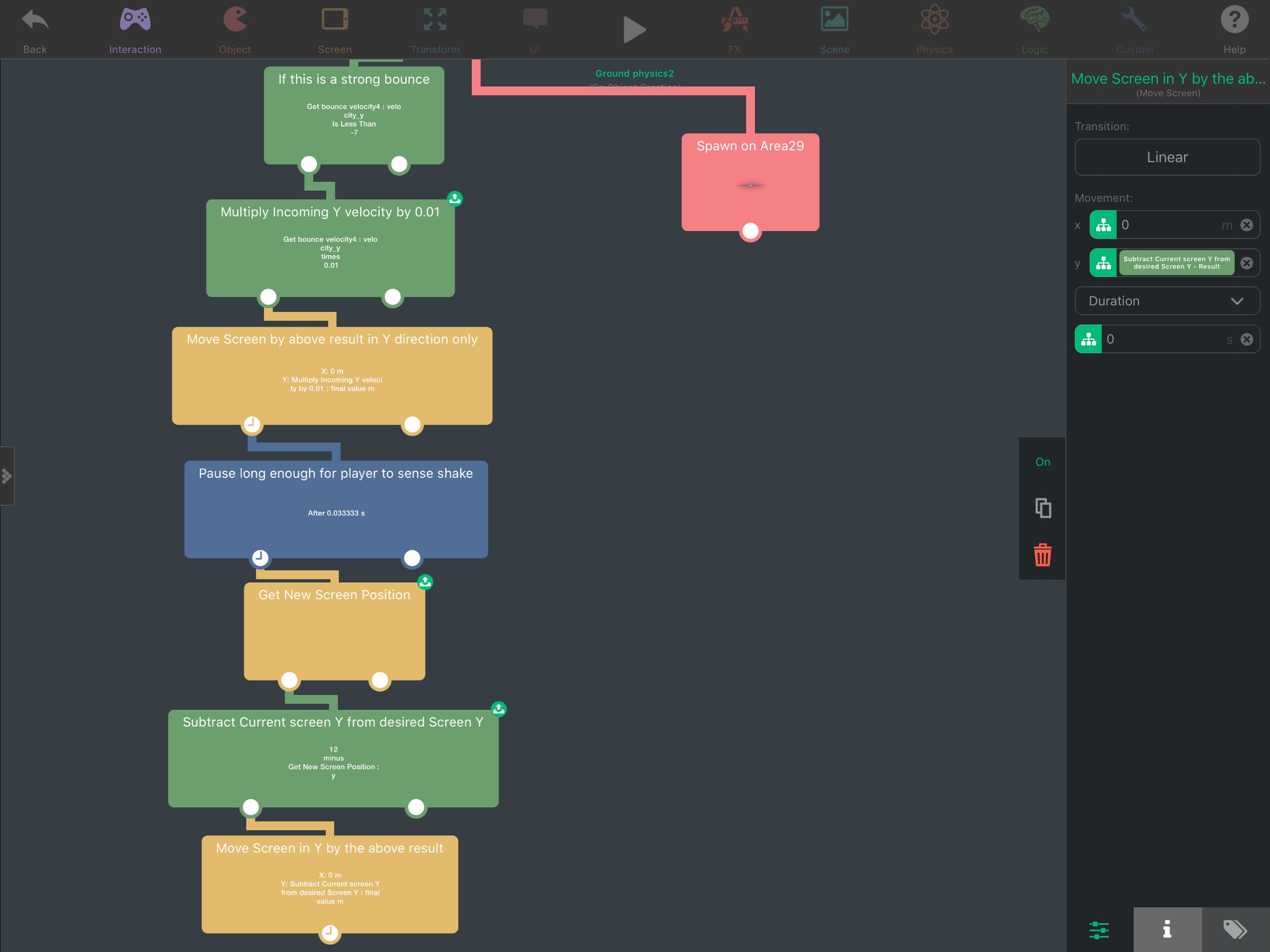
Look at the Get New Screen Position and Subtract Current Screen Position: they are explicitly designed this way to prevent in deviances that could occur in the 0.03333 wait time from messing up the correction, which is the subsequent move back to 12, the midpoint of the screen in hyperPad units.
It's THAT simple.
-
I don't think there is a bug here, at least not with move screen. It looks like something
could be interrupting your wait. Or for some reason it doesn't reach the move Screen.As a test. What happens if instead of move screen you put an add to score behaviour. If the "score" is more than one. Then that means something is triggering your behaviour multiple times and interrupting the potential screen movement.



Hello! It looks like you're interested in this conversation, but you don't have an account yet.
Getting fed up of having to scroll through the same posts each visit? When you register for an account, you'll always come back to exactly where you were before, and choose to be notified of new replies (either via email, or push notification). You'll also be able to save bookmarks and upvote posts to show your appreciation to other community members.
With your input, this post could be even better 💗
Register Login