
-
-
I just tested this quickly and there must be more to it than this because relative position didn't matter for me. I tried 2 things: wrap around screen with Move By behaviour, and wrap around screen with a drag and drop physics object. The physics object always wrapped around the screen correctly whether or not I had relative turned on, and the Move By object never wrapped around screen even when I had relative turned off (so many your bug is more like wrap around screen doesn't work with Move behaviours?).
What exactly are you using in your project?
Just in case this is somehow specific to device/iOS, I'm on iPad Air and latest version of iOS 12 (not 13).
-
I just tested this quickly and there must be more to it than this because relative position didn't matter for me. I tried 2 things: wrap around screen with Move By behaviour, and wrap around screen with a drag and drop physics object. The physics object always wrapped around the screen correctly whether or not I had relative turned on, and the Move By object never wrapped around screen even when I had relative turned off (so many your bug is more like wrap around screen doesn't work with Move behaviours?).
What exactly are you using in your project?
Just in case this is somehow specific to device/iOS, I'm on iPad Air and latest version of iOS 12 (not 13).
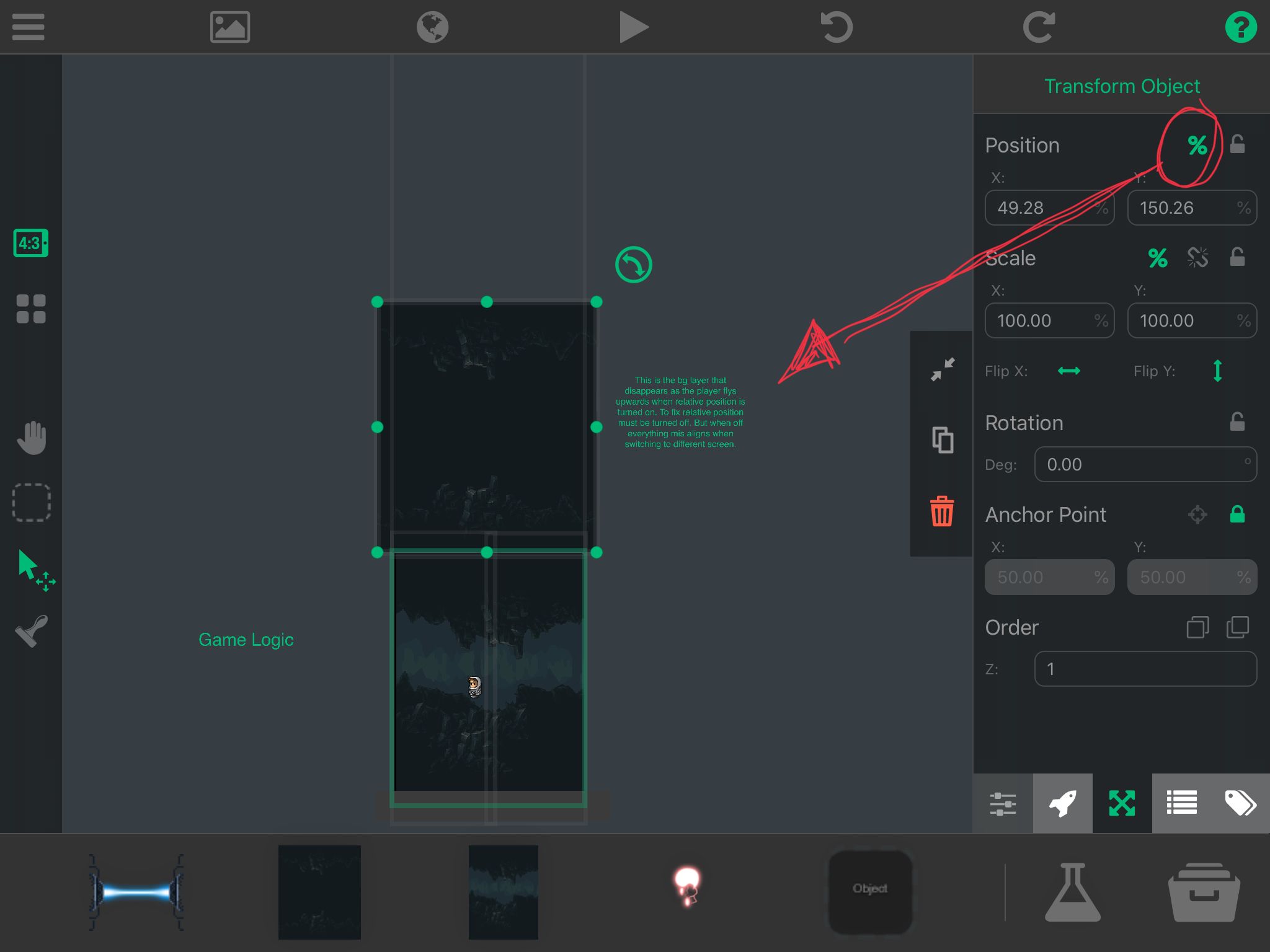
@Aidan-Oxley i used it for 2 things. My game is vertical so i have this laser that wraps around the screen. It shoots to the left and comes back out the other side. The way wrap around the screen is suppose to work. When i have relative on sometimes it works. Most of the times you will see it shoot to the other side and never return back. Its corrected when i turn off relative positioning. The other use is simply to wrap a secondary background image vertically upwards. When doing this you can see the image on screen but by the time my character flies to the top the image disappears. This again is fixed when relative positioning is turned off. However if this is off. Almost all my items are in the incorrect location when simply switching to the 4.3 screen to the ipad pro. And apple just released a note saying all games must support all screens for ipad if its an ipad game. And all screens for iphone. If its in iphone game. So creating just for the 4.3 screen doesnt seem like a go now as it also has to support the ipad pro. But the game will play. Its just that everything is misaligned.
-
@Aidan-Oxley i used it for 2 things. My game is vertical so i have this laser that wraps around the screen. It shoots to the left and comes back out the other side. The way wrap around the screen is suppose to work. When i have relative on sometimes it works. Most of the times you will see it shoot to the other side and never return back. Its corrected when i turn off relative positioning. The other use is simply to wrap a secondary background image vertically upwards. When doing this you can see the image on screen but by the time my character flies to the top the image disappears. This again is fixed when relative positioning is turned off. However if this is off. Almost all my items are in the incorrect location when simply switching to the 4.3 screen to the ipad pro. And apple just released a note saying all games must support all screens for ipad if its an ipad game. And all screens for iphone. If its in iphone game. So creating just for the 4.3 screen doesnt seem like a go now as it also has to support the ipad pro. But the game will play. Its just that everything is misaligned.
This is on an ipad 6th generation in portrait mode.
-
This sounds like a bug, We'll try to get it fixed for this upcoming update if that is the case. @Hamed may reach out for more info.
@Murtaza i just emailed you my project file also with the instructions to see the glitch. Hopefully it makes it to the update if it is a bug.
-
-
@SplitMindGaming I can't reproduce this in the way you're describing. Can you make a simple project and send us that? Preferably not the one you're working on because it has a lot of behaviours and will be hard to debug
@Hamed I’ve sent the email let me know if u received the file
-
-
Here is what I mean by relative position turned on.
@SplitMindGaming Until that's fixed, here's a working seamless (no stuttering, no visible black lines) simple example of a manually wrapping background object:
https://go.aws/2Yh34NR
The only condition it won't work properly in is if the player can teleport longer than a screen distance away to a new location instantly, then the background might disappear for a bit before coming back. I think I know how to make one work under that condition too, but this was easier and more simple to understand how it works.It would also work if you had one massive object that looks like all 9 of the background objects joined together. All logic is in the middle background object (I forgot to give them their own layer), and the rest of them are tagged.
Also I found another small problem with using relative position: Get Position can never output relative position, only position in metres. So I had to manually make relative position as well using Get Screen width and height.
-
-
@SplitMindGaming Until that's fixed, here's a working seamless (no stuttering, no visible black lines) simple example of a manually wrapping background object:
https://go.aws/2Yh34NR
The only condition it won't work properly in is if the player can teleport longer than a screen distance away to a new location instantly, then the background might disappear for a bit before coming back. I think I know how to make one work under that condition too, but this was easier and more simple to understand how it works.It would also work if you had one massive object that looks like all 9 of the background objects joined together. All logic is in the middle background object (I forgot to give them their own layer), and the rest of them are tagged.
Also I found another small problem with using relative position: Get Position can never output relative position, only position in metres. So I had to manually make relative position as well using Get Screen width and height.
@Aidan-Oxley thanks aiden




Hello! It looks like you're interested in this conversation, but you don't have an account yet.
Getting fed up of having to scroll through the same posts each visit? When you register for an account, you'll always come back to exactly where you were before, and choose to be notified of new replies (either via email, or push notification). You'll also be able to save bookmarks and upvote posts to show your appreciation to other community members.
With your input, this post could be even better 💗
Register Login