Skip to content
  • Categories
  • Recent
  • Tags
  • Popular
  • Users
  • Search
Skins
  • Light
  • Brite
  • Cerulean
  • Cosmo
  • Flatly
  • Journal
  • Litera
  • Lumen
  • Lux
  • Materia
  • Minty
  • Morph
  • Pulse
  • Sandstone
  • Simplex
  • Sketchy
  • Spacelab
  • United
  • Yeti
  • Zephyr
  • Dark
  • Cyborg
  • Darkly
  • Quartz
  • Slate
  • Solar
  • Superhero
  • Vapor

  • Default (No Skin)
  • No Skin
Collapse
hyperPad

hyperPad Forum

  1. Home
  2. Help and Support
  3. only top half of animation displayed

only top half of animation displayed

Scheduled Pinned Locked Moved Help and Support
7 Posts 3 Posters 848 Views 1 Watching
  • Oldest to Newest
  • Newest to Oldest
  • Most Votes
Reply
  • Reply as topic
Log in to reply
This topic has been deleted. Only users with topic management privileges can see it.
  • OrsoO Offline
    OrsoO Offline
    Orso
    wrote on last edited by
    #1

    Re: Animations are broken.

    I’m having exactly the same problem.
    I created the images with multiple softwares, always saving them as .png.
    In the camera roll I can see they are png because clicking on them will show the black background. Also exporting them and opening them on a Mac confirmed they ARE .png.

    When I try to create an animation here, following the manual instruction step by step, I face the same problem reported by the OP.
    The software just import the first image, ignoring all the other.
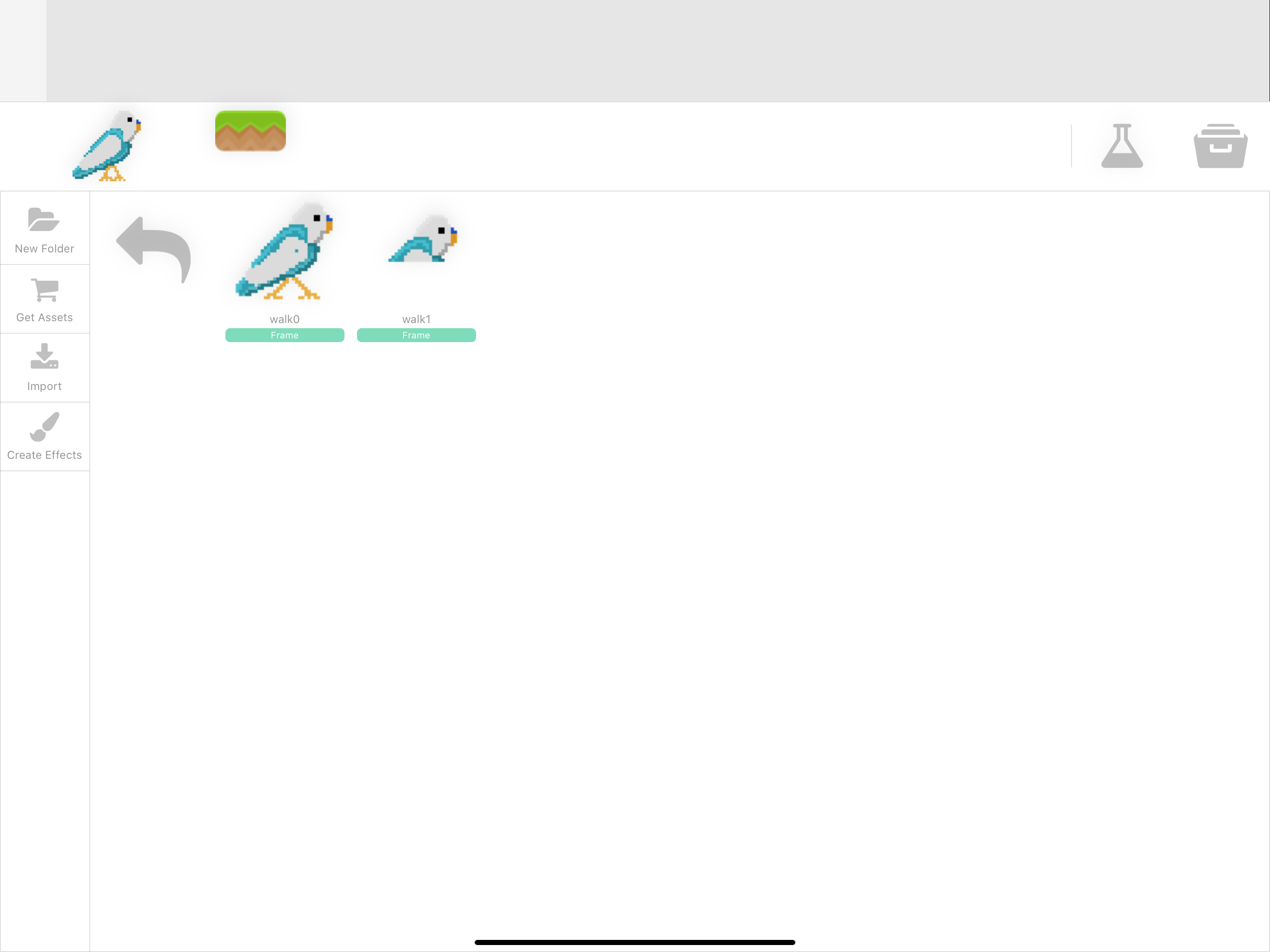
    If the animation is made with 4 frames hyperPad just import the first one (correctly) and then clones it 3 times, for a total of 4 images. The first one is the actual first frame, but the other 3 images are not the one I selected but clones of the first one displaying only the top half!

    1 Reply Last reply
    0
    • OrsoO Offline
      OrsoO Offline
      Orso
      wrote on last edited by
      #2

      D1F0CCB4-B4E0-4FDF-8D1D-96B9BE7F77B8.png
      This is what I mean

      SplitMindGamingS 1 Reply Last reply
      0
      • OrsoO Orso

        D1F0CCB4-B4E0-4FDF-8D1D-96B9BE7F77B8.png
        This is what I mean

        SplitMindGamingS Offline
        SplitMindGamingS Offline
        SplitMindGaming
        wrote on last edited by
        #3

        @Orso i actually never import from the camera roll because i constantly run through problems. Try importing the animation from the files app or even dropbox to see if that fixes the problem.

        1 Reply Last reply
        0
        • OrsoO Offline
          OrsoO Offline
          Orso
          wrote on last edited by
          #4

          Oh my god! You just saved me!
          It is true, I can confirm, importing through camera roll is the perfect way to end up with a complete mess! Importing from files: everything works perfectly!

          I would offer you a beer, but:

          1. I don’t know where you live and I don’t want to be sue for stalking 😂
          2. with all the social distancing measures around the globe we will just end up arrested or with a huge fine in the best case scenario

          So for now just accept my infinite gratitude. I can get back to work on my little project now 😊

          SplitMindGamingS 1 Reply Last reply
          0
          • OrsoO Orso

            Oh my god! You just saved me!
            It is true, I can confirm, importing through camera roll is the perfect way to end up with a complete mess! Importing from files: everything works perfectly!

            I would offer you a beer, but:

            1. I don’t know where you live and I don’t want to be sue for stalking 😂
            2. with all the social distancing measures around the globe we will just end up arrested or with a huge fine in the best case scenario

            So for now just accept my infinite gratitude. I can get back to work on my little project now 😊

            SplitMindGamingS Offline
            SplitMindGamingS Offline
            SplitMindGaming
            wrote on last edited by
            #5

            @Orso lol virtual cheers.

            1 Reply Last reply
            0
            • SplitMindGamingS Offline
              SplitMindGamingS Offline
              SplitMindGaming
              wrote on last edited by
              #6

              Also just to add to this I think I know where the problem is. iOS creates 2 folders. Recent photos and All photos. Most of the times recent photos is at the very top. Don’t select images from this folder as it is not a png format. Select the photo from the file that says All Photos. That’s where the true png format is at.

              1 Reply Last reply
              0
              • MurtazaM Offline
                MurtazaM Offline
                Murtaza
                Admin
                wrote on last edited by
                #7

                What album are you importing from?
                If you’re importing from Recent Photos, then that is most likely the issue. For some reason iOS does not keep transparency in this album and the images are not the same.

                1 Reply Last reply
                0

                Hello! It looks like you're interested in this conversation, but you don't have an account yet.

                Getting fed up of having to scroll through the same posts each visit? When you register for an account, you'll always come back to exactly where you were before, and choose to be notified of new replies (either via email, or push notification). You'll also be able to save bookmarks and upvote posts to show your appreciation to other community members.

                With your input, this post could be even better 💗

                Register Login
                Reply
                • Reply as topic
                Log in to reply
                • Oldest to Newest
                • Newest to Oldest
                • Most Votes


                • Login

                • Login or register to search.
                • First post
                  Last post
                0
                • Categories
                • Recent
                • Tags
                • Popular
                • Users
                • Search

