
What does this mean?
-
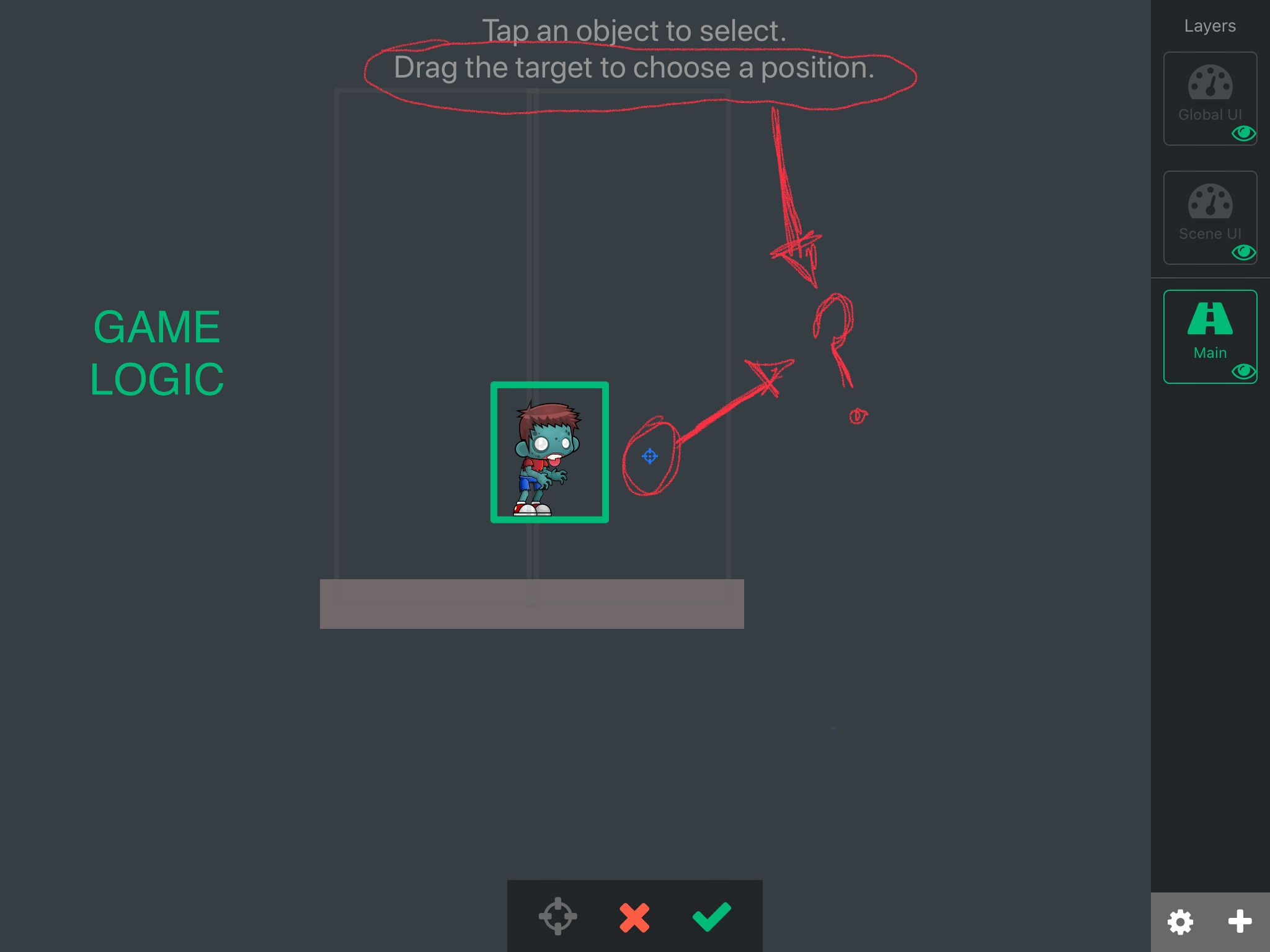
This might be the most obvious question but I cannot find anywhere on documentaion what it means or figure out exactly what it does. For the “collided” behavior what does “drag the target to choose a position” do? I would think that its the place where you want the collided to happen but i cant get that to work. I just want to know what this means exactly. I have included a screenshot. Thanks
-
This might be the most obvious question but I cannot find anywhere on documentaion what it means or figure out exactly what it does. For the “collided” behavior what does “drag the target to choose a position” do? I would think that its the place where you want the collided to happen but i cant get that to work. I just want to know what this means exactly. I have included a screenshot. Thanks
@SplitMindGaming @SplitMindGaming You are manipulating the Anchor Point. I don't think it is the collision point at all. An anchor point for example if you rotate an object, it will rotate around this anchor point. So I guess you can change the anchor point position from a collide behavior ? I don't know but don't really use it.
-
@SplitMindGaming @SplitMindGaming You are manipulating the Anchor Point. I don't think it is the collision point at all. An anchor point for example if you rotate an object, it will rotate around this anchor point. So I guess you can change the anchor point position from a collide behavior ? I don't know but don't really use it.
-
@XxWhiteHearrxX I think it doesn't do anything. I've just test something but it goes back unless of being where I set it ( in the editor ).
@XxWhiteHearrxX yeah its weird. Would actually be cool if that was used to really determine where you want the collide to happen within that certain object. For example if an object collides with the left side of his face. I mean i know you can choose left right top or bottom. But you cant really select that exact point of collision.
-
I would need to check,
But I think it will change the output on the collide behaviour based around that anchor point.
@Murtaza yeah it resets its position the moment you leave the screen and return back to it. Is it possible to set that feature up as an exact point of position you want the collide to occur at? Basically overriding or maybe adding to the top, left, right and bottom feature it already comes with.
-
@Murtaza yeah it resets its position the moment you leave the screen and return back to it. Is it possible to set that feature up as an exact point of position you want the collide to occur at? Basically overriding or maybe adding to the top, left, right and bottom feature it already comes with.
@SplitMindGaming You can make it manually I guess. You can get the position of where it has been collide within a collide behavior. It will give you X and Y position ( Wich is the positions of where it has been collide ). So with that, I think you can make what you want to do but you'll have to experiment with it, I don't have the time to do it, sorry.
-
@SplitMindGaming You can make it manually I guess. You can get the position of where it has been collide within a collide behavior. It will give you X and Y position ( Wich is the positions of where it has been collide ). So with that, I think you can make what you want to do but you'll have to experiment with it, I don't have the time to do it, sorry.
@XxWhiteHearrxX Yes i actually got it to work by adding another empty object from where I want the collide to happen. It would just be much easier and cleaner if i could set the collide point from the actual object.
-
@XxWhiteHearrxX Yes i actually got it to work by adding another empty object from where I want the collide to happen. It would just be much easier and cleaner if i could set the collide point from the actual object.
@SplitMindGaming Programming shouldn't be easy. It's like art ( just my vision tho ). Art shouldn't be easy. It should be thought and everything. But It will never hurt if sometimes a tool is made to simplify something. We would just have to be more clever to work well with these tools. In my vision, if we have a tool that makes everything, it will be boring ( I know I'm going really far into explanation but I like to share my vision of it ). For now I would highly recommend to experiment with what we have for now to be more smart with what we already have. So when new tools are given we could make more with these new tools.
-
@SplitMindGaming Programming shouldn't be easy. It's like art ( just my vision tho ). Art shouldn't be easy. It should be thought and everything. But It will never hurt if sometimes a tool is made to simplify something. We would just have to be more clever to work well with these tools. In my vision, if we have a tool that makes everything, it will be boring ( I know I'm going really far into explanation but I like to share my vision of it ). For now I would highly recommend to experiment with what we have for now to be more smart with what we already have. So when new tools are given we could make more with these new tools.
@XxWhiteHearrxX well said and very true. Yes ive been honestly working with hyper pad about 8 hours a day i would say. Im a youtuber with 300k followers and my channel mainly revolves around gaming content. Ive been very intrigued on how versatile hyperpad has been and i learned alot simply trying to build my own game. Im also coming from a pure graphic designer background and this software is like a dream come true. Thats why i keep asking for this little things because all though i know certain features can be made manually and with a little more steps. It will definitely elevate the software to another level with one click integrations and help its marketing efforts greatly by appealing to inexperienced coders and to people who just want to build games quickly. I cant wait to see what comes next.



Hello! It looks like you're interested in this conversation, but you don't have an account yet.
Getting fed up of having to scroll through the same posts each visit? When you register for an account, you'll always come back to exactly where you were before, and choose to be notified of new replies (either via email, or push notification). You'll also be able to save bookmarks and upvote posts to show your appreciation to other community members.
With your input, this post could be even better 💗
Register Login