Skip to content
  • Categories
  • Recent
  • Tags
  • Popular
  • Users
  • Search
Skins
  • Light
  • Brite
  • Cerulean
  • Cosmo
  • Flatly
  • Journal
  • Litera
  • Lumen
  • Lux
  • Materia
  • Minty
  • Morph
  • Pulse
  • Sandstone
  • Simplex
  • Sketchy
  • Spacelab
  • United
  • Yeti
  • Zephyr
  • Dark
  • Cyborg
  • Darkly
  • Quartz
  • Slate
  • Solar
  • Superhero
  • Vapor

  • Default (No Skin)
  • No Skin
Collapse
hyperPad

hyperPad Forum

  1. Home
  2. Help and Support
  3. Start the same scene but from a different location?

Start the same scene but from a different location?

Scheduled Pinned Locked Moved Help and Support
32 Posts 5 Posters 6.7k Views 1 Watching
  • Oldest to Newest
  • Newest to Oldest
  • Most Votes
Reply
  • Reply as topic
Log in to reply
This topic has been deleted. Only users with topic management privileges can see it.
  • SplitMindGamingS SplitMindGaming

    @Aidan-Oxley yes i just realized that as I was attempting to do some testing. But is there a way to easily move an object to a different layer? Lets say i accidently dragged a trashcan object the screen. Spent many hours adding the coding to it then realized its in the wrong layer this entire time. Is there a way to move it within the iU.i without puting the move layer code to it ?

    Aidan_FireA Offline
    Aidan_FireA Offline
    Aidan_Fire
    wrote on last edited by
    #14

    @SplitMindGaming Oh you wanna do it without logic, as in in the editor. Press and hold that object, you'll get the option to copy it. You can then navigate to the layer you want and then paste it using the stamp tool.

    SplitMindGamingS 1 Reply Last reply
    0
    • Aidan_FireA Aidan_Fire

      @SplitMindGaming Oh you wanna do it without logic, as in in the editor. Press and hold that object, you'll get the option to copy it. You can then navigate to the layer you want and then paste it using the stamp tool.

      SplitMindGamingS Offline
      SplitMindGamingS Offline
      SplitMindGaming
      wrote on last edited by
      #15

      @Aidan-Oxley perfect thank you so much. Lifesaver

      1 Reply Last reply
      0
      • Aidan_FireA Aidan_Fire

        @SplitMindGaming I would recommend moving your secret room actually to a place on your main scene that is off the screen, hidden, you can never see it until you go there. That way you don't have to load any scene and then have to make logic that causes the scene to know where to spawn your character.

        If for some reason you don't want to do this, it is possible to do what you asked but it might need a few things to be changed (for example the starting screen of your main scene will be seen for a split second every time unless you hide it at the start)

        SplitMindGamingS Offline
        SplitMindGamingS Offline
        SplitMindGaming
        wrote on last edited by
        #16

        @Aidan-Oxley so I got it to work and you are right about the start of the main scene shown for split second. Is there any way around that besides trying to hide the background? Why does it do that by the way?

        Aidan_FireA 1 Reply Last reply
        0
        • KamdroidK Offline
          KamdroidK Offline
          Kamdroid
          wrote on last edited by
          #17

          The scene displays before any behaviours are executed.

          I personally put an object over everything else. Like a black colour that fades out (which hides the initial scene)

          You could also try enable preloading on that scene, but that probably won't help.

          SplitMindGamingS 2 Replies Last reply
          1
          • SplitMindGamingS SplitMindGaming

            @Aidan-Oxley so I got it to work and you are right about the start of the main scene shown for split second. Is there any way around that besides trying to hide the background? Why does it do that by the way?

            Aidan_FireA Offline
            Aidan_FireA Offline
            Aidan_Fire
            wrote on last edited by
            #18

            @SplitMindGaming Yeah do something like what kamdroid said. Now that you have logic that moves the player at the start of level loading, maybe you could put the player in a blank area to start with.

            1 Reply Last reply
            0
            • KamdroidK Kamdroid

              The scene displays before any behaviours are executed.

              I personally put an object over everything else. Like a black colour that fades out (which hides the initial scene)

              You could also try enable preloading on that scene, but that probably won't help.

              SplitMindGamingS Offline
              SplitMindGamingS Offline
              SplitMindGaming
              wrote on last edited by
              #19

              @Kamdroid Thanks i will try this out.

              SplitMindGamingS 1 Reply Last reply
              0
              • SplitMindGamingS SplitMindGaming

                @Kamdroid Thanks i will try this out.

                SplitMindGamingS Offline
                SplitMindGamingS Offline
                SplitMindGaming
                wrote on last edited by
                #20

                Also with the scene displaying first before any behaviors are executed. Is that just a hyperpad thing or can you somehow code this out yourself to have it look for any priority behaviors before the screen loads?

                1 Reply Last reply
                0
                • KamdroidK Kamdroid

                  The scene displays before any behaviours are executed.

                  I personally put an object over everything else. Like a black colour that fades out (which hides the initial scene)

                  You could also try enable preloading on that scene, but that probably won't help.

                  SplitMindGamingS Offline
                  SplitMindGamingS Offline
                  SplitMindGaming
                  wrote on last edited by
                  #21

                  @Kamdroid how did you get the black screen to fade out? I dont see a set opacity option.

                  MelideM 1 Reply Last reply
                  0
                  • SplitMindGamingS SplitMindGaming

                    @Kamdroid how did you get the black screen to fade out? I dont see a set opacity option.

                    MelideM Offline
                    MelideM Offline
                    Melide
                    wrote on last edited by
                    #22

                    @SplitMindGaming Set color also change the opacity.

                    1 Reply Last reply
                    0
                    • SplitMindGamingS Offline
                      SplitMindGamingS Offline
                      SplitMindGaming
                      wrote on last edited by
                      #23

                      So guys I did mention that i got this to work. But i did it in kind of a cheesy way using add values because thats what I know how to use for now. What would be the proper coding structure for the logics when the player goes to the secret room and comes back out and the game no longer allows them to go back in. Do i use attributes for this? For example set an attribute for secret room door open and when the player enters it changes it to close?

                      1 Reply Last reply
                      0
                      • RobinsonXR Offline
                        RobinsonXR Offline
                        RobinsonX
                        wrote on last edited by
                        #24

                        @SplitMindGaming Yes, you can use attributes. Then use get attribute along with a condition. So if the door is closed, don't let the player enter.

                        SplitMindGamingS 1 Reply Last reply
                        0
                        • RobinsonXR RobinsonX

                          @SplitMindGaming Yes, you can use attributes. Then use get attribute along with a condition. So if the door is closed, don't let the player enter.

                          SplitMindGamingS Offline
                          SplitMindGamingS Offline
                          SplitMindGaming
                          wrote on last edited by
                          #25

                          @RobinsonX thanks. To me for some reason Im having a hard time wrapping my head around the concept of attributes. How would i set it up exactly. Sounds easy to say in my head but when it comes down to trying to code and make it happen it gets really confusing. How would you set this up. A player goes into the room. When he leaves. He cant go back in? This is how far i think I can get.

                          Door (Collided) with player
                          (Get attribute) door 1 entered

                          Now what would be the logic that does let him go back in when he comes back out. Sorry guys i know im an idiot.

                          Aidan_FireA 1 Reply Last reply
                          0
                          • SplitMindGamingS SplitMindGaming

                            @RobinsonX thanks. To me for some reason Im having a hard time wrapping my head around the concept of attributes. How would i set it up exactly. Sounds easy to say in my head but when it comes down to trying to code and make it happen it gets really confusing. How would you set this up. A player goes into the room. When he leaves. He cant go back in? This is how far i think I can get.

                            Door (Collided) with player
                            (Get attribute) door 1 entered

                            Now what would be the logic that does let him go back in when he comes back out. Sorry guys i know im an idiot.

                            Aidan_FireA Offline
                            Aidan_FireA Offline
                            Aidan_Fire
                            wrote on last edited by
                            #26

                            @SplitMindGaming Do you know how labels work? Have you ever used a label as some value, and you use Set Label and Get label? An attribute is basically the same thing, but invisible.

                            1 Reply Last reply
                            0
                            • Aidan_FireA Offline
                              Aidan_FireA Offline
                              Aidan_Fire
                              wrote on last edited by
                              #27

                              So is this still the thing where you enter a room and it loads you into a new scene? And are you like trying to set an attribute on the global ui? (So that it doesn't get reset?)

                              SplitMindGamingS 1 Reply Last reply
                              0
                              • Aidan_FireA Aidan_Fire

                                So is this still the thing where you enter a room and it loads you into a new scene? And are you like trying to set an attribute on the global ui? (So that it doesn't get reset?)

                                SplitMindGamingS Offline
                                SplitMindGamingS Offline
                                SplitMindGaming
                                wrote on last edited by
                                #28

                                @Aidan-Oxley yes its the same thing where it loads you to a new room. Im trying to set an attribute where it knows when u entered the room then prevents you from entering once you leave. An open and shut door policy you can say.

                                SplitMindGamingS 1 Reply Last reply
                                0
                                • SplitMindGamingS SplitMindGaming

                                  @Aidan-Oxley yes its the same thing where it loads you to a new room. Im trying to set an attribute where it knows when u entered the room then prevents you from entering once you leave. An open and shut door policy you can say.

                                  SplitMindGamingS Offline
                                  SplitMindGamingS Offline
                                  SplitMindGaming
                                  wrote on last edited by
                                  #29

                                  @SplitMindGaming yes im getting the hang of get and set labels. I read over the manual talking about attributes but its still confusing to me how to actually set things up with it. Its like going to school again. Sometimes you just need to teacher to show you how its done to really understand it.

                                  Aidan_FireA 1 Reply Last reply
                                  0
                                  • KamdroidK Offline
                                    KamdroidK Offline
                                    Kamdroid
                                    wrote on last edited by Kamdroid
                                    #30

                                    Easy way to save player position

                                    Collided with checkpoint
                                    ↓
                                    Get player x
                                    Get player y
                                    ↓
                                    Store x and y in array
                                    Either use array behaviour, or combine text like "[" + x + "," + y + "]"
                                    ↓
                                    Save array to file

                                    Then you simply load that file, and use get array item behaviour (index 0 and 1)


                                    For saving if player entered a secret area, just use save and load file. Something named like "door1" set to 1 if entered, 0 if not.

                                    FYI use an if statement

                                    SplitMindGamingS 1 Reply Last reply
                                    0
                                    • SplitMindGamingS SplitMindGaming

                                      @SplitMindGaming yes im getting the hang of get and set labels. I read over the manual talking about attributes but its still confusing to me how to actually set things up with it. Its like going to school again. Sometimes you just need to teacher to show you how its done to really understand it.

                                      Aidan_FireA Offline
                                      Aidan_FireA Offline
                                      Aidan_Fire
                                      wrote on last edited by Aidan_Fire
                                      #31

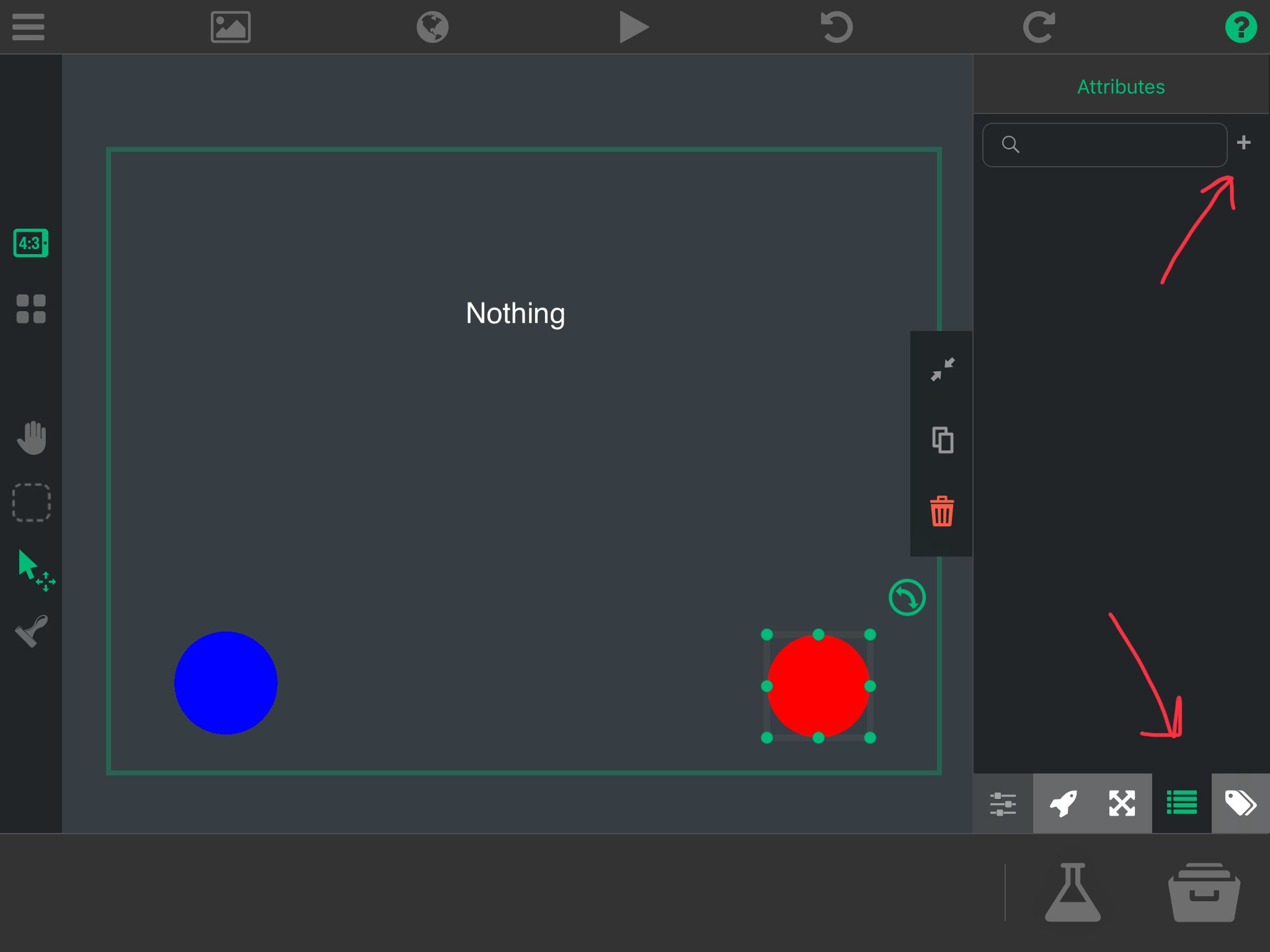
                                      @SplitMindGaming Personally, I learned everything I know in hyperPad through trial and error sort of (plus reading the descriptions of each behaviour). If attributes are confusing to you, I would suggest toying with the behaviours in a seperate test project until you understand how they work.

                                      I would use the preset ones to start with, dynamic are a bit more advanced. First you have to create the attribute, and then you can start using get/set attribute on it. 6F657097-F997-4E1D-B0D8-D23C2D6DDEFA.jpeg
                                      1 Reply Last reply
                                      0
                                      • KamdroidK Kamdroid

                                        Easy way to save player position

                                        Collided with checkpoint
                                        ↓
                                        Get player x
                                        Get player y
                                        ↓
                                        Store x and y in array
                                        Either use array behaviour, or combine text like "[" + x + "," + y + "]"
                                        ↓
                                        Save array to file

                                        Then you simply load that file, and use get array item behaviour (index 0 and 1)


                                        For saving if player entered a secret area, just use save and load file. Something named like "door1" set to 1 if entered, 0 if not.

                                        FYI use an if statement

                                        SplitMindGamingS Offline
                                        SplitMindGamingS Offline
                                        SplitMindGaming
                                        wrote on last edited by
                                        #32

                                        @Kamdroid i like that door 1 set to 1 if entered and 0 if Not entered. Im just guessing here but would that look something like this. The behaviors are in ( )

                                        If ( collided ) with door 1 object
                                        ( set attribute ) entered
                                        ( add value ) + 1

                                        1 Reply Last reply
                                        0

                                        Hello! It looks like you're interested in this conversation, but you don't have an account yet.

                                        Getting fed up of having to scroll through the same posts each visit? When you register for an account, you'll always come back to exactly where you were before, and choose to be notified of new replies (either via email, or push notification). You'll also be able to save bookmarks and upvote posts to show your appreciation to other community members.

                                        With your input, this post could be even better 💗

                                        Register Login
                                        Reply
                                        • Reply as topic
                                        Log in to reply
                                        • Oldest to Newest
                                        • Newest to Oldest
                                        • Most Votes


                                        • Login

                                        • Login or register to search.
                                        • First post
                                          Last post
                                        0
                                        • Categories
                                        • Recent
                                        • Tags
                                        • Popular
                                        • Users
                                        • Search

