Skip to content
  • Categories
  • Recent
  • Tags
  • Popular
  • Users
  • Search
Skins
  • Light
  • Brite
  • Cerulean
  • Cosmo
  • Flatly
  • Journal
  • Litera
  • Lumen
  • Lux
  • Materia
  • Minty
  • Morph
  • Pulse
  • Sandstone
  • Simplex
  • Sketchy
  • Spacelab
  • United
  • Yeti
  • Zephyr
  • Dark
  • Cyborg
  • Darkly
  • Quartz
  • Slate
  • Solar
  • Superhero
  • Vapor

  • Default (No Skin)
  • No Skin
Collapse
hyperPad

hyperPad Forum

  1. Home
  2. Comments & Feedback
  3. Would love to add my own thumbnail

Would love to add my own thumbnail

Scheduled Pinned Locked Moved Comments & Feedback
6 Posts 4 Posters 853 Views 1 Watching
  • Oldest to Newest
  • Newest to Oldest
  • Most Votes
Reply
  • Reply as topic
Log in to reply
This topic has been deleted. Only users with topic management privileges can see it.
  • SplitMindGamingS Offline
    SplitMindGamingS Offline
    SplitMindGaming
    wrote on last edited by
    #1

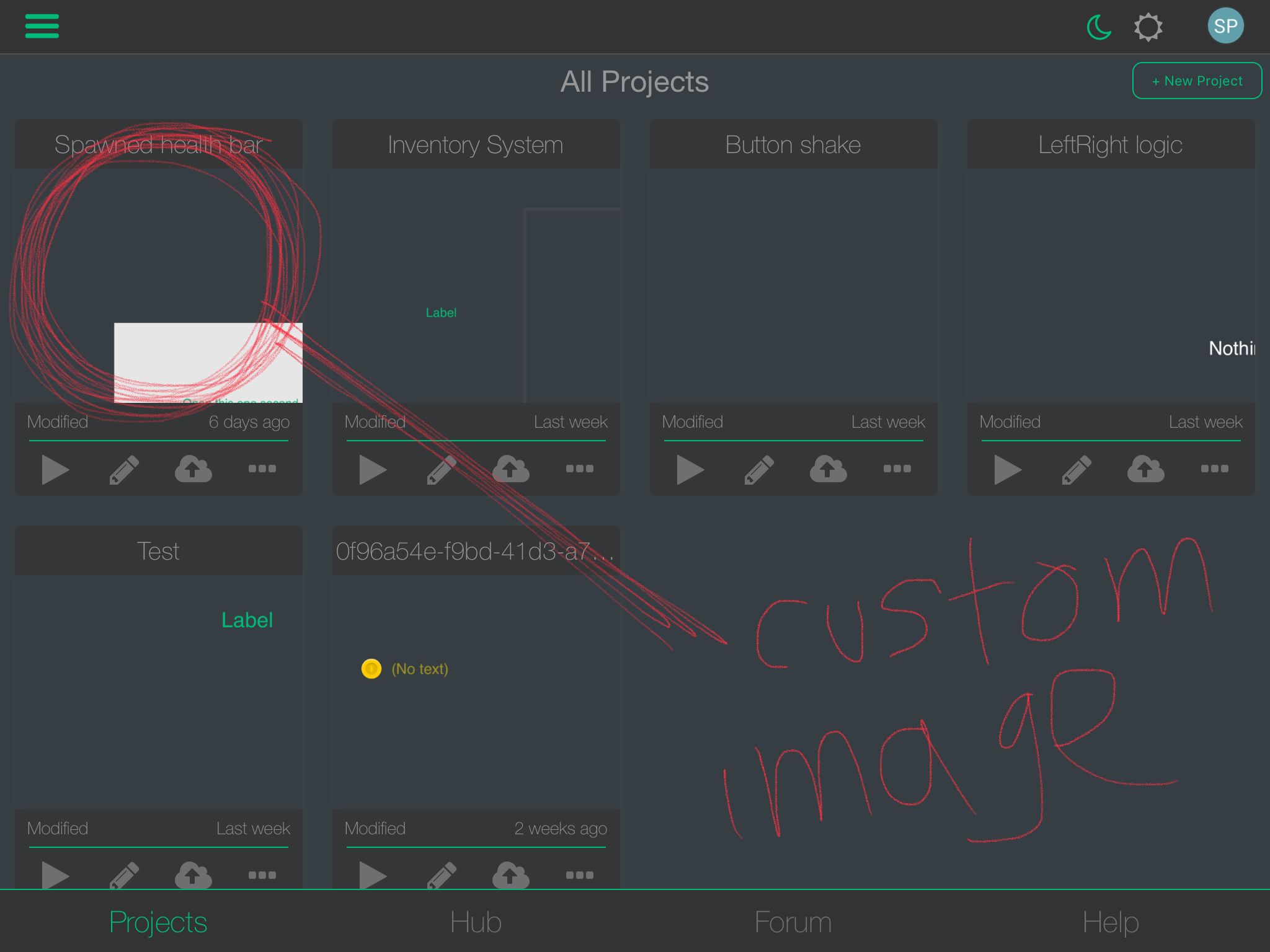
    Would love to add my own thumbnail within the projects u.i. Be nice to have all my actual game thumbnails this way when you open up your projects it looks all nice and pretty you know :) i put a screenshot of what im talking about64CCC82D-2927-48FE-8BDB-D4B55C56B1B9.jpeg

    Aidan_FireA MelideM 2 Replies Last reply
    1
    • SplitMindGamingS SplitMindGaming

      Would love to add my own thumbnail within the projects u.i. Be nice to have all my actual game thumbnails this way when you open up your projects it looks all nice and pretty you know :) i put a screenshot of what im talking about64CCC82D-2927-48FE-8BDB-D4B55C56B1B9.jpeg

      Aidan_FireA Offline
      Aidan_FireA Offline
      Aidan_Fire
      wrote on last edited by
      #2

      @SplitMindGaming Yeah I agree. I only know one proper way of changing the thumbnail at the moment: upload your project to the hub and the thumbnail will change to one of the images you upload with the project. But it would be nicer to be able to change it without doing that.

      1 Reply Last reply
      1
      • SplitMindGamingS SplitMindGaming

        Would love to add my own thumbnail within the projects u.i. Be nice to have all my actual game thumbnails this way when you open up your projects it looks all nice and pretty you know :) i put a screenshot of what im talking about64CCC82D-2927-48FE-8BDB-D4B55C56B1B9.jpeg

        MelideM Offline
        MelideM Offline
        Melide
        wrote on last edited by
        #3

        @SplitMindGaming It would be great yes!

        1 Reply Last reply
        0
        • RobinsonXR Offline
          RobinsonXR Offline
          RobinsonX
          wrote on last edited by
          #4

          I'm pretty sure you can edit the screenshot by going into the Files app, opening the hyperPad files and replacing the thumbnail image in your project folder to change it. (I don't know if it actually works.)

          This is a tedious work-around and hyperPad automatically updates the thumbnail each time you edit in your project.. 🤷‍♂️

          SplitMindGamingS 1 Reply Last reply
          0
          • RobinsonXR RobinsonX

            I'm pretty sure you can edit the screenshot by going into the Files app, opening the hyperPad files and replacing the thumbnail image in your project folder to change it. (I don't know if it actually works.)

            This is a tedious work-around and hyperPad automatically updates the thumbnail each time you edit in your project.. 🤷‍♂️

            SplitMindGamingS Offline
            SplitMindGamingS Offline
            SplitMindGaming
            wrote on last edited by
            #5

            @RobinsonX just tried to do this and i dont see the actual hyperpad app in there. Only the viewer app.

            SplitMindGamingS 1 Reply Last reply
            0
            • SplitMindGamingS SplitMindGaming

              @RobinsonX just tried to do this and i dont see the actual hyperpad app in there. Only the viewer app.

              SplitMindGamingS Offline
              SplitMindGamingS Offline
              SplitMindGaming
              wrote on last edited by
              #6

              And your right. Even if we could get that to work we would constantly have to keep updating the screenshot as it automatically creates a new one.


              1 Reply Last reply
              0

              Hello! It looks like you're interested in this conversation, but you don't have an account yet.

              Getting fed up of having to scroll through the same posts each visit? When you register for an account, you'll always come back to exactly where you were before, and choose to be notified of new replies (either via email, or push notification). You'll also be able to save bookmarks and upvote posts to show your appreciation to other community members.

              With your input, this post could be even better 💗

              Register Login
              Reply
              • Reply as topic
              Log in to reply
              • Oldest to Newest
              • Newest to Oldest
              • Most Votes


              • Login

              • Login or register to search.
              • First post
                Last post
              0
              • Categories
              • Recent
              • Tags
              • Popular
              • Users
              • Search