Skip to content
  • Categories
  • Recent
  • Tags
  • Popular
  • Users
  • Search
Skins
  • Light
  • Brite
  • Cerulean
  • Cosmo
  • Flatly
  • Journal
  • Litera
  • Lumen
  • Lux
  • Materia
  • Minty
  • Morph
  • Pulse
  • Sandstone
  • Simplex
  • Sketchy
  • Spacelab
  • United
  • Yeti
  • Zephyr
  • Dark
  • Cyborg
  • Darkly
  • Quartz
  • Slate
  • Solar
  • Superhero
  • Vapor

  • Default (No Skin)
  • No Skin
Collapse
hyperPad

hyperPad Forum

  1. Home
  2. Help and Support
  3. Optimizing objects

Optimizing objects

Scheduled Pinned Locked Moved Help and Support
18 Posts 4 Posters 3.1k Views 1 Watching
  • Oldest to Newest
  • Newest to Oldest
  • Most Votes
Reply
  • Reply as topic
Log in to reply
This topic has been deleted. Only users with topic management privileges can see it.
  • StanicaS Offline
    StanicaS Offline
    Stanica
    wrote on last edited by
    #1

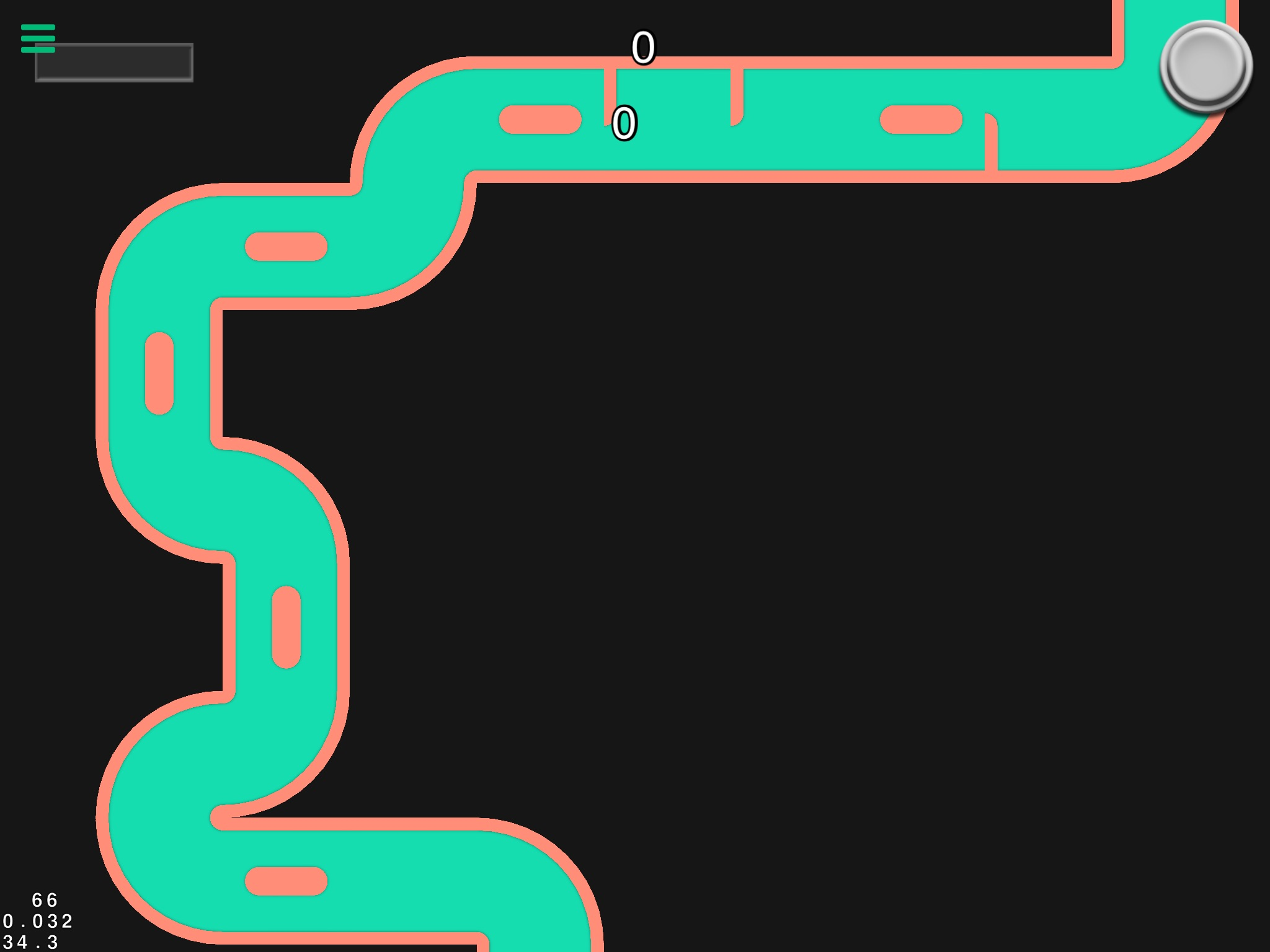
    Does anyone have tips for optimizing objects? My game drops to under 35 FPS with 66 objects on the screen. Some of the objects are backgrounds and some are walls with collision masks. There isn't a whole lot going on so I'm hoping I can do something to make performance better.

    This is what it looks like:
    Screenshot 2020-05-04 at 11.36.27 PM.png

    SplitMindGamingS 1 Reply Last reply
    0
    • StanicaS Stanica

      Does anyone have tips for optimizing objects? My game drops to under 35 FPS with 66 objects on the screen. Some of the objects are backgrounds and some are walls with collision masks. There isn't a whole lot going on so I'm hoping I can do something to make performance better.

      This is what it looks like:

      Screenshot 2020-05-04 at 11.36.27 PM.png

      SplitMindGamingS Offline
      SplitMindGamingS Offline
      SplitMindGaming
      wrote on last edited by
      #2

      @Stanica I had this same issue with FPS dropping. The answer lies on this. Are you constantly spawning new items? Or are all 60 items already in the game once you hit start.

      1 Reply Last reply
      0
      • StanicaS Offline
        StanicaS Offline
        Stanica
        wrote on last edited by
        #3

        All objects are rendered at the beginning of the scene. I don't have any loops running in the background either.

        SplitMindGamingS 1 Reply Last reply
        0
        • StanicaS Stanica

          All objects are rendered at the beginning of the scene. I don't have any loops running in the background either.

          SplitMindGamingS Offline
          SplitMindGamingS Offline
          SplitMindGaming
          wrote on last edited by
          #4

          @Stanica this is what helped me. You mentioned that you had some bg objects which is good. Be sure to make all objects that don’t have any collisions and set them as a background object. Also try adding all your coding into one main object. For example create an empty label and call it Game Logic. From there add all your coding to that label. That alone should help with performance issues drastically. It’s a pain to do as it’s much easier to have all the logic within the main object. But for some reason this helps greatly.

          SplitMindGamingS StanicaS 2 Replies Last reply
          1
          • SplitMindGamingS SplitMindGaming

            @Stanica this is what helped me. You mentioned that you had some bg objects which is good. Be sure to make all objects that don’t have any collisions and set them as a background object. Also try adding all your coding into one main object. For example create an empty label and call it Game Logic. From there add all your coding to that label. That alone should help with performance issues drastically. It’s a pain to do as it’s much easier to have all the logic within the main object. But for some reason this helps greatly.

            SplitMindGamingS Offline
            SplitMindGamingS Offline
            SplitMindGaming
            wrote on last edited by
            #5

            @SplitMindGaming if your game has a main menu right before it starts. Preload the next scene before hand.

            1 Reply Last reply
            0
            • SplitMindGamingS SplitMindGaming

              @Stanica this is what helped me. You mentioned that you had some bg objects which is good. Be sure to make all objects that don’t have any collisions and set them as a background object. Also try adding all your coding into one main object. For example create an empty label and call it Game Logic. From there add all your coding to that label. That alone should help with performance issues drastically. It’s a pain to do as it’s much easier to have all the logic within the main object. But for some reason this helps greatly.

              StanicaS Offline
              StanicaS Offline
              Stanica
              wrote on last edited by
              #6

              @SplitMindGaming That's exactly what I've done. The greenish path in the picture is a bunch of background objects without collisions. Only the salmon colored sections are walls. Most of my logic is inside an empty label called Game Logic. If I pan the camera so that a smaller number of objects are in view, the FPS jumps back to 60 so I suspect it's the collision masks that are causing the slowdown.

              SplitMindGamingS 1 Reply Last reply
              0
              • StanicaS Stanica

                @SplitMindGaming That's exactly what I've done. The greenish path in the picture is a bunch of background objects without collisions. Only the salmon colored sections are walls. Most of my logic is inside an empty label called Game Logic. If I pan the camera so that a smaller number of objects are in view, the FPS jumps back to 60 so I suspect it's the collision masks that are causing the slowdown.

                SplitMindGamingS Offline
                SplitMindGamingS Offline
                SplitMindGaming
                wrote on last edited by
                #7

                @Stanica yeah that could be the cause also. 60 objects is a pretty big number imo. My main scene on my game has at the most 30 items and I was already dealing with FPS issues as well. My only other recommendation is to possibly recycle those images on view. For example have only like 20 objects on scene and constantly move them to the players view.

                StanicaS 1 Reply Last reply
                0
                • SplitMindGamingS SplitMindGaming

                  @Stanica yeah that could be the cause also. 60 objects is a pretty big number imo. My main scene on my game has at the most 30 items and I was already dealing with FPS issues as well. My only other recommendation is to possibly recycle those images on view. For example have only like 20 objects on scene and constantly move them to the players view.

                  StanicaS Offline
                  StanicaS Offline
                  Stanica
                  wrote on last edited by
                  #8

                  @SplitMindGaming Unfortunately, the course is procedurally generated so I can't do anything fancy like render only the part of the course that's currently visible. If I could set a seed for the random number generator then I might be able to....

                  1 Reply Last reply
                  0
                  • MurtazaM Offline
                    MurtazaM Offline
                    Murtaza
                    Admin
                    wrote on last edited by
                    #9

                    How large are your graphics? and how much transparent space is there? Transparency really kills performance. You should try to crop as tightly around your objects as possible.

                    StanicaS 1 Reply Last reply
                    1
                    • Aidan_FireA Offline
                      Aidan_FireA Offline
                      Aidan_Fire
                      wrote on last edited by
                      #10

                      You should be able to have more than 60 objects out without having lots of lag. If you want to you could upload your project for me/anyone else to look at and see if they can help find causes of lag (my iPad is expert at this cause it's already laggy 😛)

                      1 Reply Last reply
                      1
                      • MurtazaM Murtaza

                        How large are your graphics? and how much transparent space is there? Transparency really kills performance. You should try to crop as tightly around your objects as possible.

                        StanicaS Offline
                        StanicaS Offline
                        Stanica
                        wrote on last edited by
                        #11

                        @Murtaza said in Optimizing objects:

                        How large are your graphics? and how much transparent space is there? Transparency really kills performance. You should try to crop as tightly around your objects as possible.

                        Each sprite is 2048x2048, scaled down to 10% with no transparency.

                        @Aidan-Oxley said in Optimizing objects:

                        You should be able to have more than 60 objects out without having lots of lag. If you want to you could upload your project for me/anyone else to look at and see if they can help find causes of lag (my iPad is expert at this cause it's already laggy 😛)

                        I might take you up on that if I can't find a suitable fix.

                        Aidan_FireA 1 Reply Last reply
                        0
                        • StanicaS Stanica

                          @Murtaza said in Optimizing objects:

                          How large are your graphics? and how much transparent space is there? Transparency really kills performance. You should try to crop as tightly around your objects as possible.

                          Each sprite is 2048x2048, scaled down to 10% with no transparency.

                          @Aidan-Oxley said in Optimizing objects:

                          You should be able to have more than 60 objects out without having lots of lag. If you want to you could upload your project for me/anyone else to look at and see if they can help find causes of lag (my iPad is expert at this cause it's already laggy 😛)

                          I might take you up on that if I can't find a suitable fix.

                          Aidan_FireA Offline
                          Aidan_FireA Offline
                          Aidan_Fire
                          wrote on last edited by
                          #12

                          @Stanica That's massive. If you can, scale down the actual image size so that your objects can exist at 100%. You should get the same quality images but way less lag.

                          StanicaS 1 Reply Last reply
                          0
                          • Aidan_FireA Aidan_Fire

                            @Stanica That's massive. If you can, scale down the actual image size so that your objects can exist at 100%. You should get the same quality images but way less lag.

                            StanicaS Offline
                            StanicaS Offline
                            Stanica
                            wrote on last edited by
                            #13

                            @Aidan-Oxley I'll try that or increasing their size to 20% so there are fewer objects on screen at once.

                            Aidan_FireA 1 Reply Last reply
                            0
                            • StanicaS Stanica

                              @Aidan-Oxley I'll try that or increasing their size to 20% so there are fewer objects on screen at once.

                              Aidan_FireA Offline
                              Aidan_FireA Offline
                              Aidan_Fire
                              wrote on last edited by Aidan_Fire
                              #14

                              @Stanica If your image editor allows it, scale your sprites down to 205 × 205 pixels, and then replace your objects with those and scale them to 100%. They should look exactly the same, I think. Yeah having fewer objects can help a bit, like if you can combine some tiles that don't do much from 2 or more separate objects into one, especially if they are background objects that don't move.

                              StanicaS 1 Reply Last reply
                              0
                              • Aidan_FireA Aidan_Fire

                                @Stanica If your image editor allows it, scale your sprites down to 205 × 205 pixels, and then replace your objects with those and scale them to 100%. They should look exactly the same, I think. Yeah having fewer objects can help a bit, like if you can combine some tiles that don't do much from 2 or more separate objects into one, especially if they are background objects that don't move.

                                StanicaS Offline
                                StanicaS Offline
                                Stanica
                                wrote on last edited by
                                #15

                                @Aidan-Oxley 👍

                                SplitMindGamingS 1 Reply Last reply
                                0
                                • StanicaS Stanica

                                  @Aidan-Oxley 👍

                                  SplitMindGamingS Offline
                                  SplitMindGamingS Offline
                                  SplitMindGaming
                                  wrote on last edited by
                                  #16

                                  @Stanica that has to be the problem right there. 2048 x 2048 for each sprite. Yeah I always try to make each of my object the exact size it needs to be without having hyperPad constantly tell the code to resize the image. The less instructions you can have hyperPad make. The better. Scaling it down to the actual size. Removing all the empty space borders. If you have photoshop the best way to really crop it perfect is to to go to file. Then export to layers. This will crop each image perfectly.

                                  1 Reply Last reply
                                  1
                                  • MurtazaM Offline
                                    MurtazaM Offline
                                    Murtaza
                                    Admin
                                    wrote on last edited by
                                    #17

                                    Yeah the image size is definitely affecting your performance.

                                    As the rest have suggested, try making it the actual size you need. For something like this that will be used to create a procedurally generated level I would avoid going beyond 256x256 pixels.


                                    1 Reply Last reply
                                    1
                                    • StanicaS Offline
                                      StanicaS Offline
                                      Stanica
                                      wrote on last edited by
                                      #18

                                      Thanks for the tips everyone. Managed to fix all performance issues by decreasing the size of my assets!

                                      1 Reply Last reply
                                      1

                                      Hello! It looks like you're interested in this conversation, but you don't have an account yet.

                                      Getting fed up of having to scroll through the same posts each visit? When you register for an account, you'll always come back to exactly where you were before, and choose to be notified of new replies (either via email, or push notification). You'll also be able to save bookmarks and upvote posts to show your appreciation to other community members.

                                      With your input, this post could be even better 💗

                                      Register Login
                                      Reply
                                      • Reply as topic
                                      Log in to reply
                                      • Oldest to Newest
                                      • Newest to Oldest
                                      • Most Votes


                                      • Login

                                      • Login or register to search.
                                      • First post
                                        Last post
                                      0
                                      • Categories
                                      • Recent
                                      • Tags
                                      • Popular
                                      • Users
                                      • Search

