Skip to content
  • Categories
  • Recent
  • Tags
  • Popular
  • Users
  • Search
Skins
  • Light
  • Brite
  • Cerulean
  • Cosmo
  • Flatly
  • Journal
  • Litera
  • Lumen
  • Lux
  • Materia
  • Minty
  • Morph
  • Pulse
  • Sandstone
  • Simplex
  • Sketchy
  • Spacelab
  • United
  • Yeti
  • Zephyr
  • Dark
  • Cyborg
  • Darkly
  • Quartz
  • Slate
  • Solar
  • Superhero
  • Vapor

  • Default (No Skin)
  • No Skin
Collapse
hyperPad

hyperPad Forum

  1. Home
  2. Help and Support
  3. Character movement

Character movement

Scheduled Pinned Locked Moved Help and Support
character
5 Posts 2 Posters 978 Views 1 Watching
  • Oldest to Newest
  • Newest to Oldest
  • Most Votes
Reply
  • Reply as topic
Log in to reply
This topic has been deleted. Only users with topic management privileges can see it.
  • Dezmo369D Offline
    Dezmo369D Offline
    Dezmo369
    wrote on last edited by
    #1

    There’s a lot I want to do with this so please bare with me but here goes

    I want movement based on the finger moving across the screen that would sling the character in the opposite direction. ( like a bow and arrow)

    While holding this would slow the world down just a bit until the finger is released and then the character would move.

    Force would be equal to how far the finger was pulled back

    Any ideas? I’m very new to this and am having a hard time figuring out how to even start

    1 Reply Last reply
    1
    • RobinsonXR Offline
      RobinsonXR Offline
      RobinsonX
      wrote on last edited by
      #2

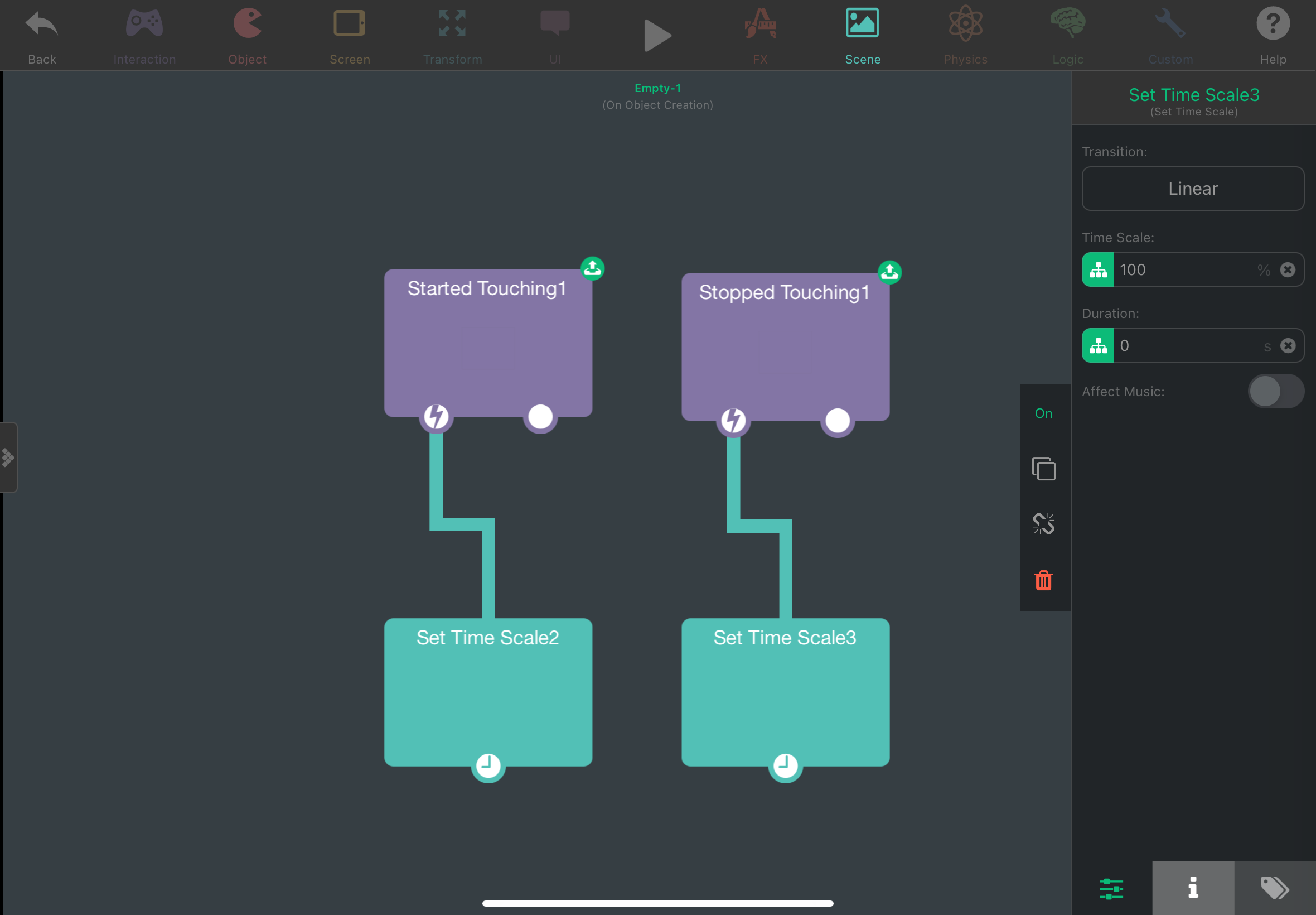
      7BFDB675-227C-4A5D-993E-1A716678132E.png
      You can use the Set Time Scale behavior to make the world go slower / faster. 100% is normal speed, 50% is half the normal speed and 200% is twice the normal speed.

      1 Reply Last reply
      0
      • RobinsonXR Offline
        RobinsonXR Offline
        RobinsonX
        wrote on last edited by
        #3

        The world will slow down when the player started touching the screen and the world goes back to normal speed when stopped touching. Now the object that is being touched would take the entire screen so the player can tap anywhere. :)

        About the flinging part, you would Subtract the positions from the stopped touching behavior from the positions of the started touching behavior. This will give you the difference between the two positions that can be used in Apply Force to fling your object.

        If you need any clarification, please reply!

        Dezmo369D 1 Reply Last reply
        0
        • RobinsonXR RobinsonX

          The world will slow down when the player started touching the screen and the world goes back to normal speed when stopped touching. Now the object that is being touched would take the entire screen so the player can tap anywhere. :)

          About the flinging part, you would Subtract the positions from the stopped touching behavior from the positions of the started touching behavior. This will give you the difference between the two positions that can be used in Apply Force to fling your object.

          If you need any clarification, please reply!

          Dezmo369D Offline
          Dezmo369D Offline
          Dezmo369
          wrote on last edited by
          #4

          @RobinsonX
          Could you send a pic of your map, mines seems to still not work sadly

          It goes stopped touching > set time scale\get position>subtract values> apple force.

          Sorry still really new to this

          But THANK YOU SO MUCH

          1 Reply Last reply
          1
          • RobinsonXR Offline
            RobinsonXR Offline
            RobinsonX
            wrote on last edited by
            #5

            Get position uses the position of an object. In this case you want the position of where the player touched, so you use x and y from Started Touching and Stopped Touching

            1 Reply Last reply
            0

            Hello! It looks like you're interested in this conversation, but you don't have an account yet.

            Getting fed up of having to scroll through the same posts each visit? When you register for an account, you'll always come back to exactly where you were before, and choose to be notified of new replies (either via email, or push notification). You'll also be able to save bookmarks and upvote posts to show your appreciation to other community members.

            With your input, this post could be even better 💗

            Register Login
            Reply
            • Reply as topic
            Log in to reply
            • Oldest to Newest
            • Newest to Oldest
            • Most Votes


            • Login

            • Login or register to search.
            • First post
              Last post
            0
            • Categories
            • Recent
            • Tags
            • Popular
            • Users
            • Search