Skip to content
  • Categories
  • Recent
  • Tags
  • Popular
  • Users
  • Search
Skins
  • Light
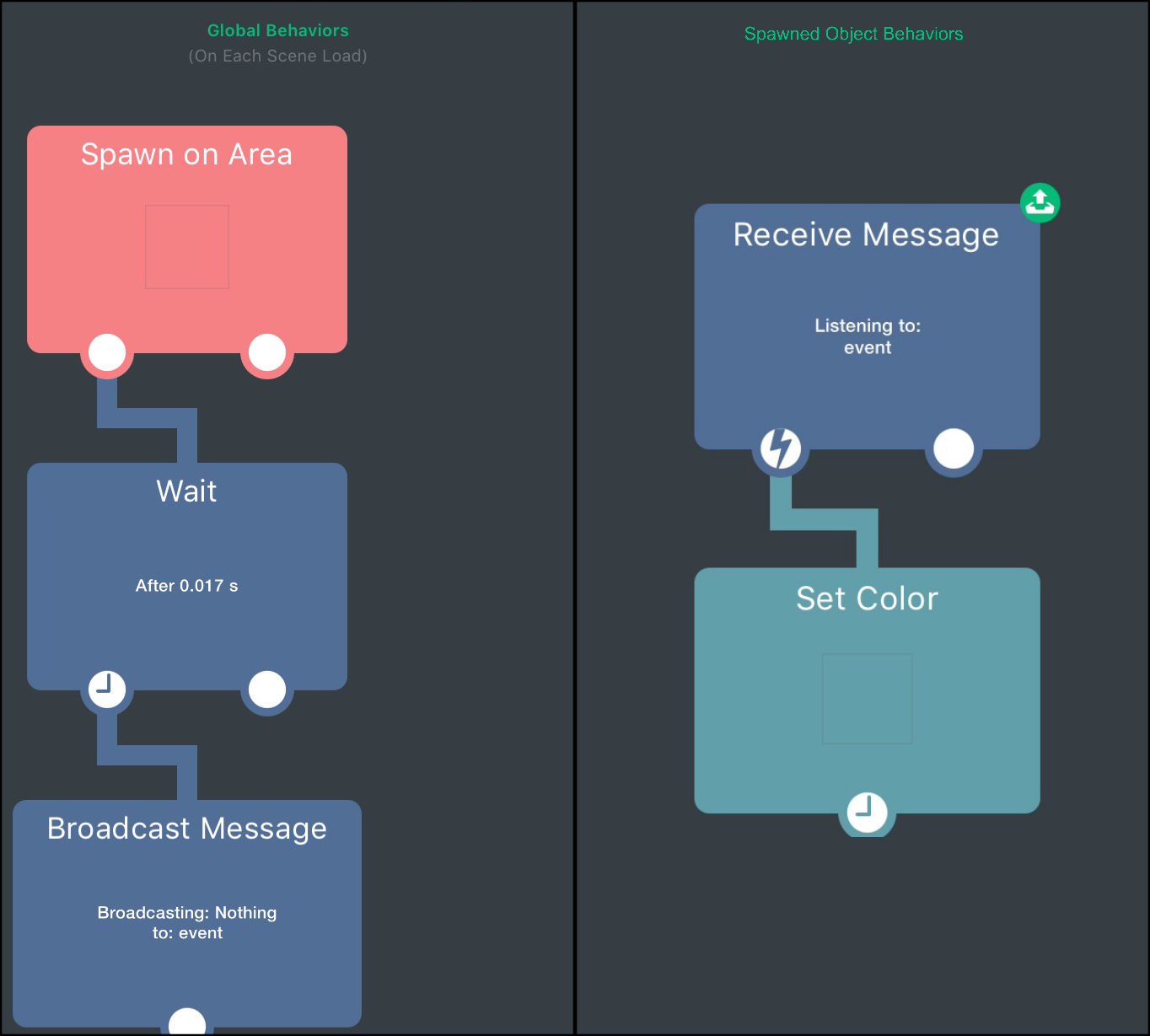
  • Brite
  • Cerulean
  • Cosmo
  • Flatly
  • Journal
  • Litera
  • Lumen
  • Lux
  • Materia
  • Minty
  • Morph
  • Pulse
  • Sandstone
  • Simplex
  • Sketchy
  • Spacelab
  • United
  • Yeti
  • Zephyr
  • Dark
  • Cyborg
  • Darkly
  • Quartz
  • Slate
  • Solar
  • Superhero
  • Vapor

  • Default (No Skin)
  • No Skin
Collapse
hyperPad

hyperPad Forum

  1. Home
  2. Help and Support
  3. Spawned Objects with Receive Message, only original works?

Spawned Objects with Receive Message, only original works?

Scheduled Pinned Locked Moved Help and Support
20 Posts 5 Posters 1.6k Views 3 Watching
  • Oldest to Newest
  • Newest to Oldest
  • Most Votes
Reply
  • Reply as topic
Log in to reply
This topic has been deleted. Only users with topic management privileges can see it.
  • D Offline
    D Offline
    Deeeds
    wrote on last edited by Deeeds
    #1

    Spawn a few objects that all have a "receive message" set to a given Event key.

    Does only the original object receive messages?

    UPDATES:
    My testing:

    1. Spawn ten objects, destroy original.
      None of the spawned objects receive the message.

    2. Don't destroy original
      None of the spawned objects receive the message, nor does the original.

    In both cases, a dummy object created to test the message is being sent is happily getting the message.

    iTap DevelopmentI 1 Reply Last reply
    0
    • D Deeeds

      Spawn a few objects that all have a "receive message" set to a given Event key.

      Does only the original object receive messages?

      UPDATES:
      My testing:

      1. Spawn ten objects, destroy original.
        None of the spawned objects receive the message.

      2. Don't destroy original
        None of the spawned objects receive the message, nor does the original.

      In both cases, a dummy object created to test the message is being sent is happily getting the message.

      iTap DevelopmentI Offline
      iTap DevelopmentI Offline
      iTap Development
      wrote on last edited by
      #2

      @Deeeds if they all have the same event key, then they should all receive the messages.

      D 1 Reply Last reply
      0
      • iTap DevelopmentI iTap Development

        @Deeeds if they all have the same event key, then they should all receive the messages.

        D Offline
        D Offline
        Deeeds
        wrote on last edited by
        #3

        @iTap-Development "should"... and you know this how?

        iTap DevelopmentI 1 Reply Last reply
        0
        • D Deeeds

          @iTap-Development "should"... and you know this how?

          iTap DevelopmentI Offline
          iTap DevelopmentI Offline
          iTap Development
          wrote on last edited by
          #4

          @Deeeds that discernment you referred to.

          D 1 Reply Last reply
          0
          • iTap DevelopmentI iTap Development

            @Deeeds that discernment you referred to.

            D Offline
            D Offline
            Deeeds
            wrote on last edited by
            #5

            @iTap-Development

            So it's not documented, nor otherwise known.

            Got it.

            Thanks for your "help".

            iTap DevelopmentI Jack de WildeJ 2 Replies Last reply
            0
            • D Deeeds

              @iTap-Development

              So it's not documented, nor otherwise known.

              Got it.

              Thanks for your "help".

              iTap DevelopmentI Offline
              iTap DevelopmentI Offline
              iTap Development
              wrote on last edited by
              #6

              @Deeeds just made a test project(surprise!) and it is as I said.

              D 1 Reply Last reply
              0
              • iTap DevelopmentI iTap Development

                @Deeeds just made a test project(surprise!) and it is as I said.

                D Offline
                D Offline
                Deeeds
                wrote on last edited by
                #7

                @iTap-Development See my updates. I'm not seeing the same as you.

                iTap DevelopmentI 1 Reply Last reply
                0
                • D Deeeds

                  @iTap-Development See my updates. I'm not seeing the same as you.

                  iTap DevelopmentI Offline
                  iTap DevelopmentI Offline
                  iTap Development
                  wrote on last edited by
                  #8

                  @Deeeds are you broadcasting right after spawning? Because if my spawn triggered the broadcast, It didn’t work.

                  D 1 Reply Last reply
                  0
                  • D Deeeds

                    @iTap-Development

                    So it's not documented, nor otherwise known.

                    Got it.

                    Thanks for your "help".

                    Jack de WildeJ Offline
                    Jack de WildeJ Offline
                    Jack de Wilde
                    wrote on last edited by
                    #9

                    @Deeeds they can receive the message. I'm guessing part of the problem might be that you're broadcasting and spawning in the same tick.

                    When an object is spawned its behaviours don't activate until the next tick, so you can wait about 0.017s and it should work.

                    If you're not destroying the original then the original should receive the message... Typo? It's case sensitive.

                    D 1 Reply Last reply
                    0
                    • iTap DevelopmentI iTap Development

                      @Deeeds are you broadcasting right after spawning? Because if my spawn triggered the broadcast, It didn’t work.

                      D Offline
                      D Offline
                      Deeeds
                      wrote on last edited by
                      #10

                      @iTap-Development No. I'm spawning at the start of the game, then, much later, sending broadcasts.

                      1 Reply Last reply
                      0
                      • Jack de WildeJ Jack de Wilde

                        @Deeeds they can receive the message. I'm guessing part of the problem might be that you're broadcasting and spawning in the same tick.

                        When an object is spawned its behaviours don't activate until the next tick, so you can wait about 0.017s and it should work.

                        If you're not destroying the original then the original should receive the message... Typo? It's case sensitive.

                        D Offline
                        D Offline
                        Deeeds
                        wrote on last edited by
                        #11

                        @Jack8680 No, not spawning and sending.

                        The objects are created at the beginning of the game/scene.

                        The messages are sent much later.

                        The original is ALSO not receiving the messages.

                        Jack de WildeJ 1 Reply Last reply
                        0
                        • D Deeeds

                          @Jack8680 No, not spawning and sending.

                          The objects are created at the beginning of the game/scene.

                          The messages are sent much later.

                          The original is ALSO not receiving the messages.

                          Jack de WildeJ Offline
                          Jack de WildeJ Offline
                          Jack de Wilde
                          wrote on last edited by
                          #12

                          @Deeeds that doesn't make sense. Can you reproduce it in a different project? I just made a test project and all my objects including the original receive the message:
                          0_1512711921227_IMG_0627.JPG

                          D 1 Reply Last reply
                          0
                          • Jack de WildeJ Jack de Wilde

                            @Deeeds that doesn't make sense. Can you reproduce it in a different project? I just made a test project and all my objects including the original receive the message:
                            0_1512711921227_IMG_0627.JPG

                            D Offline
                            D Offline
                            Deeeds
                            wrote on last edited by
                            #13

                            @Jack8680 I've just "solved" the problem.

                            Out of curiousness, I created a new message receiver, and gave it the same event key, and hooked it up. It worked. The other one still does not, they contain the same key.

                            The receiver that isn't working was a duplication of a different receiver, and has had its Event Key changed a couple of times, that I can remember. It seems to not work for its original key, nor for the new key, or any key that's given to it.

                            It's still sitting in my project, up above the newly made and working message receiver, doing nothing.

                            If you want to try to recreate this, it's got something to do with duplicating a receiver and then changing its event key more than once.

                            Jack de WildeJ 1 Reply Last reply
                            0
                            • D Deeeds

                              @Jack8680 I've just "solved" the problem.

                              Out of curiousness, I created a new message receiver, and gave it the same event key, and hooked it up. It worked. The other one still does not, they contain the same key.

                              The receiver that isn't working was a duplication of a different receiver, and has had its Event Key changed a couple of times, that I can remember. It seems to not work for its original key, nor for the new key, or any key that's given to it.

                              It's still sitting in my project, up above the newly made and working message receiver, doing nothing.

                              If you want to try to recreate this, it's got something to do with duplicating a receiver and then changing its event key more than once.

                              Jack de WildeJ Offline
                              Jack de WildeJ Offline
                              Jack de Wilde
                              wrote on last edited by
                              #14

                              @Deeeds could there be a space after the non-working receive message's key?

                              D 1 Reply Last reply
                              0
                              • Jack de WildeJ Jack de Wilde

                                @Deeeds could there be a space after the non-working receive message's key?

                                D Offline
                                D Offline
                                Deeeds
                                wrote on last edited by Deeeds
                                #15

                                @Jack8680 No. I thought this, too. And have changed the key in each situation very carefully before posting the initial question. And tried many many other keys, both digits and alphanumeric, thinking that might be a problem, too.

                                I also found something else interesting, during that - using 000 as a key is auto-reduced to 0, but shows as 000 in the behaviour's visual representation of itself. And the receivers also auto-reduce this, when set to 000, retaining the visual representation of being 000, but are actually 0. But it all works, even if they are reduced and treated as ints as keys whilst strings as representations of their former selves.

                                D 1 Reply Last reply
                                0
                                • D Deeeds

                                  @Jack8680 No. I thought this, too. And have changed the key in each situation very carefully before posting the initial question. And tried many many other keys, both digits and alphanumeric, thinking that might be a problem, too.

                                  I also found something else interesting, during that - using 000 as a key is auto-reduced to 0, but shows as 000 in the behaviour's visual representation of itself. And the receivers also auto-reduce this, when set to 000, retaining the visual representation of being 000, but are actually 0. But it all works, even if they are reduced and treated as ints as keys whilst strings as representations of their former selves.

                                  D Offline
                                  D Offline
                                  Deeeds
                                  wrote on last edited by
                                  #16

                                  @Jack8680

                                  I've further isolated how this happens:

                                  I have a factory, it makes objects with IDs based on their initial x position and a Box Container "constant" name. These two things are combined with the text combination behaviour, and then the receive message is set to this result, or to another box container that stores this result. If I switch the receiver from the box container with the result to the combine text behaviour's result and then to custom arbitrary values in a duplicate, the receiver doesn't work for anything. Ever. Might as well just delete it and make a new one.

                                  1 Reply Last reply
                                  0
                                  • RobinsonXR Offline
                                    RobinsonXR Offline
                                    RobinsonX
                                    wrote on last edited by
                                    #17

                                    There is a teeny tiny glitch with this. I understand you. You just need the event key to have some data in it and whenever an object receives a broadcast, it would work. If it doesn't work, just add a conditional IF behavior.

                                    D 1 Reply Last reply
                                    0
                                    • RobinsonXR RobinsonX

                                      There is a teeny tiny glitch with this. I understand you. You just need the event key to have some data in it and whenever an object receives a broadcast, it would work. If it doesn't work, just add a conditional IF behavior.

                                      D Offline
                                      D Offline
                                      Deeeds
                                      wrote on last edited by
                                      #18

                                      @RobinsonX Huh? I'm sorry. I'm not following you, at all.

                                      How does an IF solve any of this?

                                      1 Reply Last reply
                                      0
                                      • HamedH Offline
                                        HamedH Offline
                                        Hamed
                                        Admin
                                        wrote on last edited by
                                        #19

                                        I think I may know the issue. When you change the event key, you need to use behaviour On on the receive message for it to "Get" the new key. Unless you're typing the key manually in the field, then it sounds like a bug.

                                        D 1 Reply Last reply
                                        0
                                        • HamedH Hamed

                                          I think I may know the issue. When you change the event key, you need to use behaviour On on the receive message for it to "Get" the new key. Unless you're typing the key manually in the field, then it sounds like a bug.

                                          D Offline
                                          D Offline
                                          Deeeds
                                          wrote on last edited by
                                          #20

                                          @Hamed The Receiver Behaviour that had this problem, once it stopped working, no longer cared how I set the key. It simply stopped working. I had, quite literally, two keys with the same Event Key, and could turn one off and the other on, and see that only the new one worked, that the old one had bitten the bullet. Could never be reused, in any way. This is the first time I've seen this particular type of bug, where a behaviour node has seemingly lost contact with the hyperPad world. It took an enormous amount of time and testing to isolate it to this being the problem. It was about the last thing I thought could happen...


                                          1 Reply Last reply
                                          0

                                          Hello! It looks like you're interested in this conversation, but you don't have an account yet.

                                          Getting fed up of having to scroll through the same posts each visit? When you register for an account, you'll always come back to exactly where you were before, and choose to be notified of new replies (either via email, or push notification). You'll also be able to save bookmarks and upvote posts to show your appreciation to other community members.

                                          With your input, this post could be even better 💗

                                          Register Login
                                          Reply
                                          • Reply as topic
                                          Log in to reply
                                          • Oldest to Newest
                                          • Newest to Oldest
                                          • Most Votes


                                          • Login

                                          • Login or register to search.
                                          • First post
                                            Last post
                                          0
                                          • Categories
                                          • Recent
                                          • Tags
                                          • Popular
                                          • Users
                                          • Search
