
Quick Feedback and suggestion.
-
@DNote242 You’re right they cannot add coding into hyperPad because Apple restricts it. With your 2d drag racing game, it depends on how you’ve set it up. Is the car a physics object and you’re applying forces to it, or are you just moving it forward using the move behaviours?
@Aidan_Fire that sucks apple limiting us.
It is a physics object that I’m adding force to when you touch the “gas” button, and for natural deceleration I’ve added air resistance when you stop holding the “gas” button..if that’s the wrong way I’d love some pointers or suggestions. I just don’t know how to setup shifting and speedometer.
-
@Aidan_Fire that sucks apple limiting us.
It is a physics object that I’m adding force to when you touch the “gas” button, and for natural deceleration I’ve added air resistance when you stop holding the “gas” button..if that’s the wrong way I’d love some pointers or suggestions. I just don’t know how to setup shifting and speedometer.
@DNote242 Since it’s a physics object then, for a speedometer you can use the Get Velocity behaviour on a fast timer.
For gear shifting I think it’s possible but I’m not so sure how to do it because I don’t know what exactly should happen when you shift gear. Auto gear shifting, or manual?
-
@DNote242 Since it’s a physics object then, for a speedometer you can use the Get Velocity behaviour on a fast timer.
For gear shifting I think it’s possible but I’m not so sure how to do it because I don’t know what exactly should happen when you shift gear. Auto gear shifting, or manual?
@Aidan_Fire ok so I would like both automatic gearing and manual as options for the player but the automatic gearing is really for the AI. Now when you say “fast timer” is that an actual behavior or are you referring to something else just sped up?
Thank you for the help by the way.
-
@Aidan_Fire ok so I would like both automatic gearing and manual as options for the player but the automatic gearing is really for the AI. Now when you say “fast timer” is that an actual behavior or are you referring to something else just sped up?
Thank you for the help by the way.
-
It's an apple limitation. Because we have an in-app hub and community making it possible to share and download projects we get rejected if there is any code being executed.
Our broadcast behaviours can be referenced directly within xcode though. You can reference objects and communicate with them within XCode and the broadcast behaviours. We don't have a documentation page on it, but there is a forum topic which discusses it.
-
@DNote242 I mean this:
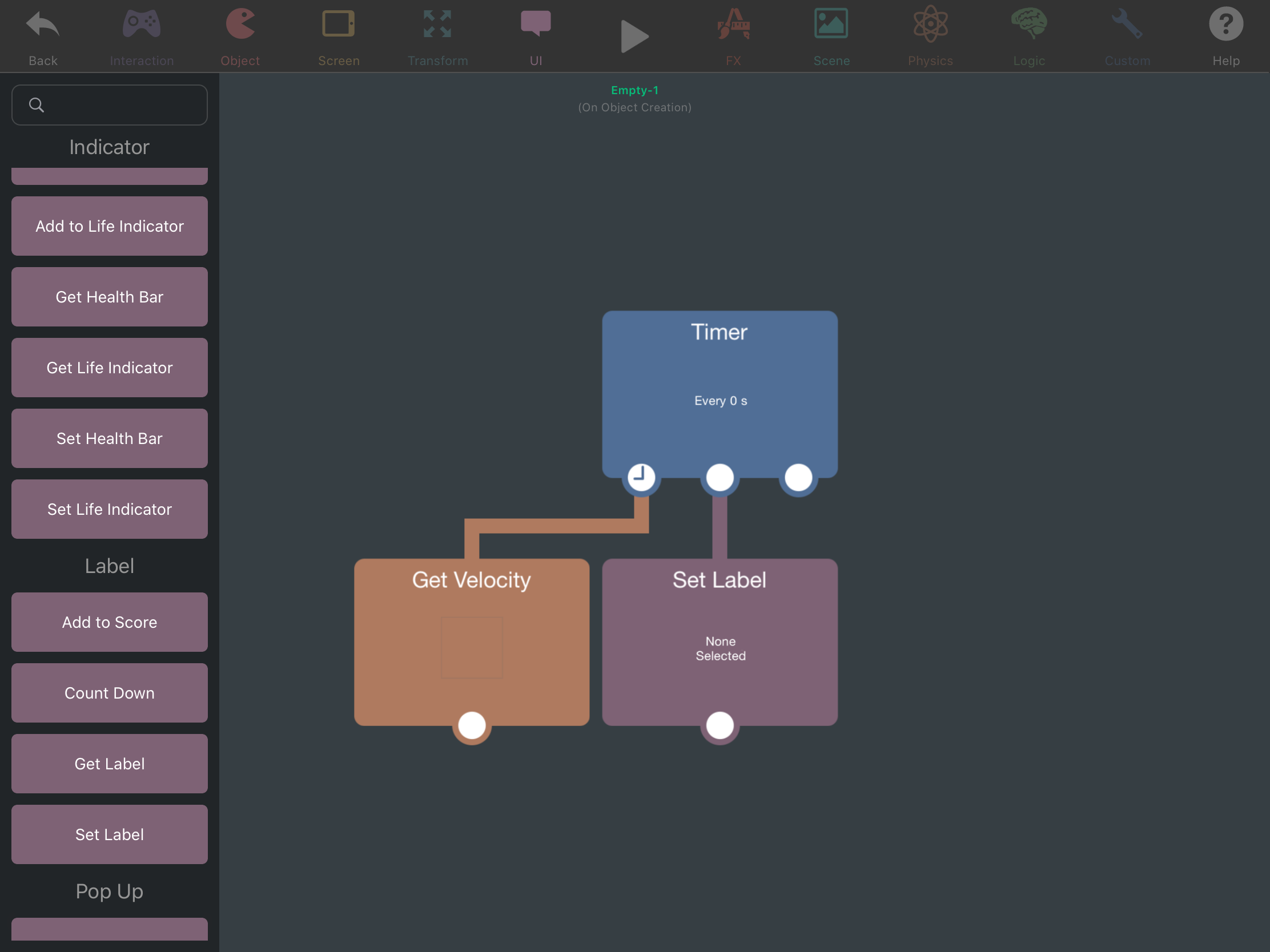
With gear changing though, what exactly would happen when you shift gears in the game? I think it’s possible if you know exactly what should happen when you do shift, and what happens if you don’t.@Aidan_Fire ok thank you for clearing that up and when you shift gears you would gain speed with each gear until you reach the top speed and not shifting would cause you to cap at a certain speed until you shift.
-
It's an apple limitation. Because we have an in-app hub and community making it possible to share and download projects we get rejected if there is any code being executed.
Our broadcast behaviours can be referenced directly within xcode though. You can reference objects and communicate with them within XCode and the broadcast behaviours. We don't have a documentation page on it, but there is a forum topic which discusses it.
-
Is it just me, or does trying to send an image on this page instantly crash hyperPad? I have a picture trying to explain how I think gear changing could work because too hard to explain in words, it I can’t send it because pressing the send picture button crashes every time.
After I sent the post below, hyperPad app stopped crashing 🤷♂️
-
Is it just me, or does trying to send an image on this page instantly crash hyperPad? I have a picture trying to explain how I think gear changing could work because too hard to explain in words, it I can’t send it because pressing the send picture button crashes every time.
After I sent the post below, hyperPad app stopped crashing 🤷♂️
@Aidan_Fire @DNote242 sent from browser rather than in app
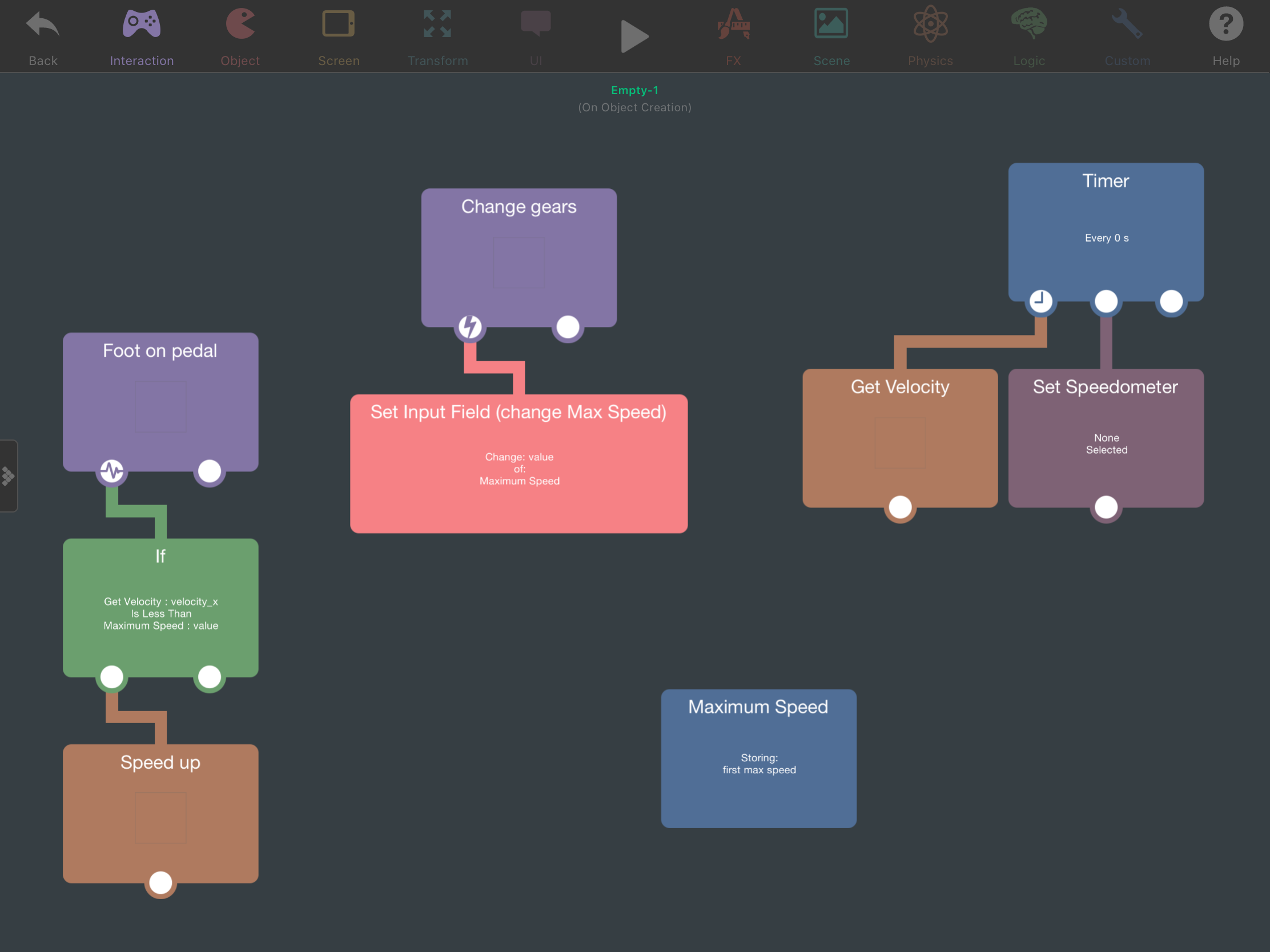
I hope this makes sense and helps. Set Input Field by the way comes from when I tap on the small icon next to the text box in the Box Container behaviour (called Maximum Speed in the screenshot). Obviously this isn’t everything here, this just shows you the kind of logic you could use and the behaviours needed. -
@Aidan_Fire @DNote242 sent from browser rather than in app
I hope this makes sense and helps. Set Input Field by the way comes from when I tap on the small icon next to the text box in the Box Container behaviour (called Maximum Speed in the screenshot). Obviously this isn’t everything here, this just shows you the kind of logic you could use and the behaviours needed.This post is deleted!





Hello! It looks like you're interested in this conversation, but you don't have an account yet.
Getting fed up of having to scroll through the same posts each visit? When you register for an account, you'll always come back to exactly where you were before, and choose to be notified of new replies (either via email, or push notification). You'll also be able to save bookmarks and upvote posts to show your appreciation to other community members.
With your input, this post could be even better 💗
Register Login