Skip to content
  • Categories
  • Recent
  • Tags
  • Popular
  • Users
  • Search
Skins
  • Light
  • Brite
  • Cerulean
  • Cosmo
  • Flatly
  • Journal
  • Litera
  • Lumen
  • Lux
  • Materia
  • Minty
  • Morph
  • Pulse
  • Sandstone
  • Simplex
  • Sketchy
  • Spacelab
  • United
  • Yeti
  • Zephyr
  • Dark
  • Cyborg
  • Darkly
  • Quartz
  • Slate
  • Solar
  • Superhero
  • Vapor

  • Default (No Skin)
  • No Skin
Collapse
hyperPad

hyperPad Forum

  1. Home
  2. Help and Support
  3. How to do a Ledge Grab?

How to do a Ledge Grab?

Scheduled Pinned Locked Moved Help and Support
8 Posts 2 Posters 1.9k Views 1 Watching
  • Oldest to Newest
  • Newest to Oldest
  • Most Votes
Reply
  • Reply as topic
Log in to reply
This topic has been deleted. Only users with topic management privileges can see it.
  • TutorialDoctorT Offline
    TutorialDoctorT Offline
    TutorialDoctor
    wrote on last edited by TutorialDoctor
    #1

    If you haven't played it already, please refer to the Atmosphere Demo I made below:
    https://www.hyperpad.com/projects/gxoi6r-z/versions/atmosphere-demo

    I am thinking about adding a platform that the character can grab (sorta like how Lara Croft does in tomb raider). The logic for it seems it will be tricky. I do have some code to reference from a Godot game someone made of a Castlevania remake.

    Anyone have any tips of how I could do this? I can create an animation and I figure I might have to check if the character collides on the left side of an object. I'm mainly wondering what conditionals I need to consider, and how to actually get the character to pull herself up onto the platform.

    Please provide Pseudocode terms

    Found some text code to reference: http://answers.unity3d.com/questions/812417/how-do-you-hang-on-to-a-ledge-in-a-2d-game.html

    1 Reply Last reply
    0
    • TutorialDoctorT Offline
      TutorialDoctorT Offline
      TutorialDoctor
      wrote on last edited by
      #2

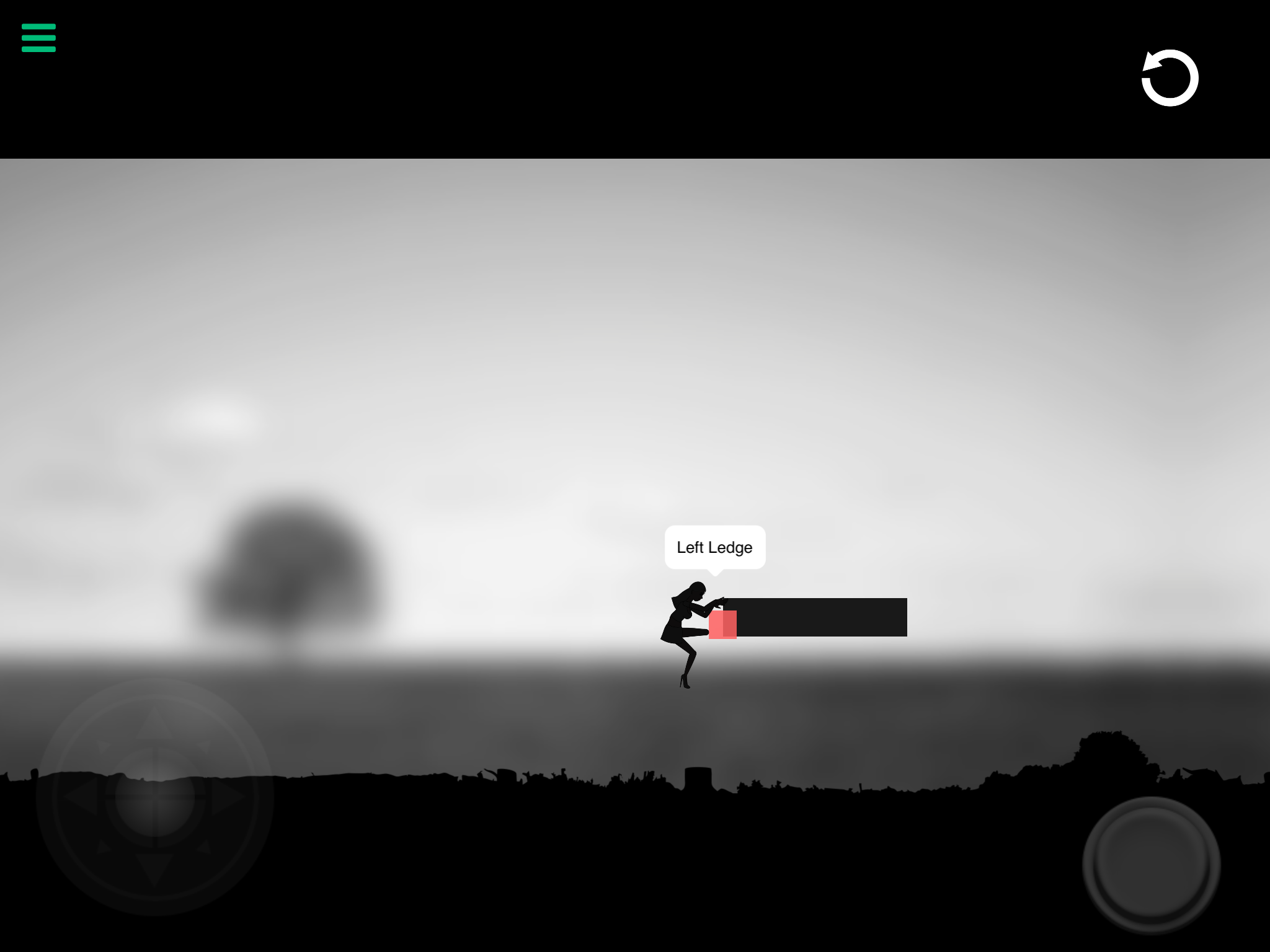
      0_1494607363711_IMG_3264.PNG

      What I hav so far (with bugs)

      1 Reply Last reply
      0
      • HakanH Offline
        HakanH Offline
        Hakan
        wrote on last edited by
        #3

        Place a hidden object near the wall to grab slightly higher than the character when player jumps it collides with hidden object then play climbing animation and behaviour move to point or move by and it should reach top of the wall.I am not sure but sometimes hidden objects are disabled you can also set color of object 0 opacity to hide it.

        TutorialDoctorT 1 Reply Last reply
        0
        • HakanH Hakan

          Place a hidden object near the wall to grab slightly higher than the character when player jumps it collides with hidden object then play climbing animation and behaviour move to point or move by and it should reach top of the wall.I am not sure but sometimes hidden objects are disabled you can also set color of object 0 opacity to hide it.

          TutorialDoctorT Offline
          TutorialDoctorT Offline
          TutorialDoctor
          wrote on last edited by TutorialDoctor
          #4

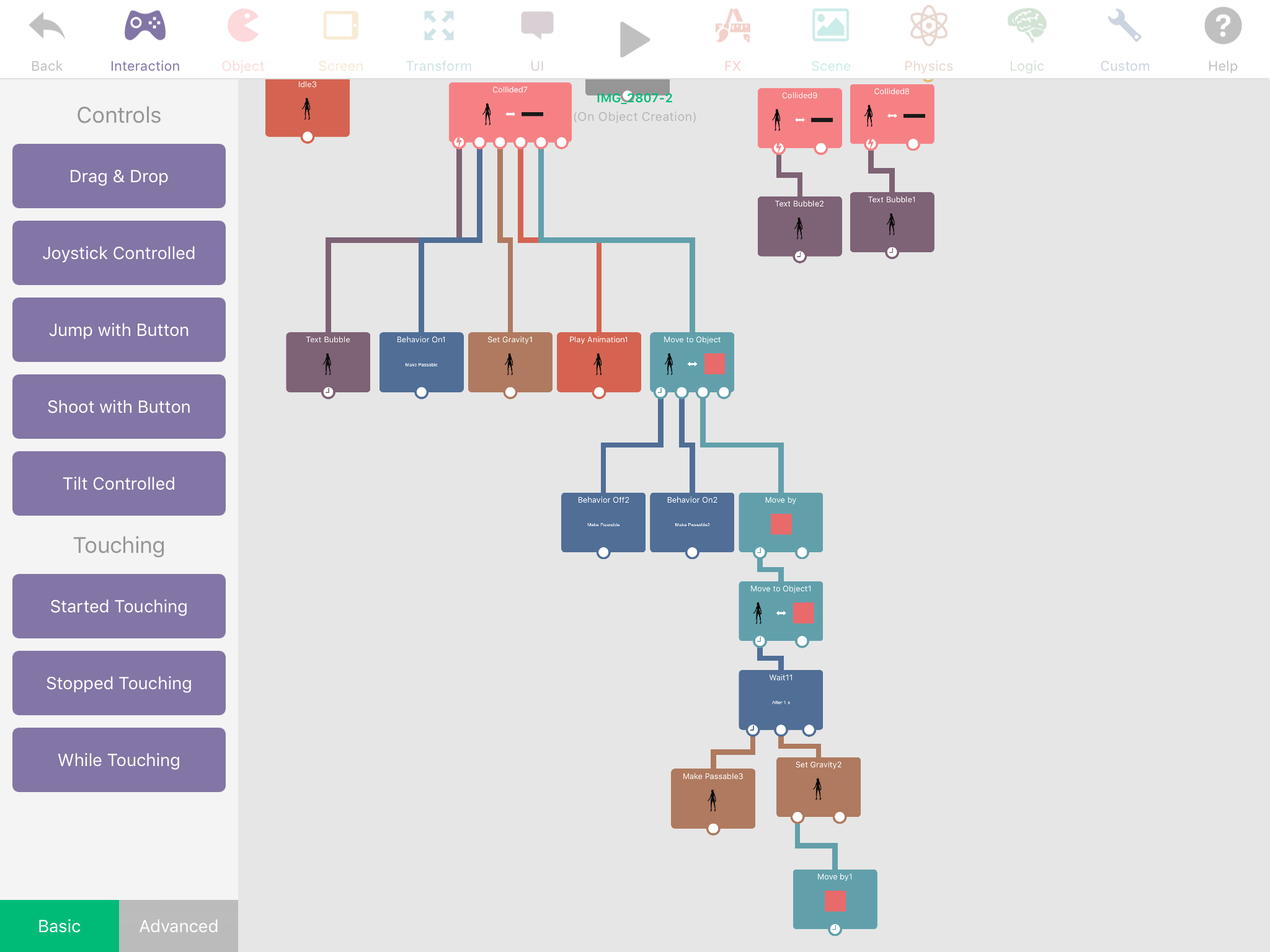
          @Hakan Sounds similar to what I did to achieve the image above except I checked collision with the left side of the platform, played the animation and moved the character to the red box (which will be invisible eventually).

          The issue I am facing is actually making the character get onto the platform and stand up (I had to make the character passable for this to work due to collision issues and now I have to make it non-passable....)
          0_1494611271828_IMG_3265.PNG

          1 Reply Last reply
          0
          • HakanH Offline
            HakanH Offline
            Hakan
            wrote on last edited by
            #5

            It doesnt seem impossible to do,with a couple tries it should be possible to do it.I liked the light that makes the character look original color,it makes a different sense.

            TutorialDoctorT 1 Reply Last reply
            0
            • TutorialDoctorT Offline
              TutorialDoctorT Offline
              TutorialDoctor
              wrote on last edited by
              #6

              Video

              https://drive.google.com/open?id=0B__SxPD_FJB7Vm50ZTNTTm91YUE

              1 Reply Last reply
              0
              • HakanH Hakan

                It doesnt seem impossible to do,with a couple tries it should be possible to do it.I liked the light that makes the character look original color,it makes a different sense.

                TutorialDoctorT Offline
                TutorialDoctorT Offline
                TutorialDoctor
                wrote on last edited by
                #7

                @Hakan The light is still there. I copied the original project to test this out (so I don't accidentally mess it up). :)

                1 Reply Last reply
                0
                • HakanH Offline
                  HakanH Offline
                  Hakan
                  wrote on last edited by
                  #8

                  I cant open the video

                  1 Reply Last reply
                  0

                  Hello! It looks like you're interested in this conversation, but you don't have an account yet.

                  Getting fed up of having to scroll through the same posts each visit? When you register for an account, you'll always come back to exactly where you were before, and choose to be notified of new replies (either via email, or push notification). You'll also be able to save bookmarks and upvote posts to show your appreciation to other community members.

                  With your input, this post could be even better 💗

                  Register Login
                  Reply
                  • Reply as topic
                  Log in to reply
                  • Oldest to Newest
                  • Newest to Oldest
                  • Most Votes


                  • Login

                  • Login or register to search.
                  • First post
                    Last post
                  0
                  • Categories
                  • Recent
                  • Tags
                  • Popular
                  • Users
                  • Search