
Question about Spritesheets
-
Greetings. I have recently downloaded a file with a ton of graphics ready for use. However, they are all in a spritesheet, and the background is not transparent. Here's what it looks like:
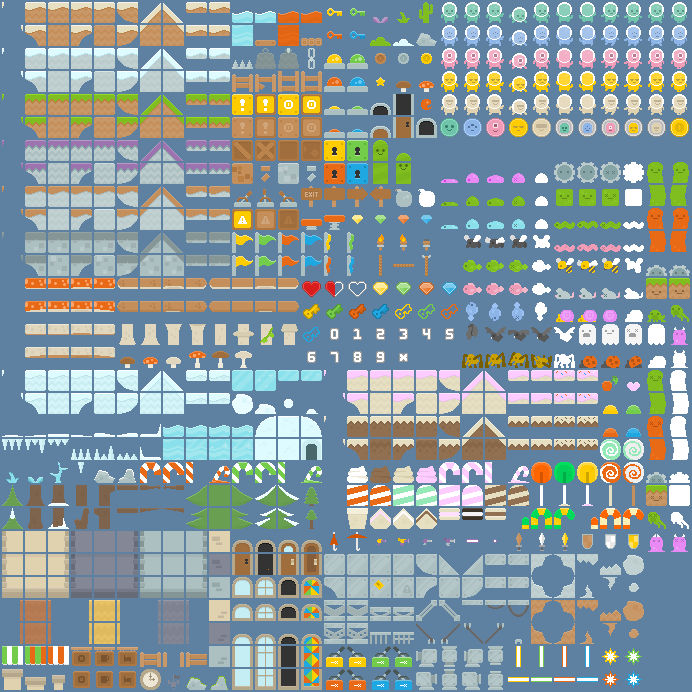
My main question is: how could I extract all of these sprites from the spritesheet while also making them transparent, given the background is non-transparent? Once I figure that out, I also have to figure out how to enlarge them so they don't look blurry when I have to enlarge them with hyperPad's object editor. Any ideas?
-
I wouldn't use that spritesheet. First of all, I don't think it's the real sprite sheet. I think it is just an example of what's included in the art pack. That's why the background is not transparent.
Typically with sprite sheets there should be a accompanying meta data file that tell the game engine the location of each tile on the sheet. Since I'm guessing this is just a generic image, it wouldn't include that metadata file. And more importantly, it most likely wouldn't be a spritesheet compatible with hyperPad any ways. hyperPad uses sprite sheets and metadata plist files compatible with Cocos2D. So anything for cocos2D should work with hyperPad.
The good news is, you can find most, if not all of those tiles in their original format on the original creators web site: https://kenney.nl/assets
We use Kenney's stuff for hyperPad because it's awesome and versatile :).


Hello! It looks like you're interested in this conversation, but you don't have an account yet.
Getting fed up of having to scroll through the same posts each visit? When you register for an account, you'll always come back to exactly where you were before, and choose to be notified of new replies (either via email, or push notification). You'll also be able to save bookmarks and upvote posts to show your appreciation to other community members.
With your input, this post could be even better 💗
Register Login