
hyperPad drains battery when on USB to Mac
-
This happens to me too...
Some apps take over memory and use up more battery than the rate of charging.• I would check the settings and turn off ALL background app refresh as it uses 20% of total battery.
• Turn off Bluetooth if necessary.
• Turn off your WiFi (from your device.) if unneeded. Note that HyperPad doesn't need internet to edit games, but only to view games on the hub or to upload/update projects.
• Close all unneeded running background apps, as they take about 30% of memory.
This seems a lot, but you don't have to do all of these... :3
-
This happens to me too...
Some apps take over memory and use up more battery than the rate of charging.• I would check the settings and turn off ALL background app refresh as it uses 20% of total battery.
• Turn off Bluetooth if necessary.
• Turn off your WiFi (from your device.) if unneeded. Note that HyperPad doesn't need internet to edit games, but only to view games on the hub or to upload/update projects.
• Close all unneeded running background apps, as they take about 30% of memory.
This seems a lot, but you don't have to do all of these... :3
@RobinsonX I'm all this except for turning off wifi. Still seeing that drain.
This is something wrong in hyperPad. Not even the most exhaustive DAWs and synths do this.
-
@RobinsonX I'm all this except for turning off wifi. Still seeing that drain.
This is something wrong in hyperPad. Not even the most exhaustive DAWs and synths do this.
@Deeeds I think what it comes down to is hyperPad is unstable as a mother of god due to the size of the project compared to the size of the team running it.
-
This is an issue we're aware of and actively dealing with (it was much worse in the early days) and there is definitely room for improvement.
The major issue with this is the way we handle I/O and file saving. Every modification you make is saved. We did this because the iPad has (especially early on) very limited memory and saving actions to 'disk' allowed us to free up memory for other heavy lifting.
Additionally in the case of crashes, your projects are more likely to be recovered.However, ever I think it's time to look at this again since iPads have become much more powerful.
The other issue is that we're running the graphics engine in the editors as well. Think of this as running a game the entire time. There are definitely improvements to be made here. @Deeeds has even done some researched and gave a few suggestions. There are also other spots that we can improve on.
Due to the nature of what hyperPad is, it will never be as battery efficient as other apps. But there is room for improvement :).
-
This is an issue we're aware of and actively dealing with (it was much worse in the early days) and there is definitely room for improvement.
The major issue with this is the way we handle I/O and file saving. Every modification you make is saved. We did this because the iPad has (especially early on) very limited memory and saving actions to 'disk' allowed us to free up memory for other heavy lifting.
Additionally in the case of crashes, your projects are more likely to be recovered.However, ever I think it's time to look at this again since iPads have become much more powerful.
The other issue is that we're running the graphics engine in the editors as well. Think of this as running a game the entire time. There are definitely improvements to be made here. @Deeeds has even done some researched and gave a few suggestions. There are also other spots that we can improve on.
Due to the nature of what hyperPad is, it will never be as battery efficient as other apps. But there is room for improvement :).
-
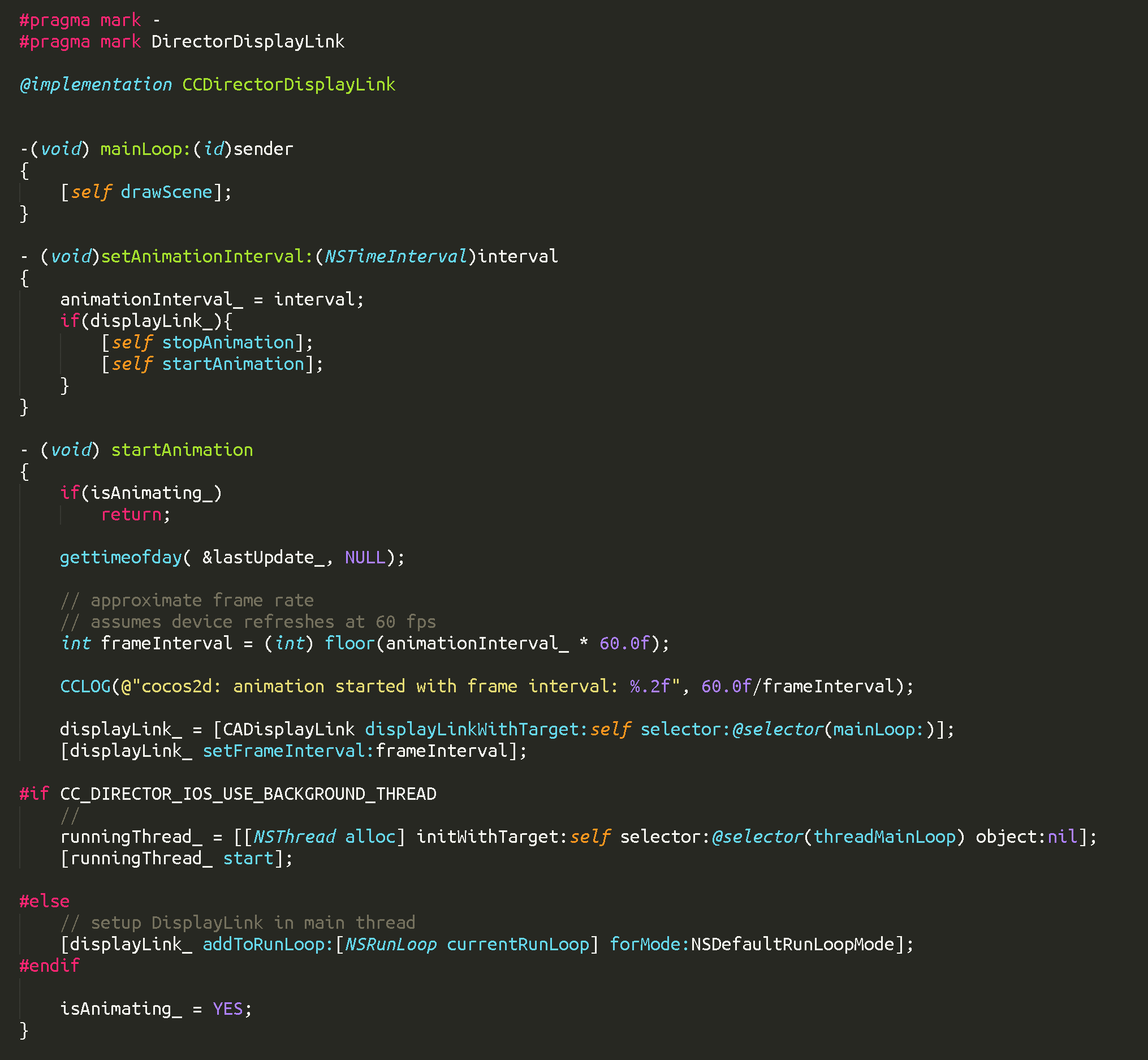
As it turns out, I don't have to pain myself trying to explain this, the guru of this bug has been kind enough to stay on top of it:
https://github.com/ejmarchant/cocos2d-objc/blob/v3.5/cocos2d/Platforms/iOS/CCDirectorIOS.m
CACurrentMediaTime is a friendlier converted version of mach time that's slightly slower and less ideal. Read more here:
https://kandelvijaya.com/2016/10/25/precisiontiminginios/At any rate (oh, puns!) here's the goodies, the most important bit, but he does some other clever stuff in the above file that's well worth taking a look at and learning from.
-(void) mainLoop:(id)sender { /* * Experimental game loop. * To stop the game becoming unresponsive after heavy load. * See : http://www.ananseproductions.com/game-loops-on-ios/ */ static double bank = 0; double frameTime; frameTime = _displayLink.duration * _displayLink.frameInterval; bank -= frameTime; if (bank > 0) { return; } bank = 0; CFTimeInterval now = CACurrentMediaTime(); [self drawScene]; CFTimeInterval elapsed = CACurrentMediaTime() - now; bank = elapsed; if (elapsed > frameTime) { bank = frameTime + fmod( elapsed, frameTime ); } } -
As it turns out, I don't have to pain myself trying to explain this, the guru of this bug has been kind enough to stay on top of it:
https://github.com/ejmarchant/cocos2d-objc/blob/v3.5/cocos2d/Platforms/iOS/CCDirectorIOS.m
CACurrentMediaTime is a friendlier converted version of mach time that's slightly slower and less ideal. Read more here:
https://kandelvijaya.com/2016/10/25/precisiontiminginios/At any rate (oh, puns!) here's the goodies, the most important bit, but he does some other clever stuff in the above file that's well worth taking a look at and learning from.
-(void) mainLoop:(id)sender { /* * Experimental game loop. * To stop the game becoming unresponsive after heavy load. * See : http://www.ananseproductions.com/game-loops-on-ios/ */ static double bank = 0; double frameTime; frameTime = _displayLink.duration * _displayLink.frameInterval; bank -= frameTime; if (bank > 0) { return; } bank = 0; CFTimeInterval now = CACurrentMediaTime(); [self drawScene]; CFTimeInterval elapsed = CACurrentMediaTime() - now; bank = elapsed; if (elapsed > frameTime) { bank = frameTime + fmod( elapsed, frameTime ); } }And here's the most obvious thing I'm going to say today.
When users aren't touching the screen in the Scene Editor or the Behaviour editor, deactivate this call:
[self drawScene];Do this and make the above changes (use mach time, though) and we'll all be able to charge our iPads from our computers, AND use hyperPad at the same time.

Hello! It looks like you're interested in this conversation, but you don't have an account yet.
Getting fed up of having to scroll through the same posts each visit? When you register for an account, you'll always come back to exactly where you were before, and choose to be notified of new replies (either via email, or push notification). You'll also be able to save bookmarks and upvote posts to show your appreciation to other community members.
With your input, this post could be even better 💗
Register Login