Skip to content
  • Categories
  • Recent
  • Tags
  • Popular
  • Users
  • Search
Skins
  • Light
  • Brite
  • Cerulean
  • Cosmo
  • Flatly
  • Journal
  • Litera
  • Lumen
  • Lux
  • Materia
  • Minty
  • Morph
  • Pulse
  • Sandstone
  • Simplex
  • Sketchy
  • Spacelab
  • United
  • Yeti
  • Zephyr
  • Dark
  • Cyborg
  • Darkly
  • Quartz
  • Slate
  • Solar
  • Superhero
  • Vapor

  • Default (No Skin)
  • No Skin
Collapse
hyperPad

hyperPad Forum

  1. Home
  2. Help and Support
  3. Resizing app

Resizing app

Scheduled Pinned Locked Moved Help and Support
18 Posts 3 Posters 4.1k Views 2 Watching
  • Oldest to Newest
  • Newest to Oldest
  • Most Votes
Reply
  • Reply as topic
Log in to reply
This topic has been deleted. Only users with topic management privileges can see it.
  • DGames135D DGames135

    @Aidan-Oxley ok I get it. But just asking. When I swap a graphic with a smaller one it reduces the size. What can I do to stop that?

    Aidan_FireA Offline
    Aidan_FireA Offline
    Aidan_Fire
    wrote on last edited by
    #7

    @DGames135 You mean like you have an object sitting somewhere in your project, and you tap the object and change its graphic to another one that's smaller? The only thing you can do is either scale the object to make it larger or resize the image in an image editor to make it larger or make the other one smaller.

    DGames135D 1 Reply Last reply
    0
    • Aidan_FireA Aidan_Fire

      @DGames135 You mean like you have an object sitting somewhere in your project, and you tap the object and change its graphic to another one that's smaller? The only thing you can do is either scale the object to make it larger or resize the image in an image editor to make it larger or make the other one smaller.

      DGames135D Offline
      DGames135D Offline
      DGames135
      wrote on last edited by
      #8

      @Aidan-Oxley so your saying that I can resize it to be smaller then resize it to be bigger and it will basically be the same image but with a smaller resolution

      Aidan_FireA 1 Reply Last reply
      0
      • DGames135D DGames135

        @Aidan-Oxley so your saying that I can resize it to be smaller then resize it to be bigger and it will basically be the same image but with a smaller resolution

        Aidan_FireA Offline
        Aidan_FireA Offline
        Aidan_Fire
        wrote on last edited by
        #9

        @DGames135 I'm not exactly sure what you mean. If you want the graphic to be bigger you either scale it up in hyperPad, or you enlarge the image in image editor. Any graphic that is enlarged though using hyperPad or an image editor will lose quality, but making it smaller won't.

        1 Reply Last reply
        0
        • DGames135D Offline
          DGames135D Offline
          DGames135
          wrote on last edited by
          #10

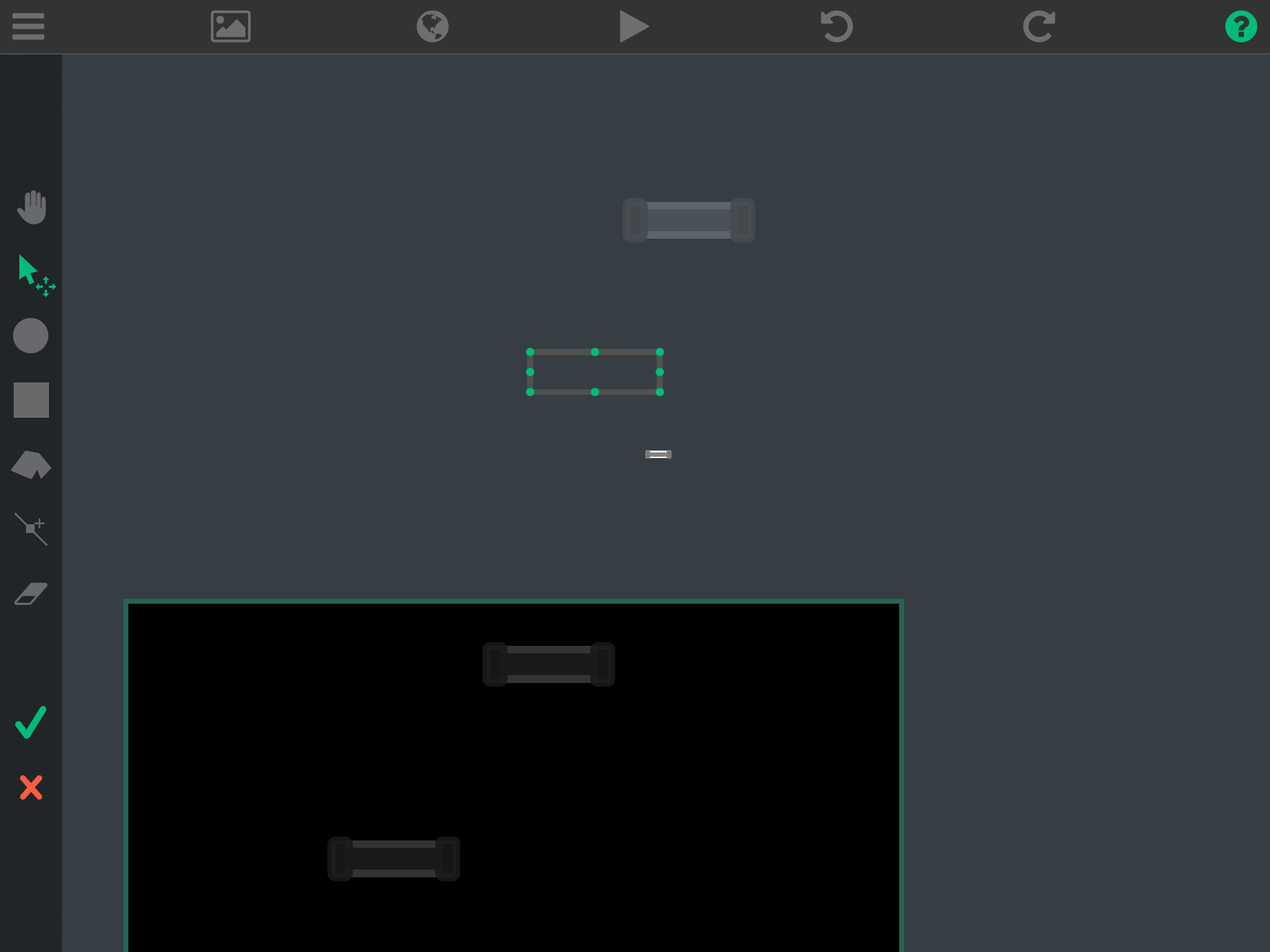
          So let me explain. When I change an old graphic to a smaller one of course it gets smaller but I can enlarge multiple graphics at once but the problem is that colision changes0_1481492173380_IMG_3196.PNG

          1 Reply Last reply
          0
          • Aidan_FireA Offline
            Aidan_FireA Offline
            Aidan_Fire
            wrote on last edited by
            #11

            Ok now I think I know what you mean. I messed around with it myself and the collision problem only happens to me when the graphic I use to replace the old one has a different scale, e.g I put in a square image into my project that I made with photoshop and I changed the collisions to match a shape the image had, then I replace the graphic with a screenshot I took, so the image was the same resolution as my iPad, then I checked the collisions and they were all the way down in the bottom corner. The only way you can fix this is to make both images the same resolution, or redo the collisions.

            DGames135D 1 Reply Last reply
            0
            • Aidan_FireA Aidan_Fire

              Ok now I think I know what you mean. I messed around with it myself and the collision problem only happens to me when the graphic I use to replace the old one has a different scale, e.g I put in a square image into my project that I made with photoshop and I changed the collisions to match a shape the image had, then I replace the graphic with a screenshot I took, so the image was the same resolution as my iPad, then I checked the collisions and they were all the way down in the bottom corner. The only way you can fix this is to make both images the same resolution, or redo the collisions.

              DGames135D Offline
              DGames135D Offline
              DGames135
              wrote on last edited by
              #12

              @Aidan-Oxley soooo can u do Watever you talked about in photoshop touch?

              Aidan_FireA 1 Reply Last reply
              0
              • DGames135D DGames135

                @Aidan-Oxley soooo can u do Watever you talked about in photoshop touch?

                Aidan_FireA Offline
                Aidan_FireA Offline
                Aidan_Fire
                wrote on last edited by Aidan_Fire
                #13

                @DGames135 yeah photoshop touch can do a lot, it's a pretty good for an iPad image editor again I still have no idea why they would remove it. Am happy to help with Mad Bouncer, it's a good game will be even better if this helps remove lag and crashes.

                Jack de WildeJ 1 Reply Last reply
                0
                • Aidan_FireA Aidan_Fire

                  @DGames135 yeah photoshop touch can do a lot, it's a pretty good for an iPad image editor again I still have no idea why they would remove it. Am happy to help with Mad Bouncer, it's a good game will be even better if this helps remove lag and crashes.

                  Jack de WildeJ Offline
                  Jack de WildeJ Offline
                  Jack de Wilde
                  wrote on last edited by
                  #14

                  @Aidan-Oxley PS touch has tons of bugs and crashes. I wish they fixed them instead of stopping though...

                  Aidan_FireA 1 Reply Last reply
                  0
                  • Jack de WildeJ Jack de Wilde

                    @Aidan-Oxley PS touch has tons of bugs and crashes. I wish they fixed them instead of stopping though...

                    Aidan_FireA Offline
                    Aidan_FireA Offline
                    Aidan_Fire
                    wrote on last edited by
                    #15

                    @Jack8680 Yes, but it's not so full of bugs that it should be removed.

                    DGames135D 2 Replies Last reply
                    1
                    • Aidan_FireA Aidan_Fire

                      @Jack8680 Yes, but it's not so full of bugs that it should be removed.

                      DGames135D Offline
                      DGames135D Offline
                      DGames135
                      wrote on last edited by
                      #16

                      @Aidan-Oxley I don't know why but when I save my graphics on my iPad they are transparent but 5 mins later they loose transparency. What can I do

                      1 Reply Last reply
                      0
                      • Aidan_FireA Aidan_Fire

                        @Jack8680 Yes, but it's not so full of bugs that it should be removed.

                        DGames135D Offline
                        DGames135D Offline
                        DGames135
                        wrote on last edited by
                        #17

                        @Aidan-Oxley did u get the email I sended????

                        Aidan_FireA 1 Reply Last reply
                        0
                        • DGames135D DGames135

                          @Aidan-Oxley did u get the email I sended????

                          Aidan_FireA Offline
                          Aidan_FireA Offline
                          Aidan_Fire
                          wrote on last edited by Aidan_Fire
                          #18

                          @DGames135 No I haven't, mail app shows nothing not even in junk mail, it's unusual though that I have no junk mail so I'll check the website mail to make sure it's not my mail app that's failing. If by transparency not working you mean in the Photos app it stops showing transparent background, don't worry about it mine does that too, if not and the image actually isn't transparent any more I'll help you fix it. EDIT: never mind I found the email, for some reason I have 2 junk mail boxes and one of the are fake lol.


                          1 Reply Last reply
                          0

                          Hello! It looks like you're interested in this conversation, but you don't have an account yet.

                          Getting fed up of having to scroll through the same posts each visit? When you register for an account, you'll always come back to exactly where you were before, and choose to be notified of new replies (either via email, or push notification). You'll also be able to save bookmarks and upvote posts to show your appreciation to other community members.

                          With your input, this post could be even better 💗

                          Register Login
                          Reply
                          • Reply as topic
                          Log in to reply
                          • Oldest to Newest
                          • Newest to Oldest
                          • Most Votes


                          • Login

                          • Login or register to search.
                          • First post
                            Last post
                          0
                          • Categories
                          • Recent
                          • Tags
                          • Popular
                          • Users
                          • Search