Skip to content
  • Categories
  • Recent
  • Tags
  • Popular
  • Users
  • Search
Skins
  • Light
  • Brite
  • Cerulean
  • Cosmo
  • Flatly
  • Journal
  • Litera
  • Lumen
  • Lux
  • Materia
  • Minty
  • Morph
  • Pulse
  • Sandstone
  • Simplex
  • Sketchy
  • Spacelab
  • United
  • Yeti
  • Zephyr
  • Dark
  • Cyborg
  • Darkly
  • Quartz
  • Slate
  • Solar
  • Superhero
  • Vapor

  • Default (No Skin)
  • No Skin
Collapse
hyperPad

hyperPad Forum

  1. Home
  2. Help and Support
  3. Change Variable based on length of touch?

Change Variable based on length of touch?

Scheduled Pinned Locked Moved Help and Support
7 Posts 3 Posters 1.4k Views 2 Watching
  • Oldest to Newest
  • Newest to Oldest
  • Most Votes
Reply
  • Reply as topic
Log in to reply
This topic has been deleted. Only users with topic management privileges can see it.
  • ThisT Offline
    ThisT Offline
    This
    wrote on last edited by
    #1

    I have an object set up to play a sfx when the object is touched. Is it possible to set it up so that the longer a finger is on the object, the more the pitch of the sfx changes?

    Jack de WildeJ 1 Reply Last reply
    0
    • ThisT This

      I have an object set up to play a sfx when the object is touched. Is it possible to set it up so that the longer a finger is on the object, the more the pitch of the sfx changes?

      Jack de WildeJ Offline
      Jack de WildeJ Offline
      Jack de Wilde
      wrote on last edited by
      #2

      @This you can use while touching with an add values that adds to a box container and the sets it's input field to measure how long the player has been touching, it activates 60 times per second while touching. I don't think you can change the pitch while the sound is being played (as in a transition between low and high pitch), so the usefulness of this depends on what you're trying to do with it.

      ThisT 1 Reply Last reply
      0
      • ThisT Offline
        ThisT Offline
        This
        wrote on last edited by
        #3

        Thank you!

        1 Reply Last reply
        0
        • Jack de WildeJ Jack de Wilde

          @This you can use while touching with an add values that adds to a box container and the sets it's input field to measure how long the player has been touching, it activates 60 times per second while touching. I don't think you can change the pitch while the sound is being played (as in a transition between low and high pitch), so the usefulness of this depends on what you're trying to do with it.

          ThisT Offline
          ThisT Offline
          This
          wrote on last edited by
          #4

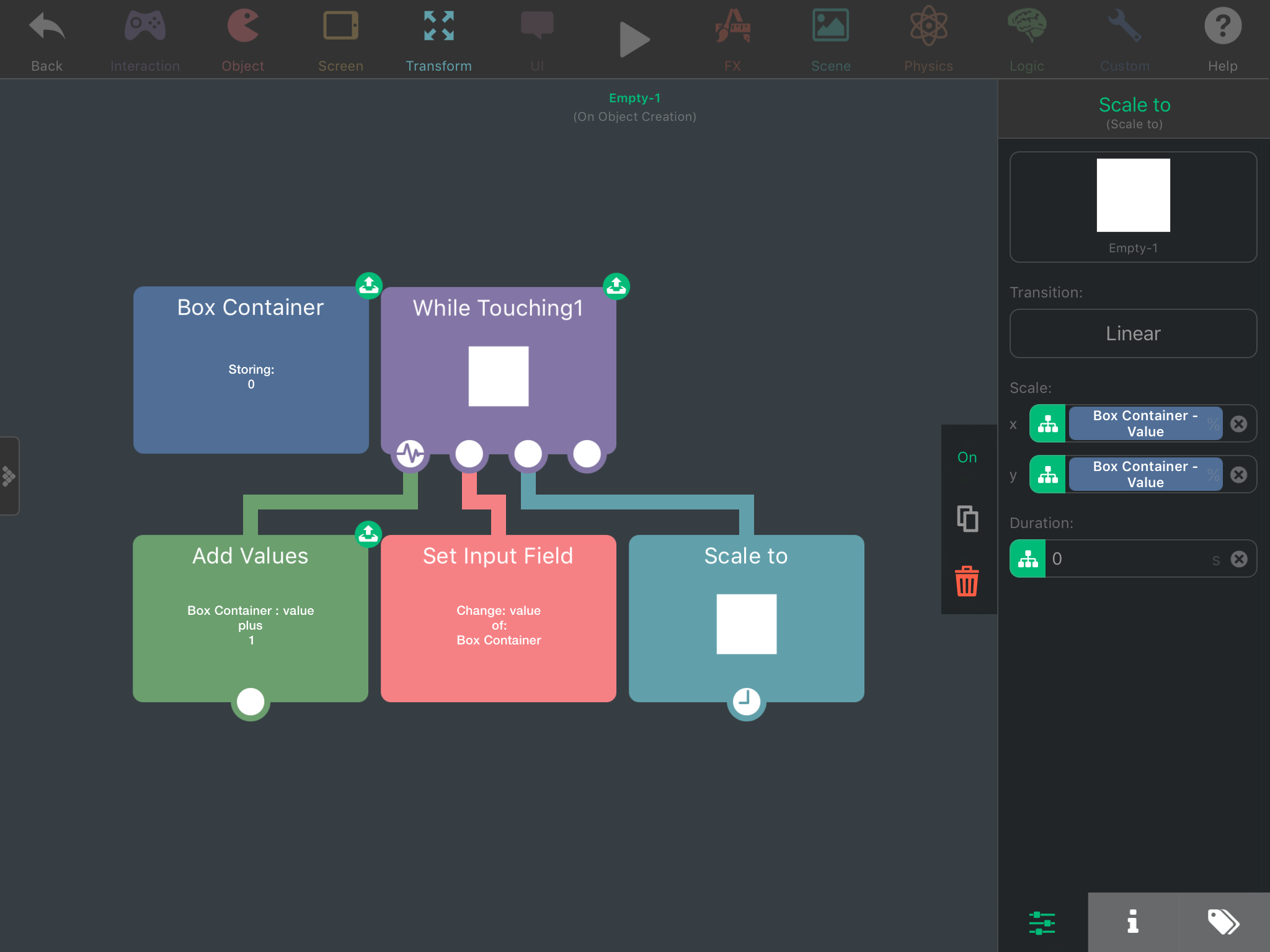
          @Jack8680 I'm revisiting this. Trying to have the scale of the object increase the longer you touch it. I've tried to do as you recommended, but haven't cracked it. Wouldn't you be able to post a screen grab?

          Jack de WildeJ 1 Reply Last reply
          0
          • ThisT This

            @Jack8680 I'm revisiting this. Trying to have the scale of the object increase the longer you touch it. I've tried to do as you recommended, but haven't cracked it. Wouldn't you be able to post a screen grab?

            Jack de WildeJ Offline
            Jack de WildeJ Offline
            Jack de Wilde
            wrote on last edited by Jack8680
            #5

            @This 0_1489729271425_IMG_3152.PNG
            This makes the object scale based on how long you touch it. You can change the box container to change the start size, and you can change the value in add values to control how fast the shape scales. For example, changing the box container to 50 and the add values to 0.833 means it will be at 100% scale after touching for a second. You get weird constants for the add value because it activates 60 times a second.

            1 Reply Last reply
            1
            • ThisT Offline
              ThisT Offline
              This
              wrote on last edited by
              #6

              Awesome! Thanks!

              1 Reply Last reply
              0
              • TutorialDoctorT Offline
                TutorialDoctorT Offline
                TutorialDoctor
                wrote on last edited by
                #7

                If it activates at 60 times per second, you may want to divide by a constant (60 perhaps) first.

                1 Reply Last reply
                0

                Hello! It looks like you're interested in this conversation, but you don't have an account yet.

                Getting fed up of having to scroll through the same posts each visit? When you register for an account, you'll always come back to exactly where you were before, and choose to be notified of new replies (either via email, or push notification). You'll also be able to save bookmarks and upvote posts to show your appreciation to other community members.

                With your input, this post could be even better 💗

                Register Login
                Reply
                • Reply as topic
                Log in to reply
                • Oldest to Newest
                • Newest to Oldest
                • Most Votes


                • Login

                • Login or register to search.
                • First post
                  Last post
                0
                • Categories
                • Recent
                • Tags
                • Popular
                • Users
                • Search