
Need help with shooting and monsters killing you.
-
I need help with something in my game, does anyone know how to make monsters kill you and move and when you shoot they die?
-
I need help with something in my game, does anyone know how to make monsters kill you and move and when you shoot they die?
@GAE-Network said in Need help with shooting and monsters killing you.:
I need help with something in my game, does anyone know how to make monsters kill you and move and when you shoot they die?
-
@GAE-Network What are you using for shooting? If you’re using the shoot with button behaviour, then the behaviours to add inside your monster should be hit by bullet (under object tab) and destroy object (connected underneath hit by bullet).
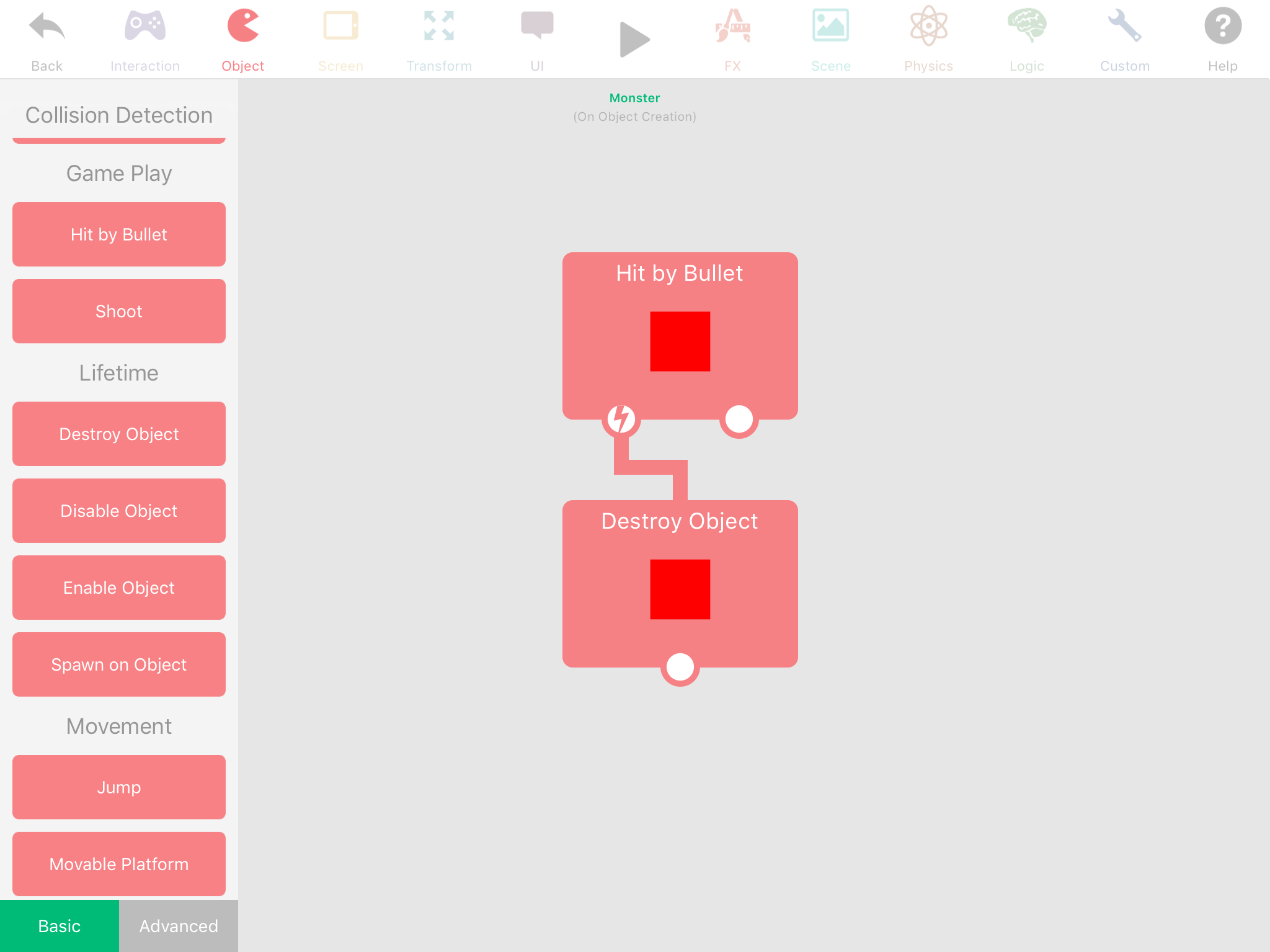
For making them move, this depends on how exactly you want them to move. -
-
I’m trying to do like hitpoints.
@GAE-Network
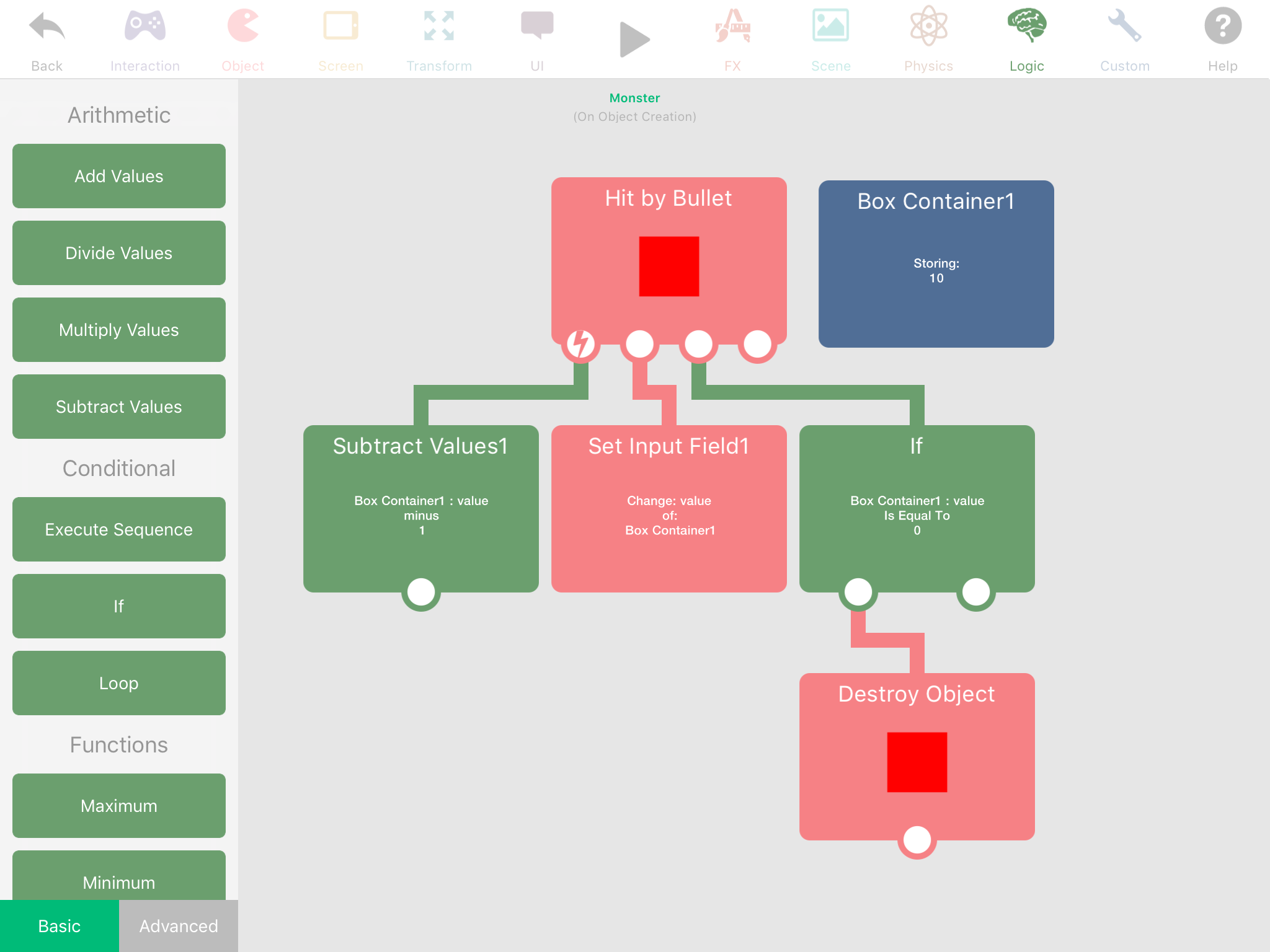
The box container is the monster’s health (in my Example, it has 10 health). When the monster gets hit by a bullet, you subtract a number (in my example, hitting a bullet takes 1 health), and then set the box container to the new subtracted health (this is don’t by using the set input field with the output of subtract values in it. You can get the set input field behaviour by pressing the box container, then at the far left of the text field press the button there. Now, if the monsters health reaches zero, it will die (be destroyed). Hope this makes sense. -
@GAE-Network
The box container is the monster’s health (in my Example, it has 10 health). When the monster gets hit by a bullet, you subtract a number (in my example, hitting a bullet takes 1 health), and then set the box container to the new subtracted health (this is don’t by using the set input field with the output of subtract values in it. You can get the set input field behaviour by pressing the box container, then at the far left of the text field press the button there. Now, if the monsters health reaches zero, it will die (be destroyed). Hope this makes sense. -
@Kamdroid I'm not helping here: physics is the best way to do it, but hyperPad hasn't turned on the physics capabilities of health bars.
My best alternative (doesn't work for fast moving or dynamic characters) is to use Move To focused on the character with an appropriate offset. Nowhere near good, nothing like the organic magic of physics. DOH!
-
@Kamdroid With difficulty. You can just run a timer and move to object, because hyperPad doesn’t really give you a way to find the right object (since they will be a bunch of spawned objects). The way my 3D points work (the faces of the shape have to conform to their spawned points) is the actually Collide with the point, which is in a tag, and the collision with that tag is being detected. Then any behaviour underneath that uses that tag will only use the object it collided with. Just as I was writing this I thought of another way using arrays, storing the positions of every object constantly in an array could work, but I don’t know what would happen if 10 or 20 objects were modifying an array 60 times a second.
-
@Kamdroid With difficulty. You can just run a timer and move to object, because hyperPad doesn’t really give you a way to find the right object (since they will be a bunch of spawned objects). The way my 3D points work (the faces of the shape have to conform to their spawned points) is the actually Collide with the point, which is in a tag, and the collision with that tag is being detected. Then any behaviour underneath that uses that tag will only use the object it collided with. Just as I was writing this I thought of another way using arrays, storing the positions of every object constantly in an array could work, but I don’t know what would happen if 10 or 20 objects were modifying an array 60 times a second.
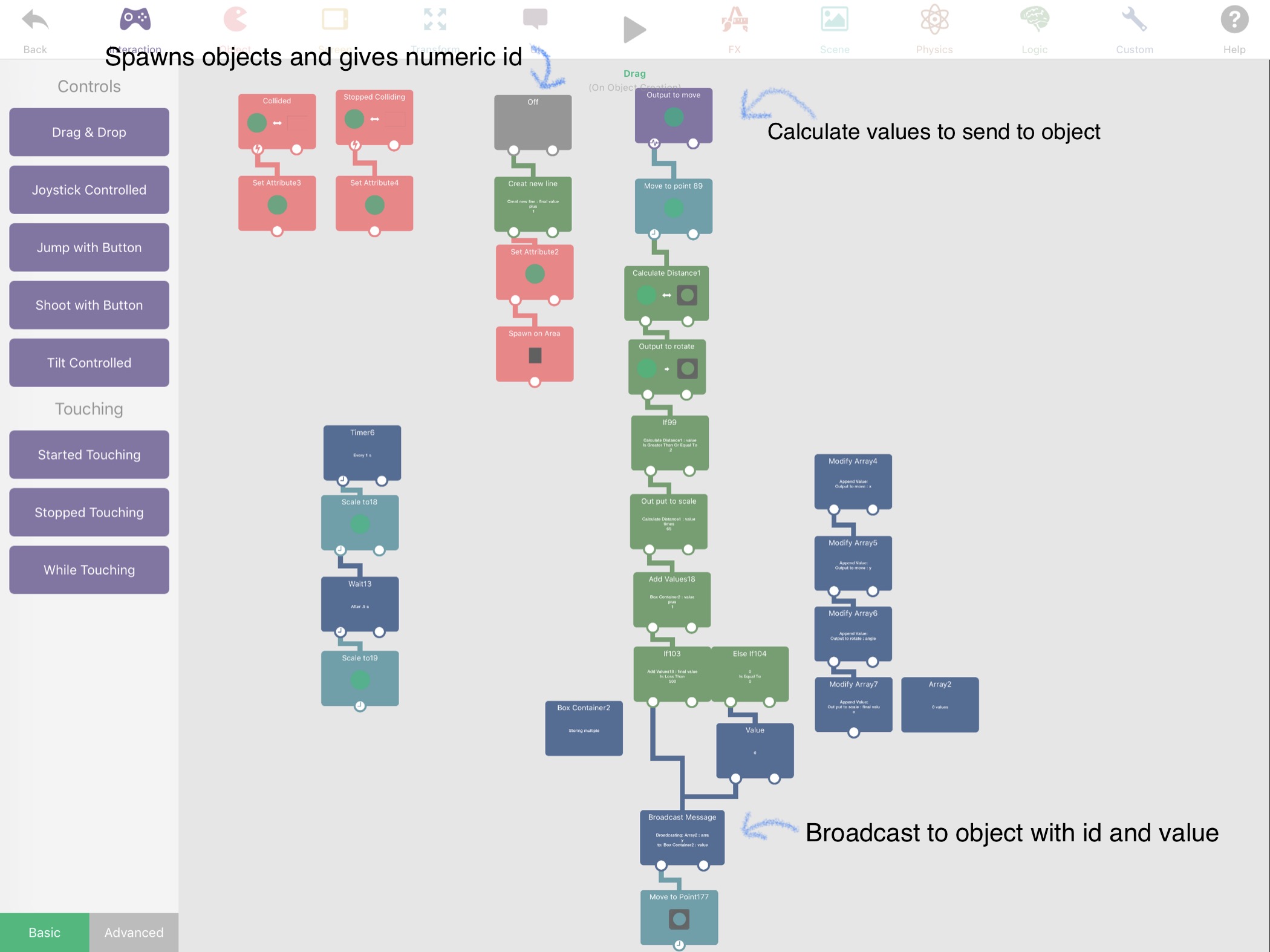
@Aidan-Oxley you can easily communicate with spawned objects using broadcast and receive message. Basically broadcast key is the object you want, and each object when created you set its id and use it for the receive key.
-
@Aidan-Oxley you can easily communicate with spawned objects using broadcast and receive message. Basically broadcast key is the object you want, and each object when created you set its id and use it for the receive key.
-
@Aidan-Oxley you can easily communicate with spawned objects using broadcast and receive message. Basically broadcast key is the object you want, and each object when created you set its id and use it for the receive key.
@iTap-Development Actually, I think you might be right. I haven’t played with broadcast messages since they added the dynamic names. This is good.
-
@iTap-Development How do you create broadcasts with the unique keys of the spawned objects? You don't know what their IDs will be at launch.
@Deeeds the broadcast key needs to be a variable or you could use set input field. I prefer the former.
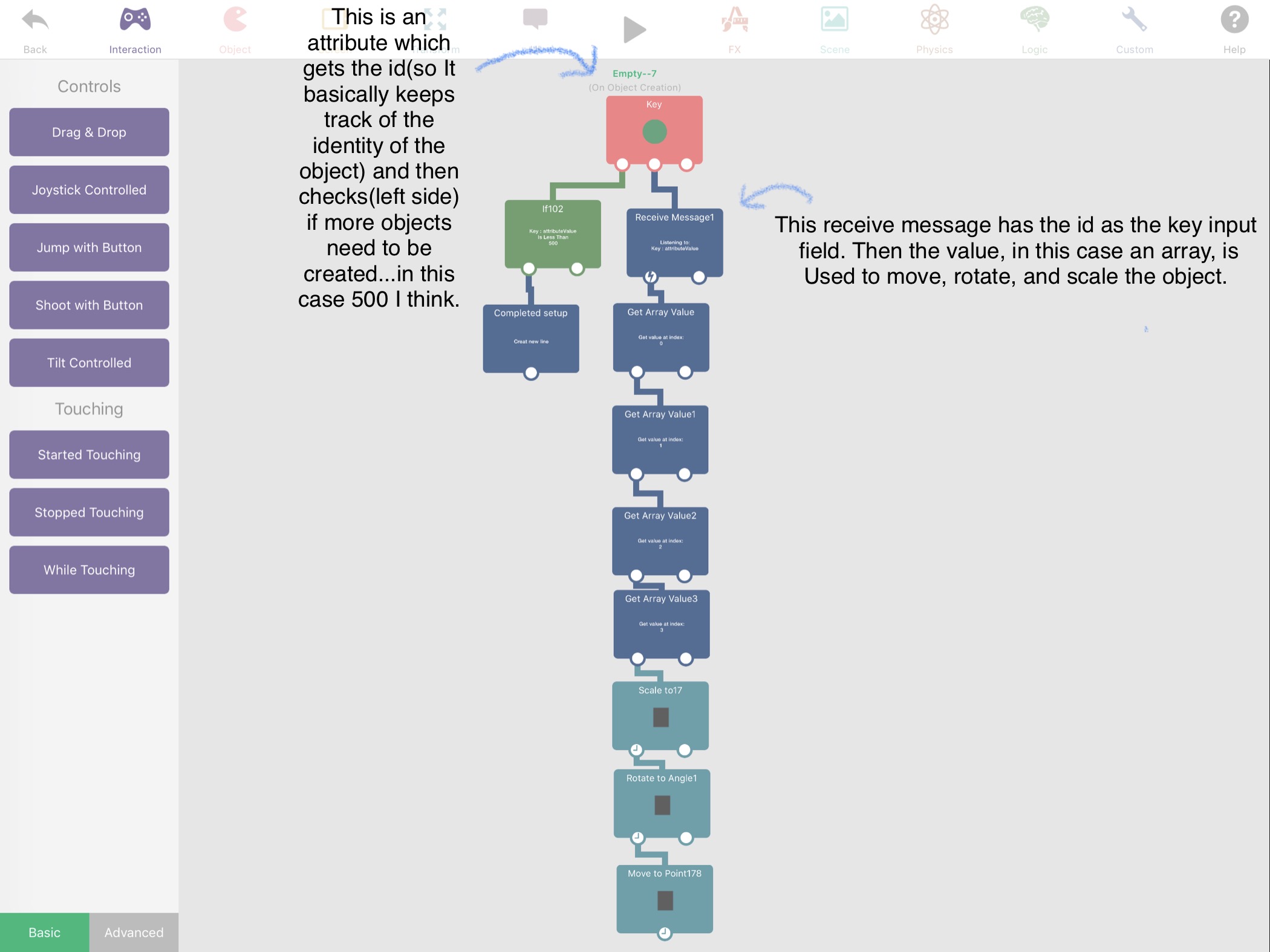
The receive keys in the spawned objects will be set when they are created. So you could have it be simply objects 0-100 or name them for certain uses etc. then just change the broadcast variable for the object you want.
And obviously in the spawned object you would have the behaviors you want run connected under the receive message behavior.I know it works because that’s what I did in the interactive tutorial for the line connecting the behaviors.
And I would recommend spawning all the objects you want at the beginning and bringing them on screen as you need them, since spawning is a slower behavior. For example making custom particles etc.
-
@Deeeds the broadcast key needs to be a variable or you could use set input field. I prefer the former.
The receive keys in the spawned objects will be set when they are created. So you could have it be simply objects 0-100 or name them for certain uses etc. then just change the broadcast variable for the object you want.
And obviously in the spawned object you would have the behaviors you want run connected under the receive message behavior.I know it works because that’s what I did in the interactive tutorial for the line connecting the behaviors.
And I would recommend spawning all the objects you want at the beginning and bringing them on screen as you need them, since spawning is a slower behavior. For example making custom particles etc.
-
@iTap-Development Sorry, what do you mean about custom particles? Precaching them by firing the particle emitter before needed?
@Deeeds it was just an example of something you could do with my idea. But what I’m saying is you could create your own particle by spawning all the of objects you need OFF SCREEN (instead of spawning as you need them, since spawning is a slower behavior) and then using broadcast message to have them do whatever it is you want for the particle. And you would probably want to name then numerically.
-
@Deeeds it was just an example of something you could do with my idea. But what I’m saying is you could create your own particle by spawning all the of objects you need OFF SCREEN (instead of spawning as you need them, since spawning is a slower behavior) and then using broadcast message to have them do whatever it is you want for the particle. And you would probably want to name then numerically.
@iTap-Development Cool. Got it. For me, quite annoyingly, I can do this kind of looping in code quite elegantly, but really struggle with the mechanics and messy way it needs to be done in hyperPad. But really need to do this simply to overcome the lack of parenting and non-physical attachments and relationships between objects.
-
@iTap-Development Cool. Got it. For me, quite annoyingly, I can do this kind of looping in code quite elegantly, but really struggle with the mechanics and messy way it needs to be done in hyperPad. But really need to do this simply to overcome the lack of parenting and non-physical attachments and relationships between objects.
@iTap-Development let me see if I've got this right:
A loop broadcasts, in the loop is a call to a variable that's incrementing with each cycle of the loop, and being used to ID objects? What I'm missing is how the name/ID of the objects is created so that this name can be stored in an array or dictionary. The lack of ability to hold a reference to, or address of, an instance of an object is... troubling me.
-
@Deeeds it was just an example of something you could do with my idea. But what I’m saying is you could create your own particle by spawning all the of objects you need OFF SCREEN (instead of spawning as you need them, since spawning is a slower behavior) and then using broadcast message to have them do whatever it is you want for the particle. And you would probably want to name then numerically.
-
@iTap-Development As is the lack, I think, of abilities to dynamically rename/name objects. I can't figure that part out, either. I'm missing something in conceiving how hyperPad handles spawning, and what it was intended to be and do.
@Deeeds yep you could use a loop or create your own, I guess depending on you needs.
So you are saying you want to have an array of the objects you’ve created so you know what to broadcast? I don’t think that would be necessary with numerically named id but if you want names like wall 1 or enemy 3 then I can see where that would come in. So if I understand correctly, just put id’s in an array when you create the objects.
I don’t think anyone will argue that we need everything to be dynamic. I would honestly prefer dynamic everything came before new features, since no dynamic means less use for the features.Spawned objects are basically exact replicas of the object. They can, for the most part, work independently with the exception of not being able to be talked to by object name. Although you can use tags for limited use, for example put a tag on the object and then it or any of its spawned objects could have a collide behavior with that tag, and then when one collides only that one would react.
-
@Deeeds yep you could use a loop or create your own, I guess depending on you needs.
So you are saying you want to have an array of the objects you’ve created so you know what to broadcast? I don’t think that would be necessary with numerically named id but if you want names like wall 1 or enemy 3 then I can see where that would come in. So if I understand correctly, just put id’s in an array when you create the objects.
I don’t think anyone will argue that we need everything to be dynamic. I would honestly prefer dynamic everything came before new features, since no dynamic means less use for the features.Spawned objects are basically exact replicas of the object. They can, for the most part, work independently with the exception of not being able to be talked to by object name. Although you can use tags for limited use, for example put a tag on the object and then it or any of its spawned objects could have a collide behavior with that tag, and then when one collides only that one would react.
@iTap-Development Cheers. I'll do some more mulling and experimenting. There are other things I'm doing and exploring and working around the ways of hyperPad, and with it... I agree... dynamic addressing needs to be first, before even functions, parenting, Undo in behaviours, etc.
-
@iTap-Development Cheers. I'll do some more mulling and experimenting. There are other things I'm doing and exploring and working around the ways of hyperPad, and with it... I agree... dynamic addressing needs to be first, before even functions, parenting, Undo in behaviours, etc.
@Deeeds here are some screen shots from the tutorial with some basic explanations...hope it helps!





Hello! It looks like you're interested in this conversation, but you don't have an account yet.
Getting fed up of having to scroll through the same posts each visit? When you register for an account, you'll always come back to exactly where you were before, and choose to be notified of new replies (either via email, or push notification). You'll also be able to save bookmarks and upvote posts to show your appreciation to other community members.
With your input, this post could be even better 💗
Register Login