
Use Loop behaviour to dynamically create objects
-
-
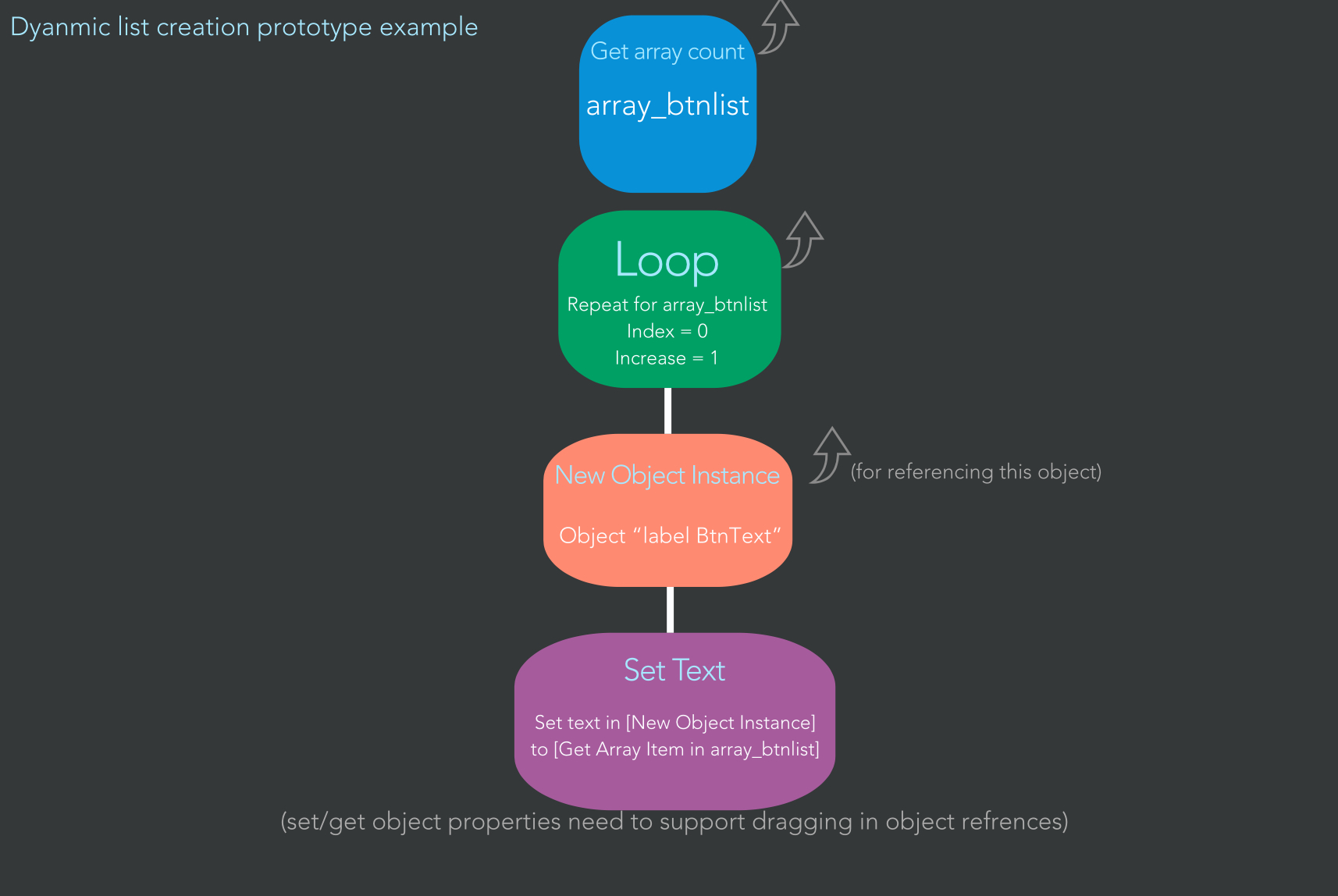
Here is a somewhat crappy idea of what it would be as behaviours, just an example for a label object, but this applies with probably all object manipulation behaviours (as they are able to not only select an object in your scene, but also drag in a object output value, as indicated as the up arrows)
This would be done by clicking on the behaviour which needs you to select an object. Drag the output/result box into the area of the object selection box.
Or it could also just use the spawn object behaviour too.
-
Here is a somewhat crappy idea of what it would be as behaviours, just an example for a label object, but this applies with probably all object manipulation behaviours (as they are able to not only select an object in your scene, but also drag in a object output value, as indicated as the up arrows)
This would be done by clicking on the behaviour which needs you to select an object. Drag the output/result box into the area of the object selection box.
Or it could also just use the spawn object behaviour too.
-
-
@Deeeds Only Scratch, but that seems even more limited than HyperPad.
I prefer using C# instead of visual code (Unity is one of my favourites), but HyperPad has a lot of potential, and it’s nice to be able to develop games directly on your iPad.
-
@Deeeds Only Scratch, but that seems even more limited than HyperPad.
I prefer using C# instead of visual code (Unity is one of my favourites), but HyperPad has a lot of potential, and it’s nice to be able to develop games directly on your iPad.
@Kamdroid I've toyed with Scratch, if you'll excuse the pun. And iStencyl and a bunch of other derivatives of the ideas Scratch descends from.
It's limited by the rules they put on themselves in terms of teaching over using, and theories over learning. I think. And the design is woeful. As if someone gave an engineer access to Microsoft Paint and said... this is the only design app ... in.the.world!
It's been a part of my research, but only because it's so heavily promoted and pushed by the powers that be. I honestly can't think of a worse paradigm for visual programming.
In Unity there was this thing called Antares Universe that was astonishing. The guy that made that is probably one of the all-time great thinkers on how to transform C# into visual coding. It's almost 1:1, which means it's difficult for new users, but very helpful for teams. His ideas live on, which is fantastic.
-
@Kamdroid I've toyed with Scratch, if you'll excuse the pun. And iStencyl and a bunch of other derivatives of the ideas Scratch descends from.
It's limited by the rules they put on themselves in terms of teaching over using, and theories over learning. I think. And the design is woeful. As if someone gave an engineer access to Microsoft Paint and said... this is the only design app ... in.the.world!
It's been a part of my research, but only because it's so heavily promoted and pushed by the powers that be. I honestly can't think of a worse paradigm for visual programming.
In Unity there was this thing called Antares Universe that was astonishing. The guy that made that is probably one of the all-time great thinkers on how to transform C# into visual coding. It's almost 1:1, which means it's difficult for new users, but very helpful for teams. His ideas live on, which is fantastic.
-
@Deeeds I’ve seen Codea before, but I still rather Unity, as Codea uses Lua and can only be exported to Xcode.
@Kamdroid I was comparing Codea to hyperPad, in the sense that it's all possible on iPad. Not comparing it to Unity.
Unity, though, needs everything exported to Xcode, too, in the sense you mean. So does hyperPad, so far as I know. I haven't submitted anything or figured out what it exports, yet.
-
@Kamdroid I was comparing Codea to hyperPad, in the sense that it's all possible on iPad. Not comparing it to Unity.
Unity, though, needs everything exported to Xcode, too, in the sense you mean. So does hyperPad, so far as I know. I haven't submitted anything or figured out what it exports, yet.
@Deeeds Oh, yes, comparing to HyperPad, Codea is a better option for those who don’t mind coding.
I meant that Codea can only export to Xcode (iOS, but please correct me if I’m wrong), whereas Unity can export to a lot of different platforms. (Windows, Mac, Web, Android, iOS etc)
-
@Deeeds Oh, yes, comparing to HyperPad, Codea is a better option for those who don’t mind coding.
I meant that Codea can only export to Xcode (iOS, but please correct me if I’m wrong), whereas Unity can export to a lot of different platforms. (Windows, Mac, Web, Android, iOS etc)
@Kamdroid Yes, you've got that right. I think Codea might be able to export to Mac and Apple TV as well as iOS, but haven't used it for a while. I used to like browsing its documentation and trying out things that caught my eye. It's an incredibly polished piece of work. Two Australians, I believe.


Hello! It looks like you're interested in this conversation, but you don't have an account yet.
Getting fed up of having to scroll through the same posts each visit? When you register for an account, you'll always come back to exactly where you were before, and choose to be notified of new replies (either via email, or push notification). You'll also be able to save bookmarks and upvote posts to show your appreciation to other community members.
With your input, this post could be even better 💗
Register Login