
Suggest: Screen Drag & Drop
-
I don't want to put you out of your way, but if you're willing to, I would much appreciate it!
-
I don't want to put you out of your way, but if you're willing to, I would much appreciate it!
@Thecheater887 I'll be on a long drive tomorrow so it won't be a problem!
-
Behavior would allow for screen scrolling like they do in Game of War: Fire Age, Clash of Clans, The Sims, etc.
On a side note, for screen scrolling limits. Is a zero timer with "if above set max" as efficient as a behavior implement?
@Thecheater887 you could use a drag and drop object that scales really large on the scene UI, and move the screen to its position*-1. For example, if you drag the object to the left 2 metres, the screen would move to the right 2 metres.
EDIT: Just realised that drag and drop somehow moves the centre to where you touch. I don't remember this previously happening, but I guess it does. This won't work exactly like this then.
EDIT 2:
Okay, by finding the difference in position between the current while touching and previous tick, I've made an example screen drag and drop. It's on the hub here. It uses the value behaviour after the other behaviours to compare positions to the last tick. Here's a picture of all the behaviours used for screen dragging:
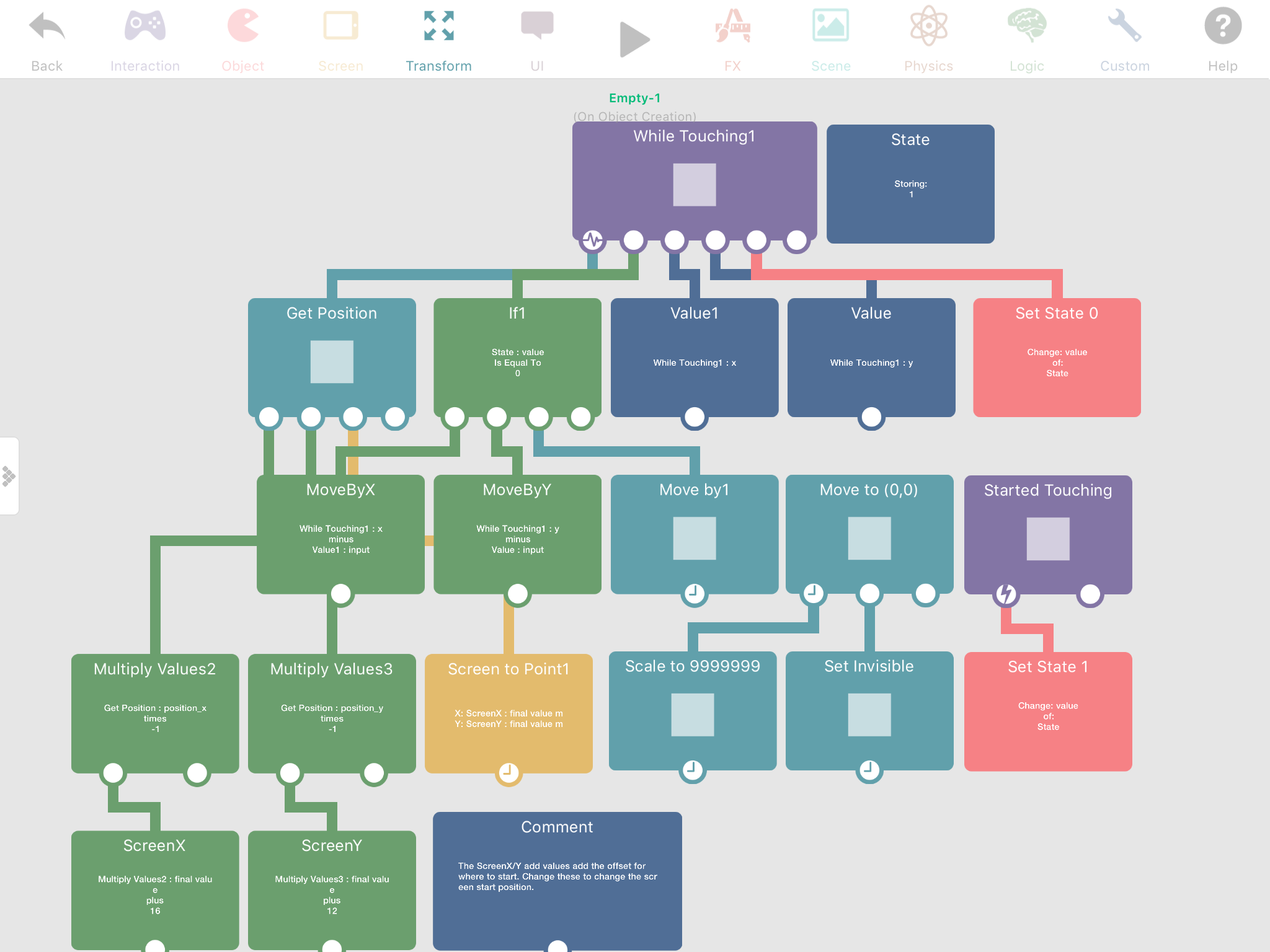
Dragging limits would be doable because it's based on position, so you could do if X<left.X, move to left.X or something similar. You could put these under the while touching so it only test the limits while the screen is moving.
A screen dragging behaviour would probably be useful though eventually.
-
Thanks! That works, but there's an occasional but handleable framedrop.
Now, bonus points, how would one achieve two finger pinch to zoom? XD
UPDATE: I exactly duped it in another project, and, well, it is very shaken to say the least, and hardly works. Is it only for default screen zoom, or relies on a variable I have set improperly?
-
Thanks! That works, but there's an occasional but handleable framedrop.
Now, bonus points, how would one achieve two finger pinch to zoom? XD
UPDATE: I exactly duped it in another project, and, well, it is very shaken to say the least, and hardly works. Is it only for default screen zoom, or relies on a variable I have set improperly?
@Thecheater887 I'm not sure, perhaps double check the behaviours, or send it to me and I'll look at it.
-
Thanks! That works, but there's an occasional but handleable framedrop.
Now, bonus points, how would one achieve two finger pinch to zoom? XD
UPDATE: I exactly duped it in another project, and, well, it is very shaken to say the least, and hardly works. Is it only for default screen zoom, or relies on a variable I have set improperly?
@Thecheater887 I have pinch to zoom mostly figured out. Do you still want me to make my example?
-
Thanks! That works, but there's an occasional but handleable framedrop.
Now, bonus points, how would one achieve two finger pinch to zoom? XD
UPDATE: I exactly duped it in another project, and, well, it is very shaken to say the least, and hardly works. Is it only for default screen zoom, or relies on a variable I have set improperly?
@Thecheater887 I have it part way done, but im not going to work on it more yet if you don't need it.
-
@Thecheater887 I have it part way done, but im not going to work on it more yet if you don't need it.
@iTap-Development sorry, I don't get notifications.
I can't seme to get his working outside of the sandbox, which I find stupid, but..
Yea, if you could continue, that would be great!
-
@iTap-Development sorry, I don't get notifications.
I can't seme to get his working outside of the sandbox, which I find stupid, but..
Yea, if you could continue, that would be great!
@Thecheater887 ok I'll try to finish today!
-
@iTap-Development sorry, I don't get notifications.
I can't seme to get his working outside of the sandbox, which I find stupid, but..
Yea, if you could continue, that would be great!
@Thecheater887 it might take a little longer that i thought, because i'm having an issue with world coordinates. But murtaza is helping with it.


Hello! It looks like you're interested in this conversation, but you don't have an account yet.
Getting fed up of having to scroll through the same posts each visit? When you register for an account, you'll always come back to exactly where you were before, and choose to be notified of new replies (either via email, or push notification). You'll also be able to save bookmarks and upvote posts to show your appreciation to other community members.
With your input, this post could be even better 💗
Register Login