
How to create an animated button “Shaking effect”
-
@SplitMindGaming I give up, really. I really think you are doing it on purpose. Good luck.
@XxWhiteHearrxX wow really. You have to understand that just because its easy for you to quickly figure out on your end because you know the program. That many of us dont understand it like that. Its why i asked the question. Obviously if i knew how to do it i woudnt have asked right. All your saying is add value here and there. You dont know how to break it down properly and you get frustrated and try to insult my intelligence with your rude emojis and remarks. I appreciate you trying to help but if your not willing to really break it down so I can understand. Dont even reply at all. Let someone who is less rude then you respond back.
-
I also am reading what this man is saying over and over and I literally dont understand what im doing wrong. He said to put get position values to random number. Look at my recent screenshot. Did i not do that? Can someone else please chime in and explain it a little more clearer. Hyperpad is a really new interface to me. So please if you decide to answer try not to get too frustrated with me.
-
I also am reading what this man is saying over and over and I literally dont understand what im doing wrong. He said to put get position values to random number. Look at my recent screenshot. Did i not do that? Can someone else please chime in and explain it a little more clearer. Hyperpad is a really new interface to me. So please if you decide to answer try not to get too frustrated with me.
@SplitMindGaming Ok, maybe you haven't got it right. It's also my fault if you I can't tell you how it's going on so don't worry you are absolutely right blaming me ( I'm also blaming myself, that's why I put emojis. It's also frustrating for me when I can't understand things properly. Sorry being rude tho ). I'm making a simple program right to show you how I would make it. I'm sending you the screenshot real soon 🤞
-
@SplitMindGaming Ok, maybe you haven't got it right. It's also my fault if you I can't tell you how it's going on so don't worry you are absolutely right blaming me ( I'm also blaming myself, that's why I put emojis. It's also frustrating for me when I can't understand things properly. Sorry being rude tho ). I'm making a simple program right to show you how I would make it. I'm sending you the screenshot real soon 🤞
@XxWhiteHearrxX thanks for that. It means alot. I promise you im not trying to mock you in any way. I literally do not know alot about this software. I do appreciate your help and your very attentive to this forum which i admire from you.
-
I also am reading what this man is saying over and over and I literally dont understand what im doing wrong. He said to put get position values to random number. Look at my recent screenshot. Did i not do that? Can someone else please chime in and explain it a little more clearer. Hyperpad is a really new interface to me. So please if you decide to answer try not to get too frustrated with me.
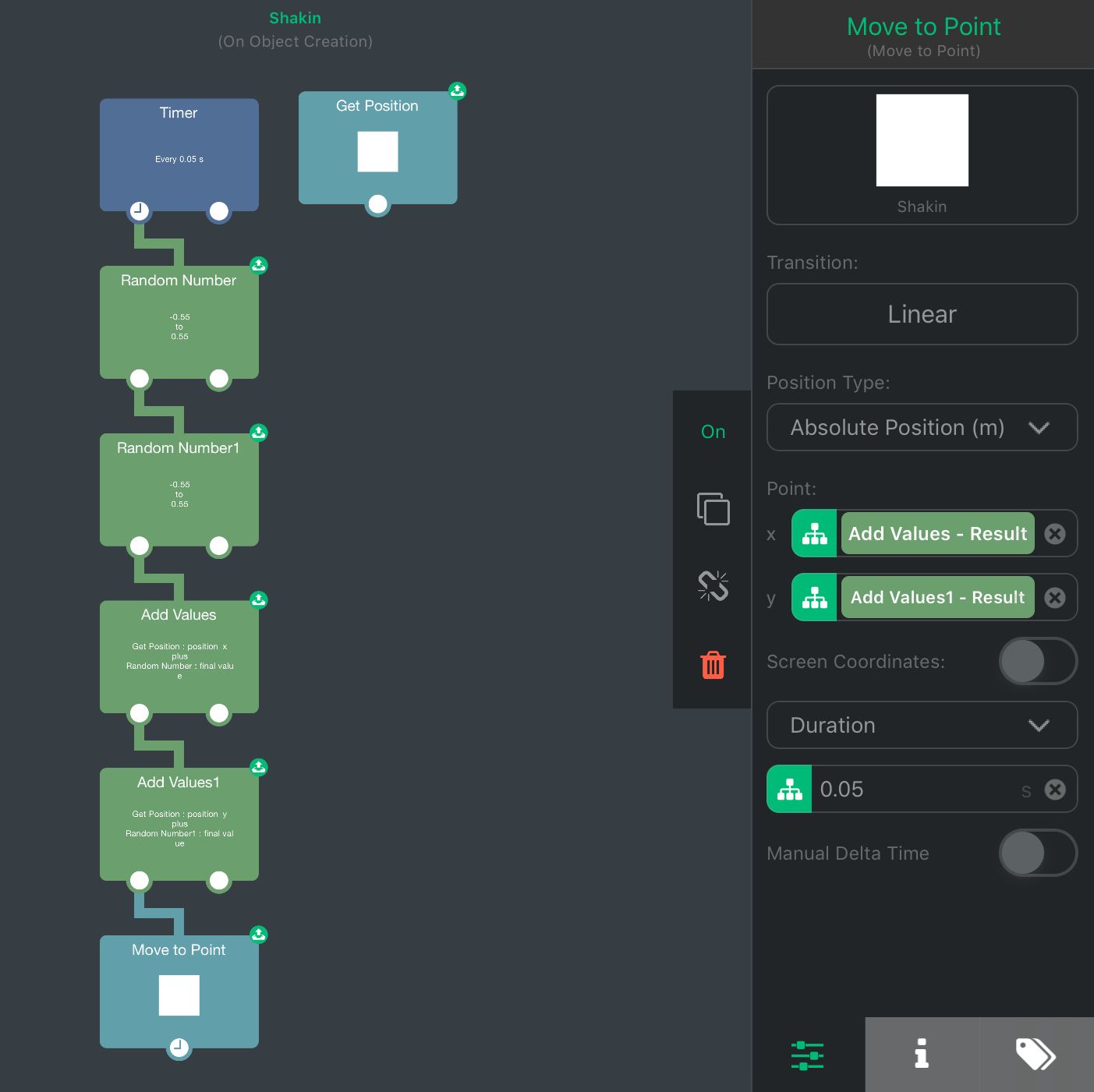
This program is not fully reliable, but it’s very simple. The first Random Number and Add Values are for X values and the second Random Number and Add Values are for Y values. The Add Values are set like this : Get Position values + Random Number. To stop it, just turn the Timer Off and it should stop everything. If you want to be precise, you can also move the object back when it’s off. I hope it’s more clear now 😣
-
@XxWhiteHearrxX thanks for that. It means alot. I promise you im not trying to mock you in any way. I literally do not know alot about this software. I do appreciate your help and your very attentive to this forum which i admire from you.
@SplitMindGaming Don’t worry. But you really have to experiment yourself on how it works. It’s better cause it’ll be really fast for you when you’ll have an idea. I suggest you to go test every behaviors just to be familiar with them. That way you could understand better on what you can do with hyperPad. Also, hyperPad has already some tutorials or manuals, giving you the link : https://www.hyperpad.com/learn
-
@SplitMindGaming Don’t worry. But you really have to experiment yourself on how it works. It’s better cause it’ll be really fast for you when you’ll have an idea. I suggest you to go test every behaviors just to be familiar with them. That way you could understand better on what you can do with hyperPad. Also, hyperPad has already some tutorials or manuals, giving you the link : https://www.hyperpad.com/learn
@XxWhiteHearrxX thanks for the link. Yes I spend many hours on the website actually really trying to sponge evrything up. Its also the reason for my many questions. That and it will help the website out when people search for similar things. On your project when you hit play. Does your object shoot to the bottom left first then shakes? I included my file. Not sure if i missed something.Button shake.tap
-
@XxWhiteHearrxX thanks for the link. Yes I spend many hours on the website actually really trying to sponge evrything up. Its also the reason for my many questions. That and it will help the website out when people search for similar things. On your project when you hit play. Does your object shoot to the bottom left first then shakes? I included my file. Not sure if i missed something.Button shake.tap
@SplitMindGaming Yup, that's why it's not really reliable. It takes the position 0, 0 for reasons I don't really know ( it should take only the Get Position values first whith Add Values, but I guess for some reason it turns to 0 or none ? I don't really know ). But you can still experiment with it and find out how you can make it better 🤞
-
@SplitMindGaming Yup, that's why it's not really reliable. It takes the position 0, 0 for reasons I don't really know ( it should take only the Get Position values first whith Add Values, but I guess for some reason it turns to 0 or none ? I don't really know ). But you can still experiment with it and find out how you can make it better 🤞
@XxWhiteHearrxX thank you so much for that. Definitely a step closer to what im trying to achieve.
-
@SplitMindGaming Yup, that's why it's not really reliable. It takes the position 0, 0 for reasons I don't really know ( it should take only the Get Position values first whith Add Values, but I guess for some reason it turns to 0 or none ? I don't really know ). But you can still experiment with it and find out how you can make it better 🤞
@XxWhiteHearrxX i figured it out. On the move to point. Change the bottom where it says duration to speed. That corrects the object from first moving to the bottom left
-
@XxWhiteHearrxX i figured it out. On the move to point. Change the bottom where it says duration to speed. That corrects the object from first moving to the bottom left
-
@SplitMindGaming Nice, Thanks !! 😉🤘
@XxWhiteHearrxX thank you again for that. Means alot That you took the time to do that for me.
-
@XxWhiteHearrxX thank you again for that. Means alot That you took the time to do that for me.


Hello! It looks like you're interested in this conversation, but you don't have an account yet.
Getting fed up of having to scroll through the same posts each visit? When you register for an account, you'll always come back to exactly where you were before, and choose to be notified of new replies (either via email, or push notification). You'll also be able to save bookmarks and upvote posts to show your appreciation to other community members.
With your input, this post could be even better 💗
Register Login