Skip to content
  • Categories
  • Recent
  • Tags
  • Popular
  • Users
  • Search
Skins
  • Light
  • Brite
  • Cerulean
  • Cosmo
  • Flatly
  • Journal
  • Litera
  • Lumen
  • Lux
  • Materia
  • Minty
  • Morph
  • Pulse
  • Sandstone
  • Simplex
  • Sketchy
  • Spacelab
  • United
  • Yeti
  • Zephyr
  • Dark
  • Cyborg
  • Darkly
  • Quartz
  • Slate
  • Solar
  • Superhero
  • Vapor

  • Default (No Skin)
  • No Skin
Collapse
hyperPad

hyperPad Forum

  1. Home
  2. Help and Support
  3. Add to score outputs a string and not a number !

Add to score outputs a string and not a number !

Scheduled Pinned Locked Moved Help and Support
7 Posts 3 Posters 1.5k Views 1 Watching
  • Oldest to Newest
  • Newest to Oldest
  • Most Votes
Reply
  • Reply as topic
Log in to reply
This topic has been deleted. Only users with topic management privileges can see it.
  • SamanS Offline
    SamanS Offline
    Saman
    wrote on last edited by
    #1

    Hi Team, I am new to the app. The output dragged out of add to score node gives a string value. I need a number value out of it to perform some calculations. How do I achieve that ..?

    SamanS 1 Reply Last reply
    0
    • WindwakerXW Offline
      WindwakerXW Offline
      WindwakerX
      wrote on last edited by WindwakerX
      #2

      Hi..

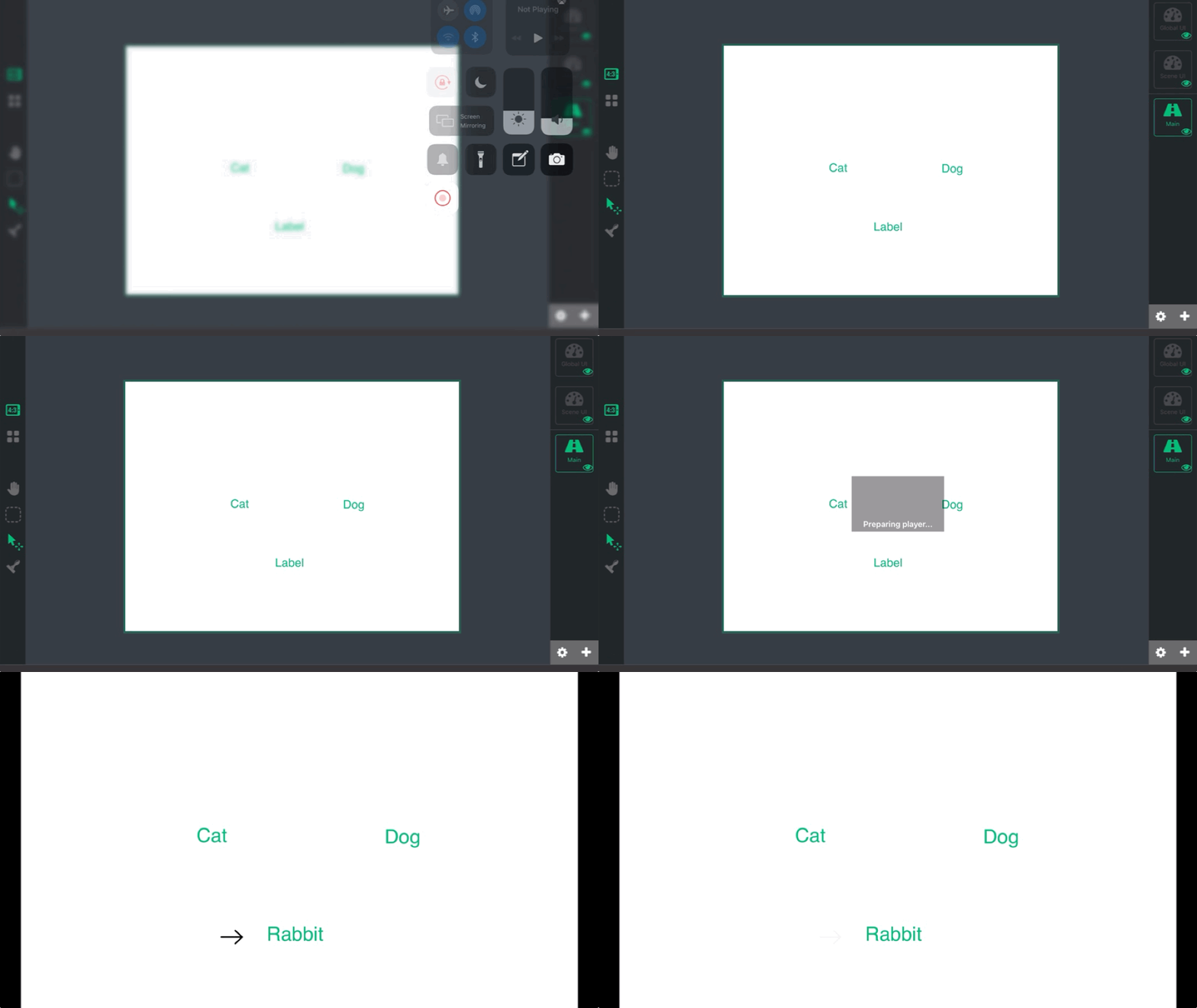
      I just tried to make something like (string) + (string) = String
      I give every string a value for example i have 3 strings (cat, dog and rabbit).

      Cat value = 1
      Dog value = 3
      Rabbit value = 4

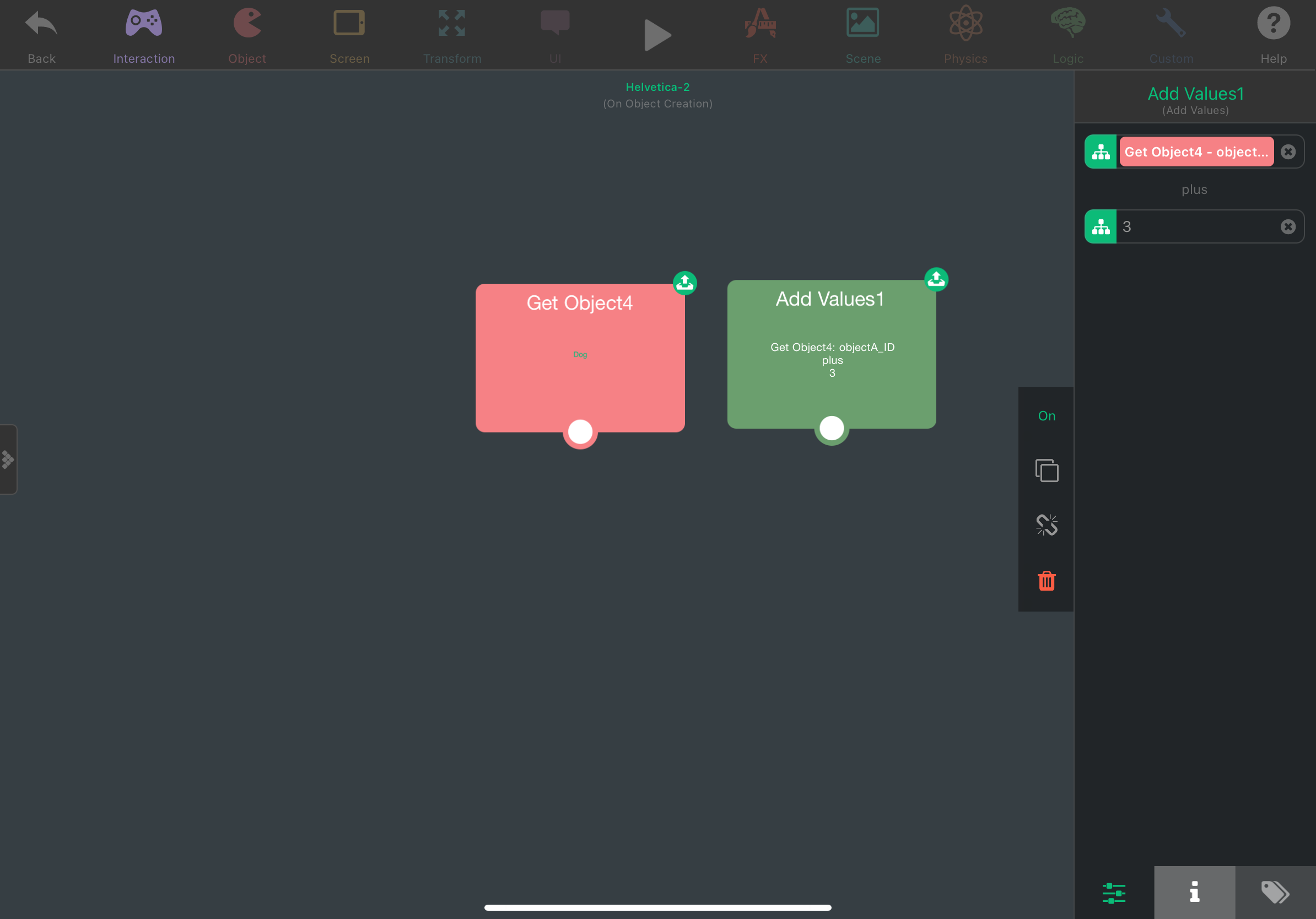
      dog value:
      B0CB4721-FF9D-4E85-964F-1FF6C15EBEA9.png

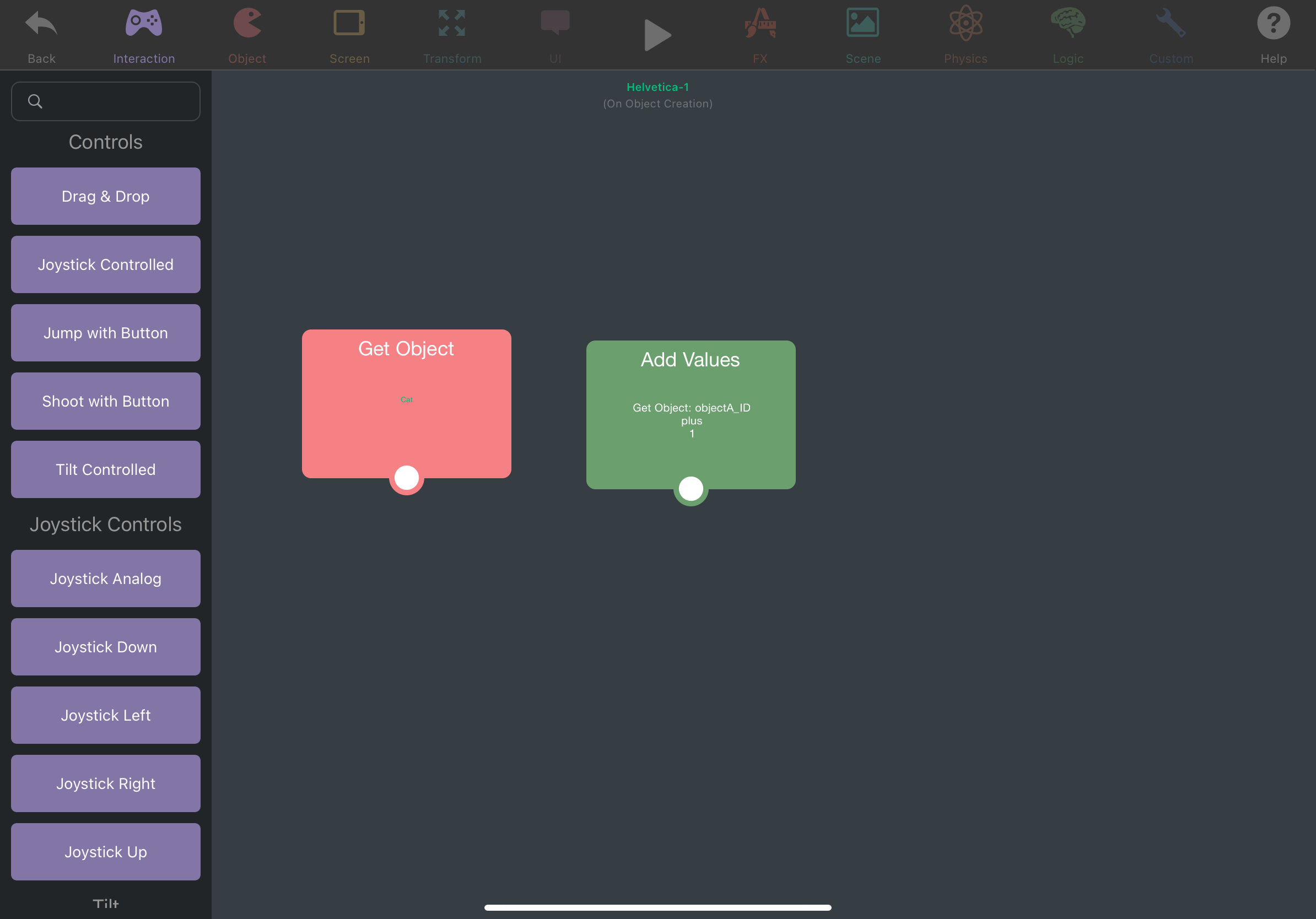
      Cat value:
      F257D091-DEFE-4710-9D21-08B1D212DE12.png

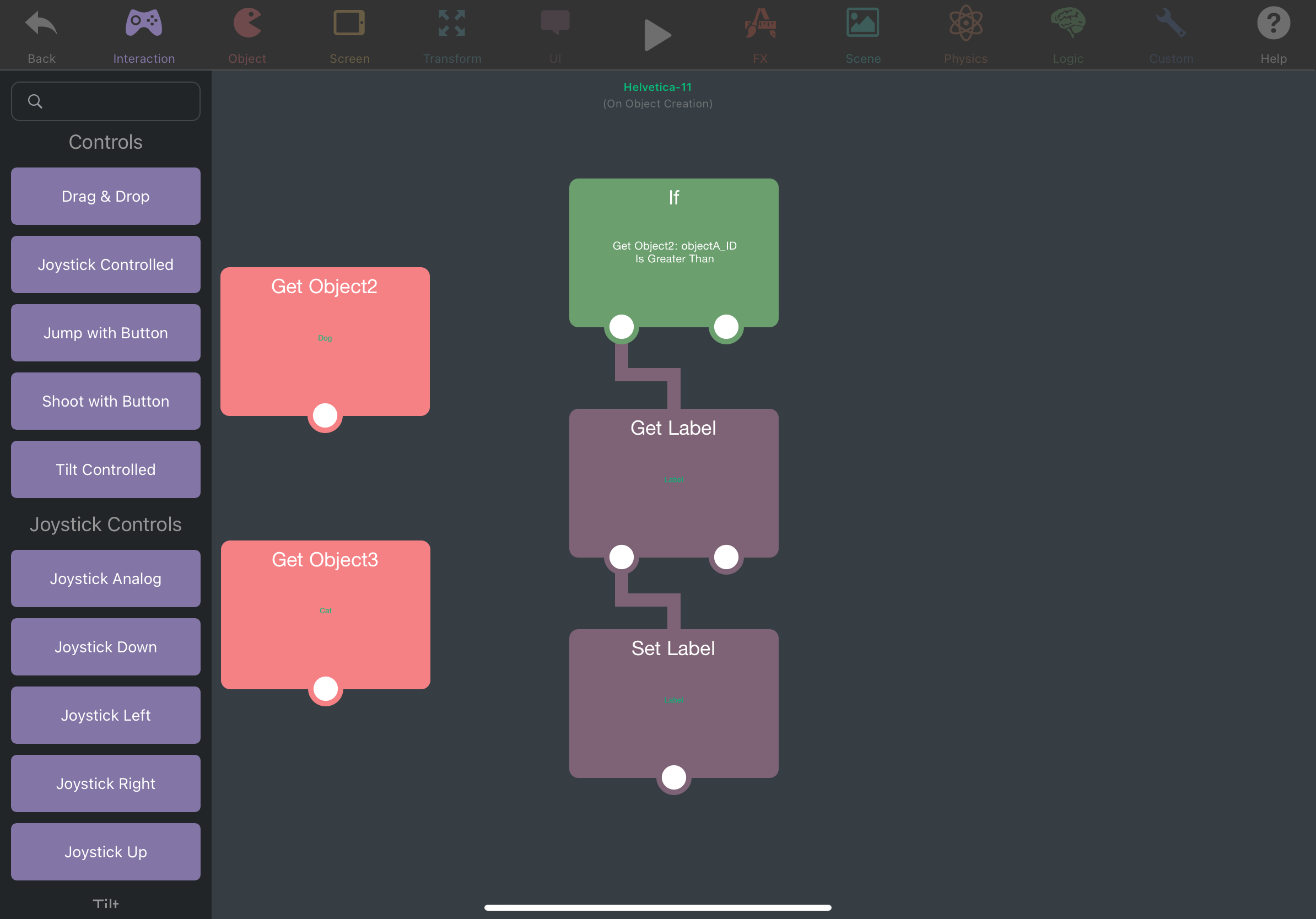
      Label value:
      DFA48862-96EB-406C-9ECA-55FF007CC9D7.png

      The result is when dog + cat will give us a rabbit which mean value 4
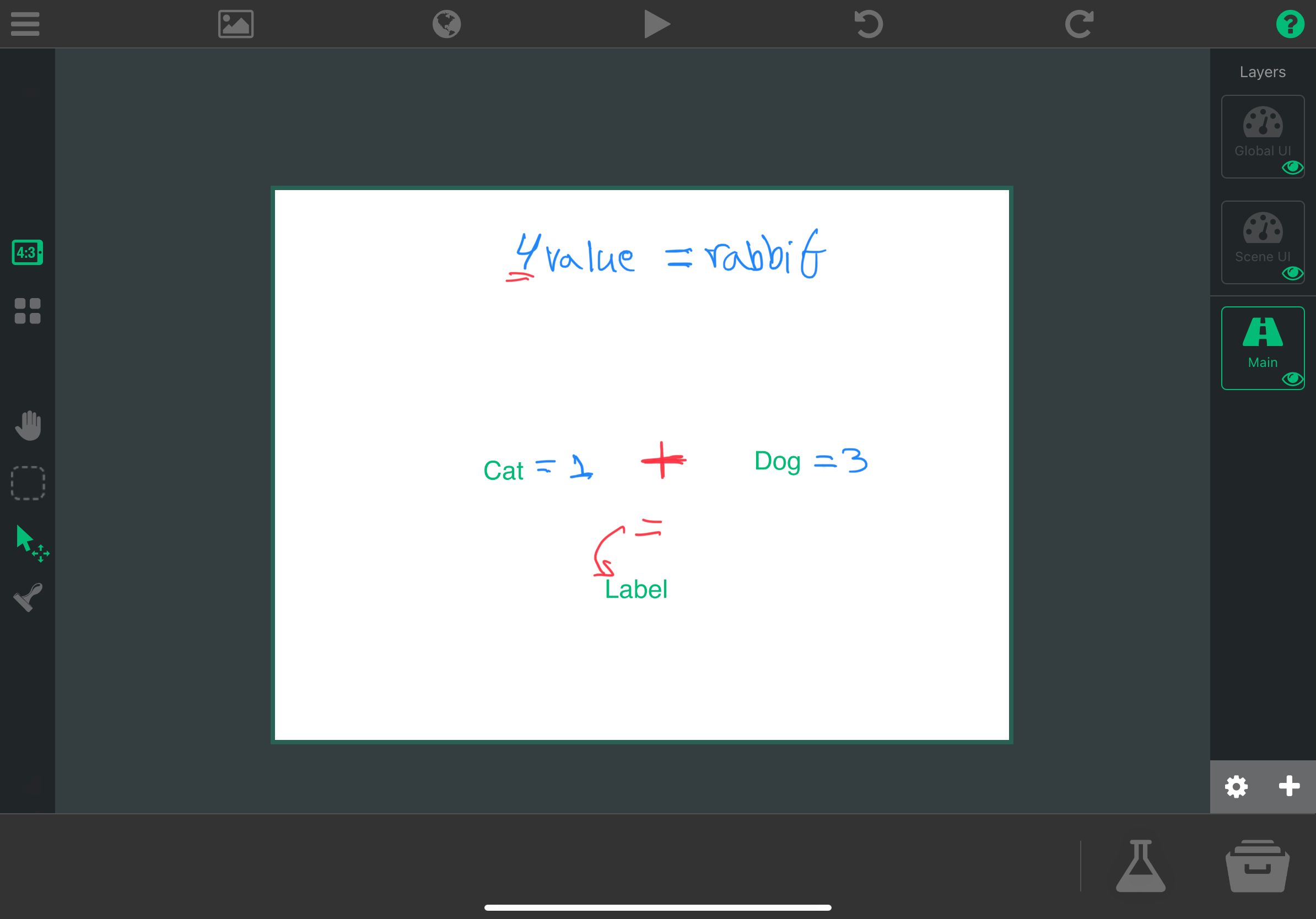
      6B65DC79-F68E-4FAC-A7AD-C74EF4D45B43.jpeg

      61D1EACB-17C3-4E37-BDDA-F7C65212250D.gif

      I hope this will help you.

      SamanS 1 Reply Last reply
      0
      • SamanS Saman

        Hi Team, I am new to the app. The output dragged out of add to score node gives a string value. I need a number value out of it to perform some calculations. How do I achieve that ..?

        SamanS Offline
        SamanS Offline
        Saman
        wrote on last edited by
        #3
        This post is deleted!
        1 Reply Last reply
        0
        • WindwakerXW WindwakerX

          Hi..

          I just tried to make something like (string) + (string) = String
          I give every string a value for example i have 3 strings (cat, dog and rabbit).

          Cat value = 1
          Dog value = 3
          Rabbit value = 4

          dog value:
          B0CB4721-FF9D-4E85-964F-1FF6C15EBEA9.png

          Cat value:
          F257D091-DEFE-4710-9D21-08B1D212DE12.png

          Label value:
          DFA48862-96EB-406C-9ECA-55FF007CC9D7.png

          The result is when dog + cat will give us a rabbit which mean value 4
          6B65DC79-F68E-4FAC-A7AD-C74EF4D45B43.jpeg

          61D1EACB-17C3-4E37-BDDA-F7C65212250D.gif

          I hope this will help you.

          SamanS Offline
          SamanS Offline
          Saman
          wrote on last edited by
          #4

          @WindwakerX Hi.. thanks very much for the intuitive logic.. I have to think a bit to see if I can some how tweak it to get what I want but I got so distracted by the cool dark theme you’ve got on your screenshots and been trying to find the settings to change theme..but I couldn’t.. Can you guide me to get my theme changed ??

          WindwakerXW 1 Reply Last reply
          0
          • SamanS Saman

            @WindwakerX Hi.. thanks very much for the intuitive logic.. I have to think a bit to see if I can some how tweak it to get what I want but I got so distracted by the cool dark theme you’ve got on your screenshots and been trying to find the settings to change theme..but I couldn’t.. Can you guide me to get my theme changed ??

            WindwakerXW Offline
            WindwakerXW Offline
            WindwakerX
            wrote on last edited by
            #5

            @Saman i think i had a dark theme because i changed my iPad settings to dark theme.

            1 Reply Last reply
            0
            • RobinsonXR Offline
              RobinsonXR Offline
              RobinsonX
              wrote on last edited by
              #6

              @Saman

              The Add to Score behavior doesn't output a number. It outputs an Object ID, which is a string. Object IDs references an object in the scene.

              Performing math operations with a string will treat it as 0. hyperPad doesn't throw an error when this happens.

              Eg. "cat" + 3 = 3 => 0 + 3 = 3

              If you want to get the score value after executing the Add to Score behavior, use Get Label. This behavior will read the contents of a text and not just give the object ID.

              The output of behaviors will automatically convert to numbers to perform math operations on.

              1 Reply Last reply
              2
              • RobinsonXR Offline
                RobinsonXR Offline
                RobinsonX
                wrote on last edited by
                #7

                Sidenote: All behaviors that manipulate objects will output Object ID(s). Some behaviors can have multiple output fields and you can select whichever one you want. 👍

                1 Reply Last reply
                1

                Hello! It looks like you're interested in this conversation, but you don't have an account yet.

                Getting fed up of having to scroll through the same posts each visit? When you register for an account, you'll always come back to exactly where you were before, and choose to be notified of new replies (either via email, or push notification). You'll also be able to save bookmarks and upvote posts to show your appreciation to other community members.

                With your input, this post could be even better 💗

                Register Login
                Reply
                • Reply as topic
                Log in to reply
                • Oldest to Newest
                • Newest to Oldest
                • Most Votes


                • Login

                • Login or register to search.
                • First post
                  Last post
                0
                • Categories
                • Recent
                • Tags
                • Popular
                • Users
                • Search