Skip to content
  • Categories
  • Recent
  • Tags
  • Popular
  • Users
  • Search
Skins
  • Light
  • Brite
  • Cerulean
  • Cosmo
  • Flatly
  • Journal
  • Litera
  • Lumen
  • Lux
  • Materia
  • Minty
  • Morph
  • Pulse
  • Sandstone
  • Simplex
  • Sketchy
  • Spacelab
  • United
  • Yeti
  • Zephyr
  • Dark
  • Cyborg
  • Darkly
  • Quartz
  • Slate
  • Solar
  • Superhero
  • Vapor

  • Default (No Skin)
  • No Skin
Collapse
hyperPad

hyperPad Forum

  1. Home
  2. Help and Support
  3. From HyperPad to AppStore upload?

From HyperPad to AppStore upload?

Scheduled Pinned Locked Moved Help and Support
6 Posts 2 Posters 1.2k Views 1 Watching
  • Oldest to Newest
  • Newest to Oldest
  • Most Votes
Reply
  • Reply as topic
Log in to reply
This topic has been deleted. Only users with topic management privileges can see it.
  • ThisT Offline
    ThisT Offline
    This
    wrote on last edited by
    #1

    I'm closing in on finishing my app. I'm wondering if anyone has a tutorial on going through the process of what I need to do after I push publish in HP?

    1 Reply Last reply
    1
    • HamedH Offline
      HamedH Offline
      Hamed
      Admin
      wrote on last edited by
      #2

      We have a tutorial on that! But it needs to be updated so that you open the .xcworkspace file instead of the .xcodeproj file.

      https://hyperpad.zendesk.com/hc/en-us/categories/200163049-Publishing

      1 Reply Last reply
      1
      • ThisT Offline
        ThisT Offline
        This
        wrote on last edited by
        #3

        Greetings:

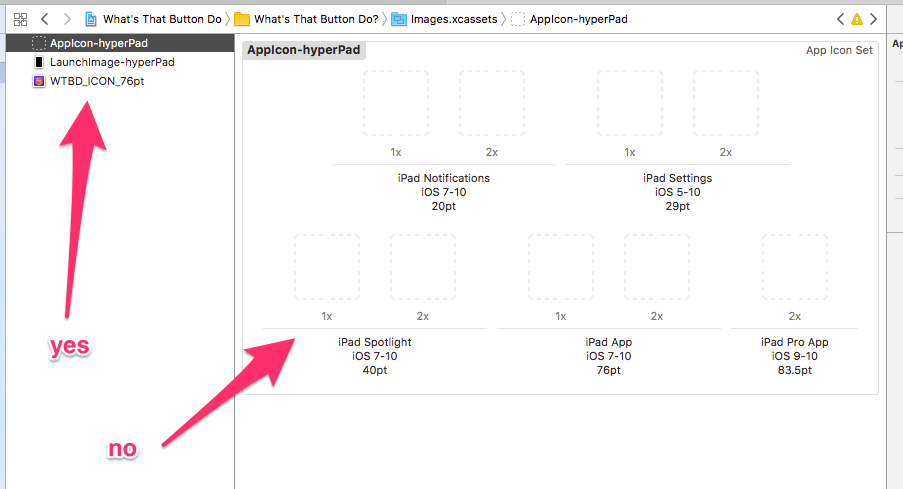
        I'm trying to follow this tutorial and having a number of issues. First is icon related. I'm trying to drag my icons in as the tutorial says, but I don't seem to be able to do it correctly. I can drag an icon into the left column and create a new icon set, but can't drag the icon into the existing set. Any help?

        Attaching screen grab.!0_1493220340844_by_default_2017-04-26_at_11_22_05_AM__4-26-17.png

        1 Reply Last reply
        0
        • HamedH Offline
          HamedH Offline
          Hamed
          Admin
          wrote on last edited by
          #4

          You don't drag the image into the left column. Drag from Finder into the dotted squares.

          ThisT 1 Reply Last reply
          0
          • HamedH Hamed

            You don't drag the image into the left column. Drag from Finder into the dotted squares.

            ThisT Offline
            ThisT Offline
            This
            wrote on last edited by
            #5

            @Hamed Thanks for the quick response! I've been trying to drag from the finder to the dotted squares, but Xcode doesn't allow. The only place it will let me drop the icon is in the left column. Any ideas? I'm in Xcode 8. Thanks!


            ThisT 1 Reply Last reply
            0
            • ThisT This

              @Hamed Thanks for the quick response! I've been trying to drag from the finder to the dotted squares, but Xcode doesn't allow. The only place it will let me drop the icon is in the left column. Any ideas? I'm in Xcode 8. Thanks!

              ThisT Offline
              ThisT Offline
              This
              wrote on last edited by
              #6

              @Hamed Discovered the problem. I was trying to use JPG, instead of PNG. All good now.

              1 Reply Last reply
              0

              Hello! It looks like you're interested in this conversation, but you don't have an account yet.

              Getting fed up of having to scroll through the same posts each visit? When you register for an account, you'll always come back to exactly where you were before, and choose to be notified of new replies (either via email, or push notification). You'll also be able to save bookmarks and upvote posts to show your appreciation to other community members.

              With your input, this post could be even better 💗

              Register Login
              Reply
              • Reply as topic
              Log in to reply
              • Oldest to Newest
              • Newest to Oldest
              • Most Votes


              • Login

              • Login or register to search.
              • First post
                Last post
              0
              • Categories
              • Recent
              • Tags
              • Popular
              • Users
              • Search