Skip to content
  • Categories
  • Recent
  • Tags
  • Popular
  • Users
  • Search
Skins
  • Light
  • Brite
  • Cerulean
  • Cosmo
  • Flatly
  • Journal
  • Litera
  • Lumen
  • Lux
  • Materia
  • Minty
  • Morph
  • Pulse
  • Sandstone
  • Simplex
  • Sketchy
  • Spacelab
  • United
  • Yeti
  • Zephyr
  • Dark
  • Cyborg
  • Darkly
  • Quartz
  • Slate
  • Solar
  • Superhero
  • Vapor

  • Default (No Skin)
  • No Skin
Collapse
hyperPad

hyperPad Forum

  1. Home
  2. Help and Support
  3. Level with me on the "Levels" :)

Level with me on the "Levels" :)

Scheduled Pinned Locked Moved Help and Support
14 Posts 3 Posters 2.7k Views 2 Watching
  • Oldest to Newest
  • Newest to Oldest
  • Most Votes
Reply
  • Reply as topic
Log in to reply
This topic has been deleted. Only users with topic management privileges can see it.
  • A ackov77

    Hi,
    I am trying to build a hidden object game. I have set the scene, added objects, score and sound.
    Now, when the score reaches "100" how do you set it up to move to the next scene? Is it something i need to put together under "logic" or "UI"?

    Also, the music...very easy to get it to play, but how do you get it to stop if you press the screen twice, let's say mute and un-mute action??

    Help!

    Thanks

    iTap DevelopmentI Offline
    iTap DevelopmentI Offline
    iTap Development
    wrote on last edited by
    #2

    @ackov77 when you set the score trigger an "if" behavior to check if it is = to 100. Then have the If trigger a load scene behavior(you may need to turn advanced behaviors on).

    For turning music off... use either a box container or an attribute and have a started touching behavior add 1 to it. Then connect an IF and check if it is = to 2 and then have a stop music behavior after the If. Then Set the box container or attribute back to 0

    1 Reply Last reply
    0
    • A Offline
      A Offline
      ackov77
      wrote on last edited by
      #3

      thank you :)

      iTap DevelopmentI 1 Reply Last reply
      0
      • A ackov77

        thank you :)

        iTap DevelopmentI Offline
        iTap DevelopmentI Offline
        iTap Development
        wrote on last edited by
        #4

        @ackov77 no problem!

        1 Reply Last reply
        0
        • A Offline
          A Offline
          ackov77
          wrote on last edited by
          #5

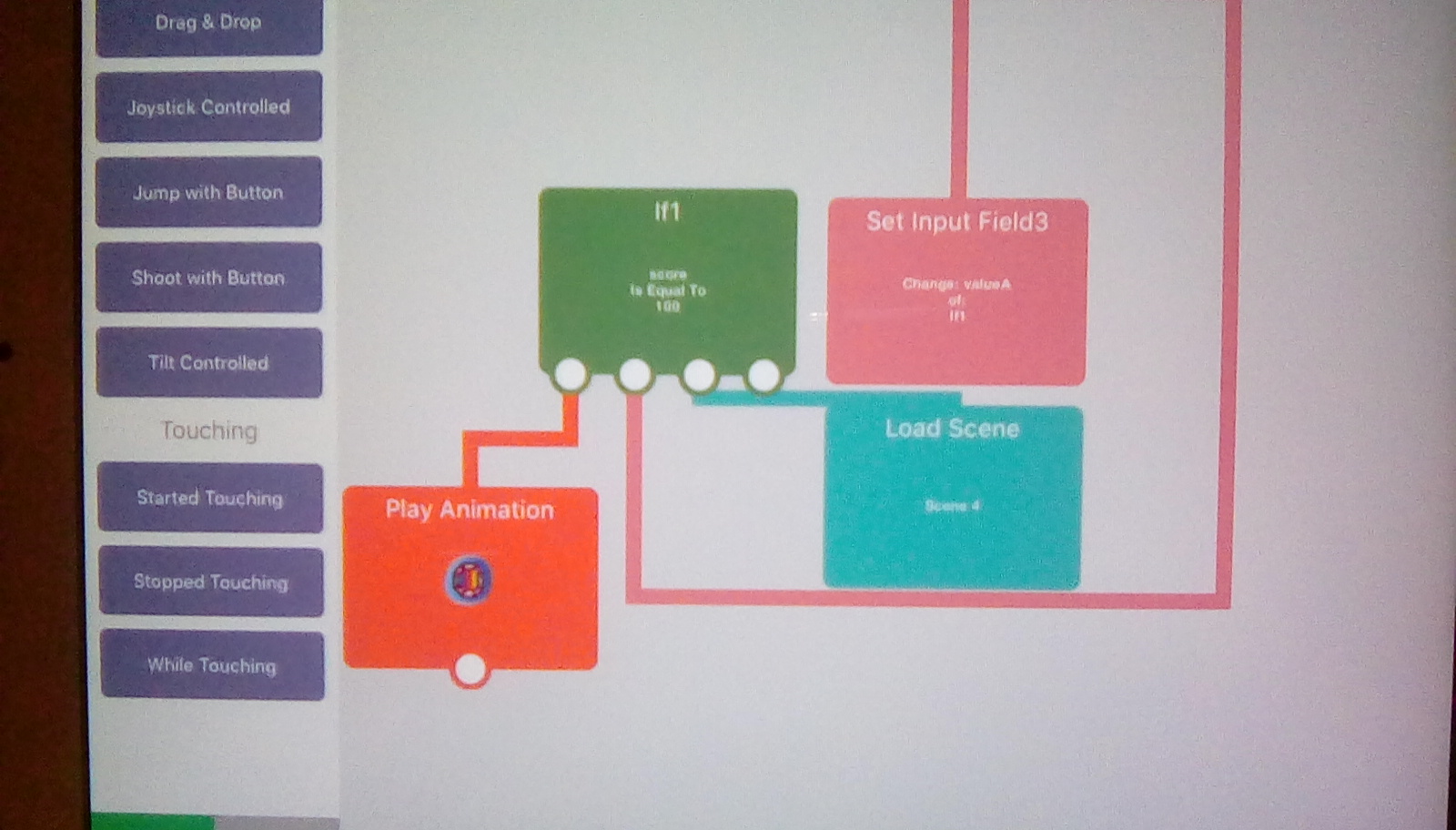
          ![alt text](0_1502161312234_IMG_20170807_212833.jpg image url) Does it appear i set things up right?

          iTap DevelopmentI 1 Reply Last reply
          0
          • A ackov77

            ![alt text](0_1502161312234_IMG_20170807_212833.jpg image url) Does it appear i set things up right?

            iTap DevelopmentI Offline
            iTap DevelopmentI Offline
            iTap Development
            wrote on last edited by
            #6

            @ackov77 you need to have the If connected under whatever behaviors you set the score with. Also, what is the set input field for?

            1 Reply Last reply
            0
            • A Offline
              A Offline
              ackov77
              wrote on last edited by
              #7

              Hello,
              I cannot recall what i used the set input for off-hand (i am at work) but i will remove that. Thank You.
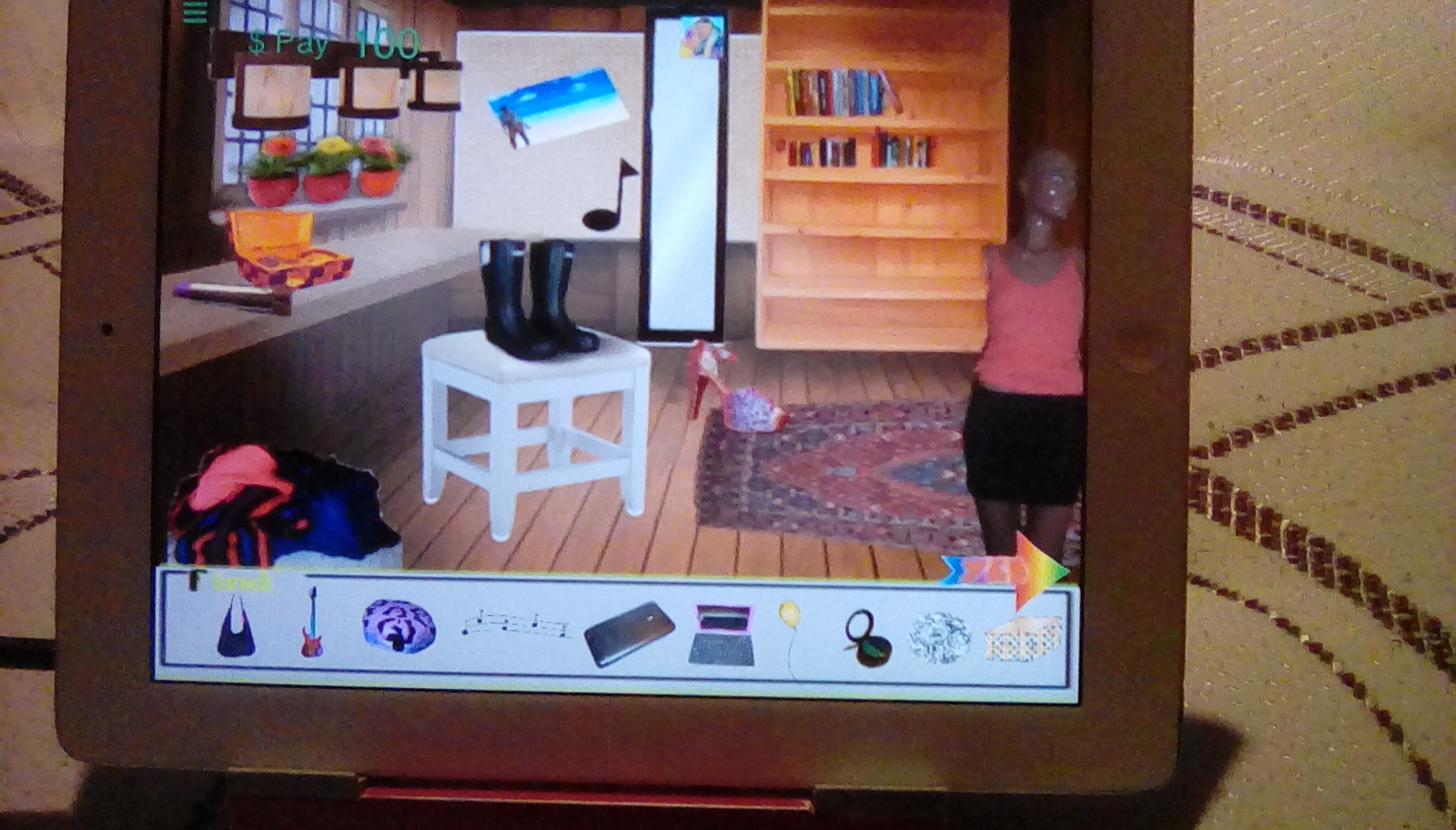
              One more thing.....don't laugh, lol....in my hidden object scene, i want the objects to disappear in the box too once the object is found. How do i make that happen?? 0_1502219928233_IMG_20170807_213938.jpg
              iTap DevelopmentI 1 Reply Last reply
              0
              • A ackov77

                Hello,
                I cannot recall what i used the set input for off-hand (i am at work) but i will remove that. Thank You.
                One more thing.....don't laugh, lol....in my hidden object scene, i want the objects to disappear in the box too once the object is found. How do i make that happen?? 0_1502219928233_IMG_20170807_213938.jpg

                iTap DevelopmentI Offline
                iTap DevelopmentI Offline
                iTap Development
                wrote on last edited by
                #8

                @ackov77 use a hide graphic behavior....it may be in advanced as well.
                A suggestion, you could you the set color behavior(under transform and maybe advanced) and set it to the same color, but change the opacity to maybe 50% so the user can see all the items collected.

                1 Reply Last reply
                0
                • A Offline
                  A Offline
                  ackov77
                  wrote on last edited by
                  #9

                  Awesome! Thanks for your help.

                  iTap DevelopmentI 1 Reply Last reply
                  0
                  • A ackov77

                    Awesome! Thanks for your help.

                    iTap DevelopmentI Offline
                    iTap DevelopmentI Offline
                    iTap Development
                    wrote on last edited by
                    #10

                    @ackov77 no problem!

                    1 Reply Last reply
                    0
                    • MurtazaM Offline
                      MurtazaM Offline
                      Murtaza
                      Admin
                      wrote on last edited by
                      #11

                      While the solution @iTap-Development gave is better since it's more robust and can be used in multiple ways, we do have this functionality built into the "Add to Score" behaviour (https://hyperpad.zendesk.com/hc/en-us/articles/115003205326-Add-to-Score).

                      there is a field that says "event when reaches" enter your desired target score here (100)
                      Then connect a load scene behaviour.

                      Now each time you add to the score it automatically checks if the score is 100. If it is, then it will trigger the load scene behaviour.

                      iTap DevelopmentI A 2 Replies Last reply
                      0
                      • MurtazaM Murtaza

                        While the solution @iTap-Development gave is better since it's more robust and can be used in multiple ways, we do have this functionality built into the "Add to Score" behaviour (https://hyperpad.zendesk.com/hc/en-us/articles/115003205326-Add-to-Score).

                        there is a field that says "event when reaches" enter your desired target score here (100)
                        Then connect a load scene behaviour.

                        Now each time you add to the score it automatically checks if the score is 100. If it is, then it will trigger the load scene behaviour.

                        iTap DevelopmentI Offline
                        iTap DevelopmentI Offline
                        iTap Development
                        wrote on last edited by
                        #12

                        @Murtaza I forgot about that behavior lol!

                        1 Reply Last reply
                        0
                        • MurtazaM Murtaza

                          While the solution @iTap-Development gave is better since it's more robust and can be used in multiple ways, we do have this functionality built into the "Add to Score" behaviour (https://hyperpad.zendesk.com/hc/en-us/articles/115003205326-Add-to-Score).

                          there is a field that says "event when reaches" enter your desired target score here (100)
                          Then connect a load scene behaviour.

                          Now each time you add to the score it automatically checks if the score is 100. If it is, then it will trigger the load scene behaviour.

                          A Offline
                          A Offline
                          ackov77
                          wrote on last edited by
                          #13

                          @Murtaza That sounds good, what tab is this event under? Logic?

                          iTap DevelopmentI 1 Reply Last reply
                          0
                          • A ackov77

                            @Murtaza That sounds good, what tab is this event under? Logic?

                            iTap DevelopmentI Offline
                            iTap DevelopmentI Offline
                            iTap Development
                            wrote on last edited by
                            #14

                            @ackov77 I think it’s under UI

                            1 Reply Last reply
                            0

                            Hello! It looks like you're interested in this conversation, but you don't have an account yet.

                            Getting fed up of having to scroll through the same posts each visit? When you register for an account, you'll always come back to exactly where you were before, and choose to be notified of new replies (either via email, or push notification). You'll also be able to save bookmarks and upvote posts to show your appreciation to other community members.

                            With your input, this post could be even better 💗

                            Register Login
                            Reply
                            • Reply as topic
                            Log in to reply
                            • Oldest to Newest
                            • Newest to Oldest
                            • Most Votes


                            • Login

                            • Login or register to search.
                            • First post
                              Last post
                            0
                            • Categories
                            • Recent
                            • Tags
                            • Popular
                            • Users
                            • Search