
Looping, Scrolling, Flat "world", like DEFENDER?
-
I would make use of the Dictionary and Array behaviours to create data structures to store the positions and information about the objects in your world. Then Use Move to point behaviours when you initialize your objects and move them to their set positions.
If the future, we will have "prefabs" which will be objects that you can save. So you can have Jet pack joyride style chunks of shaped coins for example.
-
Yeah I’d use an array as Hamed said to store the positions and object type of all blocks and other objects across the world, then using that work out how long the world is, once you’ve passed the world limit (using the player positions start to load back from the first array value. Or actually if you don’t want to use arrays you could even just teleport the player back to the start once they reach the end, if the start of the world looks the same as the end you won’t notice the difference.
-
Yeah I’d use an array as Hamed said to store the positions and object type of all blocks and other objects across the world, then using that work out how long the world is, once you’ve passed the world limit (using the player positions start to load back from the first array value. Or actually if you don’t want to use arrays you could even just teleport the player back to the start once they reach the end, if the start of the world looks the same as the end you won’t notice the difference.
-
@Aidan-Oxley sorry for a silly question. Should teleportation be done by constantly checking (IF check each frame) the X-position of the player, and instantly jumping them to the "start" each time they cross over the x limit going in either direction?
@Deeeds you could do it that way but I think the better way would be to use an empty object and use collisions for the edge of the world.
-
@Deeeds you could do it that way but I think the better way would be to use an empty object and use collisions for the edge of the world.
@Jack8680 argh, thank you!!!
Yes, that makes a lot more sense. Very moveable, too. Just pick it up and drag it, and have it partially visible during production so it's easy to drag around and change as the platform/level/world evolves. Only make it transparent when finished.
This might seem like a stupid question... I'm talking about a semi-transparent object because that's what I'd do (import a .png with partial opacity), with my limited knowledge of hyperPad. What's an "empty object", and how do I create this?
-
@Jack8680 argh, thank you!!!
Yes, that makes a lot more sense. Very moveable, too. Just pick it up and drag it, and have it partially visible during production so it's easy to drag around and change as the platform/level/world evolves. Only make it transparent when finished.
This might seem like a stupid question... I'm talking about a semi-transparent object because that's what I'd do (import a .png with partial opacity), with my limited knowledge of hyperPad. What's an "empty object", and how do I create this?
@Deeeds an empty object is an object that fills its collisions in with its colour (in this case you'd just keep it invisible). I think an admin said empty objects are better than transparent images for performance, but it's possible I've got that mixed up.
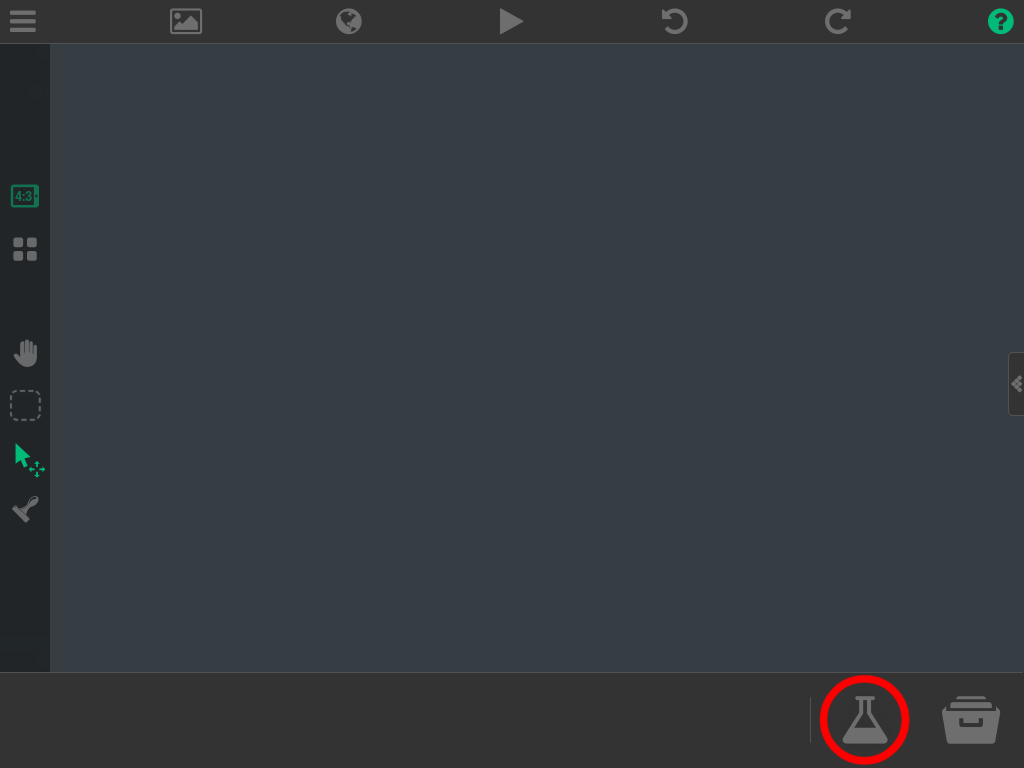
You can add an empty object by tapping the potion bottle(?) in the bottom right corner and choosing empty object. Image:
-
@Deeeds an empty object is an object that fills its collisions in with its colour (in this case you'd just keep it invisible). I think an admin said empty objects are better than transparent images for performance, but it's possible I've got that mixed up.
You can add an empty object by tapping the potion bottle(?) in the bottom right corner and choosing empty object. Image:
-
@iTap-Development Sounds about right, since an image is just an image, but an empty object has to keep redrawing itself when it has a colour other than blank.
-
@iTap-Development Sounds about right, since an image is just an image, but an empty object has to keep redrawing itself when it has a colour other than blank.
@Aidan-Oxley you can find his post if you search empty object with itap development in the posted by field.
-
@Deeeds an empty object is an object that fills its collisions in with its colour (in this case you'd just keep it invisible). I think an admin said empty objects are better than transparent images for performance, but it's possible I've got that mixed up.
You can add an empty object by tapping the potion bottle(?) in the bottom right corner and choosing empty object. Image:
@Jack8680 THANK YOU!!!
This will be a huge help to how I plan out the interactivity between player and levels, enemies and the level spaces, etc. Brilliant. CHEERS!
I had been ignoring this potion button, completely, since finding out that I could import transparent .png files by sending them to myself on email (from Mac to iPad) and then saving them to Photos... and importing. And it never crossed my mind to look in it after that.
-
@iTap-Development Cheers for this, too!
Hugely helpful tip. I'm flogging the physics engine, so any/all extra CPU saved is freedom to do more stuff, add more particles, use more graphics, make more sounds, etc.




Hello! It looks like you're interested in this conversation, but you don't have an account yet.
Getting fed up of having to scroll through the same posts each visit? When you register for an account, you'll always come back to exactly where you were before, and choose to be notified of new replies (either via email, or push notification). You'll also be able to save bookmarks and upvote posts to show your appreciation to other community members.
With your input, this post could be even better 💗
Register Login