
Frame Rate Slow Down...
-
@Murtaza Take this as gospel: I got it down to almost NOTHING in the scene, and still having the same frame rate issues.
Look at this part of my first post, and believe it, please:
" I just spent a few hours trying to remove things, turn things on and off and do all sorts of other changes to my projects in a mad pursuit of this.
But it's not me. It's you."
-
@Murtaza Take this as gospel: I got it down to almost NOTHING in the scene, and still having the same frame rate issues.
Look at this part of my first post, and believe it, please:
" I just spent a few hours trying to remove things, turn things on and off and do all sorts of other changes to my projects in a mad pursuit of this.
But it's not me. It's you."
@Deeeds Could you link your project? I wanna have a look because I’ve had laggy particle problems before but o fixed them.
-
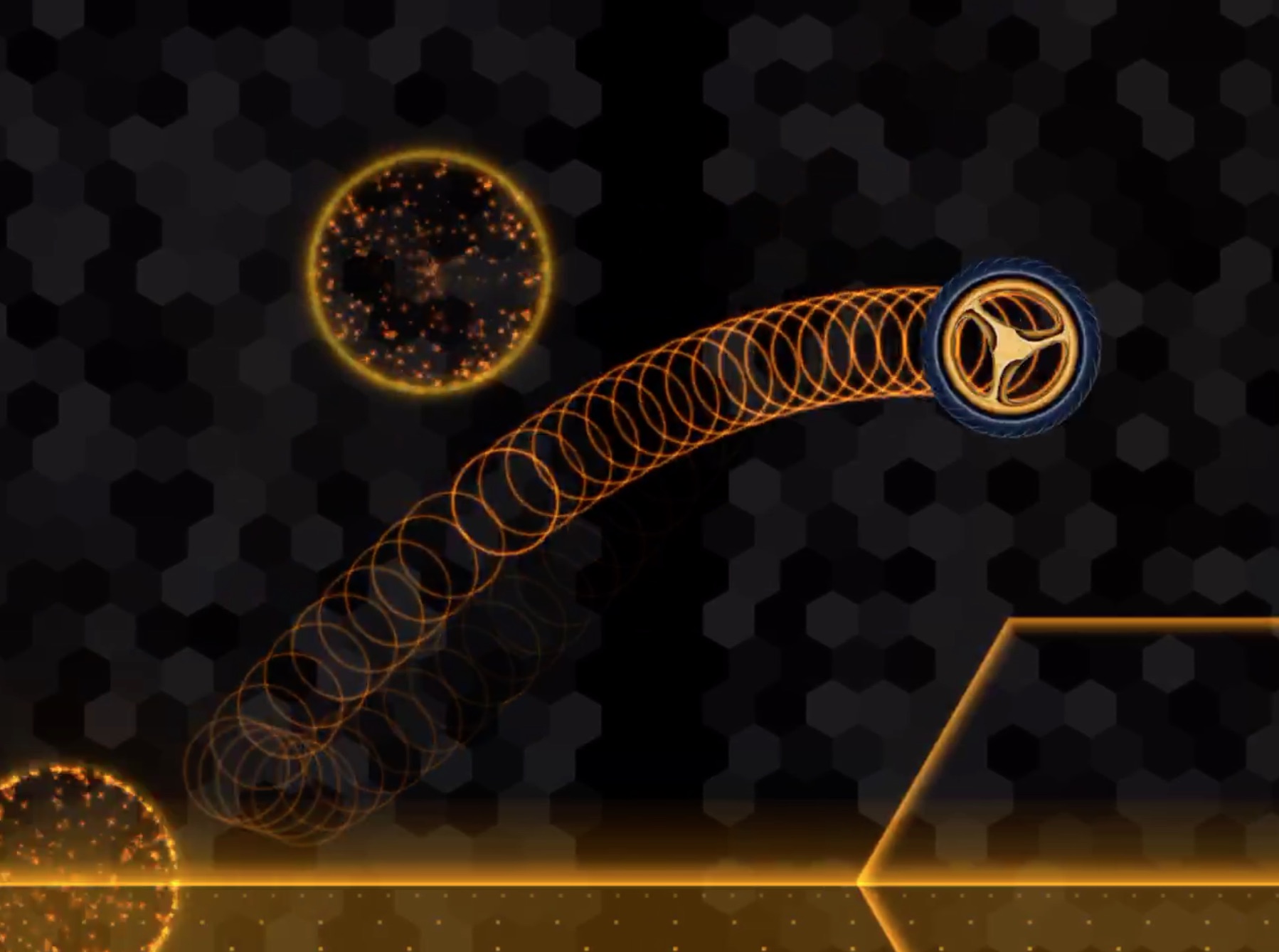
@Murtaza This is what a frame drop looks like. See the ring that's brighter and has a little gap behind it where one ring is missing.
Thanks to the fact that your particle engine doesn't interpolate particle positions in between frames, I can overload it to more accurately monitor frame rates than the shitfulness that is the cocos2D frame rate reporter.
This is from a few days ago, and is about the only frame drop in 30 seconds of testing, whilst concurrently piping the whole screen through lightning cable to the Mac to record it. So it's probably a bunch of system calls that caused it.
Soon after this, all hell broke loose and your engine became so laggy that it was incredible. Not just in play testing, but also in editing behaviours and scenes. I was frantically deleting scenes, particle systems and all sorts of objects and behaviours, mistakenly thinking it must be something I did.
By the time I got to a scene with nothing more than the hero, ground and camera controller, and it was still stuttering away, I realised the problem wasn't me.
-
@Deeeds Could you link your project? I wanna have a look because I’ve had laggy particle problems before but o fixed them.
@Aidan-Oxley No, I cannot upload the project.
As I've said before: Force quitting the app TWICE fixes the problem. For a while. It slowly creeps back. At which point I either force quit a couple more times or do a hard reset of the device, which works even better. Then I can tinker for an hour or so before lag starts to creep in.
-
@Murtaza This is what a frame drop looks like. See the ring that's brighter and has a little gap behind it where one ring is missing.
Thanks to the fact that your particle engine doesn't interpolate particle positions in between frames, I can overload it to more accurately monitor frame rates than the shitfulness that is the cocos2D frame rate reporter.
This is from a few days ago, and is about the only frame drop in 30 seconds of testing, whilst concurrently piping the whole screen through lightning cable to the Mac to record it. So it's probably a bunch of system calls that caused it.
Soon after this, all hell broke loose and your engine became so laggy that it was incredible. Not just in play testing, but also in editing behaviours and scenes. I was frantically deleting scenes, particle systems and all sorts of objects and behaviours, mistakenly thinking it must be something I did.
By the time I got to a scene with nothing more than the hero, ground and camera controller, and it was still stuttering away, I realised the problem wasn't me.
@Deeeds Yes! I get this all the time, the inconsistency in particle trails. Even when my project isn’t lagging, every now and then my particle trail will break a bit and have that effect in your screenshot above.
-
@Deeeds Yes! I get this all the time, the inconsistency in particle trails. Even when my project isn’t lagging, every now and then my particle trail will break a bit and have that effect in your screenshot above.
@Aidan-Oxley This is from system calls. It's much more noticeable in a particle system that doesn't interpolate than one that does.
iOS system calls don't care about games or anything else, they just do whatever they want. Check networks, search for app updates, check the cell connections, report home... etc etc... they all get priority, and that's the little flutters you see, even in the most primitive of scenes.
-
@Deeeds Yes! I get this all the time, the inconsistency in particle trails. Even when my project isn’t lagging, every now and then my particle trail will break a bit and have that effect in your screenshot above.
@Aidan-Oxley But when it becomes consistent, and a reliable LAG festival, that's either too much going on, or the game engine leaking and chugging on itself. hyperPad has some issues with editing particles frequently. It does not like it. And it doesn't like a lot of positional changes of scene items, either.
-
@Aidan-Oxley But when it becomes consistent, and a reliable LAG festival, that's either too much going on, or the game engine leaking and chugging on itself. hyperPad has some issues with editing particles frequently. It does not like it. And it doesn't like a lot of positional changes of scene items, either.
@Deeeds Oh I see. I don’t have lag buildup over time then because I usually don’t work on projects for more than an hour at a time.
-
@Aidan-Oxley But when it becomes consistent, and a reliable LAG festival, that's either too much going on, or the game engine leaking and chugging on itself. hyperPad has some issues with editing particles frequently. It does not like it. And it doesn't like a lot of positional changes of scene items, either.
@Deeeds How many times did you change particle settings before it got super laggy? I know that particles are weird in that they want you to restart hyperPad to update the effects of the particle. Otherwise you’ll find a glitchy duplicate of the particle (the old version) that disappears after restarting).
-
@Deeeds Oh I see. I don’t have lag buildup over time then because I usually don’t work on projects for more than an hour at a time.
@Aidan-Oxley Please look at all of what I'm saying, not the low hanging fruit you can use to deny the problem. It will literally happen to you at the point where the particle system or leak occurs in the things you do, regardless of how long you're using the app. I haven't isolated anything other than large numbers of object movements in the scene and large numbers of particle editor changes that cause the problem. The amount of time is a function of me getting to that part of what I'm doing and not otherwise important.
I get that you're overly fond of this app. But it DOES HAVE PROBLEMS!
-
@Aidan-Oxley Please look at all of what I'm saying, not the low hanging fruit you can use to deny the problem. It will literally happen to you at the point where the particle system or leak occurs in the things you do, regardless of how long you're using the app. I haven't isolated anything other than large numbers of object movements in the scene and large numbers of particle editor changes that cause the problem. The amount of time is a function of me getting to that part of what I'm doing and not otherwise important.
I get that you're overly fond of this app. But it DOES HAVE PROBLEMS!
@Deeeds I know hyperPad has problems. I’m just trying to help you see if there’s ANY way at all to make this better without resorting to ONLY waiting for hyperPad to fix it.
-
@Deeeds I know hyperPad has problems. I’m just trying to help you see if there’s ANY way at all to make this better without resorting to ONLY waiting for hyperPad to fix it.
-
@Aidan-Oxley Share your success stories.
Force quitting the app, twice, and hard resets are what I've found to work.
What have you found helps?
@Deeeds The only times I can remember what my whole project got laggy, including the editor, is when my project has too many objects.
-
@Deeeds The only times I can remember what my whole project got laggy, including the editor, is when my project has too many objects.
-
@Deeeds Wrong solution for the wrong problem. You’re getting laggy editor as well as laggy game. Deselecting graphic is a fix for just a particle constantly lagging for no reason. That’s why I was asking for a link, so I could see what you mean for myself.
-
@Deeeds Wrong solution for the wrong problem. You’re getting laggy editor as well as laggy game. Deselecting graphic is a fix for just a particle constantly lagging for no reason. That’s why I was asking for a link, so I could see what you mean for myself.
-
@Murtaza This is what a frame drop looks like. See the ring that's brighter and has a little gap behind it where one ring is missing.
Thanks to the fact that your particle engine doesn't interpolate particle positions in between frames, I can overload it to more accurately monitor frame rates than the shitfulness that is the cocos2D frame rate reporter.
This is from a few days ago, and is about the only frame drop in 30 seconds of testing, whilst concurrently piping the whole screen through lightning cable to the Mac to record it. So it's probably a bunch of system calls that caused it.
Soon after this, all hell broke loose and your engine became so laggy that it was incredible. Not just in play testing, but also in editing behaviours and scenes. I was frantically deleting scenes, particle systems and all sorts of objects and behaviours, mistakenly thinking it must be something I did.
By the time I got to a scene with nothing more than the hero, ground and camera controller, and it was still stuttering away, I realised the problem wasn't me.
@Deeeds said in Frame Rate Slow Down...:
Soon after this, all hell broke loose and your engine became so laggy that it was incredible. Not just in play testing, but also in editing behaviours and scenes. I was frantically deleting scenes, particle systems and all sorts of objects and behaviours, mistakenly thinking it must be something I did.
By the time I got to a scene with nothing more than the hero, ground and camera controller, and it was still stuttering away, I realised the problem wasn't me.
I don't think I've ever had lag continue into the editor like that. By stuttering away, do you mean constantly lagging or random lag spikes?
It seems unlikely to me it's a memory leak because I'd expect the app to crash eventually from running out of memory, unless there's some kind of garbage collector that's causing the lag.
It also sounds very weird that you'd have to quit the app twice to fix it; I wouldn't expect memory to persist into the next launch.
I've heard about ios11 running badly, could it be a related bug causing a memory leak?
-
@Aidan-Oxley FFS.
They are TWO DIFFERENT problems.
I'm only pointing out the laggy editor to show there are OTHER leaks.
@Deeeds I got the wrong idea. I haven’t had this problem, which was why I was asking for a link so that I could try to replicate it.



Hello! It looks like you're interested in this conversation, but you don't have an account yet.
Getting fed up of having to scroll through the same posts each visit? When you register for an account, you'll always come back to exactly where you were before, and choose to be notified of new replies (either via email, or push notification). You'll also be able to save bookmarks and upvote posts to show your appreciation to other community members.
With your input, this post could be even better 💗
Register Login