
Using if condition to check if the text input is correct. Please help.
-
@Aries29 I’m actually not familiar with 4 pics one word. But if you give a few details about how it works, I’m sure I can help figure out how to use combine text for it.
As for the code blocks I posted, I would put them under the behavior for the keyboard. And then get rid of the “get label” and use the output from the keyboard behavior instead.
@iTap-Development From the keyboard? Where do i find that? All I do was to use a separate object acting as a check button and thee I was able to make a simple "type and check" word puzzle game wherein the student will write his or her response on a blank underneath a picture by first tapping the "answer" button on the right side of the blank space where the answer shoukd appear, and then tap the "check" button in the left side under the blank to see whether their answer is right or wrong. I managed to do it using if and behavior on and off code blocks. By the way, how dan I post a screenshot here?
-
@Aries29 Yes I am quite sure it’s possible to make a 4 pics 1 word game in hyperPad. I’m not sure how you’re doing it or what’s going wrong though. Any chance you could send a project link, or show a screenshot of the logic that’s not working?
@Aidan-Oxley Can you show me the code blocks to use to creat a simple 4 pics one word game here?p in hyperpad? I can't figure out how to make the letters I tap appear in the exact same order on the blank underneath the 4 picture clues. Is it through combine text? Can you please show me a sample code sequence for combine text so i can see how it can combine sentences to describe say a picture of a situation presented through a series of clues of pictures? I rally want to know how it can be used in a word puzzle game like 4 pics one word or typoman in ps4.
-
@Aidan-Oxley Can you show me the code blocks to use to creat a simple 4 pics one word game here?p in hyperpad? I can't figure out how to make the letters I tap appear in the exact same order on the blank underneath the 4 picture clues. Is it through combine text? Can you please show me a sample code sequence for combine text so i can see how it can combine sentences to describe say a picture of a situation presented through a series of clues of pictures? I rally want to know how it can be used in a word puzzle game like 4 pics one word or typoman in ps4.
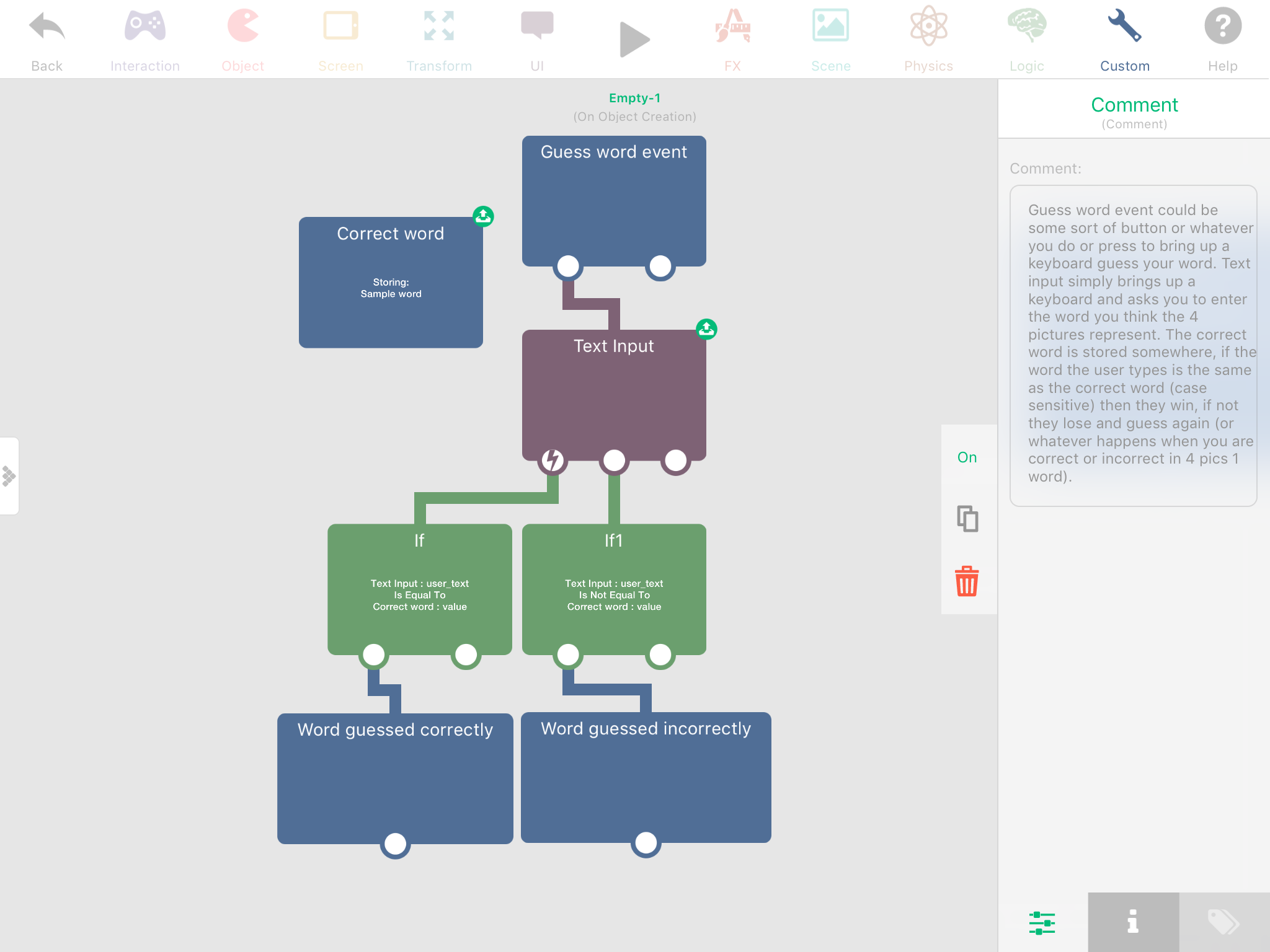
@Aries29 I’m not 100% sure how 4 pics 1 word works since I’ve never played it, so all I know is you type a word and if it’s right you win (go on to next level or something) and if it’s wrong you lose (and you have to guess again?). For having letters fill in some blanks, that’ll take some more work, and it would depend on how you have your game set up. How I set it up would very likely be different to how you have it set up. Anyway here’s a picture that hopefully helps a bit:
Also, to upload a picture, while making a comment you should be able to find an upload symbol (cloud with up arrow in it) above the area you type your comment. -
@Aries29 I’m not 100% sure how 4 pics 1 word works since I’ve never played it, so all I know is you type a word and if it’s right you win (go on to next level or something) and if it’s wrong you lose (and you have to guess again?). For having letters fill in some blanks, that’ll take some more work, and it would depend on how you have your game set up. How I set it up would very likely be different to how you have it set up. Anyway here’s a picture that hopefully helps a bit:
Also, to upload a picture, while making a comment you should be able to find an upload symbol (cloud with up arrow in it) above the area you type your comment.@Aidan-Oxley Thanks for the reply once again sir! Since you have not played 4 pics one word, then let me tell you that what happens there is that instead of typing yor answer using a keyboard, you "tap" your answer from a row of random letters generated in the game. And your tapped letters appear in the exact order you tapped them inside the blank which in turn checks your response as soon as you are done. See also my sample picture below.
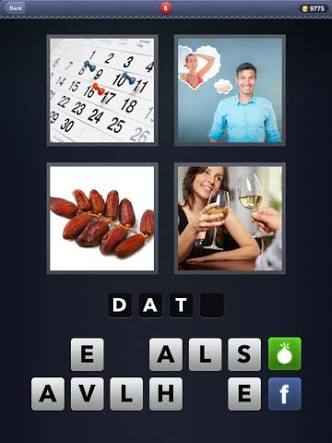
(As you can see, the letters are alredy given. The player would simply tap the letters and they will appear on the individual blanks on top in the order in which the player tapped them. Notice that the player has already tapped the letters D A and T. Once he taps E, he will get a feedback that he is correct but once he taps something else, the letters in the blanks will blink or momentarily change their colors as a feedback that the player is wrong.) -
-
@Aidan-Oxley Thanks for the reply once again sir! Since you have not played 4 pics one word, then let me tell you that what happens there is that instead of typing yor answer using a keyboard, you "tap" your answer from a row of random letters generated in the game. And your tapped letters appear in the exact order you tapped them inside the blank which in turn checks your response as soon as you are done. See also my sample picture below.
(As you can see, the letters are alredy given. The player would simply tap the letters and they will appear on the individual blanks on top in the order in which the player tapped them. Notice that the player has already tapped the letters D A and T. Once he taps E, he will get a feedback that he is correct but once he taps something else, the letters in the blanks will blink or momentarily change their colors as a feedback that the player is wrong.)@Aries29 Ahhh I remember now. I should’ve just researched that myself. I think I could make this work in a project (but would be too hard to explain by screenshots and text). I could try make a small sample project and give you a link to it. How do you have your project set up? Each subject or word to guess is a new scene, or they are all loaded in the same scene (harder but more efficient)?
-
@Aries29 Ahhh I remember now. I should’ve just researched that myself. I think I could make this work in a project (but would be too hard to explain by screenshots and text). I could try make a small sample project and give you a link to it. How do you have your project set up? Each subject or word to guess is a new scene, or they are all loaded in the same scene (harder but more efficient)?
-
@Aidan-Oxley I'll let the players encounter two or three word puzzles on a scene (level). I did search the phrase you gave me and got some assets for four pics one word.😊
@Aries29 Took me a bit longer than planned, but here's an example project with the typing like that: http://bit.ly/2rLpnNe (paste into safari to download)
The logic is a bit complicated since it's calculating the position of the answer squares based in the length of the answer (to centre it) and it's calculating the position of the usable letters from an array. I can try to explain it if you want.
-
@Aries29 Took me a bit longer than planned, but here's an example project with the typing like that: http://bit.ly/2rLpnNe (paste into safari to download)
The logic is a bit complicated since it's calculating the position of the answer squares based in the length of the answer (to centre it) and it's calculating the position of the usable letters from an array. I can try to explain it if you want.
-
@Jack8680 Oh my God...this case is closed when I saw that sample Jack. You are amazing. So much that...I would like to be your apprentice right now.
@Aries29 Ok, here’s my basic sample project for 4 pics 1 word type game: http://bit.ly/2DIGLUm
You’ll find logic in each of the hidden letters (above their line spaces), which just decides whether that letter space is next (you pick your letter, the letters fill in from left to right above their spaces). Logic in each of the shown letters simply makes them broadcast their letter to the letter spaces and then hide themselves (because the letter has been picked, it cannot be picked again). Logic in the “Guess” button when preset determines whether you have entered the correct word or not, then resets everything. Hope this helps :) -
@Aries29 Ok, here’s my basic sample project for 4 pics 1 word type game: http://bit.ly/2DIGLUm
You’ll find logic in each of the hidden letters (above their line spaces), which just decides whether that letter space is next (you pick your letter, the letters fill in from left to right above their spaces). Logic in each of the shown letters simply makes them broadcast their letter to the letter spaces and then hide themselves (because the letter has been picked, it cannot be picked again). Logic in the “Guess” button when preset determines whether you have entered the correct word or not, then resets everything. Hope this helps :)




Hello! It looks like you're interested in this conversation, but you don't have an account yet.
Getting fed up of having to scroll through the same posts each visit? When you register for an account, you'll always come back to exactly where you were before, and choose to be notified of new replies (either via email, or push notification). You'll also be able to save bookmarks and upvote posts to show your appreciation to other community members.
With your input, this post could be even better 💗
Register Login