Skip to content
  • Categories
  • Recent
  • Tags
  • Popular
  • Users
  • Search
Skins
  • Light
  • Brite
  • Cerulean
  • Cosmo
  • Flatly
  • Journal
  • Litera
  • Lumen
  • Lux
  • Materia
  • Minty
  • Morph
  • Pulse
  • Sandstone
  • Simplex
  • Sketchy
  • Spacelab
  • United
  • Yeti
  • Zephyr
  • Dark
  • Cyborg
  • Darkly
  • Quartz
  • Slate
  • Solar
  • Superhero
  • Vapor

  • Default (No Skin)
  • No Skin
Collapse
hyperPad

hyperPad Forum

  1. Home
  2. Help and Support
  3. Xcode Errors

Xcode Errors

Scheduled Pinned Locked Moved Help and Support
12 Posts 4 Posters 2.5k Views 2 Watching
  • Oldest to Newest
  • Newest to Oldest
  • Most Votes
Reply
  • Reply as topic
Log in to reply
This topic has been deleted. Only users with topic management privileges can see it.
  • ThisT This

    Greetings! I'm having several xcode issues that I do not know how to resolve.

    They fall into two categories:

    1. "wantsfullscreenlayout" is deprecated: first depracated in ios 7
    2. Apple Mach-O Linker Warnings

    Any ideas? 0_1493256352330_by default 2017-04-26 at 9.22.39 PM  4-26-17.png

    0_1493256379032_by default 2017-04-26 at 9.26.05 PM  4-26-17.png

    Jack de WildeJ Offline
    Jack de WildeJ Offline
    Jack de Wilde
    wrote on last edited by
    #2

    @This I haven't used Xcode, but it says warnings, are they stopping your project from working?

    1 Reply Last reply
    0
    • MurtazaM Offline
      MurtazaM Offline
      Murtaza
      Admin
      wrote on last edited by
      #3

      @Hamed would know more, and I'm sure he'll answer tomorrow once he's awake.

      But pretty sure you can ignore those warnings, they shouldn't stop your project from compiling. I believe they're there because of backwards compatibility.

      1 Reply Last reply
      0
      • ThisT Offline
        ThisT Offline
        This
        wrote on last edited by
        #4

        Thanks all. It won't let me compile. "Archive" is greyed out. I've tried "Build For" as well, but it keeps failing. In addition to the warnings, there is this one error: 0_1493296746585_by default 2017-04-27 at 8.33.06 AM  4-27-17.png

        1 Reply Last reply
        0
        • HamedH Offline
          HamedH Offline
          Hamed
          Admin
          wrote on last edited by
          #5

          Archive is greyed out because you need to select generic iOS device first before you can archive. Also, make sure you're running Xcode 8.3 and you're opening the .xcworkspace file instead of .xcodeproj

          ThisT 1 Reply Last reply
          0
          • HamedH Hamed

            Archive is greyed out because you need to select generic iOS device first before you can archive. Also, make sure you're running Xcode 8.3 and you're opening the .xcworkspace file instead of .xcodeproj

            ThisT Offline
            ThisT Offline
            This
            wrote on last edited by
            #6

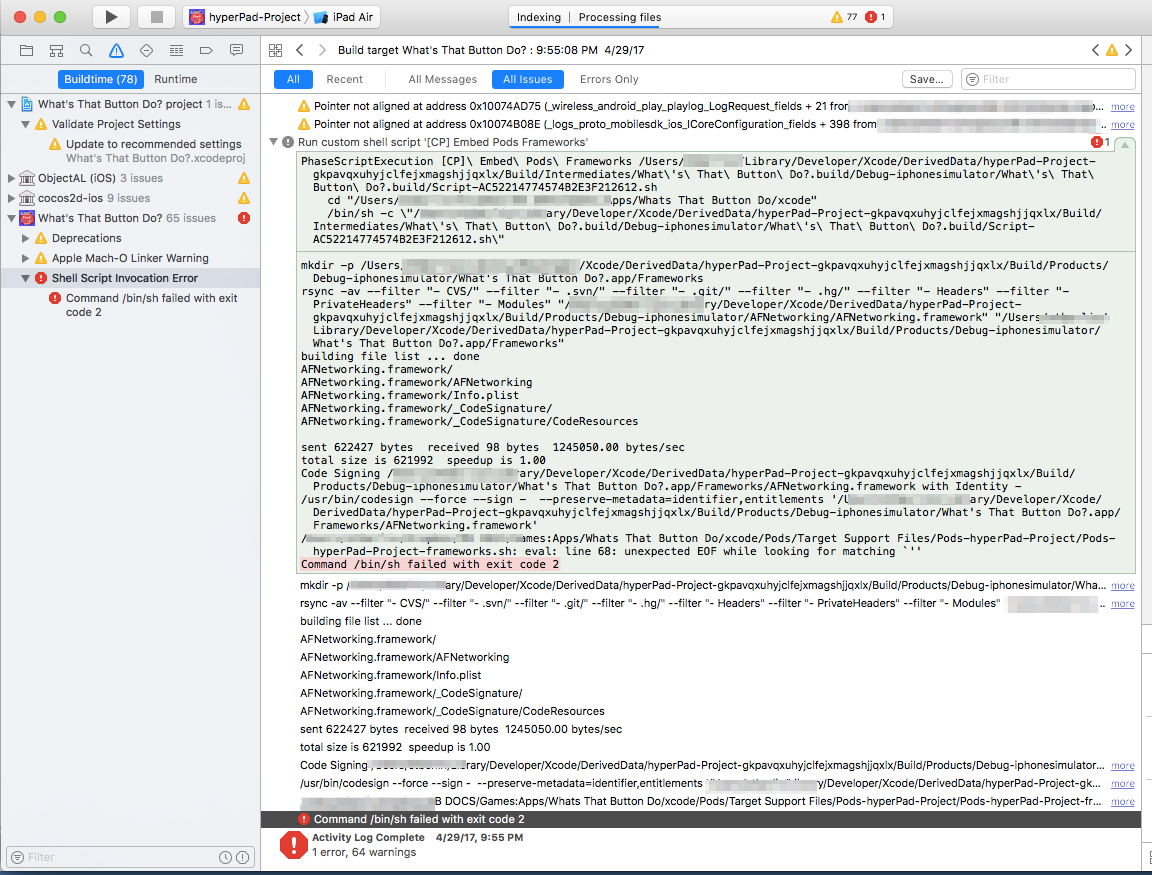
            @Hamed I've retried with .xcworkspace. I'm now getting the following error when I try to archive:

            Shell Script Invocation Error
            Command /bin/sh failed with exit code 2.

            Any ideas?

            0_1493518470013_by_default_2017-04-29_at_9_57_43_PM__4-29-17.png

            1 Reply Last reply
            0
            • HamedH Offline
              HamedH Offline
              Hamed
              Admin
              wrote on last edited by
              #7

              You have iPad Air selected. Select Generic iOS Device

              ThisT 1 Reply Last reply
              0
              • HamedH Hamed

                You have iPad Air selected. Select Generic iOS Device

                ThisT Offline
                ThisT Offline
                This
                wrote on last edited by
                #8

                @Hamed Thanks. Just did it with Generic Ios and got the same error. Any other ideas?

                HamedH 1 Reply Last reply
                0
                • ThisT This

                  @Hamed Thanks. Just did it with Generic Ios and got the same error. Any other ideas?

                  HamedH Offline
                  HamedH Offline
                  Hamed
                  Admin
                  wrote on last edited by
                  #9

                  @This you're in Xcode 8.3 correct?

                  ThisT 1 Reply Last reply
                  0
                  • HamedH Hamed

                    @This you're in Xcode 8.3 correct?

                    ThisT Offline
                    ThisT Offline
                    This
                    wrote on last edited by
                    #10

                    @Hamed Yes, 8.3.2

                    1 Reply Last reply
                    0
                    • HamedH Offline
                      HamedH Offline
                      Hamed
                      Admin
                      wrote on last edited by
                      #11

                      Try restarting your computer. If that doesn't work, try cleaning the project by going to product-> Clean. If that doesn't work hold alt, product -> clean build folder. If that doesn't work, try restarting again.

                      Finally, if that doesn't work it might be a code signing issue. Try logging out of your account in Xcode, and re-logging back in.

                      1 Reply Last reply
                      0
                      • ThisT Offline
                        ThisT Offline
                        This
                        wrote on last edited by This
                        #12

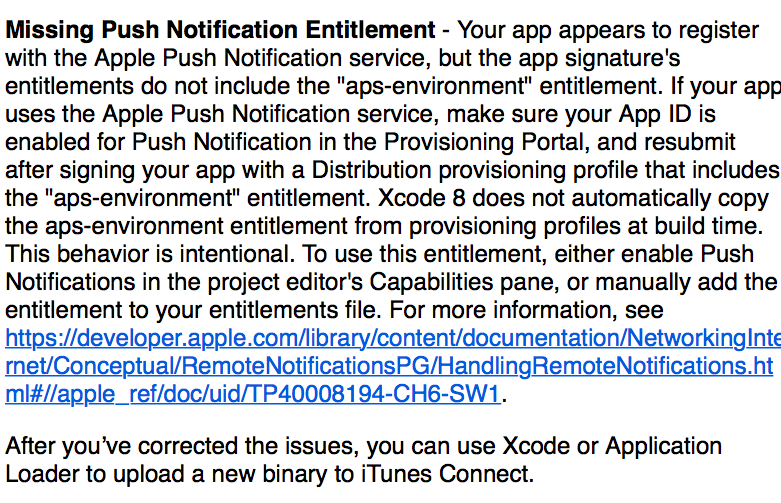
                        @Hamed I tried everything you suggested. It still didn't work. I retried from scratch and now can get it to archive. I'm getting this message in an email after I upload to Itunes Connect, however. Any ideas?

                        Push notifications is turned off under capabilities.
                        0_1493661264598_by default 2017-05-01 at 1.52.19 PM  5-1-17.png
                        0_1493661279577_by default 2017-05-01 at 1.53.42 PM  5-1-17.png

                        1 Reply Last reply
                        0

                        Hello! It looks like you're interested in this conversation, but you don't have an account yet.

                        Getting fed up of having to scroll through the same posts each visit? When you register for an account, you'll always come back to exactly where you were before, and choose to be notified of new replies (either via email, or push notification). You'll also be able to save bookmarks and upvote posts to show your appreciation to other community members.

                        With your input, this post could be even better 💗

                        Register Login
                        Reply
                        • Reply as topic
                        Log in to reply
                        • Oldest to Newest
                        • Newest to Oldest
                        • Most Votes


                        • Login

                        • Login or register to search.
                        • First post
                          Last post
                        0
                        • Categories
                        • Recent
                        • Tags
                        • Popular
                        • Users
                        • Search