
Simple Physics Swip-Swap
-
@GameCRAZY you are setting upright to 1 before getting it, so when it gets it it's set back to zero straight away:
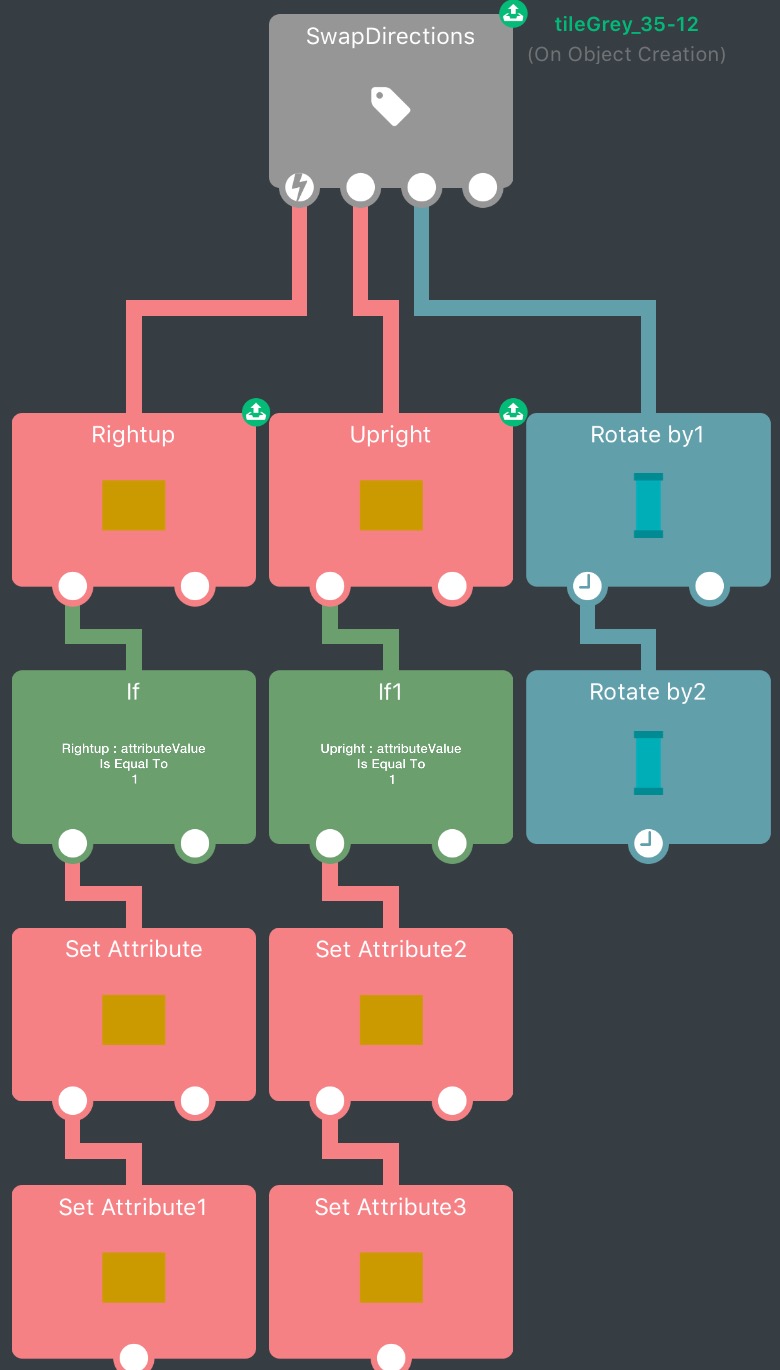
You should get both the attributes and then change them like this:
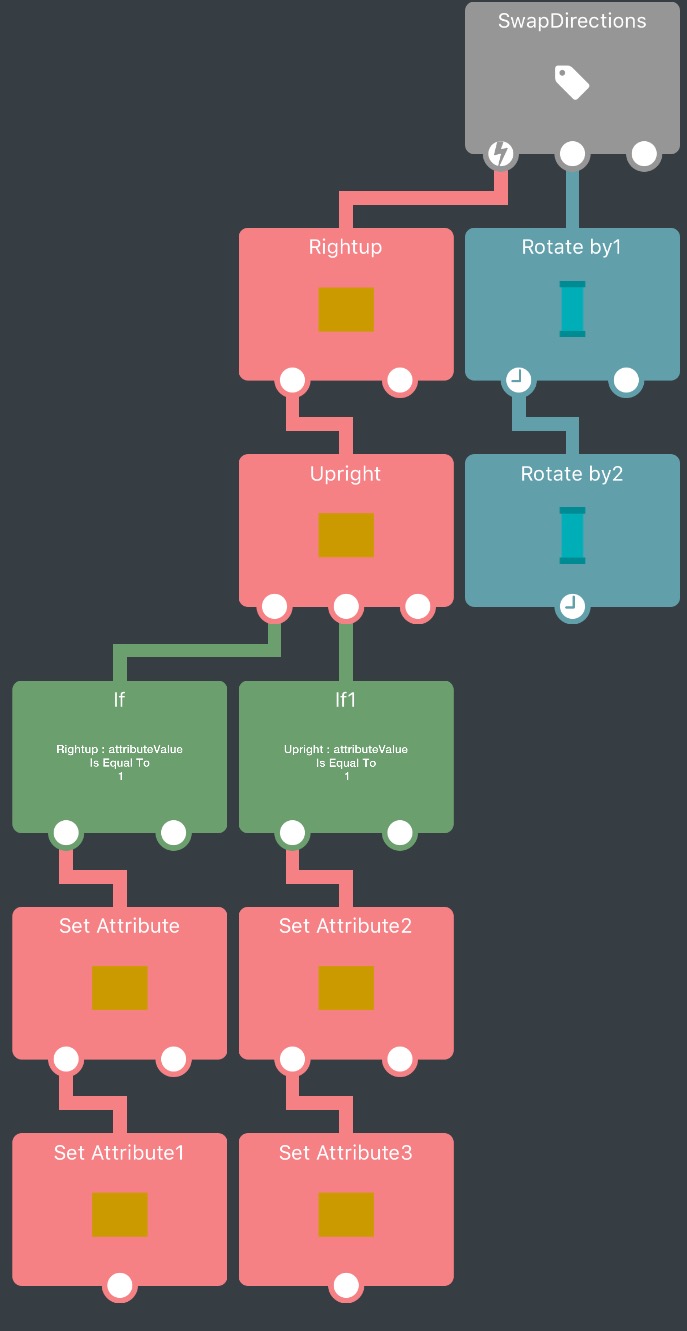
@Jack8680 Thanks! I did not realize that!
-
@Deeeds Just click the link on your iPad, and it will take you straight to the project.
@GameCRAZY I don't know if it's true for iOS11, but for me the links don't work from within hyperPad; I have to tap and hold the link, press copy, then paste into safari and open the file in hyperpad.
-
@Jack8680 That is strange, it works for me. Then again, I am running an iPad Mini that still cannot update to IOS 10...
-
Still not working as it should. The character is supposed to move, then jump; or vice versa. It is obviously bugging out.
-
Still not working as it should. The character is supposed to move, then jump; or vice versa. It is obviously bugging out.
-
@GameCRAZY Please, in English, without me needing to look at the project, what are trying to achieve?
@Deeeds I am trying to make the character go up and right, when it shows up and right with arrows. I am trying to make the character go right and then up, when it shows right and up with arrows.
It switches between the two, but it is acting up for no apparent reason. Just doing random things.
But honestly, just download the project if you want to help. It takes 2 seconds.
-
@Deeeds I am trying to make the character go up and right, when it shows up and right with arrows. I am trying to make the character go right and then up, when it shows right and up with arrows.
It switches between the two, but it is acting up for no apparent reason. Just doing random things.
But honestly, just download the project if you want to help. It takes 2 seconds.
@GameCRAZY For you, it takes 2 seconds. I have to exit my current project, which takes several minutes, and then download yours, and then try to ascertain what you're doing.
That last part might take an enormous amount of time, especially if you can't explain what you're doing, how you're thinking it can or should be done, and what you'd like to see happen.
-
@Deeeds I am trying to make the character go up and right, when it shows up and right with arrows. I am trying to make the character go right and then up, when it shows right and up with arrows.
It switches between the two, but it is acting up for no apparent reason. Just doing random things.
But honestly, just download the project if you want to help. It takes 2 seconds.
@GameCRAZY Describe your ideal, from player's perception of opportunity to the player response (psychological) and their subsequent input, the hero's movement response to this input, visual representations that change, how and why they states change, and when and where, and everything else that is part of this cycle.
-
@GameCRAZY Describe your ideal, from player's perception of opportunity to the player response (psychological) and their subsequent input, the hero's movement response to this input, visual representations that change, how and why they states change, and when and where, and everything else that is part of this cycle.
The scene has a platform, a character, and 2 arrows (one pointing right and one pointing up).
The behaviors:
- started touching (the arrows)
- get attribute (rightup) ; get attribute (upright)
a. if attribute (rightup)=1 ; set attribute (rightup)=0 ; set attribute (upright)=1
b. if attribute (upright)=1 ; set attribute (rightup)=1 ; set attribute (upright)=0 - rotateby 90 (arrow1) ; rotateby 90 (arrow2)
- started touching (the screen)
- get attribute (rightup) ; if attribute (rightup)=1 ; move character (x=2, duration=1) ; jump character (power=15)
- get attribute (upright) ; if attribute (upright)=1 ; jump character (power=15) ; wait (time=1) ; move character (x=2, duration=1)
The character is supposed to move right and then up, or up and then right. However, that only works sometimes, or rather every other time. It is definitely switching properly, but the logic just is not proper. And I do not think it is on my side because everything I am doing makes perfect sense.
Like how easy is this supposed to be, right?
Anyways, that is everything. Formatting behaviors on the forum is super-hard and takes forever :confused:
-
The scene has a platform, a character, and 2 arrows (one pointing right and one pointing up).
The behaviors:
- started touching (the arrows)
- get attribute (rightup) ; get attribute (upright)
a. if attribute (rightup)=1 ; set attribute (rightup)=0 ; set attribute (upright)=1
b. if attribute (upright)=1 ; set attribute (rightup)=1 ; set attribute (upright)=0 - rotateby 90 (arrow1) ; rotateby 90 (arrow2)
- started touching (the screen)
- get attribute (rightup) ; if attribute (rightup)=1 ; move character (x=2, duration=1) ; jump character (power=15)
- get attribute (upright) ; if attribute (upright)=1 ; jump character (power=15) ; wait (time=1) ; move character (x=2, duration=1)
The character is supposed to move right and then up, or up and then right. However, that only works sometimes, or rather every other time. It is definitely switching properly, but the logic just is not proper. And I do not think it is on my side because everything I am doing makes perfect sense.
Like how easy is this supposed to be, right?
Anyways, that is everything. Formatting behaviors on the forum is super-hard and takes forever :confused:
-
@GameCRAZY Looks fine to me!
I don't see where this could go wrong.
-
@GameCRAZY it's definitely a bug, harder to reproduce than I thought.
If you have a started touching behaviour with a duration based behaviour underneath it and a jump behaviour underneath that, it will ignore the delay every second time.
@administrators Here's an example project. The behaviours are in the red square:
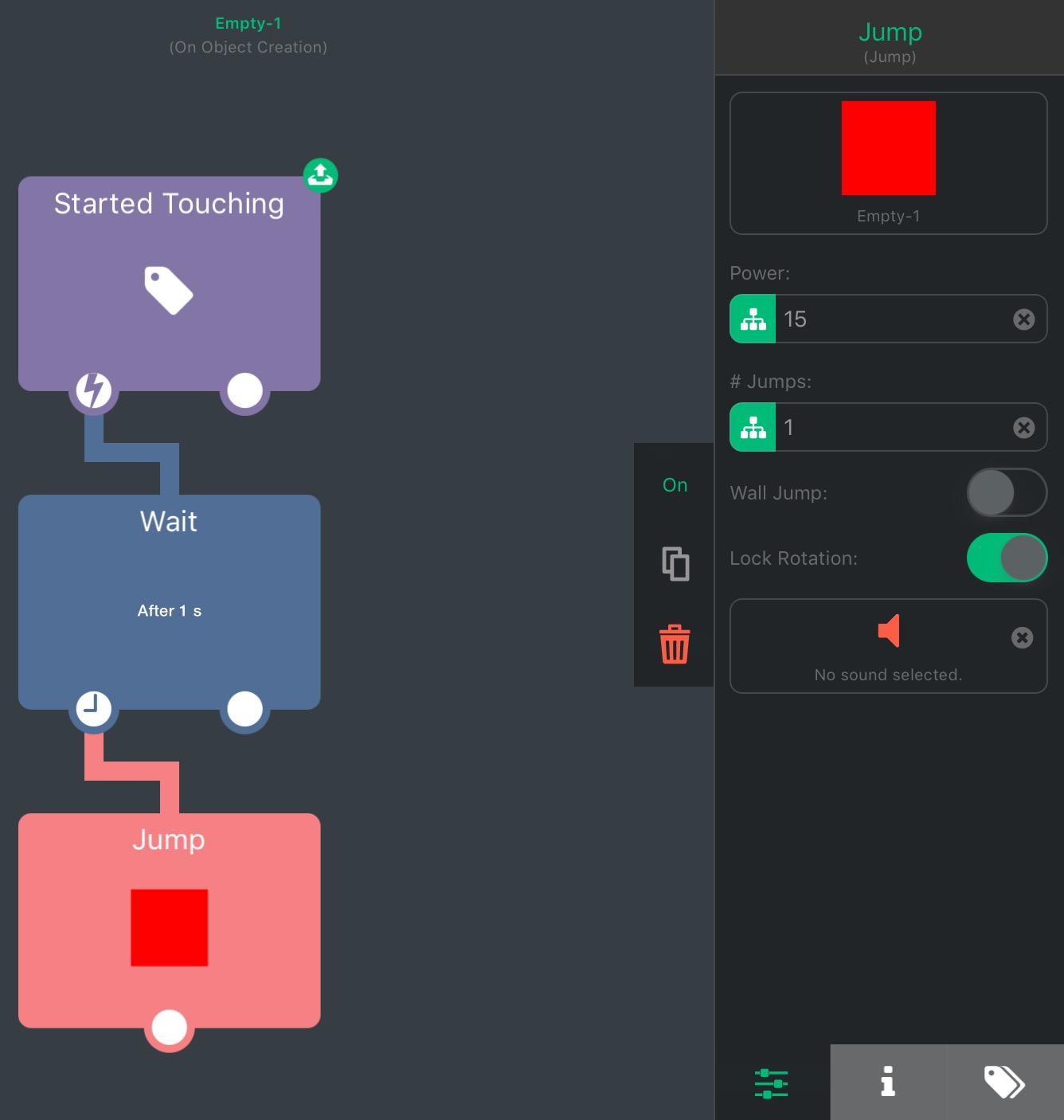
The square should wait a second to jump after tapping, but every second time it skips the delay.Edit: it's actually acting weird with a lot of behaviours. It does the same with joystick up/right/down/left/analog, and with stopped touching acts like a started touching behaviour and also skips the delay.
In your case it is ignoring the one second duration of the move by behaviour and skipping straight to the jump so it moves and jumps at the same time.
-
@GameCRAZY it's definitely a bug, harder to reproduce than I thought.
If you have a started touching behaviour with a duration based behaviour underneath it and a jump behaviour underneath that, it will ignore the delay every second time.
@administrators Here's an example project. The behaviours are in the red square:
The square should wait a second to jump after tapping, but every second time it skips the delay.Edit: it's actually acting weird with a lot of behaviours. It does the same with joystick up/right/down/left/analog, and with stopped touching acts like a started touching behaviour and also skips the delay.
In your case it is ignoring the one second duration of the move by behaviour and skipping straight to the jump so it moves and jumps at the same time.
@Jack8680 Now that's weird. I wonder what is causing that.

Hello! It looks like you're interested in this conversation, but you don't have an account yet.
Getting fed up of having to scroll through the same posts each visit? When you register for an account, you'll always come back to exactly where you were before, and choose to be notified of new replies (either via email, or push notification). You'll also be able to save bookmarks and upvote posts to show your appreciation to other community members.
With your input, this post could be even better 💗
Register Login