Skip to content
  • Categories
  • Recent
  • Tags
  • Popular
  • Users
  • Search
Skins
  • Light
  • Brite
  • Cerulean
  • Cosmo
  • Flatly
  • Journal
  • Litera
  • Lumen
  • Lux
  • Materia
  • Minty
  • Morph
  • Pulse
  • Sandstone
  • Simplex
  • Sketchy
  • Spacelab
  • United
  • Yeti
  • Zephyr
  • Dark
  • Cyborg
  • Darkly
  • Quartz
  • Slate
  • Solar
  • Superhero
  • Vapor

  • Default (No Skin)
  • No Skin
Collapse
hyperPad

hyperPad Forum

  1. Home
  2. Help and Support
  3. Newbie. Getting an object to wrap around screen. How?

Newbie. Getting an object to wrap around screen. How?

Scheduled Pinned Locked Moved Help and Support
9 Posts 3 Posters 1.6k Views 1 Watching
  • Oldest to Newest
  • Newest to Oldest
  • Most Votes
Reply
  • Reply as topic
Log in to reply
This topic has been deleted. Only users with topic management privileges can see it.
  • PaulfromausP Offline
    PaulfromausP Offline
    Paulfromaus
    wrote on last edited by
    #1

    Gโ€™day from from Australia

    Plodding along here.

    I canโ€™t work out how to get an object to wrap around a screen.

    Could you please give a screen dump to show me how to do this.

    Here is what I have tried, and the object will just disappear to the right but not appear on the left of the screen.

    Thank you for your assistance.

    Paul.
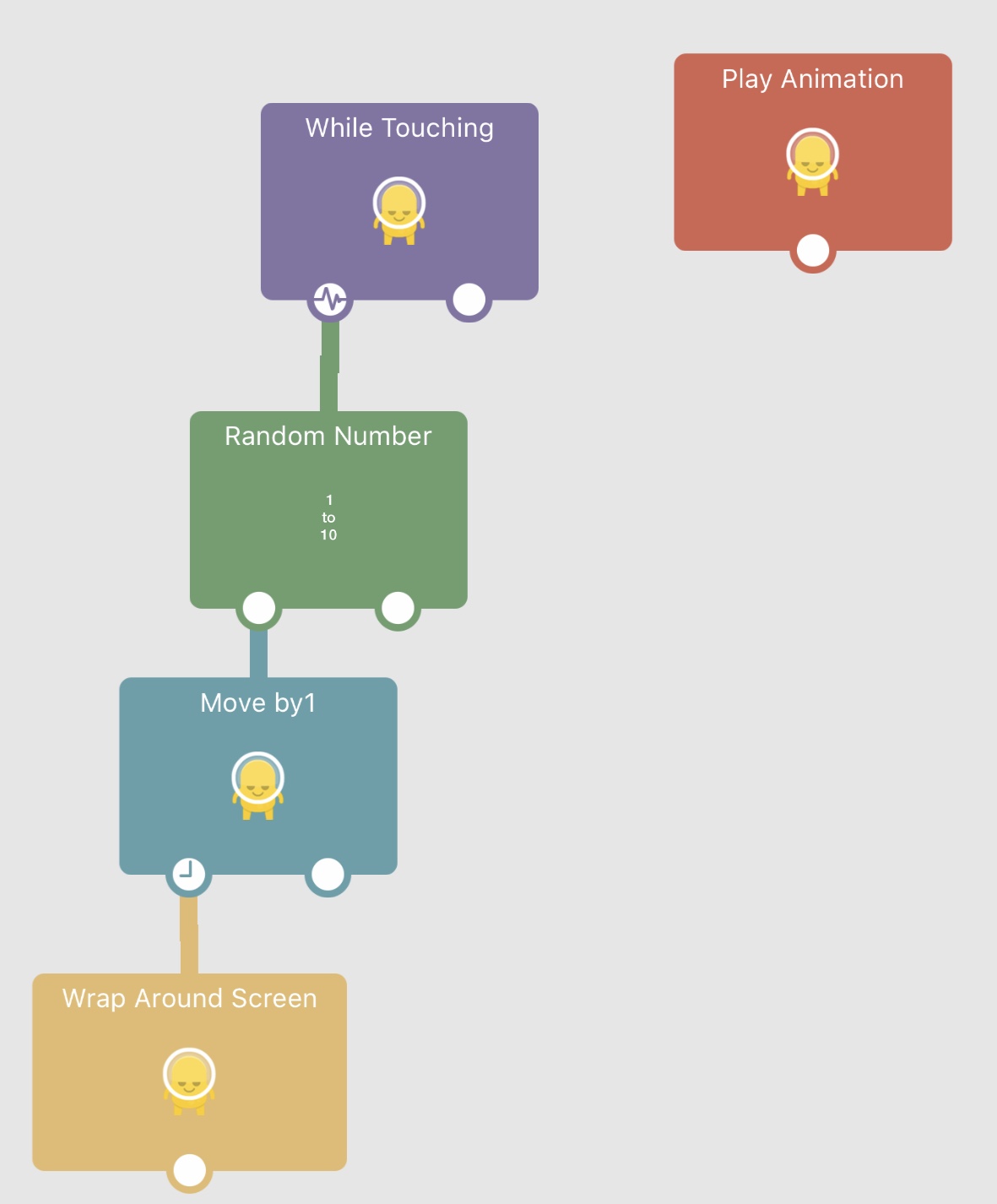
    0_1556950193529_FE935B10-85A4-4D4E-976D-AA83A76DD373.jpeg

    1 Reply Last reply
    0
    • RobinsonXR Offline
      RobinsonXR Offline
      RobinsonX
      wrote on last edited by
      #2

      The object cannot be scenery, the Wrap Around Screen behavior only works for physical or wall objects.

      If that doesnโ€™t work, you can move the object to outside the screen and then teleport it back, you can repeat it to make it seem like the object is forever moving in one direction.

      1 Reply Last reply
      0
      • RobinsonXR Offline
        RobinsonXR Offline
        RobinsonX
        wrote on last edited by
        #3

        If needed, I can send an example in this thread. :)

        PaulfromausP 1 Reply Last reply
        0
        • RobinsonXR RobinsonX

          If needed, I can send an example in this thread. :)

          PaulfromausP Offline
          PaulfromausP Offline
          Paulfromaus
          wrote on last edited by
          #4

          @robinsonx

          Thank you for your response.

          It would be great if you could upload a simple sample file.

          Thank you.

          Aidan_FireA 1 Reply Last reply
          0
          • PaulfromausP Paulfromaus

            @robinsonx

            Thank you for your response.

            It would be great if you could upload a simple sample file.

            Thank you.

            Aidan_FireA Offline
            Aidan_FireA Offline
            Aidan_Fire
            wrote on last edited by Aidan_Fire
            #5

            @paulfromaus The Wrap Around Screen behaviour works constantly, you do not need to trigger it (but this won't make a difference here). I just went and tested a similar setup, wow I never realised that Wrap Around Screen only works for physics objects that are moving due to physics (so basically Move behaviours do not seem to work with Wrap Around Screen). So yeah you'll need a manual wrap around screen setup which it seems Robinson is making for you.

            Also hello, I'm from Australia as well :)

            1 Reply Last reply
            0
            • RobinsonXR Offline
              RobinsonXR Offline
              RobinsonX
              wrote on last edited by
              #6

              @Paulfromaus here you go!

              https://s3.amazonaws.com/hyperpad-share/ABFA8A9F-CCB9-47F5-8E6C-8F18FA7F0BC2/Example.tap

              Thatโ€™s just one of the easiest ways to make an object go off one side of the screen and appear on the opposite side with as less as 3 behaviors.

              This is for wall or scenery objects. If you want to make a physical object have this illusion, you should use the Wrap Around Screen behavior.

              1 Reply Last reply
              0
              • RobinsonXR Offline
                RobinsonXR Offline
                RobinsonX
                wrote on last edited by
                #7

                There are other ways, but this is by far the easiest. ๐Ÿ‘Œ๐Ÿ˜‰

                PaulfromausP 1 Reply Last reply
                0
                • RobinsonXR RobinsonX

                  There are other ways, but this is by far the easiest. ๐Ÿ‘Œ๐Ÿ˜‰

                  PaulfromausP Offline
                  PaulfromausP Offline
                  Paulfromaus
                  wrote on last edited by
                  #8

                  @robinsonx

                  Thank you for your assistance.

                  1 Reply Last reply
                  0
                  • RobinsonXR Offline
                    RobinsonXR Offline
                    RobinsonX
                    wrote on last edited by
                    #9

                    No problem!

                    1 Reply Last reply
                    0

                    Hello! It looks like you're interested in this conversation, but you don't have an account yet.

                    Getting fed up of having to scroll through the same posts each visit? When you register for an account, you'll always come back to exactly where you were before, and choose to be notified of new replies (either via email, or push notification). You'll also be able to save bookmarks and upvote posts to show your appreciation to other community members.

                    With your input, this post could be even better ๐Ÿ’—

                    Register Login
                    Reply
                    • Reply as topic
                    Log in to reply
                    • Oldest to Newest
                    • Newest to Oldest
                    • Most Votes


                    • Login

                    • Login or register to search.
                    • First post
                      Last post
                    0
                    • Categories
                    • Recent
                    • Tags
                    • Popular
                    • Users
                    • Search
