Skip to content
  • Categories
  • Recent
  • Tags
  • Popular
  • Users
  • Search
Skins
  • Light
  • Brite
  • Cerulean
  • Cosmo
  • Flatly
  • Journal
  • Litera
  • Lumen
  • Lux
  • Materia
  • Minty
  • Morph
  • Pulse
  • Sandstone
  • Simplex
  • Sketchy
  • Spacelab
  • United
  • Yeti
  • Zephyr
  • Dark
  • Cyborg
  • Darkly
  • Quartz
  • Slate
  • Solar
  • Superhero
  • Vapor

  • Default (No Skin)
  • No Skin
Collapse
hyperPad

hyperPad Forum

  1. Home
  2. Help and Support
  3. Editing in all scenes

Editing in all scenes

Scheduled Pinned Locked Moved Help and Support
10 Posts 4 Posters 2.2k Views 1 Watching
  • Oldest to Newest
  • Newest to Oldest
  • Most Votes
Reply
  • Reply as topic
Log in to reply
This topic has been deleted. Only users with topic management privileges can see it.
  • DGames135D Offline
    DGames135D Offline
    DGames135
    wrote on last edited by
    #1

    How can I make so that wenether I edit a character in one scene it edits all other characters in other scenes so I won't have to copy and paste. Also the copy and paste can't work as other things in the scene interact with the character.

    1 Reply Last reply
    0
    • Michael KhalfinG Offline
      Michael KhalfinG Offline
      Michael Khalfin
      wrote on last edited by
      #2

      @DGames135 Mirror the character... Hold on it in edit mode, and when you see "mirror" press on it. Choose which scene you'd like the character to go to.

      Whenever you edit something in one character it will change in the other character in the other scene.

      Any more questions, just ask.

      TutorialDoctorT 1 Reply Last reply
      2
      • DGames135D Offline
        DGames135D Offline
        DGames135
        wrote on last edited by
        #3

        Omg you saved my life. You don't know how complicated my project is

        1 Reply Last reply
        0
        • DGames135D Offline
          DGames135D Offline
          DGames135
          wrote on last edited by
          #4

          Wait but if I duplicate the scene will it still have the mirror effect and still be afected by other objects?

          1 Reply Last reply
          0
          • Michael KhalfinG Offline
            Michael KhalfinG Offline
            Michael Khalfin
            wrote on last edited by
            #5

            @DGames135 If you duplicate the original scene (with the original character), it will not be mirrored. If you duplicate a scene with a mirrored character, it most likely won't stay mirrored either (it might).

            Your best bet is just to duplicate a scene, delete the character, and then mirror it back to that scene.

            1 Reply Last reply
            0
            • Michael KhalfinG Michael Khalfin

              @DGames135 Mirror the character... Hold on it in edit mode, and when you see "mirror" press on it. Choose which scene you'd like the character to go to.

              Whenever you edit something in one character it will change in the other character in the other scene.

              Any more questions, just ask.

              TutorialDoctorT Offline
              TutorialDoctorT Offline
              TutorialDoctor
              wrote on last edited by
              #6

              @GameCRAZY Hadn't realized this existed. Thanks.

              1 Reply Last reply
              0
              • DGames135D Offline
                DGames135D Offline
                DGames135
                wrote on last edited by
                #7

                The thing is that other objects in the scene interact with the character in the scene. The plan was to mirror a character and make all the interacting changes work with it. The game was supposed to have a tester ares where the original copy of the character was and I could edit it from there so changes are made in all scenes.

                1 Reply Last reply
                1
                • Michael KhalfinG Offline
                  Michael KhalfinG Offline
                  Michael Khalfin
                  wrote on last edited by
                  #8

                  @DGames135 You'll have to ask @Murtaza about duplicating scenes. Maybe just redo the interactions or the levels for now if you want to keep with the mirrored objects.

                  One problem with mirrored objects is that in most different scenes you'll want to include some different behaviors. You can include those in other objects probably.

                  1 Reply Last reply
                  0
                  • MurtazaM Offline
                    MurtazaM Offline
                    Murtaza
                    Admin
                    wrote on last edited by
                    #9

                    If you want certain behaviours to only work in specific scenes for a mirror object you can try this:
                    From a random object in that scene use "Broadcast Message" make it say something like "lvl1" (what it says isn't important, you're just using it as a reference).

                    The on your mirrored object you use Receive message, and check for that broadcast (note you need to be in that scene to see it).
                    Then use an IF.
                    If received message = lvl1
                    Behaviour on--> Then turn on a behaviour bundle with all the logic that you want to run only in that scene.

                    Also with mirrored objects, you can do collided etc, even if that object doesn't exist in all scenes... If it's interacting with an object that only exists in level 2, then the behaviours will never run in level 1 because the condition will never be met.


                    DGames135D 1 Reply Last reply
                    0
                    • MurtazaM Murtaza

                      If you want certain behaviours to only work in specific scenes for a mirror object you can try this:
                      From a random object in that scene use "Broadcast Message" make it say something like "lvl1" (what it says isn't important, you're just using it as a reference).

                      The on your mirrored object you use Receive message, and check for that broadcast (note you need to be in that scene to see it).
                      Then use an IF.
                      If received message = lvl1
                      Behaviour on--> Then turn on a behaviour bundle with all the logic that you want to run only in that scene.

                      Also with mirrored objects, you can do collided etc, even if that object doesn't exist in all scenes... If it's interacting with an object that only exists in level 2, then the behaviours will never run in level 1 because the condition will never be met.

                      DGames135D Offline
                      DGames135D Offline
                      DGames135
                      wrote on last edited by
                      #10

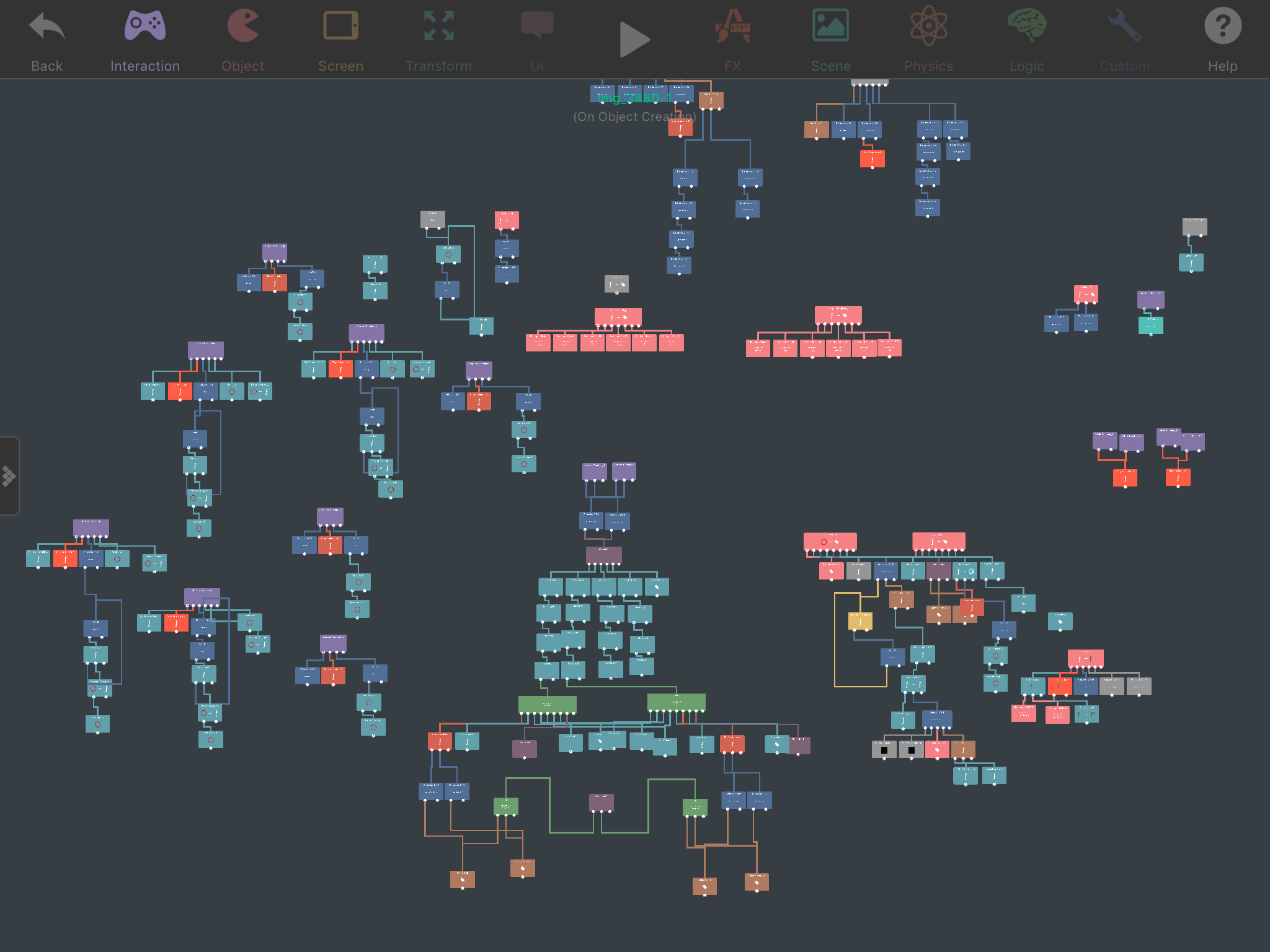
                      @Murtaza I think the logic of the character is the too complicated ro be conected by bundles.
                      0_1490079507771_IMG_3954.PNG
                      The main question was that if I duplicate a scene with the mirrored character will it still have the mirror effect?

                      1 Reply Last reply
                      0

                      Hello! It looks like you're interested in this conversation, but you don't have an account yet.

                      Getting fed up of having to scroll through the same posts each visit? When you register for an account, you'll always come back to exactly where you were before, and choose to be notified of new replies (either via email, or push notification). You'll also be able to save bookmarks and upvote posts to show your appreciation to other community members.

                      With your input, this post could be even better 💗

                      Register Login
                      Reply
                      • Reply as topic
                      Log in to reply
                      • Oldest to Newest
                      • Newest to Oldest
                      • Most Votes


                      • Login

                      • Login or register to search.
                      • First post
                        Last post
                      0
                      • Categories
                      • Recent
                      • Tags
                      • Popular
                      • Users
                      • Search